Learn key lessons in the implementation of Configurable Process Scheduling (CPS) in Global Available-to-Promise (GATP). Understand the details of condition master data and other configuration necessary to support CPS.
Key Concept
Transportation and shipment scheduling and is an integral part of the Available To Promise process. The most important elements of a sales order are the requested material and the requested delivery date. Before checking to see if the requested material is available or not, one needs to ensure that delivery of the material to the customer is possible taking into account the time taken for the necessary activities (for example pick/pack time). This process of taking the customer requested delivery date and backward scheduling (or forward scheduling in some cases) to arrive at the date when we should check for material availability is called Transportation Scheduling. One has a choice to activate or deactivate transportation scheduling by sales document type. If the availability check is performed in APO GATP, then the transportation scheduling must also be performed in GATP. There are several options to conduct Transportation Scheduling in GATP and Configurable Process Scheduling is the most flexible of the options.
The Global Available-to-Promise (GATP) module of SAP SCM is increasingly being used by companies to perform the Available-to-Promise (ATP) check function, replacing the native SAP R/3 (now SAP ERP Central Component [SAP ECC]) ATP check. GATP is implemented to take advantage of the cross location, multi-product substitution, and other advanced capabilities that standard SAP ECC does not provide.
Transportation and shipment scheduling involves backward scheduling to determine the requested material availability date based on the customer requested delivery date and then forward scheduling to determine the committed delivery date based on the committed material availability date. It is not possible to perform the ATP check in GATP and the transportation and shipment scheduling in SAP ECC.
In our article, “Maximize the Accuracy of Your ATP Response Using Configurable Process Scheduling” we described several approaches to transportation and shipment scheduling in GATP. They are: a) Configurable Process Scheduling (CPS); b) Condition technique; and, c) Using Transportation Lane and Supply Network Planning (SNP) master data. We described some of the arguments for using CPS as opposed to the other techniques available. We also gave details on some of the configuration steps that are necessary to setup CPS. The configuration that we described concentrated on the customizing activities through transaction SPRO. We described how to setup the scheduling schema which maps to the logistics functions of a company. At a high level this (scheduling schema) represents what are the activities that are part of the scheduling process and the precedence relationships between them.
The focus of the previous article was on customizing activities necessary to implement CPS. This article is designed to help you complete the customizing steps and describes the steps necessary to maintain the master data. We also describe the completion the configuration steps for CPS, move on to the master data setup for CPS, explain how CPS finds condition records based on the values passed from the sales/stock transport order, and summarize some key points.
Condition Technique Definition
You must configure the system so that based on the parameters of the order, it can find applicable condition records (for duration or calendars). This should be familiar territory for those who work with the condition technique either through pricing in SAP ECC sales and distribution or from rules-based ATP in Global ATP. For the reader who is not exposed to these constructs, we provide enough background so that it is clear.
Process Alias Determination
During an ATP check, the system needs to identify the Process Alias (and therefore the schema since they have the same name) so that it knows the scheduling activities, their relationships, and master data for scheduling. The Process Alias can be determined in one of two ways: by a mapping the item category to Process Alias or by using the condition technique itself to arrive at the Process Alias.
Figure 1 shows the configuration for the mapping between sales document item category and the Process Alias. This method for determining Process Alias can be used for sales documents only. The menu path to maintain this is SAP SCM - Implementation Guide > Advanced Planning and Optimization > Global ATP > Transportation and Shipment Scheduling > Scheduling Using Configurable Process Scheduling > Determine Assignment of Item Category to Process Alias.
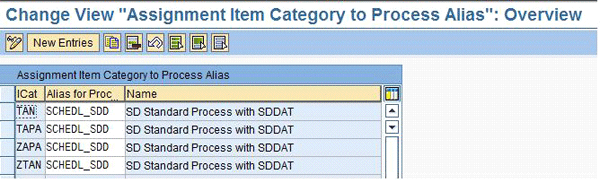
Figure 1
Mappin g of item category to Process Alias
The Process Alias can also alternatively be determined using the condition technique within CPS itself. This method is more flexible and can be used for both sales as well as purchasing (stock transfer) documents. For the system to use the condition technique to determine the Process Alias, the determination procedure must be maintained, as shown in the first row of Figure 2. For example, to determine the Process Alias, the starting point for the scheduling process, the system uses the procedure ZPRPA (Figure 2), the values from the sales and distribution module passed to GATP, and uses the condition technique to arrive at the Process Alias (the row where Scheduling Schema and Activity Type are blank and Application is SCH Schema and Use is PA Process Alias).
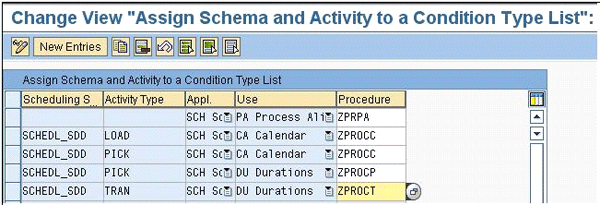
Figure 2
Mapping of schema activities to the scheduling procedure
The menu path to maintain this (mapping between the activity and the condition procedure) is SAP SCM - Implementation Guide > Advanced Planning and Optimization > Global ATP > Transportation and Shipment Scheduling > Scheduling Using Configurable Process Scheduling > Assign Schema and Activity to a condition Type List. This configuration is also used by the system to determine condition determination procedures (also called condition type lists) for each of the activities in the scheduling schema. Condition determination procedures are described in more detail in the next section.
Condition Determination
The following configuration steps must be executed in sequence because one builds on the other. When you go from the first step to the next, you need what has been configured in the previous step. To create a Scheduling Field Catalog (Figure 3) use menu path SAP SCM - Implementation Guide > Advanced Planning and Optimization > Global ATP > Transportation and Shipment Scheduling > Scheduling Using Configurable Process Scheduling > Create Field Catalog. The structure /SAPAPO/KOMGU lists all the fields that are available as standard. All these fields are order attributes that are available to define condition tables. In case the SAP supplied fields are not sufficient, refer to SAP Note 379196 – “Delivery scheduling with APO: User exit in R/3” for details on how to extend the field catalog and make additional attributes from SAP ECC available to CPS.
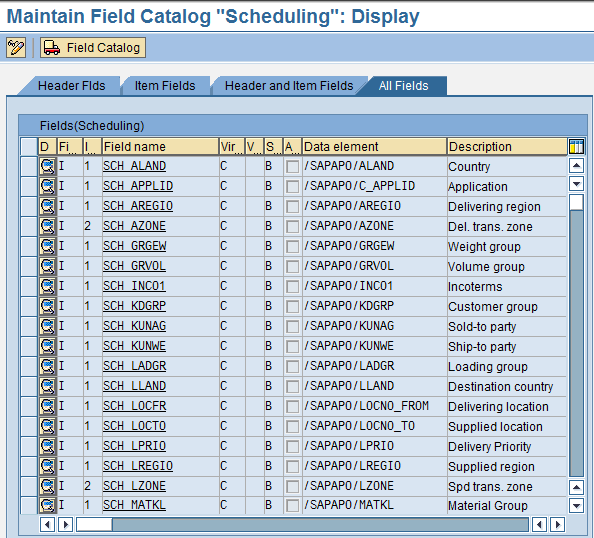
Figure 3
Scheduling field catalog
Define the Condition Tables (Figure 4) using menu path SAP SCM - Implementation Guide > Advanced Planning and Optimization > Global ATP > Transportation and Shipment Scheduling > Scheduling Using Configurable Process Scheduling > Define Condition Tables. Condition tables must begin with the characters CUS (customer namespace). Condition Tables (and other configuration elements such as access sequences, condition types and determination procedures) are defined for specific usages – DU for Duration, CA for Calendars and so on. The application is always SCH. It is necessary to activate condition tables after they are defined. This generates the background database tables and programs.
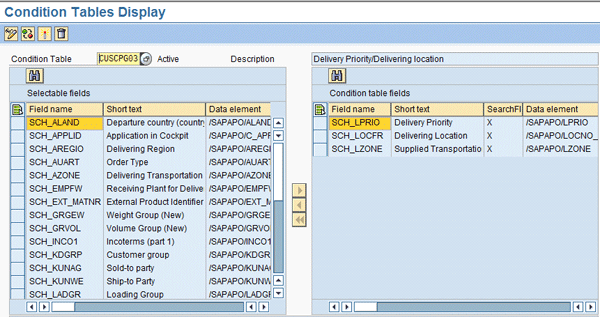
Figure 4
Defining condition tables
You define access sequences (Figure 5) using menu path SAP SCM - Implementation Guide > Advanced Planning and Optimization > Global ATP > Transportation and Shipment Scheduling > Scheduling Using Configurable Process Scheduling > Define Access Sequences. Access sequences specify one or more condition tables that the system accesses to determine condition records. We recommend that you place a check in the Exclusive checkbox (not shown in Figure 5; the exclusive check box is in individual accesses and not in the access sequence themselves.) on each access so that the system stops looking for further accesses once a condition record is found.
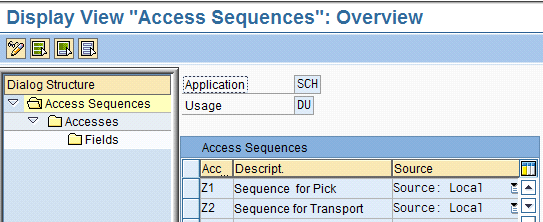
Figure 5
Defining access sequences
It may be useful to add a default condition table (Figure 6) at the end of each access. Such a condition table should always be found (i.e., it should be based on a parameter that will always be known on the order). For example, if you have an environment in which you have two order type values then you should define a table CUSCPG99 that has only the order type field in it and then maintain condition records for the two order type values – since Order Type is guaranteed to be passed to GATP, the lookup by the system for the condition record will not fail. One can then investigate why the field values for the previous accesses were not successful.
During the ATP check, the system shows a scheduling log with details of which condition tables were accessed and the fields used to access these condition tables. Create a dummy condition table that you know will succeed — that is, the search for a condition record will succeed at least for this last access (condition table) that is actually a dummy and adds no value to the scheduling process (perhaps because the times in this case are zero). Then you can step through the previous steps and see why none of the previous condition tables (and associated condition records) were not successful. By adding a dummy condition table, the scheduling log shows why the actual condition tables were not accessed and could potentially aid in problem resolution.
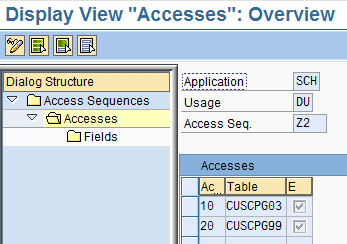
Figure 6
Defining accesses
Define the Condition Types (Figure 7) using menu path SAP SCM - Implementation Guide > Advanced Planning and Optimization > Global ATP > Transportation and Shipment Scheduling > Scheduling Using Configurable Process Scheduling > Define Condition Types. A condition type points to an access sequence and in the access sequence, we specify a list of accesses that will be used to find a condition record. We are defining condition types through the menu path given here. The condition type has a pointer to the access sequence which in turn has a set of accesses.
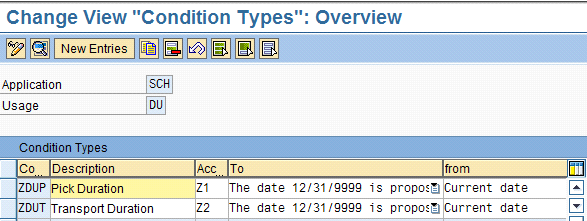
Figure 7
Define condition types
Define the determination procedures (condition type lists) (Figure 8) using menu path SAP SCM - Implementation Guide > Advanced Planning and Optimization > Global ATP > Transportation and Shipment Scheduling > Scheduling Using Configurable Process Scheduling > Define Determination Procedures. We are defining the determination procedure through this menu path.
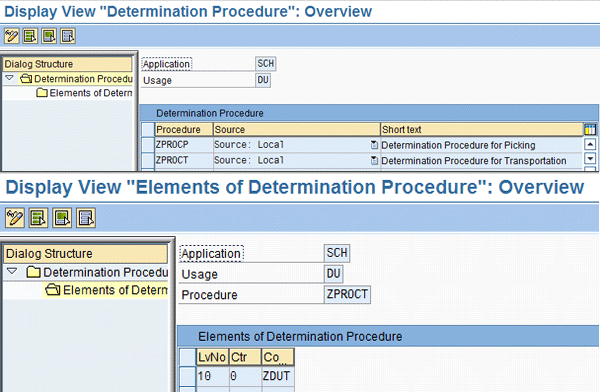
Figure 8
Define determination procedures
While it is possible to have more than one condition type in a determination procedure, it is usually not necessary. Determination procedures are then assigned to schema activities as shown in Figure 2.
In the example provided in Figure 2, schema activities PICK (Calendars) and LOAD (Calendars) are assigned the Determination Procedure ZPROCC. This shows that it is not mandatory to maintain unique procedures for every activity in the schema and the same procedure can be assigned to multiple activities (PICK and LOAD activities are assigned the same procedure for determining calendars in the example above).
Condition Record Maintenance
In addition to the above configuration for the system to use the condition technique, two additional configuration steps are necessary to support the user interface to maintain condition records.
First, you need to define the Condition Maintenance Groups (Figure 9) using menu path SAP SCM - Implementation Guide > Advanced Planning and Optimization > Global ATP > Transportation and Shipment Scheduling > Scheduling Using Configurable Process Scheduling > Determine Condition Maintenance Groups for Context.
The Maintenance Context is GCM (this is SAP-delivered context for CPS and cannot be changed).
Condition Maintenance Groups are a way of logically dividing the condition records. For example, you can have one group for durations and another for calendars so that the number of records fetched during condition record maintenance can be manageable (the number of records is usually fairly large).
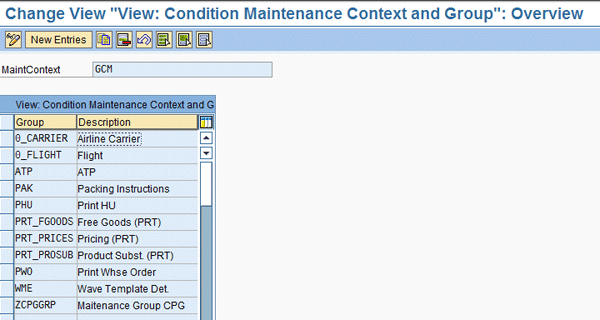
Figure 9
Defining condition maintenance groups
Next, you need to maintain the Condition Maintenance Groups details (Figure 10) using menu path SAP SCM - Implementation Guide > Advanced Planning and Optimization > Global ATP > Transportation and Shipment Scheduling > Scheduling Using Configurable Process Scheduling > Create Condition Maintenance Group. Here you specify the condition tables that are part of the condition maintenance group. You can have just one condition maintenance group for all your condition tables or you may choose to group tables by activity such as pick or transport.
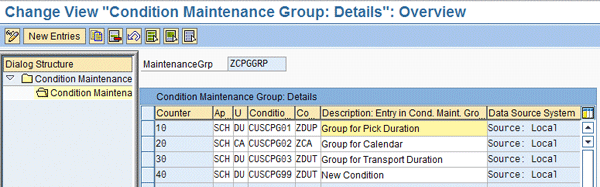
Figure 10
Maintaining condition maintenance group details
Master Data Maintenance
The menu path to maintain and view the condition data is Advanced Planning and Optimization > Master Data > Application-Specific Master Data > Transportation and Shipment Scheduling > Edit Conditions for Configurable Process Scheduling. Figure 11 shows how the maintenance group and the maintenance context are used to filter the data fetch of the system.
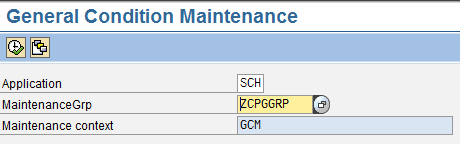
Figure 11
Specify maintenance group for maintaining condition records for CPS
Select the condition maintenance group and then click Execute icon. This brings you to the screen shown in Figure 12 with selection criteria fields on the left pane. This includes all fields from all condition tables within the condition maintenance group.

Figure 12
Maintaining condition records for CPS
Select the filter and then click on the filter icon at the top left of the selection pane to enter the filter values. It is easiest to filter by condition table (Key combination filter) and bring up all condition records within the condition table. You can filter on multiple fields by simultaneously selecting them while holding down the control key.
Points to Note
The following are some points to note and tips/tricks to remember when implementing CPS. Some key points for you to consider are: plan for master data conversion and maintenance, specify complete master data through condition records, or results may be unpredictable, and educate the testing and business team on the SAP ECC side on how transportation scheduling in GATP works and why the results are as expected.
- During an implementation of Global ATP consider the fact that transportation and shipment scheduling is always implicit in scope even if there may be no specific business requirements to be met for scheduling.
- There is no standard interface to maintain condition records for transportation and shipment scheduling. Consider the fact that you may need custom development to maintain condition records based on SAP ECC configuration.
- The UI for maintaining CPS condition records (transaction /SAPAPO/SCH_GCM) does not support the SAP Legacy System Migration Workbench (SAP LSMW) interface to load data. Depending on the volume of data you may need to develop custom programs to upload data into CPS condition tables. Consider this during the conversion phase of an implementation.
- You must not only consider the conversion programs necessary to create scheduling master data in GATP but also consider the programs necessary to maintain this master data based on changes in SAP ECC.
- When you use rules-based ATP with location or product substitution, transportation and shipment scheduling can quickly become very complicated. This is because scheduling would depend on the substituted material/plant. Condition tables cannot contain fields such as route and shipping point because these refer to the values for the (original) requested material/ plant. This means that shipping point determination and route determination logic (which would depend on the current part/plant being considered) of SAP ECC may need to be built into CPS.
- Assign time zones when defining time stream calendars if these time stream calendars are used in CPS calendar determination. If you don’t, the system assumes a UTC time zone. This can cause abnormal behavior when the system determines working times.
- Even schema activities that have zero duration can influence scheduling because their start and end dates are determined by working days of calendars. Since certain scheduling schemas (like SCHEDL_SDD) can look at multiple sources for calendar determination (CPS condition tables as well as location master data), you need to ensure that all schema activities pick the calendar that is right for your business scenario.
- Time streams, locations, and transportation lanes are buffered in SCM. To have changes reflect immediately in scheduling (perhaps, after making some changes to master data), run the program /SAPAPO/SCHED_BUFFER_RESET to reset buffers. Refer to SAP Note 362109 – SAP APO scheduling and conditions: fields filled from R/3 for details on what values from SAP ECC are transferred to SAP SCM through the scheduling field catalog. SAP Note 547941 – FAQ: Shipment and transportation scheduling in SAP APO outlines FAQs on Transportation & Shipment scheduling in SAP SCM. SAP Note 383648 – Delivery scheduling as of SAP APO 3.0: Consulting notes is a composite list of consulting notes related to scheduling in SAP SCM.
Rishi Menon
Rishi Menon is a specialist master at Deloitte Consulting LLP, with more than 17 years of supply chain and enterprise application consulting experience. He specializes in supply chain planning and order fulfillment. He is SAP SCM, APICS (CPIM, CSCP & CIRM) and PMI (PMP) certified.
You may contact the author at rimenon@deloitte.com.
If you have comments about this article or publication, or would like to submit an article idea, please contact the editor.
Satish Vadlamani
If you have comments about this article or publication, or would like to submit an article idea, please contact the editor.




 Premium