Discover how you can improve the performance of large contracts in which revenue is distributed across rights dimensions using lean distribution. SAP introduced lean distribution to allow your system to store the revenue distribution line items in the set IPM_REVDIST instead of using the billing plan functionality to store distribution information.
Key Concept
With the lean distribution functionality introduced in SAP CRM 7.0 enhancement package 1, your system does not generate one-order items for each distribution line. Instead, it stores the distribution data in the IPM_REVDIST set and does not generate any items of object type BUS2000188. This significantly improves the speed at which you can manage contracts.
If you work in an industry that deals with large contracts, such as the media industry, SAP’s lean distribution functionality is very useful. It is a valuable tool for large contracts that have a high number of line items and in which revenue is distributed across those items, such as the sales contracts commonly sold by media industries in multiple territories and media formats for intellectual property (IP) distribution. With lean distribution, your system can process these contracts much faster.
Note
Table CRMD_IPM_REVDIST and set IPM_REVDIST are interchangeable terms.
To improve the performance of contracts, lean distribution stores the revenue distribution line items (with object type BUS2000188) in a separate table, table CRMD_IPM_REVDIST. The billing plan functionality is no longer used—instead, the distribution relevance indicator in Intellectual Property Management (IPM)-specific item category settings allows the revenue distribution line items to be stored in the set IPM_REVDIST. Once the sales contract is created as a distribution-relevant item category, it is impossible to switch from distribution with the billing plan function to distribution with set IPM_REVDIST. This improves your system performance because the Business Document (BDoc) size is reduced considerably when tables such as CRMD_PRICING, CRMD_PRICING_I, and CRMD_ORGMAN only need to store header, item, and billing distribution line item information—not the revenue distribution information.
This functionality is ideal when you have a large contract and the rights are distributed to multiple media, territories, and languages, because each of these combinations and entries will be stored in table CRMD_IPM_REVDIST. In contrast, a contract that does not have lean distribution will have an entry for distribution rights in tables CRMD_ORDERADM_I, CRMD_PRICING, CRMD_PRICING_I, and CRMD_ORGMAN.
Lean distribution becomes active when you activate the switch framework CRM_PERFORMANCE. Next, I will describe how to start lean distribution within your system.
Activate Lean Distribution
Start by entering transaction SFW5 to check if the switch framework CRM_PERFORMANCE is active (Figure 1). If CRM_PERFORMANCE is not active on your screen, select CRM_PERFORMANCE and click the Activate Changes button.

Figure 1
CRM_PERFORMANCE is active
Next, to make the item categories relevant for lean distribution, follow IMG menu path SAP > Customer Relationship Management > Industry-Specific Solutions > Media > Intellectual Property Management > Transactions > Define Settings for IPM Item Categories. Mark the check box for Distr. Rel. (relevance of distribution) for the required item categories, as shown in Figure 2.
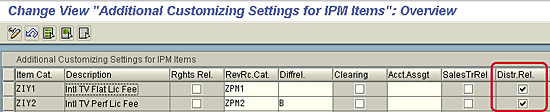
Figure 2
Ensure that the necessary item categories are relevant for lean distribution
The billing plan type should have only a milestone line or periodic billing item—not the revenue distribution line. Follow IMG menu path SAP > Customer Relationship Management > Transactions > Basic Settings > Billing Plan > Define Billing Plan Types. In my example, I use a sample billing plan type ZX.
In the screen that appears, the billing plan lines should only include the line type milestone billing or periodic billing (Figure 3). With lean distribution, there is no billing plan for revenue distribution. Instead, the set IPM_REVDIST is used. With the old distribution functionality (i.e., non-lean), there is a billing plan for revenue distribution.
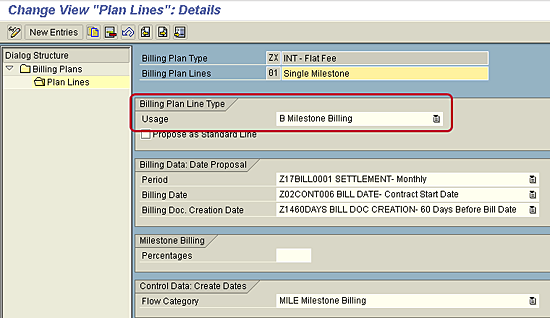
Figure 3
Ensure that the usage type is either Milestone or Periodic Billing
Next, assign the billing plan type to the item category. To do so, follow menu path SAP > Customer Relationship Management > Transactions > Basic Settings > Billing Plan > Define > Assign Billing Plan Type to Item Category (Figure 4). Ensure that the billing plan types (in my example, ZX and ZY) are assigned to the respective item categories (here, ZIY1 and ZIY2).

Figure 4
Assign the billing plan type to the item category
Lean Distribution in Action
To see the effect of lean distribution activation in contracts, start by creating a contract with multiple revenue distribution lines (Figure 5).
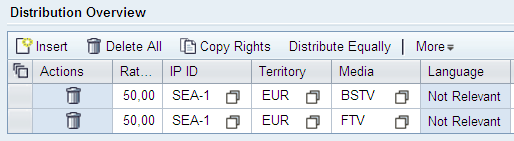
Figure 5
A sample contract with multiple revenue distribution lines
Table CRMD_ORDERADM_I no longer stores revenue distribution line items (object type BUS2000188), as shown in Figure 6. You’ll see that they are stored in table CRMD_IPM_REV_DIST (Figure 7).
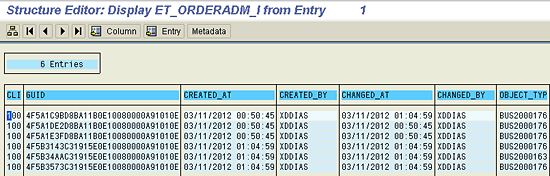
Figure 6
Table CRMD_ORDERADM_I no longer displays revenue distribution line items
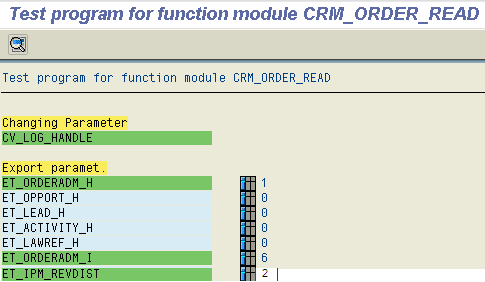
Figure 7
Table CRMD_IPM_REV_DIST with revenue distribution line items
You will also notice that function module CRM_ORDER_READ does not display the individual revenue distribution line items. To get around this, you can use class CL_CRM_IPM_REVDIST and method Read to retrieve these distribution line items.
BDoc Size Reduction
As I stated previously, lean distribution reduces BDoc size significantly. When contracts have multiple right dimensions maintained in an item-level scope, there is much more data that needs to be stored in your system. With lean distribution, the number of tables that need to store the same information is reduced to one. Table 1 shows two contracts for which revenue was distributed to 41 territories and two media types.
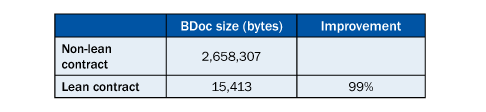
Table 1
Sample analysis of two contracts
Because the data is stored in multiple tables, the non-lean contract stores much more data. However, the lean contract stores data in only the REV_DIST table, and in turn, the amount of data that needs to be processed is decreased. The BDoc size of a lean contract is reduced by 99 percent compared to a non-lean contract. When you consider the effect that lean distribution has on a system processing multiple contracts, you can now see how this strategy decreases your processing time considerably.
Diana Dias
Diana Dias is a senior consultant at Capgemini US LLC with more than four years of experience in SAP CRM and extensive experience implementing SAP CRM solutions as a functional consultant for the retail and media industries. Currently, Diana is involved in implementing an SAP CRM-IPM solution at one of the leading studios in California. She received her master’s degree in Management and Information Systems from the University of Texas at Dallas.
You may contact the author at dianadias11@gmail.com.
If you have comments about this article or publication, or would like to submit an article idea, please contact the editor.




 Premium
