Manager
Strategic documents and methodologies set the direction and the processes for SAP projects. SAP Solution Manager Roadmaps provide the tools and content repositories you use to tailor a selected methodology and to set the direction for your project. Learn how to use these tools to ensure successful projects and to generate valuable assets for future projects.
Key Concept
Strategic documents are files of project–related information, stored in SAP Solution Manager Roadmaps, that guide your project team towards a successful project solution. Aligning strategic documents with your project methodology helps your team deliver projects successfully. The sooner you formally align your chosen strategic documents with your SAP project, the more smoothly your project team’s work will go.
The SAP Solution Manager (V7.0 SP16) Roadmap functionality helps you build and store your key strategy related documents. This functionality allows you to link a methodology to your project scope, set milestones, arrange work products into work packages, and it also provide a visual view of the overall status of your project. It also provides integration with the SAP Knowledge Warehouse (KW) so that you can share key project deliverables directly in your project-specific methodology using the roadmap function. (SAP Solution Manager 7.0 includes SAP KW version 6.0 in the application server software stack.)
Before you begin, it’s important to understand some key terms.
Methodology: A repeatable, scalable, and project-independent collection of actions, milestones, strategies, and work products to aid in the success of your project. SAP and other vendors provide methodologies for implementing, upgrading, and supporting SAP solutions for enterprises of all shapes and sizes. Executing an SAP project without a proven methodology is an invitation for disaster and exposes your organization to a level of risk that SAP experts consider unacceptable.
Roadmap: The functionality provided by Solution Manager to house the methodology and strategy-related documentation, track key project milestones, and help align the efforts of the project team members.
The focus of this article is the methodologies of the ASAP Roadmap. As mentioned, other SAP methodologies are available as SAP Solution Manager Roadmaps.
A Closer Look at Strategic Documents for SAP Projects
At the onset of a project, the leadership team must set the direction for the project before the rest of the team is assembled. The Project/Program Management Office (PMO), along with the functional and technical team leads, must put together a series of strategic documents. Because these documents set the guidance for how the project moves forward, it makes sense to store them as part of a project methodology.
Here are some examples of strategic documents commonly included in the methodology and stored on the roadmap:
Project Charter: Sets the high-level scope of the project, identifies the key stakeholders, and lists the key benefits of the projects. It often includes a summary of the business case and can serve as a communication vehicle to the rest of the areas of the company that the project may touch, even if they are not directly involved in the project.
Infrastructure Strategy: Outlines the technical infrastructure that will either be built or affected by the project. It needs to be comprehensive in nature so that all the infrastructure elements are described, the legacy infrastructures are preserved, and future growth is possible.
Reporting Strategy: Outlines how the company plans to do strategic, executive, day-to-day, tactical, and ad hoc reporting as a result of delivering the project. It often includes the strategies for operational data stores, data warehouses, and reporting tools to meet the needs of the business.
System Landscape Strategy: Describes a subset of the infrastructure strategy that is specific to the systems and servers that will be used to deliver the project. It should align with the overall infrastructure strategy, but is limited in scope to the systems directly affected by the project.
Conversion Strategy: Outlines the high-level goals and tools that will be used in the conversion effort. It often dovetails with a middleware strategy or other master data management strategies and is developed according to an overall data harmonization strategy.
These are just a few of the strategic documents that are needed on an SAP project. Others can include an organizational change strategy, communication strategy, security strategy, and training strategy.
Often project managers spend insufficient time effectively developing, storing, and sharing these documents with their project teams and the rest of the company. SAP Solution Manager prevents this problem by storing and sharing these through its Roadmap functionality.
Strategic Documents and SAP Solution Manager Roadmaps
Using a methodology for your SAP project is a critical to success. SAP provides the ASAP methodology for implementation projects as a Roadmap in Solution Manager. In addition to the list of activities recommended by SAP, the ASAP Roadmap contains guidance on how to build your project-specific strategies and provides sample strategies and templates.
The documents stored on a roadmap tend to be, but are not limited to, strategic documents because they set the standards and direction for your project. When you store these documents in the appropriate places on the roadmap, they align to your project’s methodology so that your teams have the key information they need when they need it. The sooner you formalize and publish your project’s strategic documents, the better your project can consistently move forward. For example, building and communicating the interface strategy can help the infrastructure team better understand how to build the system architecture to deliver a successful project.
Get Started with an SAP Solution Manager Roadmap
The Solution Manager Roadmap functionality housing your project’s methodology serves to answer the question, “How do I proceed in a structured way with my SAP project?”
To begin, you use transaction RMMAIN to open the roadmap. Figure 1 shows the ASAP Roadmap from a dashboard view. You can see the phases (e.g., Project Preparation, Business Blueprint), deliverable groups (e.g., DG: Training Plans, DG: Project Strategic Framework), milestones, and SAP services that are relevant for an implementation project.
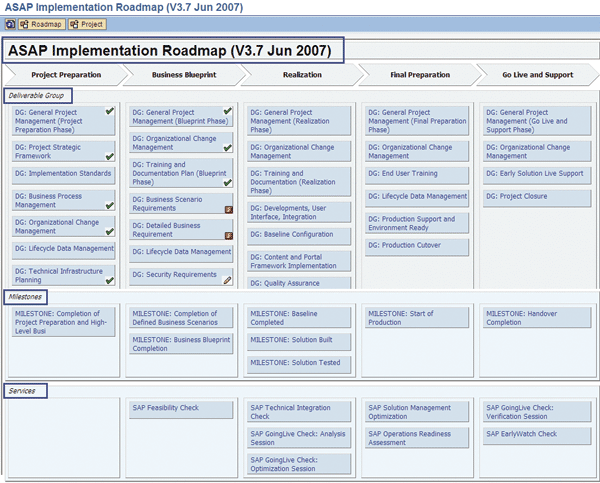
Across the top of the ASAP Roadmap are the methodology phases. Horizontally, the roadmap is divided into three sections:
Deliverable groups: Collections of project deliverables (documents, quality assurance checks, gate reviews) or key activities that are logically related within a phase as defined by the methodology. An example would be the General Project Management deliverable group. It includes the Project Startup, Initiation, Management Planning, and Sign-off.
Milestones: Key events in the methodology that are critical to completing the project phase. Examples include a phase check of when the project preparation and high-level project planning are completed.
Services: Identify which SAP services are applicable to the project as you move through the phases of the methodology. For example, during the blueprint, the SAP Feasibility Check is an available service.
This graphical view of the ASAP Roadmap not only lets project managers and team members see at a glance the status of a project against planned milestones ( for complete,
  for in progress,
  for in trouble), but also provides a navigation drill-down to the specific activities to be performed at the different stages of the project lifecycle according to the methodology being used.
Figure 2 displays the methodology’s work breakdown structure (WBS), which is where your key project documents are stored (e.g., Project Vision and Strategy, Confirmed Integration Vision and Strategy, High-Level Business Requirements Definition). Typically, the strategic documents are stored at the primary node of the WBS.
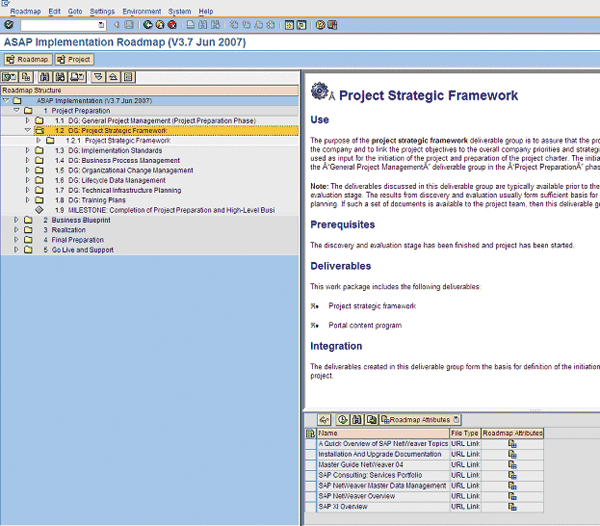
Figure 2
Work breakdown structure (WBS) of the methodology
Other project documents related to documenting the solution can be attached at the lower nodes in the WBS. For example, in the Business Blueprint phase at the WBS node 2.6.10.2 Define Reports Requirements, you can attach the reporting functional specifications for your project (Figure 3).
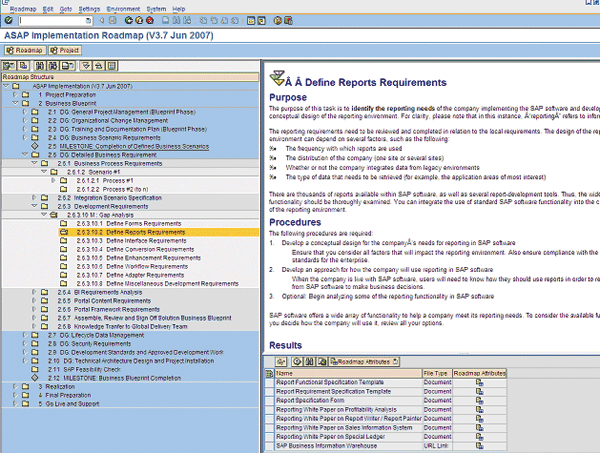
Figure 3
Navigate the WBS to find project-specific reporting specifications in the Define Reports Requirements node
What you see in the WBS for your project varies based on the Roadmap that you have chosen to use. The ASAP methodology identifies the key strategic documents you need at different phases of your project. For example, you should create your project charter during the Project Preparation phase. Other strategic documents, such as the conversion strategy or the reporting strategy, are created in the Business Blueprint or Design phase in preparation for beginning the Realization or Build phase of the project.
Note
The roadmap attributes are customizable, configurable data elements that allow for filtering and searching in the roadmap. They are beyond the scope of this article. For more information, go to https://help.sap.com and follow menu path SAP Solution Manager > Implementing and Upgrading > Projects > Roadmap > Create a Roadmap > Attributes (Variants/Roles/Subject Areas).
While viewing the ASAP methodology from the WBS, follow menu path Goto > Accelerators to see the SAP- delivered documents (e.g., EP Sample Roll-Out Strategy) and project aids (e.g., EP Business Drivers), as shown in Figure 4. These accelerators are provided to you in the methodology to help you prepare your key project documents. They include sample documents and templates, which can save you a lot of time in preparing your key documents — hence the name “accelerators.” Note that SAP delivers samples for roll-out strategy, portal strategy, and many other sample strategies that are relevant for an implementation project.
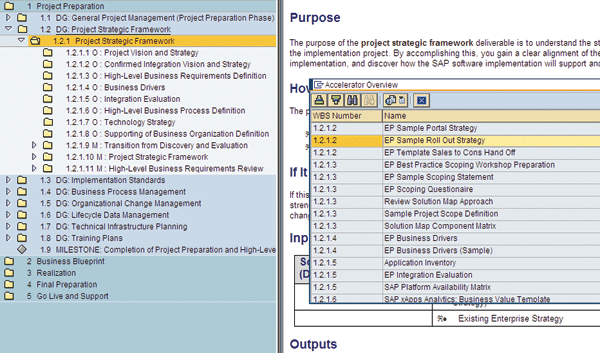
Figure 4
Accelerators for the Project Strategic Framework
The displayed accelerators are context sensitive, which means that you only see the accelerators based on the WBS element you have selected when you request the accelerator overview. The accelerators shown are associated with the selected WBS and all of the children nodes beneath it. If you view the accelerators from the top node of the WBS, you get a list of all the accelerators provided for the entire methodology. This could take a considerable amount of time and present you with a list that is difficult to search. For this reason, it is recommended that you navigate down the WBS to a more focused point in the Roadmap or methodology before searching for accelerators.
When beginning your project, you choose the methodology you want to guide your project. In an SAP Solution Manager Roadmap function, you associate this methodology to your project so you can use the same methodology for multiple projects and have each project have its own “copy” of the methodology from which to manage deliverables, milestones, and SAP Services.
By associating a roadmap to your project, you can attach your project-specific strategies to the Roadmap. Project-specific strategies can be stored on your project structure in SOLAR01 – Business Blueprint and linked to the Roadmap via the Accelerators tab in transaction RMMAIN if the Roadmap has been assigned to the project in transaction SOLAR_PROJECT_ADMIN on the Roadmap tab. This association enables you to use a standard methodology and roadmap for multiple projects while ensuring that each project has its own unique strategic documents. It allows your organization to establish enterprise-level standards for project methodologies while providing flexibility for project- specific implementation strategies. At this point, it is necessary to delve into the setup of an SAP Solution Manager project just a bit further to better understand the association of the Methodology (via the Roadmap) and your project.
Creating a Project in SAP Solution Manager
To create a Solution Manager project, run transaction SOLAR_PROJECT_ADMIN and then follow menu path Project > Create. The Project Create pop-up screen appears (Figure 5). Enter a project name (e.g., ROADMAPDMO) and the project type (e.g., SOLUTI Template Project).
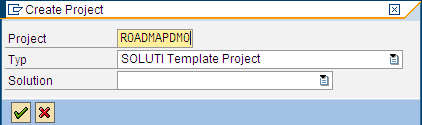
Figure 5
Enter the name of your project and specify a project type
Note
The difference in the project types is beyond the scope of this article. Assigning a project to a solution becomes important when you’re ready to move into the Go Live and Support phase and is also beyond the scope of this article.
Click the execute icon to continue. The Create Project screen appears (Figure 6). Here, you need to specify the title or description of the project (ASAP Roadmap linked to a Template Project), and the project language (EN English). These are the only two required fields to complete the creation of your project. There are many other tabs and fields that can help you control your project going forward, but you do not need them. Throughout your project, you’ll need to revisit the project configuration.
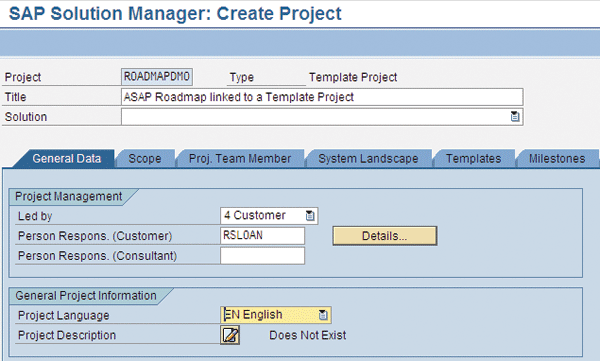
Figure 6
Enter title or description of the project, and specify the language that will be used to create the project
Switching to the Scope tab, you can see that I have previously assigned a subset of the ASAP Roadmap to this project (Figure 7). Only those areas of the Roadmap that apply to the example project scope have been chosen. In this example, the scope is core ASAP, which is the part of the ASAP methodology that applies to all projects, and mySAP ERP, which is the product being installed for this example project.
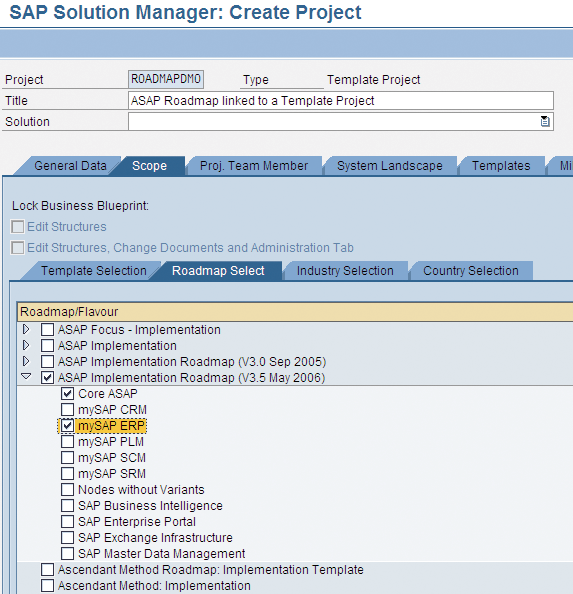
Figure 7
Specify the scope of the project.
Note
ASAP Implementation V3.8 is the current version as of the writing of this article.
Once the scope of the project has been assigned, go back to the roadmap, and this time, run transaction RMMAIN to launch the roadmap navigation tool. Click on the Project button to display only those projects that have a roadmap assigned (Figure 8).
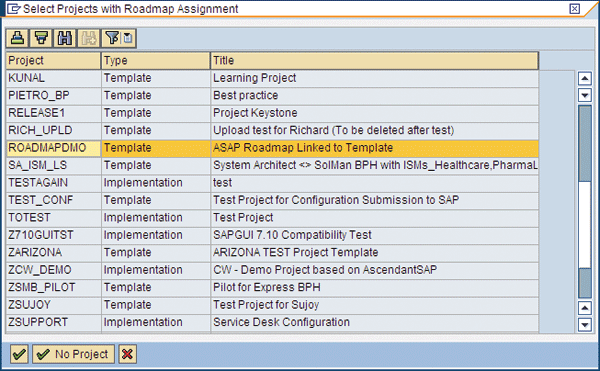
Figure 8
Display projects that have been assigned a roadmap
Select the ROADMAPDMO project and click the execute icon. As shown in Figure 9, the title bar now displays the name of the roadmap and the project. You can now see the phases, deliverable groups, milestones, and SAP services for this project.
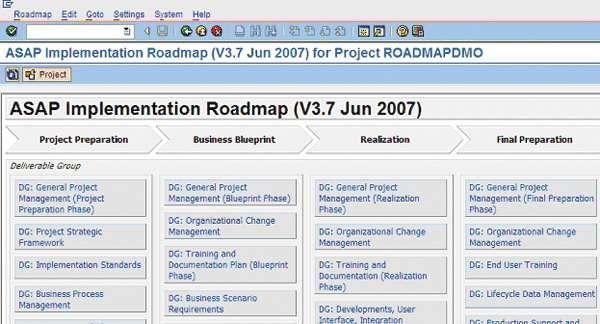
Figure 9
Updated roadmap for project ROADMAPDMO
To see the WBS activities and deliverables for a deliverable group (DG), click the DG graphic block. For example, to display the deliverable shown in Figure 10, click the DG: Project Strategic Framework button to navigate to the WBS for the Project Strategic Framework section of the methodology.
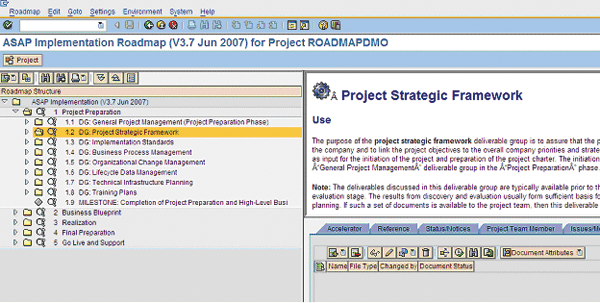
Figure 10
Project Strategic Framework section of the ASAP implementation methodology
Figure 11 should look familiar from what you saw earlier when reviewing the roadmap as a standalone methodology, except now there is a tab strip that appears in the bottom right window of the screen.

Figure 11
Tab strip of the WBS view of the roadmap assigned to a project
There are several new tabs. You use the Proj. Documentation tab to store the project-specific strategy documents. Click the Proj. Documentation tab and then click the add document icon (Figure 12). To upload documents, create new documents, or assign existing documents to this node of the WBS for the roadmap. This assignment exists as a relationship between the ASAP Roadmap and the project. It is not a direct assignment or change to the ASAP Roadmap.
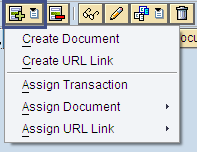
Figure 12
Add project-specific documentation to the roadmap
When the document has been created, it is displayed in the documents list on the roadmap (Figure 13).
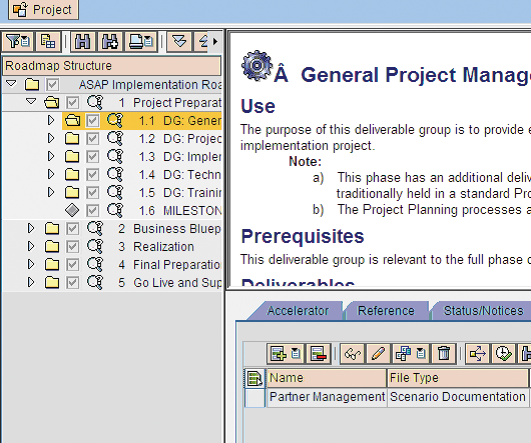
Figure 13
Document added to the roadmap
D. Russell Sloan
D. Russell Sloan is a specialist in project and program governance for IBM. He focuses on the use of SAP Solution Manager for global rollout projects for IBM’s largest customers, having worked with SAP software since 1996. Russell has degrees in accounting and information systems and has been a team and project leader for SAP projects for more than 14 years. He has been developing and deploying software systems for over 30 years.
You may contact the author at solmanruss@gmail.com.
If you have comments about this article or publication, or would like to submit an article idea, please contact the editor.






 Premium