You can manage authorizations by user role for business transactions in the Plant Maintenance (PM) module. See how to use authorization field BETRVORG to simplify your PM authorization customization.
Key Concept
Companies manage authorizations for working with Plant Maintenance (PM) internal orders, equipment, functional locations, and notifications within a user’s role. The role provides the rights necessary for accessing and manipulating company data. You use authorization field BETRVORG to ensure that the PM expert or PM manager can only access data in his or her area of responsibility. Elements requiring protection include personnel master data, transactions, tables, user master records, access authorization profiles, and access authorization objects. It is also possible to subject the assignment of authorizations to an authorization check.
The PM authorization objects I’ll
cover are:
• I_VORG_ORD:
business operation for orders
• I_BETRVORG:
business operation
• I_VORG_MEL:
business operation for notifications
First I’ll give you some background
information.
Note
In the authorization area, sometimes business transactions are called business operations.
Authorization Checks
Security measures built into your
SAP system are known as authorization
checks. They minimize the ability of
unauthorized personnel to access, manipulate,
steal, modify, or delete sensitive
data. When you begin to develop a PM
authorization concept in accordance
with your company’s security
needs, you have to make some decisions
regarding the required level of protection.
You have to specify who is going to
work with the PM module, what business
transactions in the SAP PM area they
can execute, and how to ensure that
they can pass the authorization checks.
In particular, you have to avoid assigning
an unintentional combination of PM
authorizations within a role or between
roles that are assigned together. The
standard PM module defines a variety
of actions as business transactions.
They are represented by a four-character
key and a descriptive text.
Note
A standard planned PM order is the focus of my examples. Although the screenprints in this article are from R/3 Release 4.6C, the information is applicable to R/3 systems running on Release 4.6 and beyond and mySAP ERP Central Component (ECC).
Now, I will give you a detailed overview
of the authorization management of
the business transactions for the PM
area, in terms of their relationships
with PM internal orders, PM equipment
and functional locations, and PM notifications.
When users work with sensitive data,
you have to specify the user’s
work area and restrict it. For example,
if a user is working with PM orders,
you have to restrict the business transactions
(such as technically complete, cancel
business completion, release, lock,
or unlock). If the user is working
with PM equipment and functional locations,
you may want to restrict their ability
to set or reset deletion flags. If
they are working with PM notifications,
you could restrict them to complete
notifications, delete or reset a deletion
flag, or print notifications.
My business scenario illustrates
these three relationships:
- The relationship between PM internal
orders and authorization object I_VORG_ORD.
Authorization object I_VORG_ORD has
two fields, AUFART and BETRVORG.
Field AUFART contains
the order types and BETRVORG is
the field in which you fill in the
business transactions.
- The relationship between PM equipment
and PM functional locations and authorization
object I_BETRVORG.
Authorization object I_BETRVORG contains
only one field, BETRVORG,
for business transactions.
- The relationship between PM notifications
and authorization object I_VORG_MEL.
Authorization object I_VORG_MEL contains
two fields – one for notification
types (authorization field QMART)
and one for business transactions
(authorization field BETRVORG).
PM Internal Orders
A business transaction can change
an internal order. The reason to change
a PM internal order might be, for example,
if you want to change the status to Complete
(technically) or to Complete
(business). You complete a
PM internal order technically once
the maintenance work planned in the
order has been performed. The order
obtains the status “technically
completed” and is marked as completed
for PM. You perform a business completion
of a PM order when you do not expect
any further costs to be posted to the
order. You first have to perform the Complete
(technically) function and
after that you can perform the business
completion.
Note
In contrast to the technical completion, the business completion is usually called “completion” in the SAP system.
You create PM orders via transaction IW31 and
maintain them via transaction IW32 or
menu path Logistics>Plant
Maintenance>Maintenance Processing> Order
(Figure 1).
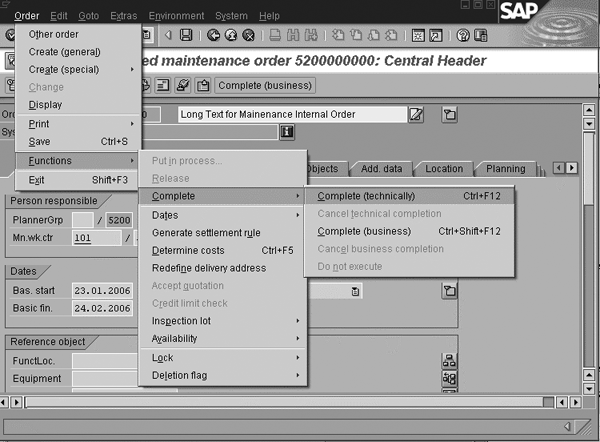
Figure 1
Transaction IW32 leads to the Change Planned maintenance order screen
Table 1 lists some
business transaction codes in a standard
PM order. This information relates
to authorizations, because you insert
all of the four-character keys for
business transactions in the BETRVORG authorization
field. The BETRVORG authorization
field is not specific just to PM. The
field contains business transactions
(or business operations) and is available
in authorization objects I_VORG_ORD, I_VORG_MEL,
and I_BETRVORG.
| Path |
Shortcut key |
Business transaction |
Business transaction
text |
| Order>Functions>Put
in process... |
Ctrl+F2
|
BFRE
|
Release |
| Order>Functions>Release |
Ctrl+F1
|
BFRE
|
Release |
| Order>Functions>Complete>Complete
(technically) |
n/a
|
BTAB
|
Technically
complete |
| Order>Functions>Complete>Cancel
technical completion |
n/a
|
BUTA
|
Revoke technical
completion |
| Order>Functions>Complete>Complete
(business) |
n/a
|
BABS
|
Close |
| Order>Functions>Complete>Cancel
business completion |
n/a
|
BUAB
|
Revoke status ‘Closed’ |
| Order>Functions>Complete>Do
not execute |
n/a
|
BABL
|
Wrap |
| Order>Functions>Dates>Schedule |
n/a
|
RMTM
|
Schedule order |
| Order>Functions>Generate
settlement rule |
n/a
|
KABV
|
Maintain
settlement rule |
| Order>Functions>Determine
costs |
Ctrl+F5
|
RMKE
|
Determine costs |
| Order>Functions>Availability>Check
stock material |
Ctrl+F9
|
RMVM
|
Check
material availability |
| Order>Functions>Availability>Production
resources/tools |
n/a
|
RMVM
|
Check material
availability |
| Order>Functions>Lock>Lock |
n/a
|
BLOC
|
Lock |
| Order>Functions>Lock>Unlock |
n/a
|
BUNL
|
Unlock |
| Order>Functions>Deletion
flag>Set |
n/a
|
LVMS
|
Mark
for deletion |
| Order>Functions>Deletion
flag>Reset |
n/a
|
LVMZ
|
Remove deletion
flag |
|
| Table
1 |
Menu
paths and corresponding business
transaction codes for a planned
PM order (transaction IW32) |
The first column in the table gives
the detailed path for changing the
status of a PM order via transaction IW32.
Here, you can quickly accomplish some
business tasks that you perform frequently
by pressing on one or more shortcut
keys on the keyboard. The second column
shows the shortcut key’s combination
for some business transactions. The
third column gives information about
the business transaction four-character
key. The description of the business
transaction text is in the last column
of the table.
Note
When a user maintains a PM order via transaction IW32, the PM order’s data is locked and another employee cannot process the same PM order’s data. The entry remains locked in tables AUFK and RKPF and the system postpones PM order processing until the data is unlocked. View the lock of the data via transaction SM12.
If an SAP user changes a PM order,
the system checks whether the corresponding
business transactions are allowed for
that user. The authorization object
that you use for order processing within
the PM area is I_VORG_ORD (Table
2). This authorization object
has two fields for authorization — one
for order type with technical name AUFART and
one for business transactions. The
technical name of the authorization
field for a business transaction is BETRVORG.
Authorization object I_VORG_ORD makes
it possible to give authorization to
a user for particular functions within
the PM order only, depending on the
type of the PM order. The I_VORG_ORD object
contains the fields shown in Table
2.
| Authorization
field name |
View field |
Data element |
Data type |
Length |
Description |
| AUFART |
AUART
|
AUFART
|
CHAR |
4 |
Order type |
| BETRVORG |
VRGNG
|
J_VORGANG
|
CHAR |
4 |
Business transaction |
|
| Table
2 |
Fields
for authorization object I_VORG_ORD |
Now I’ll illustrate this information
with my three examples. Figure
2 summarizes all the discussed
authorization objects I’m using
in my examples. It shows the Profile
Generator tool and the set of the business
transaction codes. The Profile Generator
(transaction PFCG)
is a standard SAP tool that allows
you to maintain authorizations for
people who have different permissions
in the system. Using it, you can configure
job roles for users throughout the
whole enterprise. Table TJ01 is the
value table that contains all business
transactions.
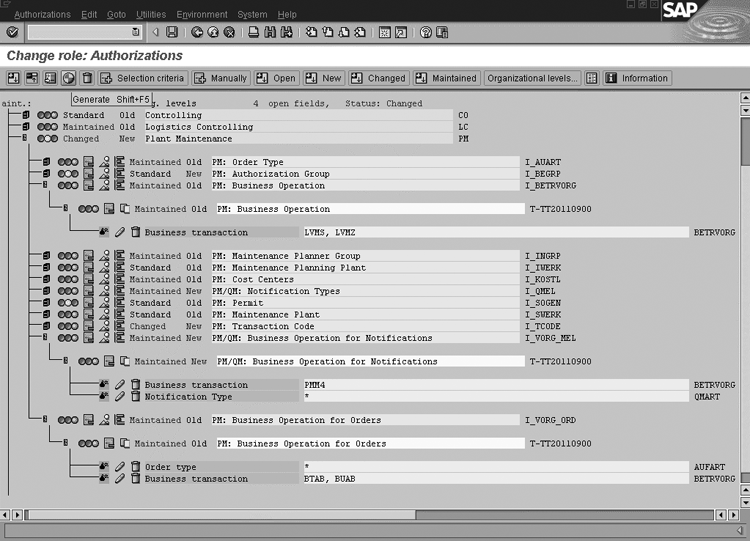
Figure 2
Change role: Authorizations screen for maintaining authorization profiles (transaction PFCG) click here to view a larger version of this image
Example 1
User PM_User1 is allowed to complete
technical orders of all types and to
cancel the business completion of all
PM order types. The Complete
(technically) business transaction
code is BTAB, and
the cancel business Complete
(business) transaction code is BUAB.
The authorization in the Profile Generator
tool looks like what you see in Figure
2. It uses AUFART =
* (all order types) and BETRVORG = BTAB,
BUAB.
Note
The lock key of field BETRVORG=BLOC is not related to the lock key that you can edit using transaction SM12.
If you want to determine in the Profile
Generator tool (Figure 2) which data
sources are used in the value search
for the F4 help on the authorization
fields, use transaction code SU20 (Figure
3). Here I focus on the BETRVORG authorization
field, which contains the business
transaction codes. It is the field
created specifically for managing the
access to business transaction codes.
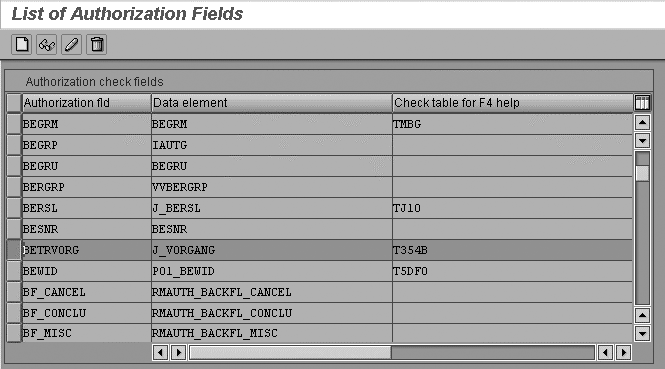
Figure 3
Maintain the authorization fields in the List of Authorization Fields screen (transaction SU20) click here to view a larger version of this image
Mark the row with the authorization
field BETRVORG and
click on the Display button (or use
shortcut key F7). You can see in Figure
4 that BETRVORG is
used in more than one authorization
object. It shows that table T354B is
the search help table for authorization
values for business transactions in
the Profile Generator tool. The BETRVORG authorization
field is found in authorization objects I_BETRVORG, I_VORG_ORD,
I_VORG_MEL,
as well as in other objects from the
Quality Assurance (QA) area.
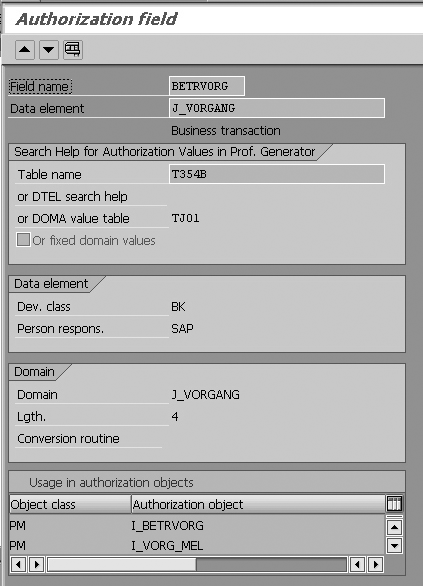
Figure 4
Display screen for maintaining Authorization Field BETRVORG (transaction SU20)
PM Equipment and Functional
Locations
You use the check of authorization
object I_BETRVORG when
you work with PM equipment via transaction
codes IE01 (create equipment), IE02 (change
equipment), or PM functional locations
via transaction codes IL01 (create
location) and IL02 (change
location). Authorization object I_BETRVORG contains
only one field, which is BETRVORG,
as shown in Table 3.
As I mentioned, the BETRVORG authorization
field is the place where you put business
transactions if you want to perform
an authorization check.
| Authorization
field name |
View field |
Data element |
Data type |
Length |
Description |
| BETRVORG |
VRGNG
|
J_VORGANG
|
CHAR |
4 |
Business transaction |
|
| Table
3 |
Authorization
fields for authorization object I_BETRVORG |
Tables 4 and 5 list
business transactions in a PM functional
location, which is an organizational
unit within logistics (transaction IL02)
and in a PM equipment location, which
is where a maintenance task is performed
(transaction IE02).
Often you hear users say they could
not perform the business transaction “set
deletion flag” but they do not
specify the business transaction code.
The security operator has to guess
the code of the business transaction.
To avoid that situation, you can use
the information in Table 4.
| Path |
Business transaction |
Business transaction
text |
| Functional
location>Functions> Active<->Inactive>Deactivate |
INAZ
|
Reset
object inactive
|
| Functional location>Functions> Active<->Inactive>Activate |
INAK
|
Set
object inactive
|
| Functional location>Functions> Deletion
flag>Set |
LVMS
|
Mark for deletion |
| Functional location>Functions> Deletion
flag>Reset |
LVMZ
|
Remove deletion
flag |
|
| Table
4 |
Menu
paths and corresponding business
transaction codes for a PM functional
location (transaction code IL02) |
| Path |
Business transaction |
Business transaction
text |
| Equipment>Functions>Active<->
Inactive>Deactivate |
INAZ
|
Reset
object inactive
|
| Equipment>Functions>Active<-> Inactive>Activate |
INAK
|
Set
object inactive
|
| Equipment>Functions>Deletion
flag>Set |
LVMS
|
Mark for deletion |
| Equipment>Functions>Deletion
flag>Reset |
LVMZ
|
Remove deletion
flag |
|
| Table
5 |
Menu
paths and corresponding business
transaction codes for PM equipment
(transaction IE02) |
The first column of the tables shows
the complete path for the relevant
business transactions in transactions IL02 and IE02.
The second column gives the four-character
key for business transactions, and
the last column describes the business
transaction’s text.
Example 2
User PM_User2 is allowed to set and
reset deletion flags for PM equipment
and locations. Remove or set the deletion
flag in the system via business transactions LVMZ or LVMS,
respectively. If you want to remove
equipment or locations from the system,
you have to set the deletion flag.
The authorization for authorization
object I_BETRVORG in
transaction PFCG looks
like what you see in Figure 2: BETRVORG =
LVMS, LVMZ (mark
for deletion, remove deletion flag).
PM Notifications
You use authorization object I_VORG_MEL when
you check the access to business transactions
in PM notifications (transaction IW22). AUTHORITY-CHECK is
an ABAP command used to perform authorization
checks in programs. Before accessing
the database, the user should carry
out an authorization check, which is
implemented in the ABAP program. All
that is done because the access protection
system must ensure that only authorized
individuals have access to the system
and to particular data.
PM notifications document the work
that has been performed, such as maintenance
tasks. They are available for future
analysis. It is important to authorize
this function for precise application
security concerning authorization and
to protect execution of PM business
transactions against unauthorized access. Table
6 shows that I_VORG_MEL contains
two authorization fields: BETRVORG and QMART.
With this object you can control which
users can perform which functions for
the notifications. The I_VORG_MEL object
contains the fields shown in Table
6.
| Authorization
field name |
View field |
Data element |
Data type |
Length |
Description |
| BETRVORG |
VRGNG
|
J_VORGANG
|
CHAR |
4 |
Business transaction |
| QMART |
QMART
|
QMART
|
CHAR |
2 |
Notification type |
|
| Table
6 |
Fields
for authorization object I_VORG_MEL |
Table 7 lists business
transactions in a PM notification.
The first column shows the detailed
path, the second gives some shortcut
keys for access, and the last two columns
refer to the business transaction’s
codes with the corresponding text.
A user can enter maintenance notifications
for functional locations and for equipment.
The data of PM notifications is transferred
to history and is of importance for
future planning.
| Path |
Shortcut key |
Business transaction |
Business transaction
text |
| Maintenance notification>Functions>Put
in process... |
Shift+F1
|
PMM2
|
Put notification
in process |
| Maintenance notification>Functions>Postpone |
Shift+F2
|
PMM1
|
Postpone notification |
| Maintenance notification>Functions>Complete… |
Shift+F4
|
PMM4 |
Complete notification |
| Maintenance notification>Functions> In
process again |
Shift+F6
|
PMM6 |
Put notification
in process again |
| Maintenance notification>Functions> Deletion
flag>Set |
n/a
|
PMM8 |
Mark for deletion |
| Maintenance notification>Functions>Deletion
flag>Reset |
n/a
|
PMM9 |
Remove deletion
flag |
| Maintenance notification>Order>Create>Direct |
n/a
|
PMM3 |
Assign order |
| Maintenance notification>Order>Create> In
background |
n/a
|
PMM3 |
Assign order |
| Maintenance notification>Order>Assign |
n/a
|
PMM3 |
Assign order |
| Maintenance notification>Order> Delete
assignment |
n/a
|
PMM7 |
Terminate order
assignment |
| Maintenance notification>Print>Notification |
n/a
|
PMM5 |
Print notification |
|
| Table
7 |
Menu
paths and corresponding business
transaction codes for a planned
PM order (transaction IW22) |
Example 3
User PM_User3 is allowed to complete
notifications of all types. Execute
the complete notification authorization
via business transaction PMM4.
The authorization in the Profile Generator
tool looks like this: BETRVORG
= PMM4 (complete notification) QMART
= * (all notification types),
as shown in Figure 2.
Implementing the Authorizations
Figure 2 shows the whole scenario
including examples 1, 2, and 3. It
gives a view of the Profile Generator
tool that aids in managing user authorizations.
To find the appropriate authorization
management customizing activities follow
the IMG menu path Implementation
Guide For R/3 Customizing (IMG)>Plant
Maintenance and Customer Service> Basic
Settings>Maintain Authorizations
for Master Data or the Profile Generator
tool (transaction PFCG).
Note
When you test with test users in the TST system, only add the business transactions and generate the Profile Generator tool. The test user does not need to log in again to activate the authorizations.
It is important after making any change
in the Profile Generator tool that
you save and generate before exiting.
The save icon is on the application
toolbar in Figure 2. You can use the
generate icon to generate the authorization
profile. Figure 2 depicts all the authorization
settings that you must assign to users
for my examples. After generating you
can be sure that the users of this
authorization profile have the proper
rights for accessing business transactions
in the PM area.
Maria Nikolova
Maria Nikolova has worked as a senior SAP expert for the National Electricity Company (NEK) in Bulgaria since January 1999. Maria has a master’s degree in telecommunications as an engineer from the Technical University in Sofia, Bulgaria. She has experience with an MIS project implementation of SAP R/3 (headquarters and rollout), the authorization concept and user administration, SAP Customer Competence Center (SAP CCC) , SRM, and the SD, HR, CO, Asset Management (AM), MM, and PM modules. Prior to joining NEK, she worked as a manager of Equipment Engineering Ltd. for four years.
You may contact the author at searchsapmnikolova@yahoo.com.
If you have comments about this article or publication, or would like to submit an article idea, please contact the editor.