Understand the basic business processes involved in loyalty management in SAP CRM Marketing. Learn the essentials of loyalty programs, loyalty reward rules, and loyalty member activity and how you can integrate them with the CRM Web Channel, the CRM WebClient UI, and the Interaction Center WebClient.
Key Concept
Loyalty management is a marketing application introduced in SAP CRM 7.0. By activating function CRM_LOY_PROD, you can start to use loyalty management business processes. In addition, SAP introduced business function CRM_LOY_PART_MAN and loyalty partnership management in SAP CRM 7.0 enhancement package 1.
Loyalty management is applicable at any organization where loyalty programs are defined and points are earned based on the behavior of customers. Customers can register their personal information with the company and receive a unique identifier, such as a numerical ID or membership card, and then use that identifier when making a purchase. Loyalty management is leveraged in many industries — utilities, hotel chains, and coffee shops are just a few organizations that utilize loyalty programs and rewards. Today, when you walk into certain retail chains, you can find a loyalty program in which a cash back award is credited for every purchase.
A more specific example involves airline companies. Typically, airline customers enrolled in the loyalty program accumulate frequent flyer miles corresponding to the distance flown on that airline or its partners, though there are often other ways to accumulate miles. Acquired miles can be redeemed for air travel, other goods or services, or increased benefits, such as travel class upgrades, airport lounge access, or priority bookings.
The basic setup of loyalty management is designed around the blocks shown in Figure 1. It is a comprehensive solution for designing, establishing, and executing an effective customer loyalty program.
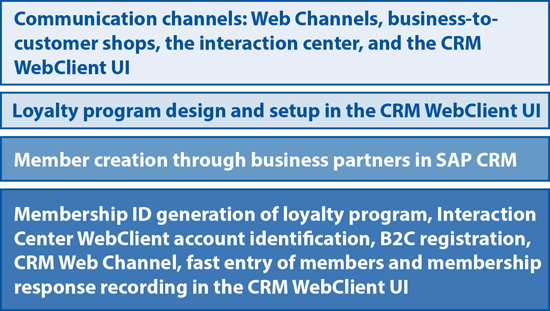
Figure 1
Channels in loyalty management and the relevant business processes (loyalty programs, member creation, and member ID generation)
Note
You can perform the membership ID generation mentioned in Figure 1 in various channels, including the Interaction Center WebClient, B2C Web shops, Internet Sales (CRM-ISA), and the CRM WebClient UI. I review these processes in this article.
From SAP CRM 5.1 onwards, the CRM WebClient UI has been the home of business process maintenance for all SAP CRM-related processes for marketing, sales, and service. The business role for loyalty management is pre-defined as LOY_PRO for a loyalty professional in the CRM WebClient UI, and as IC_LOY_AGENT for logging into the Interaction Center to perform functions such as membership generation, creating loyalty transactions, and display of points balance. In this article, I discuss both LOY_PRO and IC_LOY_AGENT.
Loyalty Program Management Setup
The first step is to define your program’s strategy and objectives (Figure 2). The loyalty program is a marketing project type that you define for your particular business scenario. For example, you can define a program ID for the loyalty program (e.g., free text such as LOY_AMERICANAIRLINES) and define a program such as holiday rewards from a hospitality company or a miles reward program from an airliner.

Figure 2
Loyalty program creation screen in CRM WebClient UI
Next, you can assign program partners, which are defined as business partners with role loyalty partners. Here is an example: In the airline industry, loyalty programs often partner with other airlines, car rental companies, and hotels to generate additional revenue and increase customer loyalty. Say that a traveler chose to fly on Malaysian Airlines to Dallas. Malaysian Airlines will choose a partner airline to reach the destination so that the traveler flies from Thailand to New York and then takes an American Airlines flight to reach Dallas. For this scenario, you would create the program partner American Airlines in SAP as a business partner using Account Management, assigning it the role of loyalty partner (Figure 3).

Figure 3
Program partners in a loyalty program
Next, you need to maintain dynamic attributes so that you can use them in reward rule processing, the details of which I describe later in this article. Assign dynamic attributes to your loyalty program that will be visible in the conditions and actions for rule processing. A member activity, such as change tier, is performed for the dynamic attributes to affect the member tier levels. Dynamic attributes are defined in customizing path SPRO > Customer Relationship Management > Marketing > Loyalty Programs > Define Dynamic Attribute (Figure 4).

Figure 4
Dynamic attributes in a loyalty program
When the loyalty program is released, the loyalty processing engine—which I explain in greater detail later in this article—considers only the released loyalty program when a member activity is created.
Loyalty Membership
A loyalty member can be any business partner in SAP CRM with general data (except for the Employee role). For example, in the Web Channel, this could be an internet user for a business-to-consumer (B2C) shop (Figure 5).
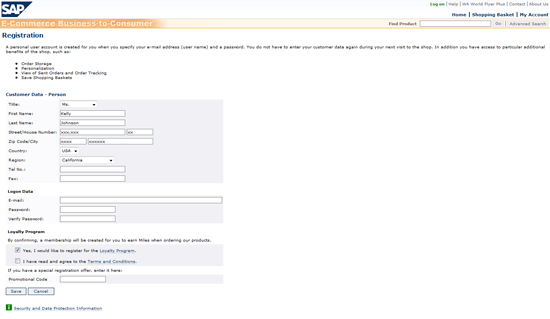
Figure 5
B2C first-time user registration in CRM Web Channel, with the loyalty program shown at the bottom of the screen
When the user clicks the Log on button (Figure 6), the loyalty program invitation appears (Figure 7).
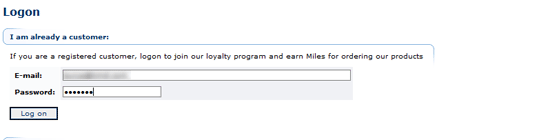
Figure 6
Customer login screen

Figure 7
Invitation to join the loyalty program
In the CRM Web Channel in SAP CRM 7.0, when a customer registers for a loyalty program, a membership ID is generated by the system when that member logs into the business-to-customer (B2C) shop of a Web Channel or the account identification screen on an Interaction Center WebClient channel (Figure 8). The steps for these processes are:
- The Web Channel provides a B2C user or a consumer on a browser who is new to the company’s website both a registration option and the option to join the loyalty program. When the consumer provides the registration information and confirms the loyalty program, the system generates a membership ID for the loyalty program.
- The Interaction Center allows the LoyIC Agent role to confirm an account and register the loyalty program to trigger a membership ID.
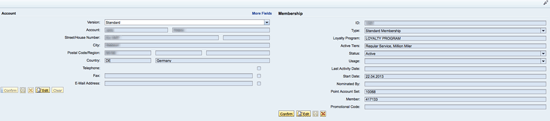
Figure 8
Interaction Center account identification screen where the membership ID is triggered
Loyalty Reward Rule Management
Customer purchases are often awarded based on cash spent, the number of store visits, or purchased units. The conditions of the loyalty program are defined in the reward rule management process. In this section, I describe the steps you need to take to set up reward rule management.
The loyalty engine executes the rule actions when a member activity fulfills the defined conditions. The reward rules are integrated with marketing campaigns for registration and enrollment. Marketing segmentation is also defined for loyalty-specific attributes or target members for tracking member activity over a period of time. A campaign is created for the target group of customers that can register for the program, and it has rules assigned for the campaign (Figure 9). Members can enroll in the CRM WebClient UI as shown for the Notebook Campaign in Figure 9.
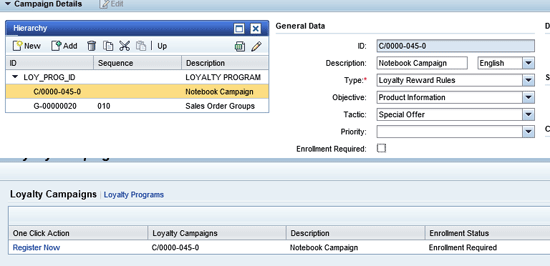
Figure 9
Member enrollment in the CRM WebClient UI for a loyalty campaign
The reward rule hierarchy has three levels:
- Loyalty program
- Reward rule group
- Reward rule
A reward rule group determines whether you can edit with a template or in expert mode. The reward rule group consists of many reward rules associated with it to trigger a member activity with these rules. The loyalty processing engine processes these rules when a member activity is created as a part of loyalty management. When creating a sales order for loyalty, you can buy points, earn points, and redeem points. The conditions that fulfill to buy points are defined in rules as a part of the loyalty program, and you can customize conditions and actions for your organization.
Loyalty Processing Engine
When SAP CRM is installed, your Basis team will have also installed the component CRMLOY (CRM Loyalty Management 700) as an add-on where SAP CRM is installed or in a separate instance. Deploying in separate box ensures performance and stability when a multi-channel environment is deployed for the Web Channel and the Interaction Center WebClient.
The member activity function uses the loyalty processing engine to earn points, redeem points, buy points, or a tier transition at regular intervals. The engine processes the rule and the conditions defined in a reward rule management and processes points (e.g., buy, earn, redeem, or tier transition from a gold to platinum status). You can execute the report RLOY_ENGINE_SCHEDULE by the loyalty engine at a regular frequency or for a single activity using the Process button on the member activity page.
Member Activity
Activities that a member can perform for operating various transactions (e.g., earn points, buy points, and redeem points) are supported by loyalty management processes. You can create roles for each of the activities in the loyalty program using the LOYPRO business role. The rules to earn, buy, and redeem points have conditions and actions as follows.
Create a reward rule group as a marketing project for the loyalty program. For this example, I created one in the CRM WebClient UI with the business role LOYPRO (Figure 10).
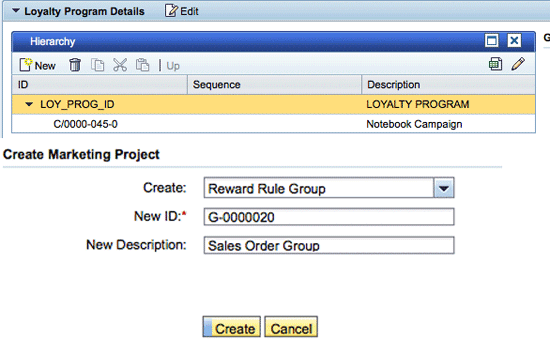
Figure 10
Create a reward rule group
Select the reward rule group created in Figure 10 on the Hierarchy level (i.e., the loyalty program) and click the Create button. Figure 11 shows the version details of a reward group in the CRM WebClient UI.
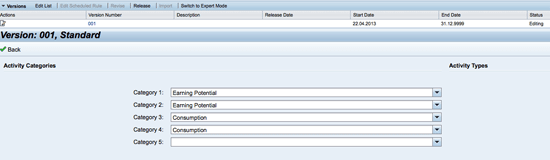
Figure 11
Create a reward rule group
The system will create version 001 automatically. When you define a reward rule group or reward rule, the system creates a version with a unique sequential number. In this version, you can define the rules that form the basis of your reward rules. The version is released at the rule level and the rule group level once the conditions and actions are assigned as shown in Figure 12. My sample rule was created to earn points as miles on a product purchase. When sales order ZLTA is chosen for loyalty accrual, the miles are added to the member.
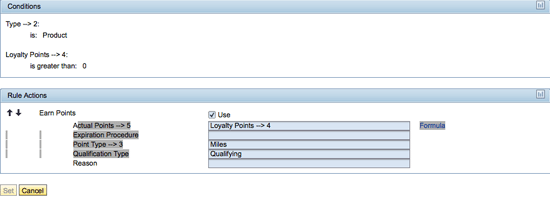
Figure 12
Rule builder for how loyalty points are calculated
Note
SAP CRM provides standard sales order types LTAA (loyalty accurals), LTAB (loyalty buy points), and LTAR (loyalty redemption). For this article, I seleced a copy of LTAA (ZLTA). When you create sales orders in the CRM Web Channel, SAP allows you to choose from ISLA (accrual), ISLB (buy points), and ISLR (redemption).
Note
Point type miles are assigned to a loyalty profile in customizing. You cannot assign the same point type miles to a second loyalty profile. SAP Note 1759351 explains how to customize point types.
You can maintain conditions and actions in the customizer for the rule builder in loyalty management. For example, say that point account 10066 is for special point type and miles point types as defined in customizing. The transactions shown in Figure 13 were created to earn, buy, and redeem miles point type products.

Figure 13
Member activites for earning and redeeming points
Users earn miles when purchasing a notebook or a plane ticket when this sample loyalty program is in place. Buy miles can be 1000, 2000, or 3000 miles. Redeem miles allows a customer to use their miles to make a purchase. In Figure 14, the customer is redeeming 1000 points for a laptop.
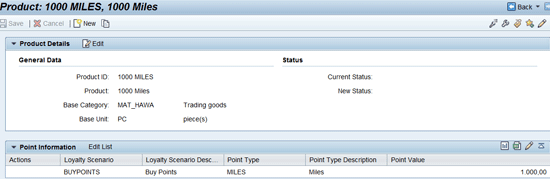
Figure 14
The product screen showing the point information for product ID 1000 miles
As shown in Figure 14, you can add a new category (LM_REWARD_CATEGORY) to the product for a purchase, buying 1000 miles as a product, or redeeming points. A new assignment block, point information, is introduced automatically by the system to identify the loyalty information on the product.
The transactions available are Loyalty Accruals to earn miles, Loyalty Buy Points for buy miles, and Loyalty Redemption for redeem miles (Figure 15).

Figure 15
Member activity point types miles earned, redeemed, and point balance
In addition, a member is allowed to transfer points and donate points in the loyalty management business process (Figure 16).

Figure 16
Transfer points for a membership and a member
Now that you know the essentials of loyalty management, you can explore various other features that were introduced in SAP CM 7.0 enhancement package 1, such as benefits handling, vouchers, and partnership management.
Surya Kuchibotla
Surya Kuchibotla has 22 years of industry experience, including over 14 years working with SAP, 10 years specializing in SAP CRM, and four years in the SAP Sales and Distribution module. An SAP CRM-certified consultant, he has been exposed to global projects in SAP in the areas of design, business process mapping, development, integration, and testing. Surya has process experience across numerous industries verticals, including manufacturing, high-tech, consumer goods, financials, utilities, and professional services. You may contact Surya on LinkedIn at
www.linkedin.com/in/suryakuchibotla.
You may contact the author at surya1011@gmail.com.
If you have comments about this article or publication, or would like to submit an article idea, please contact the editor.


 Premium