Once the SAP Customer Service (CS) component is fully integrated with your FI/CO modules, it can track many business processes such as standard warranty. However, it may not be able to effectively account for all of your business processes. The author, who recently created an extended warranty workaround to adapt a company's system to provide better service to customers, shares her lessons learned.
The Customer Service (CS) component in R/3 allows you to track and account for complex common business processes such as standard warranty and extended warranty programs. However, you first must fully integrate those processes with your FI/CO modules.
Far from what is commonly believed, FI/CO integration with CS involves more than just automated accounts determination. You have the option to use the standard R/3 cost object controlling system for certain CS processes. For other processes, you may find that the standard functionalities in R/3 do not meet all your business requirements.
During a recent implementation for a company I'll call Company X, I researched various SAP standard and custom solutions to integrate the service application with finance modules. I will describe one of the most common service offerings — extended warranty — and demonstrate how to build a workaround that meets the business requirements where I found standard functionalities inadequate. (For a brief overview of the standard warranty contract in R/3, see the sidebar, "Standard Warranty Contract.")
Revenue Recognition Basics
In some cases at the sale of equipment, customers sign up for an extended warranty program for their service needs after the standard warranty period has expired. The complexity of this process lies in revenue recognition.
Staff Accounting Bulletin 101 (SAB101) requires that four primary prerequisites be met for revenue recognition, one of which is delivery and performance of service. This requires that even though you may have billed the customers for the service to be rendered in the future, you should not recognize the revenue until the service has been rendered and the cost has been incurred. Accounting-wise, this means an initial billing posts to a deferred revenue account, with the actual revenue being recognized later. This process is referred to as the revenue recognition. Extended warranty contracts normally require such a revenue recognition process.
The Extended Warranty Process
Let's understand the process further with an example and a T-accounts chart. (The last section of my article goes into detail about how to implement the functionalities described in this example.) A customer signed up for extended warranty coverage for $20,000 when he purchased a piece of equipment. The company billed the customer for the extended warranty coverage. However, as revenue recognition criteria were not met, the company deferred the revenue. The customer already had another ongoing long-term service contract with Company X and wanted to have the equipment managed under the same service contract. The service contract now contains both billable and deferred (in other words, free) service items, each of which has its own billing plan and different payment terms. (See Figure 1, Process Step 1.) For the first period in the milestone-billing plan, the planned revenue for billable items is $5,000, and for the deferred item the value is $3,000.
|
Start
|
|
At the sale of equipment, extended warranty was sold to cover the extended service periods and was billed along with the equipment's sale. |
|
1
|
|
For the equipment covered by extended warranty, the customer has added this equipment to be covered under an ongoing service contract. For this service contract, some equipments were to be billed (item category TAO) while others were deferred-revenue-related (item category ZDTR). Milestone billing plan was updated with revenue recognition schedule, dates, and amounts (item category ZDTR). |
|
2
|
(1)
|
As part of original equipment filing, deferred revenue was credited as alternative reconciliation account in A/R via special G/L transaction journal entry (JV). Allocation field of deferred revenue line was updated with contract/item number, tax is posted (tax rate 8%). |
|
3
|
|
Create service order per service job referencing the service contract/item (service order I for deferred, service order II for billable item). |
|
4
|
(2)
|
Confirm operation (labor) for the service orders ($1,000 for service order I, $1,600 for service order II). |
|
5
|
(3)
|
Issue materials for the service orders by goods movement ($800 for service order I, $1,200 for service order II). |
|
6
|
(4)
(5)
|
Billing run, service contract was billed. Invoice splits, create one billing document for the billable item ($5,400 w/tax, posts to A/R) and another billing document for the deferrred item ($3,000 w/o tax, posts to deferred revenue) and allocation of deferred revenue line of the accounting document was updated automatically with contract/item number. |
|
7
|
(6)
|
Settlement run, costs collected in service orders were settled to the contract items number. |
|
8
|
(7)
|
Result analysis and settlement ran on the contract item, COS were transferred to G/L while revenue and costs collected for the contract and assigned service orders were settled to CO-PA. |
|
9
|
|
Clear A/R deferred revenue (credit) against deferred revenue (debit) by allocation field using automatic clearing program SAPF124, when fully recognized or when under-/over-consumption of the deferred revenue (if any) was zeroed out. |
|
| |
| |
| |
|
Trade A/R (from equipment sale)
1xxxxx
|
|
Deferred revenue (customer A)
24xxxxx
|
| (1) 21,600 |
|
(5) 3,000 |
(1) 20,000 |
|
Material consumption
6xxxxx
|
S/P raw materia
l 1xxxxx
|
(3) 800
(3) 1,200 |
|
|
(3) 300
(3) 1,200 |
|
Service consumption
6xxxxx
|
Trade A/R (customer A
) 1xxxxx
|
| |
(4) 5,000
(5) 3,000 |
(4) 5,400 |
|
|
Service COS
5xxxxx
|
Service cost transfer
6xxxxx
|
(7) 1,800
(7) 2,800 |
|
|
(7) 1,800
(7) 2,800 |
| |
Sales tax
2xxxxx
|
| |
(1) 1,600
(4) 400 |
|
Service order I
|
|
Service order II
|
|
in
|
out
|
in
|
out
|
(2) 1,000
(3) 800 |
(6) -1,800 |
(2) 1,600
(3) 1,200 |
(6) -2,800 |
|
Contract defered item
|
Contract billable item
|
|
in
|
out
|
in
|
out
|
(5) -3,000
(6) 1,800 |
(7) 1,200 |
(4) -5,000
(6) 2,800 |
(7) 2,200 |
| Figure 1 |
General process steps including both logistics- and finance-related steps (numbered) and FI/CO steps (numbers in brackets) in the extended warranty contract process are shown at the top. The impact of the steps in FI/CO is shown in the T-accounts at the bottom on the figure. (Match the bracketed numbers in the FI/CO steps at the top with the bracketed numbers in the FI and CO impact sections at the bottom to see the effect.) |
|
To defer the revenue, a journal entry was posted debiting the account receivable and crediting deferred revenue and sales tax. See FI/CO Step (1) in Figure 1. When the extended warranty program started, the customer called to claim service against the extended warranty program. A service order was created (Process Step 2) to collect material and labor charges against such a service call (Process Steps 4 and 5) and to settle to the service contract line item on a periodic basis (Process Step 7).
When the service contract was billed for the first period, it generated two billing documents (Process Step 6). I'll explain how to enable generation of two billing documents later in this article.
The first billing document is for a billing of $5,400 with $400 output tax for the regular billable items, as you can see in FI/CO Step (4). The other billing is for revenue recognition of a total of $3,000 with no tax in FI/CO Step (5).
For revenue recognition, the deferred revenue account is posted in lieu of the account receivable account as a result of reconciliation account determination. The deferred revenue credit posted via journal entry in FI/CO Step (1) and the debit posted via billing in FI/CO Step (5) can be linked by contract and item number and cleared against each other.
Refer to Figure 2 for a flow chart that combines the process and FI/CO steps you saw in Figure 1.
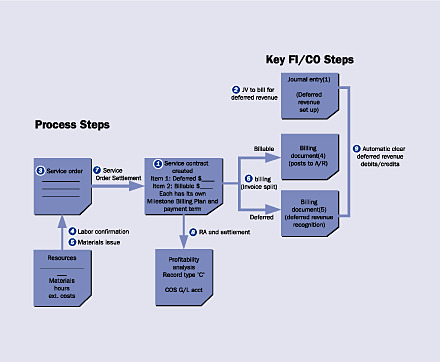
Figure 2
Overview of the integrated extended warranty (deferred revenue) contract process. The circled numbers match the process steps in Figure 1. The numbers in the shaded boxes represent the FI/CO steps in Figure 1.
Analyzing the Functionality
R/3 offers two standard revenue recognition processes. One is time-related revenue recognition, and the other is service-related revenue recognition. Time-related revenue recognition adheres strictly to a time schedule, with revenue evenly distributed across the time units. It allows the use of billing plans and uses the same sales document for both billing and revenue recognition purposes. However, revenue recognition is sometimes not strictly "by the clock," because many kinds of services are provided upon customer request and revenue can only be recognized upon delivery of service. This makes it impossible to implement the revenue strictly in proportion to the time lapsed.
With service-related revenue recognition, the revenue is realized on the basis of a specific event, e.g., a delivery. The process uses two types of sales documents and does not allow the use of billing plans. One is a value contract, which is used to carry out the billing and track the deferred revenue balance. The other is a release order that is created each time a service is carried out: It refers to the value contract and is used for the revenue recognition function.
During the implementation, I concluded neither of the R/3 standard revenue recognition methods would satisfy the company's requirements for these reasons:
- The company's business process for revenue recognition of the service contract is neither time-based nor service-based. The revenue recognition amount is determined by the number of pieces of equipment covered by the contract and a set of servicing formulas. The amount is forecasted by the CRM operation application when the customer is given a quote, prior to creating the contract. Although the revenue recognition amount can vary from month to month (which resembles the service-related method), it is predetermined at the beginning of the contract creation (which resembles the time-related option).
- Another complexity if we were to use R/3 standard time-based revenue recognition is caused by the fact that the company's fiscal period differs from the calendar month. The calculation of the accrual period does not coincide with the fiscal period, which forces a different fiscal period to recognize a different amount of revenue, depending on the number of calendar days contained in the period. However, the process requires that the revenue be recognized on a monthly basis and be posted to a fiscal period for the entire calendar month.
- In Company X, the use of deferred revenue is very volatile. The customer decides where and when deferred revenue is to be used and transfers the deferred revenue amount frequently among different contracts. Often the deferred revenue and billable items coexist on one service contract. The equipment is covered by deferred revenue this month, but next month it becomes billable again. A specific set of equipments is covered by a specific contract and can be renewed under the same contract number year after year. Whether a piece of equipment under a contract is billable is irrelevant for the customer to request servicing, as the customer always refers to the contract number to request the service for the equipment covered.
A business decision was made not to disrupt customer satisfaction by forcing the customer to memorize and refer to different contracts depending on whether the equipment is covered by deferred revenue at that point in time. This requires the revenue recognition process to be set up not at the contract-header level, but rather at the line-item level. The R/3 standard service-related revenue recognition process doesn't allow the mix of deferred revenue items and billable items on the same contract.
In addition, in R/3 standard service-related revenue recognition, it is difficult to change the initial deferred revenue amount, let alone transfer it from contract to contract. Yet customers do transfer the deferred revenue between different contracts for their internal needs, such as for budgeting or capacity planning purposes.
Note!
The revenue recognition functionality is new. A search for the SD-BIL-RR component between versions 4.5B to 4.6D produces 286 SAP notes. Revenue recognition functionality was available in standard R/3 starting with Release 4.5B, and in that version, it is largely incomplete. It was available in earlier releases in conjunction with Industry Solution-Software (IS-SW). For example, the VF46 transaction (cancellation of revenue recognition) and VF47 transaction (consistency check of revenue tables) virtually do not exist. Transactions VF46 and VF47 were introduced starting with Release 4.6C.
Implementing the Functionality
This analysis made it clear that we needed to build our own revenue recognition process. We used the standard milestone billing plan on a value basis and standard billing functionality (VF01/SDBILLDL) to provide clearer and more flexible reconciliation between the credit (initial setup) and debit (consumption) of the deferred revenue. With milestone billing in R/3, billing occurs at completion of different stages of work, in this case, of the services contract. It allowed us to do monthly billing with variable accounts. Throughout the process only one sales document is used — the service contract. Revenue is recognized and deferred revenue is cleared by leveraging R/3 billing function according to the milestone billing plan that defines the revenue recognition schedule.
Implementation
Here is how to implement the alternative revenue recognition process:
Deferred revenue needs to reside on the contract line item level. Copy from the standard item category (e.g., TAO) for billing plan items and configure a special item category (e.g., ZDTR) to represent deferred revenue line items that are also relevant for order-related billing in conjunction with the billing plan.
You need to build a custom configuration table (e.g., table ZFDR) to accommodate the deferred revenue related settings. (See Table 1.) The table entries link a combination of sales area, sales document type, and item category to a specific payment term. The table is used for reconciliation account determination, invoice split function, etc. Because customers have already been billed for the deferred revenue-relevant items at the original sales of the equipment, you have to make sure you don't bill the customer again for these items. This means that some items on the contract are posted to A/R, while others are not. A corresponding invoice is printed and sent to the customer (we call this "billable") for items that posted to A/R. Those that are not posted to A/R are not relevant for invoice printing (i.e., "deferred").
|
1000
|
01
|
11
|
ZCON
|
ZDTR
|
ZDTR
|
|
1000
|
01
|
12
|
ZCON
|
ZDTR
|
ZDTR
|
|
1000
|
01
|
13
|
ZCON
|
ZDTR
|
ZDTR
|
|
1000
|
01
|
14
|
ZCON
|
ZDTR
|
ZDTR
|
|
| |
| |
| |
| Table 1 |
Table ZFDR (service deferred revenue determination table). ZCON is the service contract sales document type. |
|
Invoice Split
Two measures can achieve this split between billable and deferred items. You trigger an invoice split for different item categories (depending on if it was deferred or billable) and modify the output requirement to skip the deferred item category ZDTR.
Invoice split refers to the creation of several billing documents from one reference document (in this case, the service contract) by certain criteria. You split the billing of a single contract into multiple billing documents distinguished by item category. In other words, at the time of billing, regular billing plan items (item category TAO) are consolidated into one billing document while deferred revenue items (item category ZDTR) form another billing document. To trigger the invoice split, you first create a special payment term (ZDTR: deferred revenue only, non-A/R) to indicate that the deferred contract item is not relevant for billing and collection. Second, you modify SD user exit MV45AFZZ (specifically, Form userexit_move_field_to_VBKD) to default this special payment term for contract item category ZDTR. When a sales area-sales document type-item category match is found in ZFDR table, the special payment term is placed in the contract item billing view. Now if the deferred and billable items coexist on the same contract and are billed at the same time (each item comes with different payment terms), standard SAP invoice split functionality automatically splits the billing of these items into separate documents at the time of billing. This way you can keep deferred and billable items on separate documents, as the billable items are relevant for cash collection while deferred items are not.
Output Control
To suppress printing of the billing document that now contains only deferred revenue items, you can develop a new output control requirement and add it to the output determination. The creation of the output requirement is straightforward. When a match to table ZFDR is found, you skip all output types by setting SY-SUBRC to 4.
Reconciliation Account Determination
For automatic debit of deferred revenue after the service is rendered, use SD reconciliation account determination. Deferred revenue is initially billed and credited at the sale of equipment via a journal entry. As service is rendered, deferred revenue is debited and revenue is posted. Deferred revenue thus behaves like a sub-ledger A/R reconciliation account. As billing normally posts to the A/R reconciliation account, you use the SD functionality reconciliation account determination to use SAP standard billing function for debiting deferred revenue. It redirects R/3 to post to deferred revenue as the A/R sub-ledger account.
The deferred/billable designation is at the contract item level, which is represented by the item category ZDTR. However, the field item category is not available as a selection in the standard field catalog for reconciliation account determination (transaction OV60). SAP note 301077 offers a user exit (Exit_SAPLV60B_011/LXVVFU11) to "influence reconciliation account determination by means of changes to inbound parameters." With this user exit, you can add a field to structure KOMPCV (account determination communication item structure) for account determination at the sales document item level.
You can determine the value for the item category (field VBAP-PSTYV) by importing additional parameters such as the sales document number (I_XVBRP-AUBEL = VBAP-VBELN) and the sales document item number (I_XVBRP-AUPOS = VBAP- POSNR). Once the item category is added to the item structure KOMPCV (E_KOMPCV-PSTYV = VBAP-PSTYV), it can drive alternative reconciliation account determination via transaction OV64. (Table 2.)
|
1000
|
01
|
11
|
ZCON
|
ZDTR
|
24xxxx |
24xxxx |
|
1000
|
01
|
12
|
ZCON
|
ZDTR
|
24xxxx |
24xxxx |
|
1000
|
01
|
13
|
ZCON
|
ZDTR
|
24xxxx |
24xxxx |
|
1000
|
01
|
14
|
ZCON
|
ZDTR
|
24xxxx |
24xxxx |
|
| |
| |
| |
| Table 2 |
Table C999 (reconciliation account determination): 24XXXX is the deferred revenue account |
|
No-Tax Pricing
In addition, the business process requires that the revenue recognition not be relevant to tax, because the tax was already posted with receivables during the initial billing for the sale of the equipment. Company X is currently using Taxware to determine the U.S. tax. To achieve no-tax pricing for deferred revenue, it used a Taxware interface user exit (Exit_SAPLV51A_001/ LXFYTU01). Once deferred revenue items are detected in the service contract (by matching table ZFDR entries), the user exit sets an exemption indicator to the corresponding revenue amount (Set c_com_tax-exempt_ind = ‘X' and Set c_com_tax- exempt_amt = c_com_tax-amount). Thus, deferred revenue items are not priced with tax, and subsequent billings for these items do not post to tax either.
Special G/L Transaction
In this process, deferred revenue credit is posted via a journal entry to each customer. The allocation field is manually updated with the contract document number and item number (see FI/CO Step (1) in Figure 1). You do this via a special G/L transaction to post to an alternative reconciliation account. The debit is posted automatically at the time of contract billing, as explained earlier. (See FI/CO Step (5) in Figure 1.)
Automatic Clearing
To facilitate the match and clear of the credit postings (reserve setting) and debit postings (reserve consumption) of deferred revenue by allocation field, Company X modified user exit RV60BFZA for SD-FI data transfer. It enabled the company to transfer the contract document number (XVBRP-VGBEL) and item number (XVBRP-VGPOS) to the allocation field (KOMK2-ZUONR) of the customer open item (in this case, deferred revenue) when the matching deferred revenue ZFDR table entry is found. Not only can the deferred revenue balance be viewed in G/L by the contract document/ item number, but also once deferred revenue is fully consumed, the R/3 automatic clearing program SAPF124 can clear the credit and debit of deferred revenue account by allocation field. One potential drawback of this revenue recognition process is that the original A/R and deferred revenue is posted via a journal entry, unlike in standard SAP, where it is posted via billing of the contract. This restricts the adoption of this alternative, as it doesn't generate billing. There are several remedies to this problem. For example, you can add one "dummy" item for billing and post to A/R and deferred revenue at the time of billing. If you use CO-PA for booking and are fearful this would double-count the booking value, you can use a statistical discount condition type to offset the billing amount to maintain correct booking balance. This way, all functions of R/3 SD billing can be used, including invoice printing.
At Company X, this is not an issue because the original billing and invoice printing for the equipment sale would have been processed by another system that interfaces with R/3. What's left is capturing the transaction financially with a journal entry.
Companies need to evaluate their individual business requirements and understand the advantages and disadvantages of SAP standard functionality compared to the alternative I'm describing. In this workaround, although you may not have automated original billing and printing, you gain control and flexibility for deferred revenue management.
Standard Warranty Contract
A warranty is a commitment made to a customer to provide services for a particular object that won't be billed for during a defined period of time or product life cycle. Many business transactions, such as buying, selling, and maintaining equipment, involve a reference to a warranty.
A conservative practice in accounting is to consistently reserve or accrue estimated warranty costs as part of the equipment cost of sales when the equipment sales are recognized. In R/3, this warranty service offering is recorded in the form of a service contract with the appropriate contract data, such as validity dates, installation date, assignment of one or more specific objects (equipment). To use the warranty contract for reserve accounting, the key is to treat reserve accrual as a type of cost provision and adopt the sales order make to order (MTO) costing method. (See the figure below for an overview of the integrated standard warranty contract process.)
In the item category/requirement type/requirement class configuration, the account assignment category should be equal to "E" (transaction OME9). "E" represents sales order – MTO. With "E," each line item of the contract (SDI) becomes a cost object and, with the settlement profile configured, can settle to the G/L.
The initial reserve can then be posted by crediting a primary cost element via a journal entry (JV) to the warranty contract item. Once posted, the cost can be settled to the reserve G/L account. Thus you can analyze the initial reserve setting in G/L. (To see the detailed T-accounts for this process, go to the download at the bottom of this article.)
When service is claimed against a warranty for equipment, upon the creation of the service notification, all valid service contract line items linked to this equipment are prompted by the system for selection. Once selected, the contract item automatically becomes the receiver of the service order settlement. Throughout the service process, costs from operational activities such as material issue and labor confirmation are posted to the service order. The collected costs then are settled from the contract item to the G/L. This enables you to analyze the reserve consumption at the G/L level.
To link the initial reserve and its later consumption, Company X created an accounting document substitution to import the warranty number (which was placed at the customer purchase order number VBKD- BSTKD of the warranty contract) into the allocation field of the reserve account at the time of settlement. This way you can track the initial reserve and consumption reserve at the G/L level according to the unique warranty number. SAP notes 42615 and 48121 provide the technical details you need to know to use the substitution functionality.
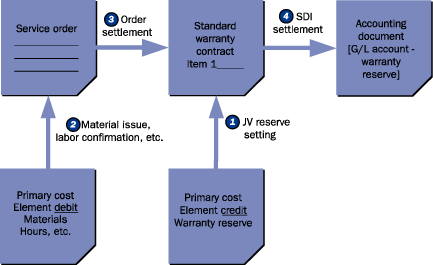
Overview of the integrated standard warranty process. The top three boxes represent R/3 documents. The bottom two boxes represent process steps.
Qian Sharon Tang
Qian (Sharon) Tang is a system program manager who is responsible for the support and development of various areas of SAP systems. Prior to this, she was a senior FI/CO application consultant at SAP China. She has been working with SAP since 1995, with emphasis on FI/CO modules such as FI-GL/AR/AP/SPL, CO-CCA, CO-PC, CO-PA, CO-ML, EC-PCA, and cross-module integration between FI/CO and logistics. She also has experience with MM, SD, SM, and PP.
You may contact the author at qian_s_tang@yahoo.com.
If you have comments about this article or publication, or would like to submit an article idea, please contact the editor.


 Premium