Manually creating customer batch numbers during the inbound delivery process is a major source of productivity loss. Learn about an enhancement to the SAP ERP system that increases end user productivity through automatic generation of customer batch numbers and characteristic assignment. In addition to increased productivity and faster processing time, the data quality also improves, resulting in easier and better tracing and auditing results.
Key Concept
Imagine a scenario in which a company receives an average of 10 to 12 shipments per day, with each shipment having around eight to 10 batch-managed products. This requires the manual creation of around 100 batches per day. Even if the set of manual activities takes a minimum of four to five minutes per batch (including the assignment of characteristic values), the company ends up spending seven to eight hours a day creating batch numbers.
Two technical enhancements in SAP ERP Central Component (ECC) allow you to automatically create a batch and to populate certain batch characteristics from data that was provided within advanced shipping assignment (ASN) messages. We provide sample code for creating batch master records and for capturing data provided in ASNs as batch characteristic values. It applies to the purchase order (PO) ASN process in Supply Network Collaboration (SNC).
Note
This article requires an understanding of the basic concepts of batch management and traceability as well as the standard processes of PO, goods receipt, and ASN creation.
Companies in the high-tech or pharmaceutical industries are typically required to uniquely identify individual production lots (batches) of the same material. They need to capture the characteristics of these batches and individually track their inventory as well as where-used data. Materials that require such precise identification are typically identified not only by a material number but also by a unique batch identifier, which needs to be specified in every individual transaction. For example, a purchase order will have different line items for each batch being purchased. Providing the material number only is not sufficient.
Figure 1 shows the standard manual process. The supplier (vendor/manufacturer) sends an ASN to the customer providing the product number, shipping date, quantity, batch number, and other data to characterize the batch. This might be done through SNC, where the supplier can either log on and create the ASN or send an XML message. The ASN is processed and creates an inbound delivery in the back-end ERP system. In a later step a goods receipt is posted against this inbound delivery.

Figure 1
Standard process of delivery collaboration between the buyer and supplier across ECC and SNC systems
Since the ERP system has defined the product as batch managed, a batch number needs to be provided during the goods receipt process. In addition, the batch record should carry additional characteristics, such as a reference to the supplier batch or the manufacturing date. In many instances the batch numbers are not standardized across the supplier base. Therefore the customer will have its own batch number range. The end user manually creates the batch number, links it to the vendor’s batch number, and enters the required characteristics.
How to Automate the Process
We have automated this process at multiple pharmaceutical and high-tech companies with a small enhancement in the inbound delivery creation process. Figure 2 shows the updated process flow.
The customer creates POs in the ECC back-end system and transfers them to SNC. Here the supplier can access the POs via the SNC Web UI and create confirmations and ASNs. When the ASN is transferred to the customer’s ECC system, the system creates an inbound delivery. During the creation process of the inbound delivery, we enhanced the system to create the customer’s batch number, update the inbound delivery with that number, and enhance the customer batch number with additional batch characteristics provided by the supplier. As a result, the inbound delivery will contain all the required batch data without manual intervention. The goods receipt process, requiring the batch data, can then also be processed without interruption.
Standard SAP functionality also allows for automated customer batch creation during the goods receipt process. However, this would not be sufficient, since this batch would not have linkage to the supplier’s batch number or any of the additional characteristics provided by the supplier in the ASN.
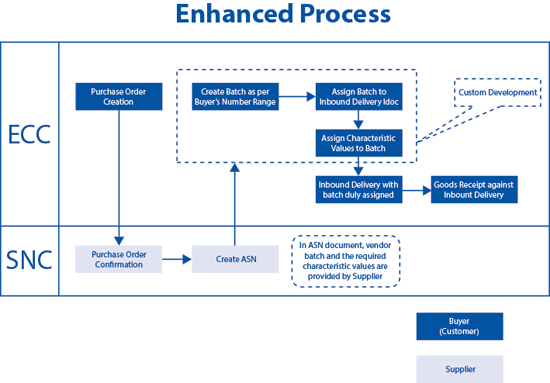
Figure 2
Enhanced process for creating the batch number and assigning characteristics
Implementation Overview
The following example implementation is for illustration only. You would need to adjust it to your specific needs and technical environment.
We used two enhancements, both of them called within the inbound delivery process.
The first enhancement occurs in the Business Add-In (BAdI) MM_EDI_DESADV_IN where you call the module BAPI_BATCH_CREATE to create a batch. In addition the batch number is assigned to the inbound delivery. We directly assign it to the IDoc field ch_komdlgn_idoc-charg.
The second enhancement occurs in customer exit V55K0013, where the batch characteristics are assigned. This occurs via BAPI_BATCH_CHANGE and BAPI_OBJCL_CHANGE. In the first BAPI certain attributes such as Vendor, Country of Origin, and Vendor Batch are added. In the second BAPI you can add characteristics such as Change Number or Vendor Name.
If required, you can pass any number of required values from SNC by enhancing the delivery notification XML with the required fields and by performing the required mapping to the IDoc. If you don’t find relevant sections in the IDoc, you can add custom segments. For a reference on how to enhance the SNC documents, refer to [link: Non Standard Scenarios for SAP Supply Network Collaboration] by Christian Butzlaff, Thomas Heinzel and Frank Thome, Galileo Press 2009.
Note
The code included with this article was developed primarily for demonstration purposes. Therefore no error handling has been incorporated. You should use discretion when using this code in your implementation.
Code for Enhancing the BAdI MM_EDI_DESADV_IN for Auto-Creation of a Batch
The sample implementation of the BAdI takes the material number, plant, and storage location values from the inbound DESADV IDoc. The module BAPI-BATCH_CREATE is used to create the batch. The module now returns the newly created batch number, which is then added to the inbound delivery runtime data. This ensures that the batch is available, once the inbound delivery is created on the database.
Download the code here.
Use the Customer Exit V55K0013 to Assign Trading Data and Characteristics to a Batch
Exit V55K0013 enhances the batch created above with additional data. In the first step, trading data like vendor, vendor batch, and country of origin are assigned to batch. In the example we configured additional characteristics – such as change number and vendor name – for the class assigned to the batch-managed material under consideration. In the second step of the customer exit, the value for these characteristics is determined from the IDoc data and assigned to the batch characteristics.
Download the code here.
Batch Creation and Characteristic Assignment Enhancements in Action
Figure 3 shows the creation of an ASN in SNC. Specific details such as supplier batch and change number are entered into the appropriate fields. Figure 4 shows the Ship-From Location Details tab, which populates according to the information entered in the General tab in Figure 3.
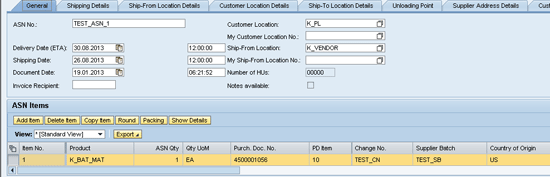
Figure 3
General tab of ASN
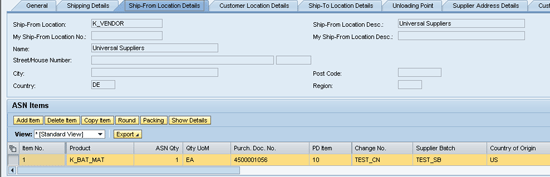
Figure 4
Ship-From details of the ASN
In the above screens, the following information has been provided:
- Vendor: K_Vendor
- Vendor Batch: TEST_SB
- Country of Origin: US
- Change No: TEST_CN
- Vendor Name: Universal Suppliers
Once the ASN is published in SNC, an inbound delivery is created in SAP ECC, which has an internal batch ID (180000241) assigned to it (Figure 5).
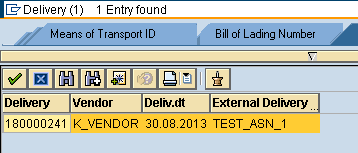
Figure 5
Batch ID created for TEST_ASN_1
In addition, the enhancement you implemented assigns a new batch, 0000000073, for the item at the time of inbound delivery and assigned to the item (Figure 6). To view the inbound delivery (Figure 6), enter transaction code VL33N or follow menu path Logistics > Materials Management > Purchasing > Purchase Order > Inbound Delivery > Display.
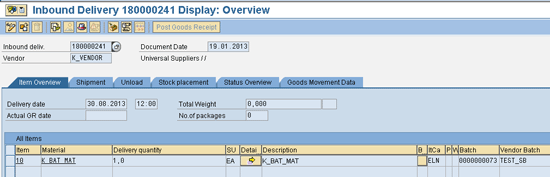
Figure 6
New batch created
Review the batch created. Use transaction code MSC3N to display batches, or follow menu path Logistics > Material Management > Inventory Management > Environment > Information > Batch. Under the Basic data 1 tab, you see that the trading data was populated from the ASN, as expected from the enhancement (Figure 7).

Figure 7
Trading data from ASN is populated
Under the Classification tab in the same screen, the characteristic values are populated by the enhancement (Figure 8).
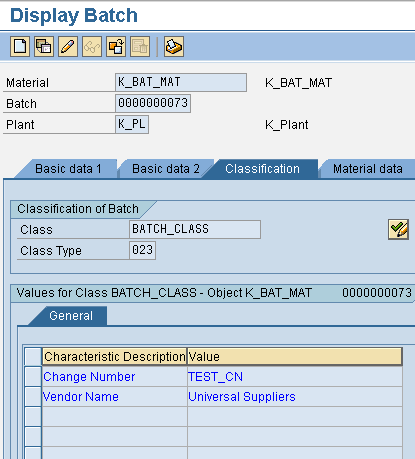
Figure 8
Characteristic values are populated
Christian Butzlaff
Dr. Christian Butzlaff is responsible for SAP Value Prototyping services at SAP America. Before that he held various positions in the SAP Development Organization. In particular, he was Development Manager for SAP Supply Network Collaboration (SAP SNC). In his current role he works with customers on prototype engagements, for example, in the area of SAP Integrated Business Planning.
Christian holds a PhD from the University of Hamburg, Germany. He is PMI certified and is currently pursuing a specialization in machine learning.
You may contact the author at c.butzlaff@sap.com.
If you have comments about this article or publication, or would like to submit an article idea, please contact the editor.

V. Krishna Anaparthi
V. Krishna Anaparthi has vast experience in the field of enterprise consulting. Playing the roles of project manager and solution architect, he is instrumental in the successful implementation of multiple SAP projects across the consumer goods, pharmaceutical, and high-tech industries. He is currently serving as the process architect at SAP Labs India Pvt. Ltd. and is a part of the SAP Business By Design development team.
Krishna holds an MBA from NITIE, Mumbai, India. He has PMP, CPIM, and CSCP certifications and is proficient in supply chain and project management processes.
You may contact the author at v.krishna.anaparthi@sap.com.
If you have comments about this article or publication, or would like to submit an article idea, please contact the editor.





 Premium