/Project Management/HANA/Mobile
Learn how to take advantage of data visualization approaches, including performance management dashboards, using the SAP Mobile Platform (formerly known as the Sybase Unwired Platform), SAP Mobile Analytics Kit, and SAP Mobile BusinessObjects.
Key Concept
The SAP Mobile Analytics Kit (MAKit) is a feature of the SAP Mobile Platform that runs on an analytics system and performs complex visual data analysis on mobile devices. The MAKit lets users visualize and examine data on mobile devices using pie, column, bar, line, and bubble charts. It is available for Apple iOS and HTML5 environments.
The convergence of data visualization, mobile computing, and big (really big) data means that executives today have extraordinary oversight capabilities into the operational execution, sales planning, and financial management of their organizations. Dynamic data visualization and analytics offer trends, forecasts, exceptions, and abnormalities with deep drill-down capabilities both at the on-premises desktop level and in mobile device applications.
The realm of these capabilities is only limited by the ability to harvest and consume this information in an in-memory or real-time basis. In its July 2012 report, “2012 Hype Cycle for Enterprise Architecture,” research firm Gartner Group suggests that this convergence of analytics, big data, and mobile computing may automate many decision-making tasks facing executives today, freeing up new cycles for strategy setting, business innovation, and value creation.
To craft such a technology environment to enable development of visually rich, deeply analytic mobile computing apps, an organization needs to take stock of its “data inventory” and how this information needs to be used and consumed by executives, managers, staff, and partners to accomplish business tasks.
Using the SAP Mobile Analytics Kit (MAKit), data visualization — once the exclusive domain of the desktop — is now available on mobile devices. These elements can be used in combination to create a mobile decision support environment.
Note
The MAKit is available from the SAP Mobile Platform (formerly known as the Sybase Unwired Platform) Workspace, version 2.1 ESD #3. Mobile SDK and developer licenses are required to use the MAKit template, which is also available in the Workspace.
In the next section I show a few different topologies of enterprise architecture using some of the components of the SAP Mobile Platform, SAP HANA, general SAP BusinessObjects BI environments, and mobile-enabled components available to SAP users.
Creating a Mobile Environment to Support Decision Making
For now, I am going to assume that companies are not going to consider extending their decision-making environment to the general propulation, including customers and the general consumer economy. Nevertheless, as part of their corporate mobile computing strategy, large, multinational organizations need to address some of the same issues that a consumer-based mobile computing strategy would consider. When determining how to best create your mobile environment to support decision making, you need to consider some basic questions:
- Which tasks are to be accomplished inside the enterprise?
- How much information is required? How often is this information required to be refreshed? Does it need to be live data in a real-time, in-memory environment?
- Who are the users who consume the information that is needed? Is it a small or large group? Do they consume the information freely and consistently throughout the day or only during particular decision points or recurring business cycles (e.g., month-end or invoice processing)?
- Will the users of the information be operating on multiple mobile platform devices or only one? (While this is more specific to corporate mobile computing, many firms have had success with bring-your-own-device user adoption approaches.)
While many inside the SAP ecosystem advocate for a long-term move to real-time, in-memory, big-data computing, the fact remains that many industry sectors and companies within those sectors have non-amortized IT assets and low near-term infrastructure budgets that are obstacles to an immediate move into an SAP HANA-centric environment. Understanding this, there are different ways organizations can consider making data visualization available and accessible in on-premise as well as mobile environments.
Generally I see three ways this can be accomplished in the new mobile, big-data world:
- On premise using SAP HANA with the entire data universe available
- Mobile deployment with a segment of the data universe handled by SAP Mobile BusinessObjects (MBO)
- Mobile deployment using SAP HANA with the entire data universe available
Let’s look at these three scenarios in further detail.
On Premise Using SAP HANA with the Entire Data Universe Available
Companies can use standard InfoCubes inside of SAP BusinessObjects BI 4.0 to create queries and display information using SAP BusinessObjects Dashboards, BEx queries, and other tools in an on-premises environment. When you consider a mobile application environment, these choices become limited as the options to develop mobile apps consuming data are fewer. As such, it is important to understand what your data consumption requirements are, based on your SAP and non-SAP environment, for the enterprise mobile apps used to execute the business.
In the initial on-premises scenario, big-data visualization can be facilitated using the topology shown in Figure 1. In this scenario, SAP ERP, SAP BusinessObjects BI, and non-SAP, third-party information sources are aggregated and loaded into an SAP HANA instance to provide in-memory analytic visualizations. The full data set of the organization is committed to the SAP HANA instance and, as such, is available readily for data visualization purposes. The tools used to provide these visualizations include dashboards, scorecards, and other renderings from a portfolio of available SAP solutions.

Figure 1
SAP HANA-enabled, on-premises data visualization topology
Mobile Deployment with a Segment of the Data Universe Handled by SAP MBO
The second option is to parse and pre-segment data of the full universe used in SAP NetWeaver BW or SAP ERP, as in the first example, and to only make available that information to be consumed by the various mobile device platforms. In this case, SAP MBO is used to provide the sub-sets of the data universe needed to be consumed by the mobile apps.
Many architects familiar with creating InfoCubes inside of SAP NetWeaver BW find this similar in approach: Just as you create InfoCubes to expedite various queries, the pre-segmentation allows for the specific data to be consumed by the mobile app based on the needs of the user. As shown in Figure 2, the SAP Mobile Platform then enables the exchange of information from the mobile device to MBO for queries, transactions, and rendering of data.

Figure 2
SAP MBO-enabled, mobile data visualization topology
Mobile Deployment Using SAP HANA with the Entire Data Universe Available
The third option is to push the full universe into SAP HANA and distribute the information using the SAP Mobile Platform. This allows a full availability — in memory — to be experienced by the mobile user (Figure 3).
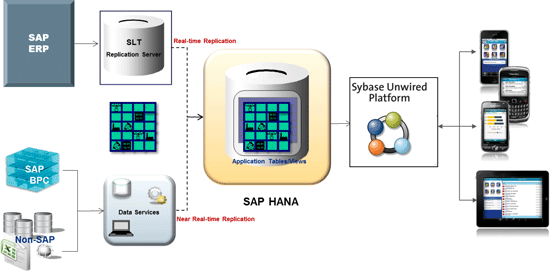
Figure 3
SAP HANA-enabled, mobile data visualization topology
Once the environment has been decided, development teams need a way to create dynamic charting and analytic visualizations inside the mobile apps that consume the data. SAP has made available the MAKit for just such a purpose. In the next section I show you some example templates that come out of the box with the MAKit and some example mobile apps made leveraging the MAKit.
Create Data Visualization Using the MAKit
The MAKit offers a basic HTML5 layer of BI graphics that you can use across multiple platform domains, particularly iOS and Android. Other platforms, such as Blackberry and Safari, are available as long as the HTML5 output is contained in a “native wrapper” for these environments.
A number of ready-to-use templates exist for mobile app developers in the MAKit suite. Figure 4 illustrates a variety of code types that are pre-configured for use in the HTML5 suite of charts once the MAKit is installed. A developer can match the code examples with specific kinds of charts or pre-configured examples of the charts found in the MAKit templates.
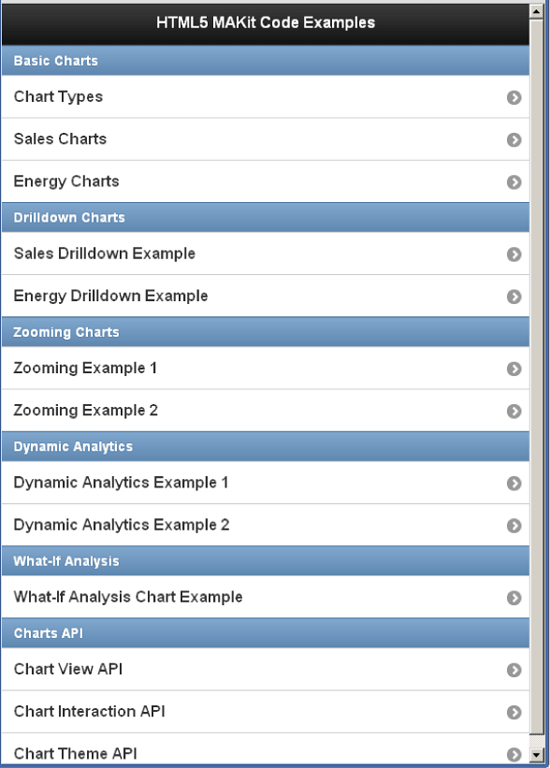
Figure 4
Available chart HTML5 code options using the MAKit
These code examples can be specified by selecting Charts Types in the list. This displays the chart types available for use and modification in Figure 5. When assigning a particular chart to a data source, developers have the option to select and review the various representations the data source provides based on chart type. This is important particularly for executive users who may prefer one method of data visualization over another. In addition, when describing the data source to be consumed, trends can be visualized more accurately in one chart type over others based on the nature of the data provided.

Figure 5
Change chart types based on developer and user requirements with the MAKit
Check out my video demo below for quick look at the MAKit in action.
Set Up a BI Mobile Environment Using SAP's Mobile Analytics Kit
A number of business apps have been developed using the MAKit by SAP partners and customers. These apps have many uses, such as monitoring SAP ERP functions in real time and tracking locational data on maps, among others.
As the explosion of mobile apps continues, so does the need for companies to have ready-to-use mobile computing environments to present critical business information to be consumed by highly available and visually supportive apps. The MAKit does just that and can be used within the SAP Mobile Platform environment regardless of whether the environment is supported by SAP HANA or a pre-segmented MBO data consumption approach. This provides flexibility of choice to companies that have determined that mobile computing is a strategic advantage for enterprise computing and customer engagement.

William Newman
William Newman, MBA, CMC is managing principal of Newport Consulting Group, LLC, an SAP partner focused on EPM and GRC solutions. He has over 25 years of experience in the development and management of strategy, process, and technology solutions spanning Fortune 1000, public-sector, midsized and not-for-profit organizations. He is a Certified Management Consultant (CMC) since 1995, qualified trainer by the American Society of Quality (ASQ) since 2000, and a trained Social Fingerprint consultant in social accountability since 2012. William is a recognized ASUG BusinessObjects influencer and a member of SAP’s Influencer Relations program. He holds a BS degree in aerospace engineering from the Henry Samueli School of Engineering and Applied Science at UCLA and an MBA in management and international business from the Conrad L. Hilton School of Management at Loyola Marymount University. He is a member of the adjunct faculty at both Northwood University and the University of Oregon with a focus on management studies and sustainability, respectively.
If you have comments about this article or BI Expert, or would like to submit an article idea, please contact the editor.
You may contact the author at wnewman@newportconsgroup.com.
If you have comments about this article or publication, or would like to submit an article idea, please contact the editor.

 Premium