For many global companies, it makes sense to reduce overhead by consolidating their payment processes. SAP users can accomplish this by using the In-House Cash (IHC) component. The author describes the capabilities and configuration of the IHC.
Many global companies face the challenge of reducing the cost and number of intra-group and external payments. One way to accomplish this is to consolidate their payment processes. SAP provides a means to do so with the In-House Cash (IHC) component. It can also be used for incoming payments from the external business partners of subsidiaries. IHC is one of the functionalities of the Corporate Finance Management (CFM) module. CFM is a part of SAP R/3 Enterprise Financial Extension. (See the sidebar, "SAP Enterprise and CFM In-House Cash," on page 13.) IHC is a new concept and I've found that its configuration is not well documented.
IHC, which is usually implemented at the head office of a company, provides a method to control and monitor the account balances of a group's companies and also shows the incoming and outgoing payments as a forecast. The component calls for two organizational units — the head office and an IHC center, referred to as a bank area. The head office is the headquarters or a parent company code that processes all the payments for the subsidiaries via the head office house bank.
The IHC center manages intra-company payments, payments made by subsidiaries to external partners, and incoming payments from external partners to subsidiaries. It also creates and sends bank statements to subsidiaries, which reduces the float or transfer time and eliminates the value date differences of the payments among subsidiaries. Calculating and debiting interest and charges and granting current account overdrafts are also possible within IHC.
Of course, not all companies can centralize all their payment processes, so different usage configuration methods exist in IHC. For example, it is possible for the house bank of the head office to make intra-company payments and payments to external business partners while keeping the internal payments from external business partners to subsidiaries in the subsidiaries' local banks.
IHC's functions include:
- Centralized payment process and cash management
- Reduction of the number of external banks and associated interfaces
- Netting (internal payment clearing)
- Optimized cross-border payments
- Reduced cost of payment transactions, bank accounts numbers, and bank fees
- Better control of financial interest of subsidiaries
- Elimination of bank transfer charges
- Larger investments for the subsidiaries and subsequent improvement in the interest revenue
- Liquid funds that remain within the group without incurring any value-date losses
Note!
IHC offers centralized and mixed scenarios. In a centralized scenario, all group companies keep their bank accounts in the IHC center and all the internal and external payments are made via the IHC center. With the mixed scenario, the IHC center is one of the house banks of each group company. Group companies can also keep their house bank accounts separately and use either IHC or another house bank for payments. Given this choice, it makes sense to process payments to subsidiaries by the IHC center. You can use the IHC center to make payments both between group companies and to external business partners while keeping incoming payments from external partners decentralized. As a result, you can process payments using either an external house bank or an in-house cash center, so the mixed scenario is the most efficient way of handling the payment process with the IHC center in terms of flexibility.
Organizational Units in IHC
The starting point for IHC is the bank area. The bank area is the central organizational unit that manages and processes all the subsidiary bank accounts. To configure the bank area, go to the SAP reference IMG menu and follow the menu path IMG>Corporate Finance Management>In- House Cash>Basic Settings>Bank Area> Define Bank Area.
In my example, the parent company code is H000 and the Bank Area is IHC. ( Figure 1.) Bank Area IHC is assigned to Company Code H000. Company Code H000 is responsible for the accounting of the IHC. Depending on the system architecture, the Company Code H000 can be configured in the same or in a different server as IHC.

Figure 1
Bank area definition
Note!
The screenprints in this article are taken from SAP R/3 Enterprise IDES system.
The next step is to activate the bank area as an in-house cash center by following the R/3 Enterprise IMG customizing menu path IMG>Corporate Finance Management>In-House Cash> Basic Settings>Bank Area>Activate bank area as in-house cash center.
Master Data of In-House Cash
To work with financial transactions in IHC, you need the following master data: business partners, definition of products and current accounts, and conditions.
Business Partners
IHC uses the concept of the SAP Business Partner for financial services. Business partners can be affiliated companies, external business partners, other banks, or internal organizational divisions. The SAP Business Partner for Financial Services enables you to create and manage business partners centrally. This is particularly important if a business partner deals with a company in different roles, for example, as a contract partner and as an interested party. Details are maintained in the master data for the business partners, who are then linked to the IHC center. You can create the business partners from the application menu path SAP menu>Accounting> Corporate Finance Management> Business Partners>Maintain Business Partners.
In my example, subsidiaries S001 and S002 are business partners. Figure 2 shows the master data of Business Partner S001.

Figure 2
Business partner master data
Definition of Products and Current Accounts
Each subsidiary should keep its bank accounts with the IHC center. The IHC center is the house bank of the subsidiary. Basic data like the date of opening the account, currency, and account holder are stored in the account master record. For account settlement (account balancing), you enter the conditions, the account balancing periods, and the settings for cash concentration. The account balance is displayed directly in the account, along with withdrawal limits that have been defined for the account and the bank statement frequency. The general ledger transfer is also maintained in the account master data. To create the account, you first have to create the dimensions of the accounts as a product. For example, banks offer products that have various conditions such as overdraft protection, discounts on business loan rates, and the amount of interest on the account balance, etc. All those dimensions, characteristics, and conditions are parts of the banking product. The banking product in IHC is represented with an SAP object called a product. Figure 3 shows an example of a product that is the basis of a current account. You can use the product configurator, which is part of IHC, to define products without any programming effort. Each current account is created based on the product. In the product definition, you define which fields will be displayed and filled in the current account. In other words, a product simply defines the nature and behavior of the current account.

Figure 3
An example of a product
Tip!
The business partners are created centrally. You can give different roles to existing business partners. The role of account holder should be given to the business partner so that the accounts of the subsidiaries can be kept in the IHC center. In my example, the account holder role has been given to subsidiaries S001 and S002. Figure 4 shows the roles of Business Partner S001. Subsidiary S001 has different roles such as Account Holder, Bank Statement Recipient, Vendor, etc.

Figure 4
Roles of the Business Partner
Conditions
Conditions is another type of master data that is used to determine the account features and payment transactions. Each condition has a certain category. The condition categories are divided into the following groups: interest, charges, and value date.
Configuration of IHC
I'm going to describe the required configuration by using the example of an intra-group payment process mapped with IHC. Configuration has to be carried out in R/3 systems of the subsidiaries and affiliated companies and in the R/3 system of the headquarters, where the IHC center and the financial accounting department of the head office are usually created.
Required Settings for Subsidiaries
For this article, I'm assuming that the subsidiaries are using R/3, but they may also use another ERP software. IHC operates without any constraints in those cases as well. The following are the required settings for the subsidiaries:
- Definition of IHC as an internal house bank. You should first define IHC as a bank using transaction FI01. For a subsidiary, the in-house cash center is a house bank. Use transaction code FI12. In my example, S001 and S002 are configured as subsidiaries in different countries. From Figure 5, you can clearly see that the IHC center is a real house bank from the point of view of each subsidiary using IHC.
- Change the bank details for the group's internal customers and vendors
- Change the settings in the payment program
- Change the settings in the bank statement program
- ALE communication with the IHC Center (See the sidebar, "How IHC Works.")

Figure 5
IHC as a house bank of a subsidiary (transaction code FI12 — change of house bank)
Required Settings for IHC Center
The IHC center needs to be configured to deliver the functionality as a real bank. The IHC center as a bank should manage the current accounts of its customers, make money transfers, generate bank statements, receive bank statements, and so on. To achieve that objective, settings for the following are required:
- Definition of products (conditions, etc.) and setup of current accounts on the basis of the products
- Incoming payments
- Generation of the IHC bank statements
- External payments
- Incoming bank statements from external bank
- Transfer to the G/L
- Definition of ALE communication and business transaction events (BTEs)
Head Office Configuration Requirements
The IHC center is located centrally and the head office manages the current accounts. The receivables and the payables are displayed in general ledger accounts in summarized form. The following are the requirements to manage the IHC center accounting by the head office:
- Definition of in-house cash G/L accounts
- BAPI/RFC or ALE communication with the IHC center
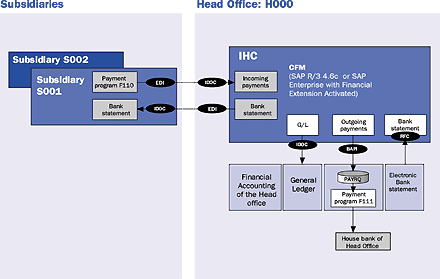
Here's an example to give you a closer overview of the IHC functionality. Suppose that your head office H000 has two subsidiaries, S001 and S002. In the head office, the IHC center is set up and the FI module is used. Subsidiary S002 renders services to Subsidiary S001 and Subsidiary S001 makes a payment to Subsidiary S002. See Figure 6 for the master data setup. Figure 7 provides more detail on the example.

Figure 7
etail on intercompany postings

The invoice is sent from Subsidiary S002 to S001. After receiving and posting the invoice, Subsidiary S001 starts the payment program. The system determines the open items, taking into account the payment terms and the specified bank details, and proposes a payment run. Since the IHC center has been identified as the vendor bank of S002, it is instructed to make the payment to Subsidiary S002. During the payment run, the payment program posts the payment documents. The payment program generates a standard IDoc PAYEXT. The IDoc sent from the subsidiary is imported automatically to the IHC center.
After importing the IDoc, the IHC center generates the corresponding debit and credit balance updates on the relevant IHC current accounts of the subsidiaries. The IHC center has a receivable position owed from Subsidiary S001 and a payable position due to Subsidiary S002. This clears payables between group companies without the need for physical payments (such as checks or bank transfers) by an external bank. This is known as internal clearing payment or netting procedure. The IHC center then generates and sends bank statements to subsidiaries S001 and S002 using IDoc FINSTA01. Subsidiaries import IDocs and this triggers corresponding postings.
The financial accounting system at the head office managers current account data in a summarized form. The end-of-day processing functions in the IHC center summarizes the account turnovers and transfers the totals to the general ledger. The corresponding postings in financial accounting are updated automatically.
SAP Enterprise and CFM In-House Cash
New developments in SAP R/3 Enterprise (Release 4.7) are encapsulated in extensions (Financials, HR, SCM, and PLM) and application packages such as Financial Services (i.e., SAP CFM). Extensions and application packages are combined in an SAP R/3 Enterprise Add-On that has a separate release cycle to the SAP R/3 Enterprise core. IHC is a part of SAP Corporate Finance Management (CFM). CFM is one of the components of SAP R/3 Enterprise Financial Services (EA-FINSERV package). Once the extension or application package is activated, related SAP menus and IMG menus are generated. SAP R/3 Enterprise Extensions are shipped together with SAP R/3 Enterprise as part of the SAP R/3 maintenance. Some of the extensions of SAP R/3 Enterprise may not be covered by your current software and maintenance contract. Some of the SAP R/3 Enterprise Extensions such as the SAP R/3 Enterprise Financial Extension can also be activated in SAP R/3 4.6C. In SAP R/3, Enterprise Extensions are activated via transaction code FIBF or configuration menu path IMG>Financial Accounting>Financial Accounting Global Settings>Business Transaction Event. For more information on the release strategy of SAP CFM, refer to SAP note 339451.
How IHC Works
The subsidiaries and affiliated companies can use any program (R/3, R/2, or any external program). Communication between the IHC center and the group companies is provided by IDocs. (IDoc use is supported from Release 4.0B. An IDoc converter is needed for earlier releases of SAP and the external systems). PAYEXT and FINSTA01 are the IDoc types used for communication between subsidiaries and the IHC center. PAYEXT carries the information about the payment from subsidiaries to IHC automatically when the subsidiary executes the payment program. FINSTA01 carries the information about the bank statements, and it is sent from IHC center to subsidiaries.
Communication between the in-house cash center and the head office is provided by BAPIs and RFCs. The BAPI carries the payment information from the IHC center to the head office as a payment request automatically. When the head office imports the bank statement information, the payment information is carried to the IHC cash center by RFC. See the figure for the technical architecture of IHC.
Tip!
If the system gives a bug when you are creating the master data of IHC, you can regenerate the master data screens by executing transaction code BUSP. I faced that problem in the beginning of the project implementation and found the solution with a lot of investigation.
Aylin Korkmaz
Aylin Korkmaz is a manager in Accenture’s Global Energy practice specializing in finance streamlining and management reporting. She has seven years of experience working in global multi-stream projects containing challenging business process designs and change management issues. Aylin has deep process architecture and design skills, and is one of Accenture’s leading practitioners in the area of Financial and Strategic Enterprise Management modules. She has led design and configuration teams within complex SAP solution environments and delivered cutting-edge finance and business intelligence solutions.
You may contact the author at aylin.korkmaz@accenture.com.
If you have comments about this article or publication, or would like to submit an article idea, please contact the editor.


 Premium

