In a typical implementation of lockbox service, users frequently encounter process, data, or functionality issues that are not controllable by the standard configuration. The author draws on her recent experience with a lockbox implementation to show how to develop workarounds with user exits and reformat programs.
Payment transactions in the United States are made almost exclusively in the form of checks. Banks offer lockbox service to accelerate the processing of the checks. Customers send payments directly to the lockbox bank. The bank deposits the checks and sends the remittance information to the payee via file transfer. The R/3 lockbox program reads this file and updates cash and receivables accounts automatically.
Manual effort is eliminated for most transactions and is required only for those items that fail to post. Lockbox greatly reduces the float time and expedites payment processing, reducing days for sales outstanding and maximizing cash application productivity and cash flow. It is especially important if a company’s business is too large for manual posting to be a viable, cost-effective option. (See, "What Is a Lockbox?" below.)
Despite the advanced functionality lockbox offers, it is not a very customizable function in R/3. It has only three tables for its configuration: T049L, T049A, and T049B. The headache of implementing the lockbox process comes from the need for creative use of limited customization to cope with unlimited customer lockbox data scenarios.
In a typical implementation, lockbox users frequently encounter process, data, or functionality issues that are not controllable by the standard configuration. However, you can develop workarounds with user exits and reformat programs.
Reformat programs are almost always necessary, because banks often supply lockbox data in a customized Bank Administration Institute format (BAI/BAI2) that does not conform to R/3-defined BAI/BAI2 format. (See, "What Are BAI and BAI2?" below.) It's important to understand the structure of the BAI/BAI2 format, because it defines the lockbox data that you are going to be working with. How to make the most sense of the data and to help R/3 recognize it is the ultimate goal of any lockbox implementation.
This article draws on my experience from a recent lockbox implementation between an R/3 user that I will call ABC Company and its lockbox bank. You’ll see some of the data content and format issues the company encountered. They include negative amounts in a credit memo, unwanted alpha characters, invoice or reference numbers used multiple times within one check, and non-unique reference numbers in R/3.
After lockbox processing, a check can be applied, partially applied, posted on account, or unprocessed. Any checks with an application status other than applied require manual processing. Therefore, the company’s goal was to maximize the number of applied or partially applied checks.
Typically, six steps are involved in an end-to-end lockbox process:
- Lockbox data transmission
- Reformat bank BAI/BAI2 data to R/3 format
- Execute the main lockbox program
- Update MICR1 numbers and report on changes
- Execute Lockbox Totals Report for lockbox statistics
- Post-process checks that are not fully applied by R/3
For more information, the download additional material by clicking on the link at the end of this article.
What is a Lockbox?
Lockbox is a service provided by U.S. banks that facilitates the collection and processing of customer payments. Instead of sending their payments to you, your customers send payments to a central bank location (usually a post office box). The bank credits your account, consolidates the remittance data from multiple customers into a flat file according to BAI or BAI2 format, and sends this file to you via data file transfer. The physical remittance checks and addenda are normally mailed to you the next day. For information about lockbox configuration in R/3, refer to OSS note 62848.
Benefits of lockbox automation include:
- By accelerating check collection, deposits, and credit memos, the payee can earn a return on the early collection of cash.
- The payee can reduce the internal processing costs and reduce errors.
Since 1999 some banks have offered paperless lockbox solutions to facilitate same-day cash applications. For example, instead of having companies wait a day for their remittance paper package to arrive, a bank now scans digital images of a company’s remittance checks and documents. It then can send the image file as part of lockbox data transmission, post the images on line for the company to view on a same-day basis, or provide a fully-indexed CD-ROM via overnight delivery. The paperless lockbox service not only facilitates timely cash application, but also greatly reduces expenses associated with the shipping and storage of the paper remittance documents.
Lockbox Data Transmission
ABC Company used to dial in to the bank and download its lockbox files. However, this method was not always reliable because of faulty telephone line connections. Later, it upgraded its transmission to FTP over the Internet. To solve data security concerns, it adopted encryption software. ABC Company scheduled its lockbox job to start at a specific time every business day. The job logs onto the bank’s server and looks for a lockbox file whose name follows a pre-agreed naming convention. It transfers the file via the Internet, stages it on the company’s server, and starts the decryption process. Once the file is decrypted, it triggers the conversion of the data.
Reformat Bank BAI/BAI2 Data to R/3 Format
A reformat program reads the bank’s lockbox file (Figure 1) from the server. It prepares a reformatted file (Figure 2). ABC Company built the following functionalities into its reformat program to cope with different data scenarios that the bank’s lockbox file might contain:
Flag Credit Memos
Although customers primarily use the lockbox service to submit payments, sometimes they also take deductions as well by submitting credit memo numbers issued to them. When a credit memo arrives at the lockbox, the bank puts a minus sign in front of it. This is done according to a customized BAI/BAI2 format agreed upon by the bank and the company. However, the standard R/3 BAI/BAI2 format does not allow the use of the minus sign. In order to flag the credit memo amount to be negative in the output file, the reformat program automatically converts the minus sign to a customer credit memo (CCM) indicator. The indicator is placed in the field, Reason code for payment difference.
Normally, when a valid credit memo number is found in R/3, the system recognizes the corresponding payment amount as being negative. However, if the credit memo number is not a valid one, by default R/3 treats the corresponding amount as positive. The use of the CCM indicator helps R/3 recognize the amount as negative.
Removal of Characters
ABC Company designed the customized format program to remove any alpha characters from the invoice or reference document number field on the bank’s lockbox file. This facilitates the matching process, because in R/3, document numbers are only numeric. Note the conversion of the negative sign "-"and the deletion of unwanted alpha character "A" by comparing Figures 1 and 2.
Combining Customer Payments
The reformat program is also engineered to combine customer payments by invoice or reference number if either is used multiple times within one check. Sometimes, for their own reference, customers split payment for one invoice into two or more payments within one check. This makes it difficult for the lockbox program to do partial payments for the same invoice within the scope of one check. To avoid this confusion, a reformat program totals payments within the same check by invoice or reference number.
Interpret and Report the Lockbox Data
A nice-to-have function of the reformat program is to translate the almost unintelligible lockbox BAI/BAI2 format data into a readable report so lockbox users not familiar with the technical BAI/BAI2 format can understand the data. Since R/3 doesn’t provide information on how many invoices are paid by each check, you can build the reformat program to report this as well. A comparison between the files in Figures 1 and 2 and the report in Figure 3 shows the difference.
Note
R/3 has 10 data structures, each representing a different type of lockbox record: FLB01, FLB02, FLB05, FLB06 (BAI) or FLB26 (BAI2), FLB04 (BAI) or FLB24 (BAI2), FLB07, FLB08, FLB09. The leading number of each data line indicates which data structure is in use—e.g., the record with leading 1 (type 1 record) follows the FLB01 format; the record with leading 2 (type 2 record) follows the FLB02 format, and vice versa. The example file with underlined numbers in Figure 2 illustrates a scenario in which only one transmission of one lockbox (lockbox number 100 is found in type 5 record) is imported. Only two batches exist (001 and 900 are found in type 7 record) within that lockbox transmission. Only one check is contained in each batch (128966 and 1253901, respectively, in type 6 record). The R/3 lockbox program can handle a lockbox import file that contains several different lockbox transmissions. Each of these transmissions can be from a different lockbox bank with its own set of data. In addition, multiple batches containing multiple checks can exist within a single lockbox.
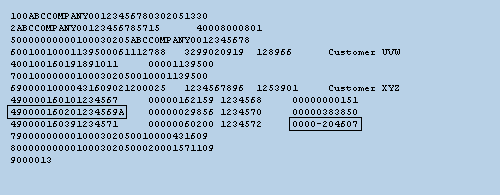
Figure 1
Sample input BAI2 file transmitted by the bank with minus sign and "A"
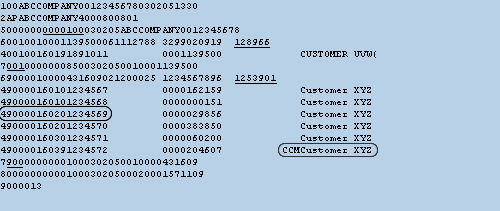
Figure 2
Sample output BAI2 file converted by ABC Company's reformat program
File date of Lockbox Transmission: 02/05/2003 |
| |
LOCKBOX 0000100 |
| |
| Customer Name |
Check No. |
Check Amount |
Invoice No. |
Invoice amount |
Diff Cust Ref. |
| Customer UVW |
128966 |
11,395.00 |
|
|
|
| |
|
|
1891011 |
11,395.00 |
|
| |
| *SUB-TOTAL by check |
11,395.00 |
|
11,395.00 |
|
| |
| ** SUB-TOTAL by Customer |
11,395.00 |
|
11,395.00 |
|
| |
| Customer XYZ |
1253901 |
4,316.09 |
|
|
|
| |
|
|
1234567 |
1621.59 |
|
| |
|
|
1234568 |
1.51 |
|
| |
|
|
1234569 |
298.56 |
1234569A |
| |
|
|
1234570 |
3838.50 |
|
| |
|
|
1234571 |
602.00 |
|
| |
|
|
1234572 |
-2046.07 |
|
| |
| * SUB-TOTAL by check |
4,316.09 |
|
4,316.09 |
|
| |
| ** SUB-TOTAL by Customer |
4,316.09 |
|
4,316.09 |
|
| |
| Check Item |
Check Number |
Number of Invoices |
|
|
| 1 |
128966 |
1 |
|
|
|
| 2 |
1253901 |
6 |
|
|
|
| . |
| . |
| Total invoices: |
|
16 |
|
|
|
| |
| |
| |
| Figure 3 |
Sample customized report of reformatted lockbox records |
What Are BAI and BAI2
The lockbox data transmission format follows the standards defined in the 1972 Bank Administration Institute (BAI) publication, “Lockbox Communication Standards for Banks.” These standards were developed to accommodate the growing trend of electronic transfer of remittance information.
Virtually any type of data can be incorporated within these standards. Each bank determines its individual data record requirements. The lockbox banks and corporations negotiate to reach an understanding of the most efficient configuration of the standards.
BAI and BAI2 are the two defined lockbox transmission formats. However, BAI is no longer supported by the BAI organization (i.e., standards are no longer updated or improved). Nonetheless, many banks still offer transmissions in the old BAI format.BAI is more basic than BAI2. That is, BAI2 provides greater detail. BAI has one aggregated check amount for many invoices, while BAI2 can provide one payment amount per invoice. If some invoices are unidentified, BAI2 allows the application of identified invoices and posts the unidentified invoices on account. This is termed a “partially applied” check. However, for the same scenario, BAI only posts the total check on account or leaves the whole check unprocessed, depending on whether the customer was identified or not. BAI2 allows a much greater chance of invoice matching and clearing, and demands less manual post-processing.
For more information, contact BAI via email at info@bai.org or call 800-224-9889.
Execute the Main Lockbox Program
In this step, the main lockbox program, RFEBLB00, imports the reformatted lockbox file, reads the reformatted data, uses it to create payment advices per check submitted via the lockbox, and carries out posting and clearing. It also generates two reports. One is called Log of Imported Checks. It lists matching results for each invoice within each check and the payment advice number for each check. The other one is called Lockbox Posting Log. It provides posted document numbers for each check as a result of lockbox posting with clearing. It sometimes can be confusing as to how these two reports are generated. Understanding this is helpful for lockbox troubleshooting. For more detail and to see a sample of the reports, refer to the download "Implementing the Functionality" at the bottom of this article.
Flag Negative Amounts for Credit Memos
One of the biggest issues ABC Company encountered was how to deal with negative amounts when the customer referred to invalid credit memo numbers. This becomes more of a problem when a customer submits payments for multiple invoices within one check, a common occurrence for customers with large transaction volumes.
You saw that the reformat program converts the minus sign to CCM. Without the minus sign or CCM, R/3 reads an invalid credit memo number as a positive amount by default. As a result, the amount of the check does not agree with the amount of addenda invoices (and credit memos), inducing an out-of-balance situation. This causes R/3 to post the whole check on account if a customer is identified (or to leave it unprocessed if a customer is not identified). This happens even if the rest of the invoices match and could be cleared. On the lockbox posting log report, an error message reads, "The difference is too large for clearing." This delays the clearing process for the rest of the invoices/ credit memos and defeats the purpose of having a lockbox program for timely cash application.
To solve this problem, ABC Company applied a modification to the program RFEBLB20 which was called by the main lockbox program RFEBLB00. It modifies the code to convert the CCM indicator to a negative sign at the creation of the payment advice for that check.2 This ensures that the minus sign is used for the credit memo deduction even if the corresponding credit memo number provided by customer can’t be found in R/3. This workaround keeps the check in balance and facilitates its partial application. R/3 then applies payments against the rest of valid invoices/credit memos within that check automatically. Only the credit memo with an invalid number needs to be processed manually. After serving its purpose, CCM is deleted from the payment advices in the standard user exit 001 of program RFEBLB20, prior to the completion of payment advice creation.
Delivery Document Numbers
In program RFEBLB20, standard user exit 002 is used to identify unique billing document numbers. At ABC Company, customers sometimes pay to the lockbox by referencing the delivery document number. The lockbox can handle this because the lockbox program can be instructed to search by both document number and reference document number. In R/3, the reference document number for the billing document is always the delivery document number. However, because the post goods issue accounting document has the same delivery document number as the reference document number, the search of the lockbox program fails to find a unique document. You can use procedure BKPF-AWKEY= ‘VBRK’ in the user exit 002 to eliminate the PGI accounting document (BKPF-AWKEY= ‘MKPF’) and find the billing document number only.
Update MICR Number and Report Changes
Lockbox configuration offers an option of having R/3 update the customer master data automatically. If you choose it, the main lockbox program triggers a new job, Lbox Bank Details, whenever a customer is identified by invoice numbers and the corresponding MICR number is new during the lockbox processing. This job creates a new batch input session, CUST-MICR, to insert the new MICR number to the customer master data. Program RSBDCSUB can be scheduled to process the CUST-MICR session as a step of the lockbox job.
However R/3 doesn’t give a clue as to which customers were updated with new MICR numbers. To obtain this information, ABC Company customized a report to provide a list of customers with updated MICR numbers. (See Figure 4.)
Job Lbox Bank Details creates the session CUST-MICR by executing program RFBIDE00. During the creation of this job, the main lockbox program passes a file path to RFBIDE00. The file contains the data of customers whose bank details are to be updated. A customized report can be created to fetch the job variant used by RFBIDE00 for a given date and time (use table TBTCP: Background Job Step Overview) and use the file path set in the variant (use function module: RS_VARIANT_CONTENTS) to report the customer information.
Lockbox bank detail update run date 02/05/2003 via update program: RFBIDE00 |
| |
Lockbox customer update file: /user/sap/Production/SYS/LBOX/123456 |
BDC session name: CUST-MICR. Lockbox process is updating the |
following customers: |
| |
Customer no. |
Bank key |
Bank Account |
99999 |
021200025 |
1234567896 |
| |
| |
| Figure 4 |
Sample Customer bank data change report |
Execute Lockbox Totals Report for Lockbox Statistics
You can execute standard R/3 report RFEBLBR1 (Lockbox Totals Report) to provide statistics on the amount and percentage of all different check application statuses and the success rate for each lockbox run.
Tip!
The Lockbox Totals Report should run as a separate job. It can’t be included in the same lockbox job because the lockbox main program submits a job of its own, RFEBLB00-LOCKBOX, to carry out bank postings and A/R clearing postings. The timing of this posting and clearing job is hard to predict. When scheduling the Lockbox Totals Report, allow sufficient time between this job and the lockbox job so the proper statistics can be extracted. For an example of a Lockbox Totals Report, refer to the online material at
www.ficoexpertonline.com/downloads/.
Post-Process Checks Not Fully Applied by R/3
Lockbox users need to access the lockbox post-processing transaction FLB1 to process any checks that couldn’t be fully applied by the lockbox import program. All checks processed by the lockbox program and the corresponding amounts, status, and customers can be viewed via transaction FLB1 (Figure 5 and 6). Users can process all the checks that failed (with a status other than applied) from this transaction. Checks with "posted on account" and "unprocessed" status can be post-processed by double-clicking on the check line to go into the next screen. The update is then accomplished by changing payment advices created by the lockbox program. Checks with a "partially applied" status do not have a payment advice available, but you can process them by choosing the check and clicking on Save, which leads directly to the post with clearing process.
| Date 02/5/2003 |
Area |
Subledger accounting |
|
| Lockbox 0000100 |
Mode |
Display incorrect screens |
|
| Batch 001 |
|
|
|
|
| Check number |
Amount |
Status |
Customer |
Name |
| 128966 |
11,395.00 |
Applied |
99998 |
Customer UVW |
| 1234 |
100.00 |
Part.app |
98881 |
Customer A |
| 110011 |
2,000.00 |
On accou |
99990 |
Customer B |
| 43782 |
200.00 |
Unproces * |
|
|
| |
| |
| |
| Figure 5 |
Lockbox data overview via transaction FLB1, batch 001 details |
| Date 02/5/2003 |
Area |
Subledger accounting |
|
| Lockbox 0000100 |
Mode |
Display incorrect screens |
|
| Batch 900 |
|
|
|
|
| Check number |
Amount |
Status |
Customer |
Name |
| 1253901 |
4,316.09 |
Applied |
99999 |
Customer XYZ |
| |
| |
| |
| Figure 6 |
Lockbox data overview via transaction FLBI, batch 900 details |
1
Qian Sharon Tang
Qian (Sharon) Tang is a system program manager who is responsible for the support and development of various areas of SAP systems. Prior to this, she was a senior FI/CO application consultant at SAP China. She has been working with SAP since 1995, with emphasis on FI/CO modules such as FI-GL/AR/AP/SPL, CO-CCA, CO-PC, CO-PA, CO-ML, EC-PCA, and cross-module integration between FI/CO and logistics. She also has experience with MM, SD, SM, and PP.
You may contact the author at qian_s_tang@yahoo.com.
If you have comments about this article or publication, or would like to submit an article idea, please contact the editor.


 Premium