Learn how to enable cost assignment, activity allocation, and external services tools in time management infotypes. This allows you to address your organization’s needs for different types of cost allocation in time management infotypes and different types of payroll posting requirements.
Key Concept
An SAP ERP HCM system offers a wide range of time management integration options within its standard configuration purview. Understanding the different posting requirements of the payroll and project departments enables you to generate cost reports based on activity. This gives users the ability to control and optimize future project costs overall at the macro and the micro levels.
The SAP system’s time management component can meet your HR, payroll, and project management departments’ time allocation needs without custom work. I use three example scenarios to demonstrate its capabilities in these areas:
- Making different cost assignments by cost center, activity, or work breakdown structure element
- Activity allocations
- External services (e.g., purchase order integration with actual hours posted for that activity)
- Attendances, substitutions, and availability
- Allocating specific costs to specific time elements
Here are the three scenarios that show different business requirements.
Requirement 1: Employee X is working for the payroll department for 20 days a month, and for one month he worked for the recruitment department for two days. You need to post employee X’s salary to different cost centers — for 20 days to the payroll department and for two days to the recruitment department. In this case, the posting is based on two different organizational units and there is no activity captured.
Requirement 2: Employee Y is working as a machine operator and works for the production unit. However, on one occasion he worked for 16 hours for the packing unit, so in this scenario you need to post these 16 hours separately into a different cost center based on employee Y’s activity. This example is slightly different from the one in requirement 1, because the employee’s hours are split between the employee’s home cost center and a different cost center and the posting is based on activity.
Requirement 3: Employee Z is an external employee not on the company payroll. He’s an outside contractor — a maintenance worker — who is contracted to work for the company and is paid using a work order with a set number of hours. In this case, when he logs his original time worked in the SAP time system, the system has to pass on his actual hours to the materials management module to compare, analyze, and process his actual working hours (as an external employee). This last scenario shows how time management infotypes and material management are integrated through the SAP system external services component.
I address the different requirements in the SAP ERP HCM system and how the HR and payroll departments handle cost assignment, activity allocation, and external services. The prerequisites for all three requirements are fully configured HR master data and a cost center or cost elements in Managerial Accounting (CO).
Configuration Steps
The SAP system’s time management component can be integrated with other SAP and non-SAP components, including:
- External components — Systems outside of the SAP system landscape (e.g., time management systems such as Cognos)
- Internal components — Systems available within the same SAP system landscape (e.g., Cross-Application Time Sheet [CATS], Project System, and Managerial Accounting [CO])
First you need to ensure that the required infotypes are activated for this integration. You can check this in menu path SPRO > Personnel management > Personnel Administration > Customizing Procedures > Infotypes. Click the infotypes node to go to the infotypes attribute screen (Figure 1).
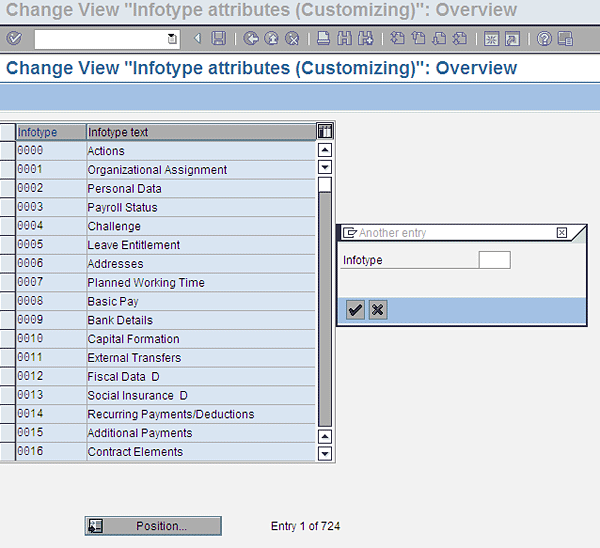
Figure 1
Infotype attributes view
Click the Position… button and enter 2002 in the Infotype field. Then select Infotype 2002 (Attendances) and click the details icon  (Figure 2).

Figure 2
Infotype attributes overview with change icon
You can now view the details of infotype 2002’s attributes (Figure 3).
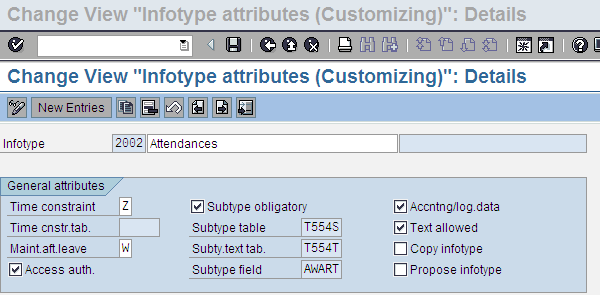
Figure 3
3 Infotype attributes details for infotype 2002 (table V_T582A)
Next, check the Accntng/log.data check box. If it is not selected, click the check box to activate it and then click the save icon. This step makes the infotype eligible for entry of additional controlling objects, such as cost assignment and activity allocation.
Now you need to make sure that this same step is taken for all the time management infotypes (e.g., infotypes 2001 [absences], 2005 [overtime], and 2010 [employee remuneration information]) and that the Accntng/log.data check box is activated as well. Once you have done this step, follow menu path SPRO > Time management > Integrating Time management with other SAP applications > Permit integration for infotypes (Figure 4).
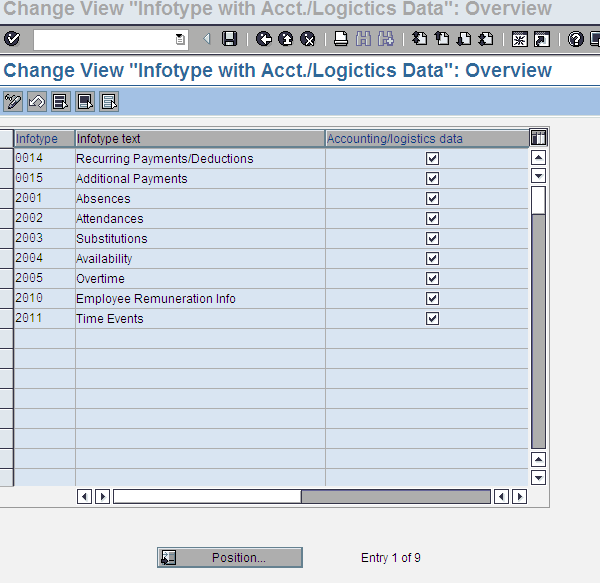
Figure 4
Time infotype integration with accounting data view (table V_582A_C)
Tip!
Table V_582A_C in Figure 4 and table V_T582A in Figure 3 are interrelated. You cannot directly activate table V_582A_C (Figure 4) without first activating table V_T582A (Figure 3).
Follow menu path SPRO > Time management > Integrating Time management with other SAP Applications > Recording cost assignment specifications > Permit Cost assignment for infotypes (Figure 5).
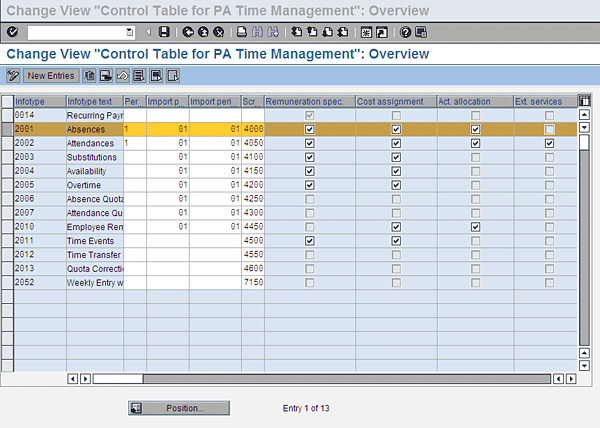
Figure 5
Activation of other SAP applications view
In Figure 5 if you look at the selected line (infotype 2001 [Absences]), you see that the check boxes for Remuneration spec (specification), Cost assignment, and Act. (activity) allocation are checked, but the Ext. (external) services check box is not.
Tip!
You have to perform the same activity for the rest of the time management infotypes; namely, infotypes 2002 (attendances), 2003 (substitutions), 2004 (availability), 2005 (overtime), 2010 (employee remuneration information), and 2011 (time events). Some of the check boxes are shaded in gray, indicating that the standard system settings cannot be changed. For example, in Figure 5, the external services check box is gray for infotype 2001 (absences), and you are not permitted to activate it.
Figures 6 and 7 show the different data entry screens of infotype 2002 (attendances) before and after the integration takes place (transaction code PA30 [maintain HR master data]). Follow menu path SAP Easy Access > Personnel management > Administration > HR master data > Maintain (transaction code PA30).
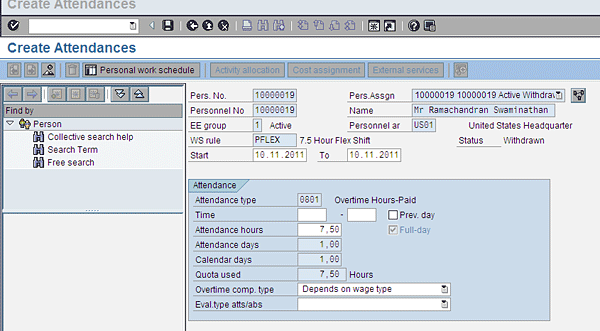
Figure 6
Infotype 2002 (attendances) screen before the SAP system applications integration
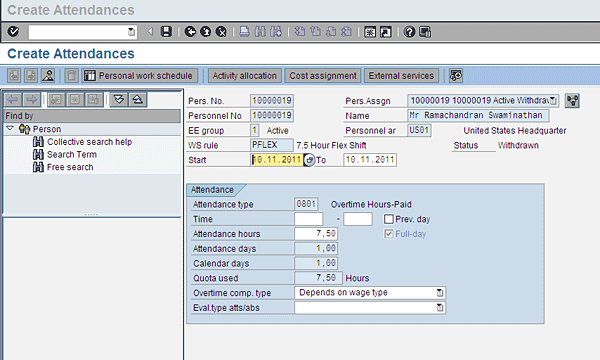
Figure 7
Infotype 2002 (attendances) screen after integration of the SAP system applications
Requirement 1: Cost Assignment
Employee X works for Company A. For most of the month he works in the payroll department, but for two days of a particular month he works in the recruitment department. For those two days, his proportionate salary for that period needs to be posted to a different cost center.
In this example, you need to configure the system to allow employee X to post 16 hours of his time under one cost center, and the rest of his working hours should be posted to his home cost center (cost center in this scenario refers to the original cost center attached to the employee’s organizational unit).
Click the Cost assignment button in Figure 7 to go to the screen in Figure 8.
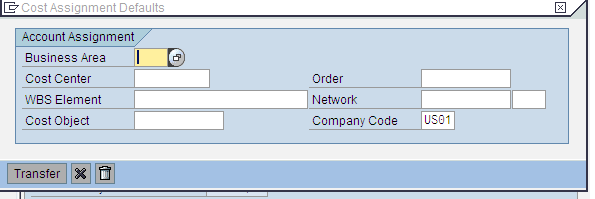
Figure 8
The Account Assignment screen in infotype 2002
In the screen shown in Figure 8, enter the relevant Cost Center, WBS (work breakdown structure) Element, Cost Object, Order, and Network details. Click the Transfer button. Based on your particular attendance type entry, your entry is posted into controlling. The screen in Figure 8 has other fields, such as Business Area, Cost Center, and Order. You can post to any of these other areas (e.g., Business Area, Cost Center, or Order), but leaving these fields blank gives you the option to change them later as requirements may change at some later time.
You can restrict some of the fields for your users by modifying the function module RP_TIME_COBL_002. Follow menu path SPRO > Time management > Integrating Time management with other SAP Applications > Recording cost assignment specifications > Specify controlling objects permitted.
Similarly, you can also modify the account assignment sub screen elements shown in Figure 8 and maintain different variants or screens for different groups of employees based on company code, personnel area, personnel subarea, employee group, and employee subgroup. You complete this step by maintaining a feature called DOKNT. Follow menu path SPRO > Time management > Integrating Time management with other SAP Applications > Recording cost assignment specifications > Maintain Feature for Object selection.
Requirement 2: Activity Allocation
Company B has a production department, and a machine operator is working there full-time. However, in the last month, this machine operator worked for a different organizational unit — the packing unit — for 16 hours. These 16 activity hours now need to be posted to the packing unit. Therefore, the sender cost center (the production department in this example) needs to be credited with 16 hours of activity, and the receiver cost center (the packing unit’s cost center and WBS element) needs to have 16 hours of activity debited.
You need to activate the Activity type allocation for infotype 2002. Clicking the Activity allocation button in Figure 7 opens the subscreen shown in Figure 9 in which you enter the data for activity allocation. Now, for example, if you enter the 10-digit cost center number in the Cost Center field, 16 hours is debited for this cost center, and 16 hours is credited into the employee’s master cost center.
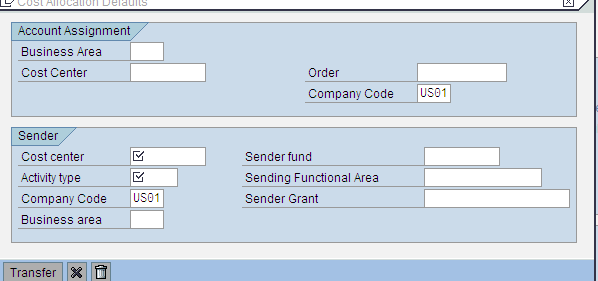
Figure 9
Activity allocation screen
If you need to modify the subscreen with function module RP_TIME_COBL_001 (for example, if you want to hide fields other than Cost center and Activity type), follow menu path SPRO > Time management > Integrating Time management with other SAP Applications > Recording Activity Allocation > Specify controlling objects permitted.
The process flow for Activity allocation is as follows:
- The user enters the data (Figure 9).
- The user transfers the data to CO using program RPTPDOC0.
- The receiver cost centers (cost center and order) are debited in CO, and the sender cost center is credited.
- The sender cost center details are posted into CO after the payroll run and posting.
Tip!
If you activate the activity allocation functionality, you are required to schedule the program or report RPTPDOC0 (daily or weekly or monthly) as required in job scheduling to ensure that the data gets to CO on time.
Requirement 3: External Services
Company C has an outside-contracted employee who performs maintenance on all the telecom equipment in the company. His work falls under a company purchase order in the materials management module, with specific hours that he works (i.e., he works six hours a week). If his time worked is booked in infotype 2002 (attendances), you need to validate it against the purchase order for payment by activating the external services component.
The next step is to activate the required components of cost assignment, activity allocation, and external services in the time management infotypes. You have already activated external services for infotype 2002 in my example, as shown in Figure 5. Now you can use this functionality in the infotype 2002 (attendances) screen in maintain master data (PA30). Follow menu path SAP Easy Access > Personnel management > Administration > HR master data > Maintain (transaction code PA30). To enter the data for external services, click the External services button (Figure 10).
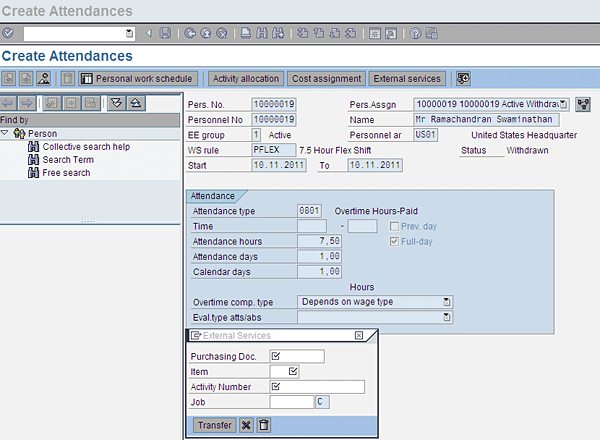
Figure 10
Infotype 2002 (attendances) with the External Services dialog box
In the External Services subscreen in Figure 10 enter the details in the fields shown. The process flow for the external services component is as follows:
- After you enter the data (Figure 10), the time evaluation schema TM02 is automatically processed according to the requirement.
- The time evaluation schema TM02 with function MMSRV automatically provides this data back to the external services component with a specified wage type and provides the hours to the materials management module.
- The entered time for a given purchase order number is evaluated and compared against the time entered in the materials management module.
- Based on the evaluation, payments are processed for the external employee.
Tip!
The basic requirement for external services is that the HR department should have the external employee’s mini-master data in the SAP ERP HCM system. HR mini-master data refers to the capture of infotypes 0000 (actions), 0001 (organizational assignment), and 0007 (planned working time for external employees). The employee needs to be assigned to a non-payroll relevant payroll area in infotype 0001 (organizational assignment infotype).
You can modify the External Services screen (for example, if you want to hide some fields), in Figure 10 by following menu path SPRO > Time management > Integrating Time management with other SAP Applications > Recording External services > Specify objects permitted. The specified function module is RP_TIME_COBL_003.
In addition to these standard integration aspects of the various SAP ERP HCM system applications, SAP provides the following enhancements for customer-specific requirements. These enhancements define customer-specific default values and customer checks for additional data:
- Customer enhancement PTIM2001 (time recording): Default values for activity allocation
- Customer enhancement PTIM2002 (time recording): Default values for cost assignment
- Customer enhancement PTIM2003 (time recording): Default values for external services
- Customer enhancement PTIM2004 (time recording): Check activity allocation
- Customer enhancement PTIM2005 (weekly screen for time recording): Default attendance/absence type
- Customer enhancement PTIM2006 (weekly screen for time recording): Complete check
For more details about this topic, see these HR Expert articles: “Choose the Most Accurate Rate for Internal Activity Allocation Using a BAdI,” by Sanjiv Agarwal, and “Quick Tip: Ensure Payroll Processes Time-Based Cost and Alternate Payment Information,” by Donna Shrout.
Raghavendran Parthasarathy
Raghavendran Parthasarathy works for Hexaware Technologies as a Principal Consultant,where he manages SAP solution design for customers across the globe. He has worked in SAP ERP HCM for over 14 years in various capacities, including payroll projects in the Middle East, Europe, and Asia/Pacific. In addition to payroll, Raghavendran has experience in negative time management, personnel administration, and recruitment. He has also been a part of portal implementations. Currently, he is involved with cloud-based HCM applications such as SAP SuccessFactors and Workday.
You may contact the author at raghs99@yahoo.com.
If you have comments about this article or publication, or would like to submit an article idea, please contact the editor.