When executing your ABAP reports, "summarization levels" - an additional set of tables defined in the CO-PA configuration and stored separately from segment level tables and that have their own subset of data - offer you a chance to add one or more layers to the data retrieval pyramid that will be used by COP-PA's report program. The idea is that the higher up the pyramid, the faster the data can be retrieved. After an explanation of what summarization levels are, this article points out the impact (both pro and con) they could have on your end users and gives you some advisory tips on how to develop a sound summarization level strategy for your organization by analyzing the reports you plan to create, the allocations you expect to develop, and any planning functions you might want to use to access your summarization levels.
Summarization levels are special summary tables that contain only the specific characteristics that are needed by your report(s). The concept behind summarization levels is to offer you a chance to increase performance by adding one or more layers onto the data retrieval pyramid that CO-PA’s report program is going to use when executing your reports.
As you see in Figure 1, one tradeoff of this increased reporting performance is the level of detail available to the report reader — the higher up the pyramid, the faster the data retrieval … but the smaller the amount of detail.
Better response time is the obvious benefit of using summarization levels. But are there any other tradeoffs that would impact users and therefore need to be taken into consideration? I’ll answer that question here, and then show you five quick tips on how you should approach the task of designing summarization levels for your organization.

Figure 1
How "Summarization Levels" Fit in a Data Retrieval Pyramid Concept
What’s the Potential Impact of "Summarization Levels" on My End Users?
A summarization level is actually something that you define via customization (transaction code = "kedv"). When you save your customization instructions, R/3 then generates the needed database tables that will store the summarized CO-PA data.
As shown in Figure 2, however, the data updates to your summarization-level tables do not occur at the same time as the data updates to the standard tables from Figure 1 — i.e., the "Actual Line Items," "Totals by Profit Segment," and "Profit Segment List" tables. Instead, the summarization-level tables are updated only upon request, by running transaction code "kedu" either directly, or periodically as a batch job.
This means that one impact on your report readers is that the initial data they see in their report (from the summarization-level table) might not be as current as what’s available (from the standard, although slower, CO-PA tables).
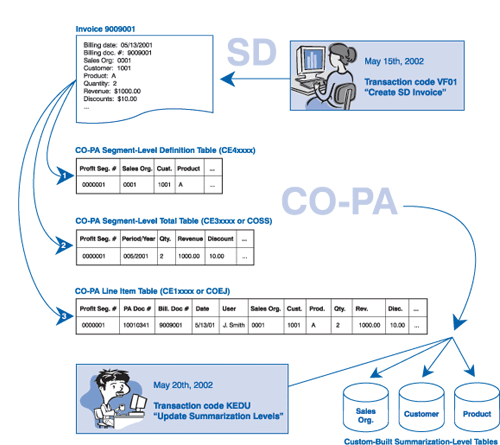
Figure 2
Data Update Timing Difference Potential: CO-PA Standard Tables vs. Summarization-Level Tables
Tips for Defining Your "Summarization Levels"
Summarization-level tables store data the same way segment-level tables do. As shown in Figure 3, for each summarization level that you define, two separate tables must be generated, with one table (called the key storage table) storing the summarization-level characteristic values, and the other table (called the totals table) storing the value fields.
No limit exists on the number of summarization levels that you can create. But each one you create and populate will, of course, consume storage space. The goal is to create the minimum number of summarization levels to optimize their effectiveness.
Unfortunately, no good guide exists that can help you define the summarization levels for your organization. You do have the option of allowing CO-PA to define its own summarization levels for you, but this is unlikely to be the most efficient configuration.
The recommendation I generally give to my clients for developing a sound summarization- level strategy is to analyze the reports they plan to create, the allocations that they will develop, and any planning functions that they will use to access these levels.
Here are some advisory tips for approaching that kind of tradeoff analysis:
 Never include both the product and customer characteristic in a summarization-level definition unless you feel you can achieve significant savings in data volume — i.e., perhaps you’d want to define summarization levels for different sales organizations, all of which had significant sales volume. This would usually result in the summarization level being redundant with the segment level tables and would thus yield a minimal gain in performance.
Take advantage of "nesting"1 wherever possible. Nesting will speed up the system performance of filling the summarization levels with data.
Think of your CO-PA end-user community:
- How will users report on the data?
- Will portions of the organization focus on product-related information, while others focus on customer-related information?
- Does significant reporting occur by sales organization or by another organizational breakout?
The answers to these questions can help you define your levels.
Consider your allocations as well as your planning activities. What characteristic values will be derived? What will be the tracing factors in the allocations? Again, your answers to these questions will help you develop appropriate summarization- level definitions.
Finally, consult with members of the technical team for advice about indexing the summarization levels that you define. Indices can be created at will, but remember that indices consume valuable memory space and their number can adversely affect system performance.
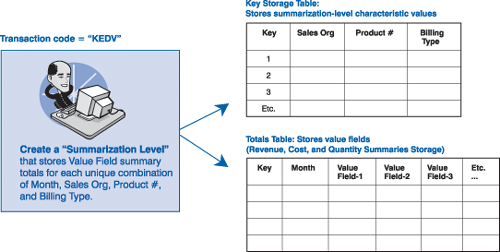
Figure 3
Two Tables for Each Declared "Summarization Level"
Summary
To wrap up, summarization levels are an additional set of tables that are stored separately from segment-level tables. They have their own subset of data, and are defined in the CO-PA configuration. Summarization-level tables are faster to access than segment-level tables because they contain only a subset of the segment level table data. Summarization-level tables are not filled at the time of record posting; they are filled separately through the execution of a program, which can be run directly, or can be scheduled to run at prescribed time intervals (usually nightly or weekly).
The downside of using summarization levels is that the viewed data may not be the most current (depending on the frequency with which these tables are filled), and they require additional data storage space. Generally, however, I think you’ll find that the benefits of using summarization-level tables far outweigh any downside.
1
Tony Rogan
Tony Rogan is a certified FI/CO consultant at SAP with eight years of SAP consulting experience. He began his SAP career with a Big 5 consulting firm and over the years has worked in various industries, including utilities, non-profit, high-tech, consumer goods, and process manufacturing. Tony’s expertise lies in the Financial and Controlling modules, with emphasis on Cost Center Accounting, Profitability Analysis, Internal Orders, Profit Center Accounting, Special Purpose Ledger, Project Systems, and Product Costing. He also has experience working with Enterprise Consolidations, LIS, and Business Information Warehouse.
You may contact the author at tony.rogan@sap.com.
If you have comments about this article or publication, or would like to submit an article idea, please contact the editor.