The visit planning functionality in mySAP CRM 2005 can help sales representatives improve their efficiency by reducing the amount of time spent on administrative work. Discover how you can add a third-party tool to optimize the reps’ daily agendas.
Key Concept
A visit plan contains a list of the customers you contact regularly. Sales teams use visit plans for long-term planning and for creating activity scheduling lists. An activity scheduling list is the list of customers to contact on a particular day in a particular sequence. The activity scheduling list determines who contacts the customer as well as the sequence and date of the visits.
Do you find that your salespeople spend valuable time coordinating schedules, setting up customer visits, and performing other administrative tasks? Wouldn’t you prefer that they spend their time on the actual selling process, since that’s where their key competencies lie? New mySAP CRM visit planning functionality can help maximize your sales force’s time by streamlining administrative tasks and allocating their time more efficiently.
I will describe the visit planning functionality and explain the two main processes involved in setting up a visit plan: visit planning maintenance and activity scheduling. You can use them separately or together. Then I will show you how you can use route optimization, a third-party enhancement to visit planning, to plan work trips.
Visit Planning
Visit planning is part of the mySAP CRM 2005 release, which has been available in Ramp-Up since October 2005. The release introduces a new object called “visit plan” (Figure 1). This object allows users to create an unlimited number of visit plans, each with an unlimited number of business partners.

Figure 1
mySAP CRM visit planning screen with Visit Plan Header data click here to view a larger version of this image
Administrators can centrally maintain visit plans or salespeople can maintain them on their own, so SAP offers this functionality in two areas. For connected use (e.g., in the back office or for use by the sales representative who has Internet access), you can find visit planning within the Activity Management component of mySAP CRM Enterprise Sales. Traveling salespeople who need a disconnected, offline application can access visit planning within mySAP CRM Field Sales.
Most salespeople regularly visit customers in a predefined sequence. Visit planning allows the salesperson to maintain different groupings of customers in a logical way, for example all customers visited on Mondays. The visit plan can contain information including the sequence of visits and the usual start time and duration of the visit. It allows you to store information such as the visit day of the week and the contact persons for every customer in the visit plan. After maintaining the relevant visit plans, salespeople can use the automated activity scheduling tool to choose a visit plan. The system automatically adds it to their calendars. Now I’ll explain the processes available to you to set up a visit plan.
Two Main Processes of Visit Planning
The first process in visit planning is strategic, while the second is more tactical. Visit planning maintenance, the first step, provides tools to perform strategic planning within a given time frame. In visit planning maintenance, salespeople can maintain repetitive visit schedules for customers. They can add various individual contact data per planned visit to the visit plan, for instance telephone number and cell phone number (Figure 2).

Figure 2
ySAP CRM Visit Planning screen with Visit Plan Item data click here to view a larger version of this image
If sales assistants or administrators create visit plans, they can assign them to an owner or to a territory. You might have a sales assistant perform this high-level planning once a year.
After finalizing the visit plan, the sales representative can proceed to activity scheduling and go into more detail to plan on a tactical level. The new central activity scheduling tool consists of three tabs: Activity Scheduling (partner list), the activity Calendar, and Activity Proposals (Figure 3). The system generates activity proposals and helps sales representatives prepare their work weeks by planning their weekly or daily agendas. Since the overall visit planning process consists of visit plan maintenance and activity scheduling, the user can schedule activities based on a visit plan, leveraging it as template to generate activities for a certain time period.

Figure 3
mySAP CRM Activity Scheduling overview click here to view a larger version of this image
Tip!
Before you start using the visit planning scenario in mySAP CRM, set the values your company uses for duration, preparation time, transaction type, activity category, period, working hours, and date type. In mySAP CRM Enterprise Sales, go to Customizing for CRM>Transactions> Settings for Activities>Maintain Default Values for Visit Plans and Activity Scheduling. The system automatically downloads these default values to mySAP CRM Field Sales (except for the date type).
Activity scheduling allows the salesperson to conduct more operational planning by enabling repetitive activity generation. You can use this business process to generate activity proposals (e.g., customer visits) and display and store them as business activities in the activity calendar (Figure 4). From here, you can accept, reject, and, if applicable, reschedule the activities to match your requirements. You do this by maintaining scheduling data (e.g., the scheduling period, the employee’s working hours) and then selecting business partners for activity scheduling.

Figure 4
mySAP CRM activity scheduling calendar view click here to view a larger version of this image
However, visit plan maintenance is not a prerequisite for activity scheduling. While you could use existing visit plans, you could also add customers from other sources of data within activity scheduling. Depending on the sales representative’s preference, you could, for example, incorporate the customers/business partners you wish to contact by selecting all of the customers in a campaign’s target group or by selecting customers/business partners based on their addresses. You do this by using the standard or advanced business partner search. Another option for selection, specific to my SAP CRM Field Sales, could be to use all open activities (due visits).
The system generates due visits in mySAP CRM Field Sales to remind salespeople to visit certain business partners soon. The system determines due visits based on the date the sales representative last visited the business partner and the visit frequency maintained for that business partner. If a visit is due, the system displays a due visit notification. During activity scheduling, you can search for business partners using due visits. The system sorts the due visits list by “due since,” with the business partner who is most urgently due for a visit listed at the top. You can then select one or several due visits and add the business partner information to the activity scheduling list.
Based on the customers added, the system generates activities (e.g., phone calls, emails) and displays them on your personal CRM calendar to provide an overview of tasks to complete. When you generate activity proposals, the system identifies feasible times for the specified business partners or contact persons. The system validates the proposed activities with the business partners’ business hours to make sure that the proposed activity falls within that time frame. The system considers a business partner’s visiting hours as well as working hours and scheduling periods, based on how you maintained the business partner during activity scheduling.
Route Optimization
If you would like to take your visit planning a step further, you can use a third-party route optimization tool from PTV AG. This tool is available only within mySAP CRM Field Sales. Route optimization allows you to optimize the order and schedule of business activities on the activity calendar to reduce total travel time and costs (Figure 5). It automatically calculates how to reduce the mileage by route optimization or how mileage, cost, and time change with overnight stays. With route optimization, sales representatives can make the most of their trips by checking which other customers are geographically on the way to a specific customer. You can perform route optimization well in advance of the actual business trip.

Figure 5
Activity calendar view as a starting point for route optimization within mySAP CRM Field Sales click here to view a larger version of this image
In the example shown in Figure 5, click on the Optimize button in the activity calendar. In the pop-up window, select the required time period (Figure 6). Click on the OK button and the system optimizes the sequence and schedule of the business activities in this time period utilizing geographical data (Figure 7).
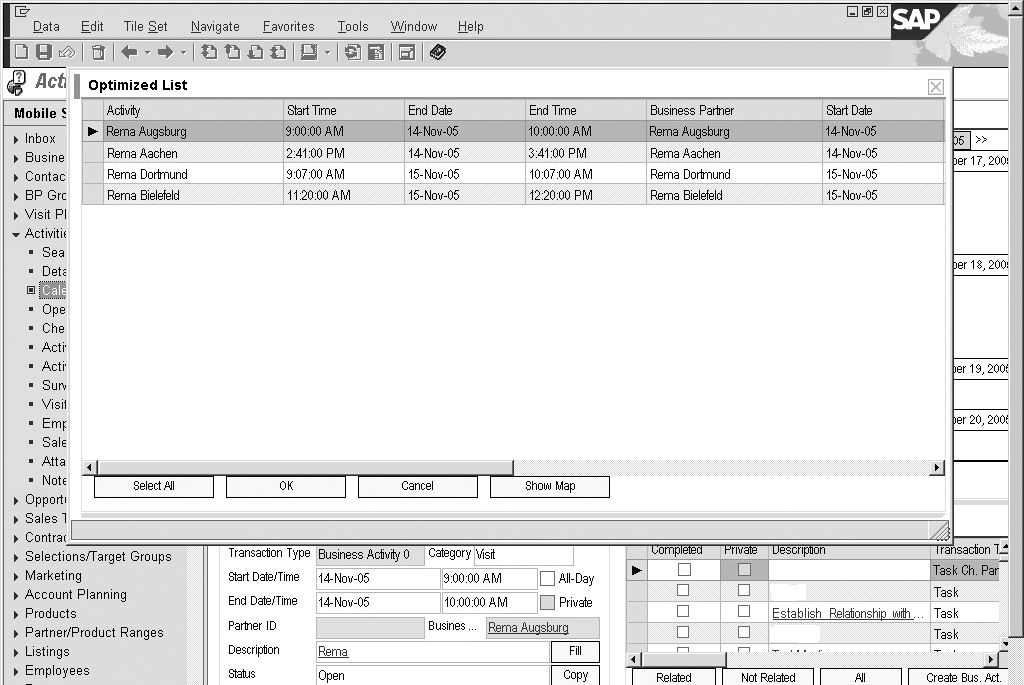
Figure 7
Optimizing multiple days within mySAP CRM Field Sales click here to view a larger version of this image
If you use the route optimization tool, you must export the necessary business partner from mySAP CRM Enterprise Sales to the route optimization tool utilizing the External Interface Adapter (XIF Adapter) provided by CRM Middleware. Once the system completes the route optimization, it imports the data as optimized visit plans. The system then replicates these reusable visit plans to the Field Sales laptops. After replication, you select a specific visit plan and generate activity proposals for it with activity scheduling.
If on the day of the business trip a customer cancels an appointment, the sales representative can select the activities before and after the cancelled appointment and find a customer who fits geographically into the trip through a corridor search. This is a specific search for customer address data within a user-defined corridor (e.g., an area on a map). For example, if you create two activities that are geographically apart from each other and have available time between them, you can run a corridor search to look for other customers who could fit between the two activities.
Salespeople benefit from using route optimization because they can spend more time at the customer site. They also can schedule more visits per day or week, using their time more efficiently. In addition, salespeople can control how they plan the work week, even if the system suggests predefined tours. The savings potential for visit costs is an added benefit.
Sandra Pfeiffer-Sonntag
Sandra Pfeiffer-Sonntag is a customer project manager of mySAP CRM at SAP. Since joining SAP in 1998, she has held various positions in product management. After working for four years as a customer project manager at SAP Labs in the US, she is currently working at the SAP AG global headquarters in Germany. Sandra holds a master’s degree in business administration from the University of Mannheim, Germany, and an MBA from the University of Toledo, Ohio, US.
You may contact the author at sandra.pfeiffer-sonntag@sap.com.
If you have comments about this article or publication, or would like to submit an article idea, please contact the editor.


 Premium