A new data flow concept has been introduced in SAP NetWeaver 2004s. SAP still supports the existing classic 3.x data flow, which allows customers to migrate as their needs warrant. Although the migration is not required, it presents a host of new capabilities.
Key Concept
A DataSource can only exist in one of two states: emulation and migration. An emulated DataSource technically remains a 3.x DataSource. A migrated DataSource is an emulated DataSource that has been technically migrated to SAP NetWeaver 2004s, which allows it greater functionality and data staging mechanisms.
The new BI capabilities of SAP NetWeaver 2004s contain a tremendous amount of new functionality. SAP introduced a series of major changes in the data staging area, changing extensively the way it maps, transforms, and physically loads data into the SAP NetWeaver system. It rearchitected this area and frequently refers to it as SAP NetWeaver 2004s’s new data flow.
Included in this new data flow is a new DataSource concept, changes in InfoPackages, a new data agent called the data transfer process (DTP), the removal of the InfoSource as a mandatory data staging layer, and the consolidation of all data transformations into a single object called BI transformations. While this one topic area certainly contains a lot of material to cover, I’m going to focus on the new DataSource concept in this article and how to migrate to it.
Compared to the classic approach in 3.x, I summarize the changes to DataSources in the BI capabilities of SAP NetWeaver 2004s as follows: The Persistent Staging Area (PSA) is now mandatory for all data loads and is also tied to the DataSource. The two terms are now virtually interchangeable.
An InfoPackage still loads data for a DataSource, but the InfoPackage can only carry out the load up to the PSA. It does not move the data any further up the data flow chain as it did in prior BI releases. The DTP that I mentioned previously handles this segment of the data flow. Figure 1 shows an InfoPackage for a migrated DataSource. Notice that the Only PSA option is the only available option on the Processing tab. It is not possible for this InfoPackage to update an InfoProvider anymore.

Figure 1
An InfoPackage can no longer update a data target
A source system tree in SAP NetWeaver now organizes all DataSources. You can view all replicated DataSources without having to log into the SAP source system. These DataSources provide a limited amount of maintenance and provide a better display of some of the general administrative information of the DataSource that you previously could only access by looking directly at tables ROOSOURCE and ROOSFIELD. You can edit the hierarchy display of the DataSources, shown in Figure 2, but not in the SAP NetWeaver system. Read the two sidebars, “Rearrange the Source System APCO” and “Remote Activation of Business Content DataSources” for more information on how to manage DataSources in SAP NetWeaver 2004s more easily.
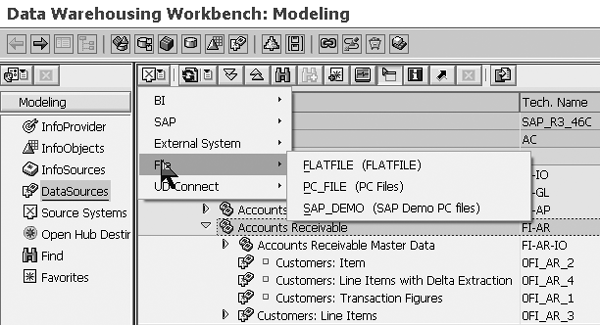
Figure 2
View of DataSources hierarchy and list of Source Systems types as viewed from the Data Warehousing Workbench
SAP NetWeaver 2004s presents and views all DataSources, regardless of their type (such as SAP source system, flat file, Universal Data Interface [UDI], DB Connect, and Web services) in the same consistent manner. There are naturally some differences in what the system displays based on what type of DataSource you are dealing with. A flat file or Web Service DataSource has options to preview the data, whereas a DataSource from an SAP source system does not. However, the overall concept of viewing the technical details of the DataSource is more consistent across the different types.
Like most other objects in the BI capabilities of SAP NetWeaver 2004s, SAP still delivers and supports the older 3.x versions of a DataSource. In the case of DataSources, the system still displays an existing 3.x DataSource alongside migrated DataSources so they can still benefit from other features of the new data flow in SAP NetWeaver 2004s. This means that a 3.x DataSource can still update an InfoProvider via BI transformations and you can physically load it via a DTP. To be clear, it is not mandatory that you migrate a DataSource to use some of the other new data staging mechanisms. This gradual adoption of the new data flow components is a primary benefit of the emulated DataSource concept.
SAP refers to 3.x DataSources as emulated DataSources. To identify if the system has migrated a DataSource or not, you can go to the detail screen of the DataSource and look for the word Emulated circled in Figure 3. Emulated DataSources also have a small square icon inserted between the DataSource icon and its description as shown in Figure 4. This square icon is consistent with all 3.x objects when you view them in the Data Warehousing Workbench.
Tip!
The PSA and the DataSource are now one and the same in SAP NetWeaver 2004s. One result of this union is that you can no longer access the PSA tab that was previously visible on the 3.x Administrator Workbench. To view the PSA contents of a particular data load, you must first access the appropriate DataSource. You’ll see the PSA icon on the DataSource’s details screen as shown in Figure 3.
Please be aware that you cannot migrate all DataSources to the SAP NetWeaver 2004s format. Export DataSources, hierarchy DataSources (i.e., segmented DataSources), DataSources that use the IDoc transfer method, or DataSources from BAPI source systems must still reside as 3.x DataSources.
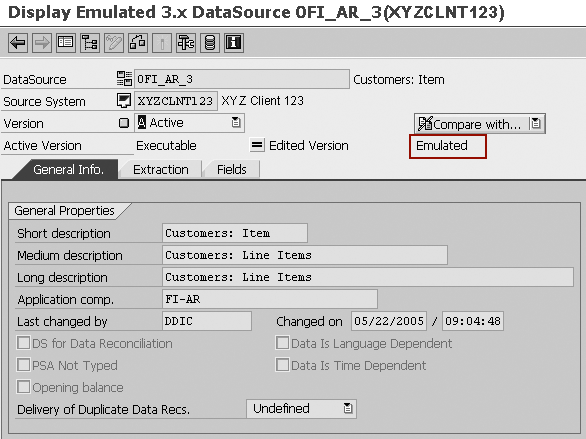
Figure 3
Note the term Emulated in the detail screen of the DataSource
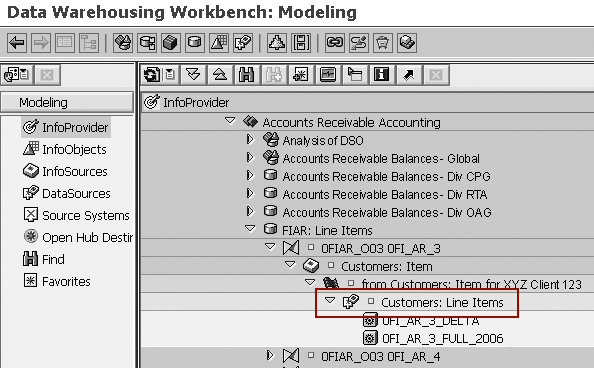
Figure 4
Emulated DataSource as shown from the Data Warehousing Workbench. Note the small gray box between the DataSource icon and its description.
This leads to an obvious question: why migrate if the existing 3.x DataSource still fits into the new data flow of SAP NetWeaver 2004s?
The main reason to consider migration is the same reason to switch from existing 3.x functionality to SAP NetWeaver 2004s functionality whenever possible. SAP currently supports the older technology but SAP will not develop older technology. Companies that choose not to migrate to any of the new features in SAP NetWeaver 2004s may want to have a plan to do so in the future and a justification for not making the change.
From a functional perspective, Realtime Data Acquisition (RDA) is only possible on migrated DataSources and does not work on emulated DataSources. There is also specific functionality in SAP NetWeaver 2004s using a special type of DTP that allows direct access to source data. However, this is only possible on migrated DataSources.
What happens when the system migrates the DataSource? Existing 3.x DataSources are unchanged after the technical upgrade and all DataSources are viewed initially as emulated DataSources. The same is true for all of the components of the 3.x classic data flow. As I said earlier, if you want to use this emulated DataSource within the new data flow, inclusive of transformations, ABAP Objects, and DTPs, you can.
During migration, the system deletes the 3.x DataSource that you already replicated to the SAP NetWeaver system along with its associated transfer structure and transfer rules. This includes any custom transfer routines and start routines that may exist for this DataSource. The system retains the InfoPackage and PSA table associated with each DataSource, but transfers them to the new migrated DataSource to be compliant with some of the items mentioned previously. Previous data load requests are also retained and visible after the migration is complete. You carry out the migration manually and individually for each DataSource. There is no way to mass migrate DataSources via a program or other SAP utility.
Given this situation, the best way to proceed with the components of the new data flow is to model an emulated DataSource using the new BI transformations and the DTP. It is the concept of an emulated DataSource that allows for this blending of functionality so customers can move forward with the implementation of the DTP or BI transformations initially. Once you have tested the new data flow and it is operational, you should migrate the DataSource and delete the old data flow objects. The only exception to this general recommendation is if you want to use RDA or the new DTP for direct access. These require that you migrate the DataSource first before proceeding with the rest of the data flow.
Step-by-Step Procedure
Let’s review the steps necessary to migrate an existing DataSource to the new SAP NetWeaver 2004s DataSource concept, and the steps to revert back to the previous version if warranted. Reverting back is a fail- safe approach that SAP provides to recover the old DataSource in case any unforeseen problems occur.
First, let me review an existing emulated DataSource that is a candidate for migration (0FI_AR_3). Figure 5 shows the DataSource as it exists prior to migration. Notice that the square icon before its description designates it as an emulated DataSource. The details screen of the DataSource also shows that it is a 3.x emulated DataSource (Figure 6).
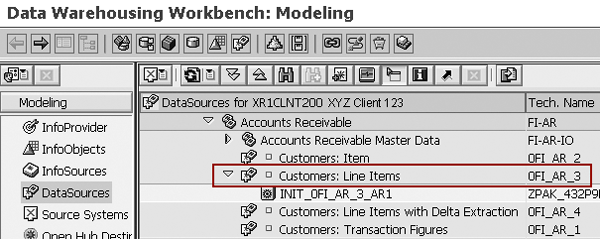
Figure 5
DataSource in 3.x before migration, denoted by the square before the description
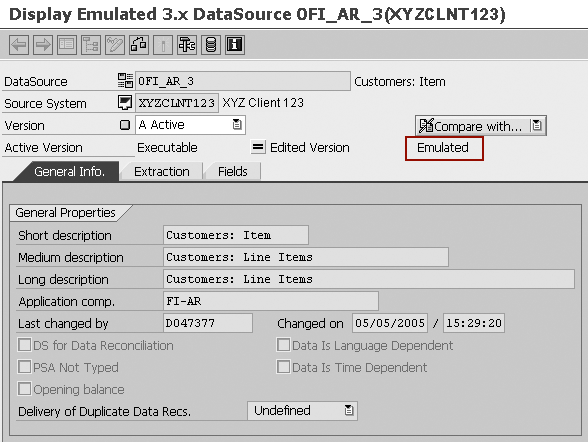
Figure 6
Details screen of DataSource. Notice the Emulated text next to the Active Version status at the top.
To initiate the migration, go to the Data Warehousing Workbench, right-click on the DataSource, and choose the Migrate option (Figure 7).
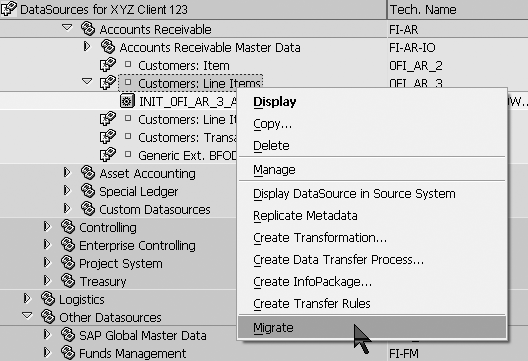
Figure 7
Select the Migrate option
You’ll see a dialog window (Figure 8) that presents a critical step in the migration process. This dialog window asks whether you first want to export the metadata of the existing 3.x DataSource before the migration begins. The point of this is to save the 3.x DataSource and any associated objects (such as the transfer structure, transfer rules, and any custom routines) before the system deletes them. If you choose the W/O Export option, the metadata does not save and it would not be possible to revert back to the 3.x DataSource concept later on (if you require it). The safer approach is to choose the With Export option to give yourself the possibility of recovering the DataSource.
Tip!
Table RSDSEXPORT stores the 3.x metadata that is exported during this step.
Note
If you would like to learn more about ETL process, SAP Education offers these classes in the US: BW350 – SAP BW Extraction (for BW 3.5) or BW350 BI – Data Acquisition (for BI in SAP NetWeaver 2004s) and DBW70E BI – Delta Enterprise Data Warehousing SAP NetWeaver 2004s. For more information, go to
www.sap.com/useducation.

Figure 8
Decide whether to export the metadata of the DataSource
When the technical process is finished, you should see the message shown in Figure 9. Now that you have migrated the DataSource, it appears in the DataSource tree as shown in Figure 10. Notice that the system retained the existing InfoPackage and transferred it to the new DataSource. It retains any existing PSA contents as well.

Figure 9
Message that the DataSource migration took place

Figure 10
DataSource appears in the DataSource tree without the box icon in its description. Note that the three DataSources above it are marked as being emulated DataSources.
Now that the migration is complete, let’s view the DataSource’s details to confirm that the migration was successful. You’ll notice that you can no longer see the Emulated tag that was displayed on the DataSource screen previously (Figure 11). If you look at the list of DataSources in the Data Warehousing Workbench (Figure 10), the first three DataSources are still emulated and have the small square icon in front of the description. However, the migrated DataSource 0FI_AR_3 does not.

Figure 11
Migrated DataSource no longer has the Emulated text designation
If I access the older Administrator Workbench via transaction code RSA1OLD (Figure 12), the DataSource and its source system assignment (to XR1CLNT200, in this example) no longer exist. From the 3.x perspective, this DataSource no longer exists in BW.
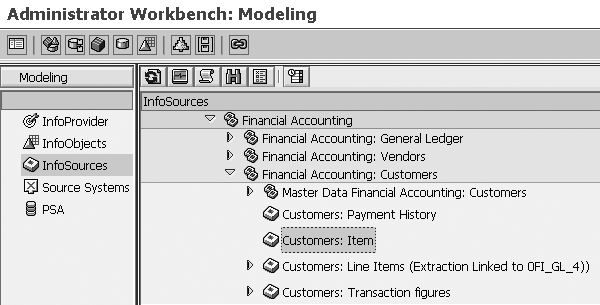
Figure 12
View of 3.x Administrator Workbench. The migrated DataSource no longer appears as a source system mapping to the highlighted InfoSource.
Recovering a DataSource
As mentioned earlier, you can restore the migrated DataSource to its 3.x version if necessary. The migration is purely a technical activity and doesn’t result in any loss of functionality, so think twice before reverting back to the 3.x version. SAP provides this function as a precaution in case any unforeseen problems arise as part of the new SAP NetWeaver 2004s data flow.
When the DataSource is recovered, SAP NetWeaver recovers the previous 3.x version of the DataSource and deletes the SAP NetWeaver 2004s version. It also restores the transfer structure and transfer rules and retains the existing PSA contents and all existing InfoPackages.
Here are the steps to carry out the recovery. First, use transaction code RSDS and enter the appropriate DataSource and source system combination. Go to the menu path DataSource>Recover 3.x DS as shown in Figure 13. Notice that it is also possible to initiate the migration of the DataSource from this screen as well as from the Data Warehousing Workbench. You’ll then see the information warning shown in Figure 14. Click on Yes to recover the DataSource.
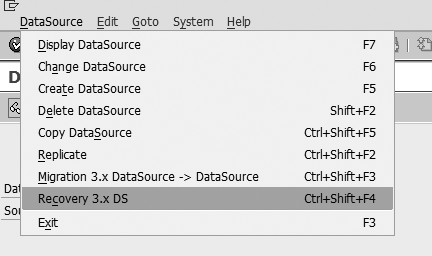
Figure 13
Menu path to recover the migrated DataSource
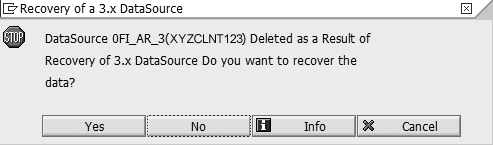
Figure 14
Warning message that the recovery of the 3.x DataSource results in a deletion of the migrated version
If you go back to the DataSource section of the Data Warehousing Workbench as shown in Figure 15, you’ll see that the system has restored DataSource 0FI_AR_3 to its 3.x version and that you can also see the original transfer rules complete with custom routines.

Figure 15
The 3.x DataSource is restored as seen from the 3.x Administrator Workbench
At this point, you’ll want to investigate your InfoPackages. While the recovery process keeps all InfoPackages (even those that were created after migration), the system initially deactivates the list of data targets in the InfoPackage definition. This is because these are not valid options for an SAP NetWeaver 2004s InfoPackage, so they weren’t defined in the InfoPackage prior to the recovery.
If you elected to create any BI transformations or DTPs, the system does not delete them automatically as part of the recovery of the 3.x DataSource. It only deletes the SAP NetWeaver 2004s version of the DataSource during recovery. You’ll have to delete these objects manually, if warranted.
Rearrange the Source System APCO
One of the benefits from the new DataSource concept in SAP NetWeaver 2004s is that you can now view all of the SAP source system DataSources from within the SAP NetWeaver system. You can view more information about the object and its metadata without having to log in to the source system. You can now view information as simple as the DataSource’s full description, some of its data extraction parameters (such as what type of delta process it uses), and the complete field list of the DataSource in the SAP NetWeaver system in more detail than what you can view in a singular screen in the source system itself.
This is a welcome benefit to any BI developer, but has one negative. You now have to navigate DataSources via the Application Component Hierarchy (APCO). What is the APCO? The delivered APCO is a presentation hierarchy that classifies and organizes all of the DataSources in the SAP source system. It groups each DataSource so a BI developer can quickly navigate to all DataSources pertaining to a single functional area (for example, FI-GL for G/L transaction DataSources).
During the initial implementation, you activate the APCO in the source system by using transaction code RSA9 or the SAP NetWeaver IMG menu path Business Information Warehouse>Business Content DataSources>Transfer Application Component Hierarchy. However, you can only activate the entire APCO, not individual components that are in use for that particular SAP installation. This means you’ll get a structure that looks like what you see in Figure 1.

Figure 1
Application component hierarchy in the ERP source system
If you apply the “one size does not fit all” theory, it’s hard for SAP to create a structure that presents the DataSources in a manner that is representative of each company’s particular SAP installation. For instance, some companies have R/3 systems that are mostly Financial Accounting (FI)-based, while others place more emphasis on Sales and Distribution (SD) and Profitability Analysis (CO-PA). Others are pure HR installations with no logistics at all, yet their APCO hierarchy presents logistics nodes of the hierarchy as well. Then there are others with Industry Solution (IS) components that are even more critical to their daily operations, such as IS-Retail and its associated functionality in point of sale data management (POSDM) and materials assortment planning (MAP).
Secondly, you will note some differences with the technical naming convention. Some objects have leading zeroes while others don’t. Some have leading “Os” instead of zeroes. The order isn’t as intuitive as it could be, at least not to me. Looking at FI, you’ll see that the first two nodes are dedicated to Travel Management and Funds Management. They precede the more frequently implemented General Ledger, Accounts Payable, and Accounts Receivable modules. The main reason for this is that the business content for Travel Management and Funds Management were released after the G/L and the rest of the core FI modules. It would seem that the content developers placed their content at the top of the FI section, which happens to be the default when adding new nodes to the APCO hierarchy.
Because all DataSources are now viewable from within the SAP NetWeaver 2004s system, I find myself spending more time during development viewing a data model from the perspective of the DataSource (a “bottom-up” point of view) than from the InfoProvider (a “top-down” point of view). This forces me to view the data models from the generic APCO perspective that may not fit with how a particular company has chosen to implement its ERP system. Companies should consider reviewing and changing their existing APCO in their SAP source system to something more representative of what they have implemented in ERP, because the hierarchy focuses on the BI capabilities of SAP NetWeaver 2004s and therefore is highly generic. It almost never maps cleanly to a company’s requirements and, like most BI content objects, can be safely modified.
To change the structure, go to the DataSource Repository either by using transaction RSA8 or menu path Post processing of DataSources>Edit DataSources and Application Component Hierarchy from the BI IMG in the ERP system. Now that you have pulled up the APCO and the list of DataSources, the change is best carried out in four steps:
- Create a new structure. The icons on the screen are intuitive enough that detailed steps are not required. To create a series of nodes, click on the create node icon and specify a technical name and description for the new node. I’d recommend following SAP’s traditional naming convention for each functional area (use SD for Sales and Distribution) and the current pattern of grouping master data DataSources separately from transaction DataSources. Once you’ve created a more accurate hierarchy, save your work and relaunch the transaction.
- Reassign DataSources as necessary. Some of these automatically appear under your new hierarchy if you create a node with the same technical ID as one that already exists. Once you’ve reassigned all of the DataSources, save your work and relaunch the transaction.
- Delete the old structure.
- Create a manual transport to move the new hierarchy into downstream ERP systems. To do this, look at SAP Note 382471. I’ve found that the transport object that you need to create is actually R3TR DSAA APCO_MERGED and not R3TR DSAA APCO as explained in the note.
Cleaning up the APCO hierarchy into a more customized format makes the navigation of DataSources easier and less cumbersome. I’ve created a generic example as seen in Figure 2.
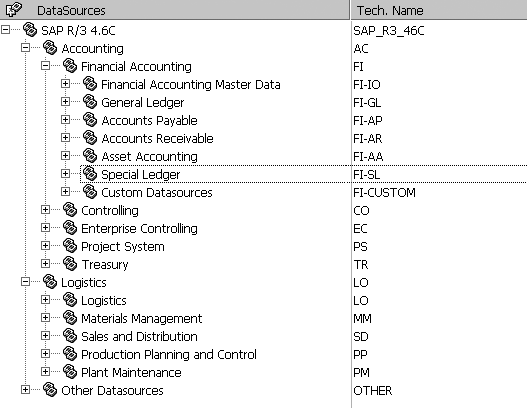
Figure 2
Example of a customized APCO hierarchy
Remote Activation of Business Content DataSources
New in the BI capabilities in SAP NetWeaver 2004s is the ability to remotely activate a DataSource in the SAP source system during business content activation.
In the past, to activate business content you had to activate processes in two systems. First, you activated the Application Component Hierarchy (APCO) and all necessary DataSources in the SAP source system. Then you activated the necessary BW content in BW from the Administration Workbench.
The problem with this is that most people tend to activate all DataSources with little thought as to what they will actually use for that particular installation. Now in SAP NetWeaver 2004s, if you activate a particular InfoProvider and all data flow before it, SAP NetWeaver 2004s remotely activates the necessary DataSource in the source system as well. Because you now can view and manage DataSources in SAP NetWeaver, this limits their number, making the general navigation of SAP NetWeaver simpler. During this process, the system also automatically replicates DataSources to the system. This means that the manual activation of a DataSource via transaction RSA6 is no longer required (although the process still works). Note that for this process to work, you’ll need to have the role SAP_RO_BCTRA and authorization object S_RO_BCTRA on your user ID in the SAP source system.
Nathan Genez
Nathan Genez is an SAP FI/CO- and SAP BW-certified consultant who has worked with SAP ERP since 1996, with an emphasis on the capital accounting modules: PS, IM, and FI-AA. A former platinum consultant with SAP America, Inc., he has worked with SAP BW since release 1.2B. He is currently a managing partner at Serio Consulting in Houston, Texas.
You may contact the author at nathan.genez@serioconsulting.com.
If you have comments about this article or publication, or would like to submit an article idea, please contact the editor.




 Premium
