With the new general ledger (G/L), you no longer need custom programs or user exits to obtain the asset balances for segment reporting. Instead, you can update profit center/segments details for all asset transactions and depreciation postings in the new G/L. Find out what settings you need to make in Asset Accounting (FI-AA) to make it happen.
Key Concept
Costs and quantities are posted to account assignment objects. In any SAP system, the account assignment objects in asset transactions are generally derived from the assigned cost object in asset master data, such as cost center and internal order. The new G/L introduces new account assignment objects, like segment or profit center, which are not possible to maintain on the asset master data directly.
Asset Accounting (FI-AA) in the new G/L requires special configuration methods for segment reporting to satisfy diverse asset accounting requirements. I will explain the prerequisite settings in FI-AA to get balanced books at the profit center/segment level and show how splitting and balancing functions of new G/L are supported by FI-AA.
Activating and configuring account assignments objects is the key to successful segment reporting with the new G/L. While most people are familiar with the link between FI-AA and Cost Center Accounting or internal orders, fewer may know how to derive the segments and profit centers to ensure that the new G/L balances in mySAP ERP. They are either derived automatically from cost objects in the asset master data or the cost objects entered during the postings. I’ll show how to set up the system to enable this functionality.
The account assignment objects were limited in the old releases. The following account assignment objects became available in the asset master record with SAP R/3 Enterprise Core 4.70 (SAP_APPL 470):
- Funds center
- Funds center for investment purposes
- Functional area
- Functional area for investment purposes
- Fund
- Fund for investment purposes
- Grant
- Grant for investment purposes
- Real estate object
- Work breakdown structure (WBS) element (for costs)
Note that profit center and segment are not on the list. These cost objects were derived from the available account assignment objects or entered manually during the posting. For example, if cost center were active, you could derive profit center details from the cost center master data and segment detail from the profit center maintained in the cost center. Once the account assignment objects are configured to get the profit center/segment details to new G/L, however, splitting and balancing are done online and there is no need to wait for closing to get segment reporting.
Figure 1 shows the customizing screen of account assignment objects available to derive profit center/segment details in asset transactions. Activate the account assignment objects needed for asset accounting transactions and make the relevant settings for these account assignment objects. Whether to put an activation flag on the accounts assignment objects depends on your business requirements. For example, if you activate cost center, internal order, and WBS element, these objects will be available in asset postings. You will be able to post depreciation directly to the WBS element defined in the asset master data. You may also need to capture acquisition and production costs (APC) values on a functional area, which requires activation of the functional area.
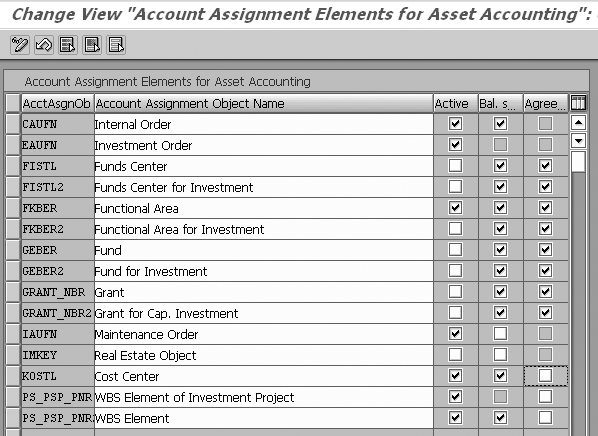
Figure 1
Maintain Account Assignment objects for FI-AA
Note
The active objects also have to be ready for input according to the screen layout rule for the time-dependent data. Maintain screen layout rules using menu path Asset Accounting>Master Data>Screen Layout>Define Screen Layout for Asset Master Data.
The balance sheet (Bal. Sheet) column in Figure 1 indicates whether the account assignment object is relevant to the balance sheet. If the flag is on, it is not possible to change the account assignment objects that are relevant to the balance sheet directly in the asset master record once the asset has been capitalized.
The Agreement column ensures that the account assignment object from the asset master is the same as the one in the posting line. If the flag is on, it is not possible to change the account assignment object during the posting. If it is off, you can alter the cost object during the postings. As you can see in the example in Figure 1, the agreement box is off for cost center and internal order, which means it is possible to change cost center and internal order and subsequently profit center/segment in the postings.
Follow IMG path Financial Accounting (New)>Asset Accounting>Integration with the General Ledger>Additional Account Assignment Objects> Activate Account Assignment Objects for the configuration of account assignment object for asset accounting.
After you have activated the account assignment objects in asset accounting, the next step is to assign the relevant account assignment objects to company code, depreciation area, and asset transactions. For segment reporting, you must activate the account assignment type APC Values Posting and Depreciation Run for the depreciation area for the corresponding cost objects. Follow IMG path Financial Accounting (New)>Asset Accounting>Integration with the General Ledger>Additional Account Assignment Objects>Specify Account Assignment Types for Account Assignment Objects (Figure 2). By making this configuration, you ensure that specified cost objects are populated for all APC cost transactions and depreciation postings.
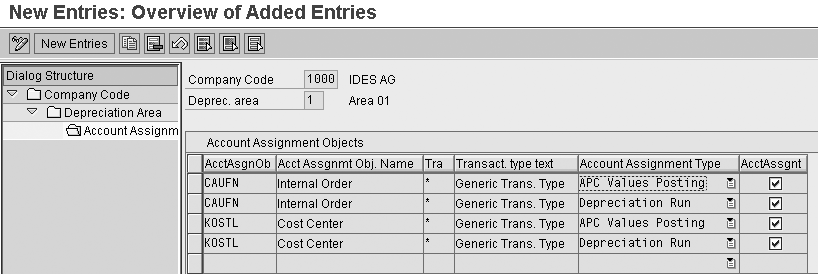
Figure 2
Account Assignment types for account assignment objects
Figures 1 and 2 show the fundamental configuration steps to derive the profit center and segment details in the asset transactions and depreciation run in new G/L.
Splitting and Balancing
In addition to these configurations, you need to activate splitting functionality for segment reporting, which I explained in my previous article. Once splitting is activated, the functionality works for all asset transactions and depreciation. Some configuration steps are necessary for splitting, such as assign document types to business transaction and classify asset accounts as item categories. Figures 3 and 4 highlight an asset acquisition splitting example. In the data entry view (Figure 3), the vendor invoice for the asset acquisition is posted against two assets (3405 and 3406). Since I assigned Account Assignment types for APC values postings to the cost center in Figure 2, the segment and profit center are automatically derived from the cost object maintained in the asset master data. With this configuration, all asset APC values postings receive profit center and segment details in the G/L postings.
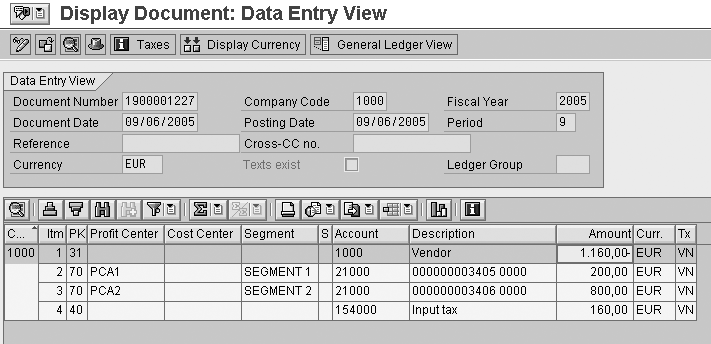
Figure 3
Use the Data Entry View for asset acquisition posting
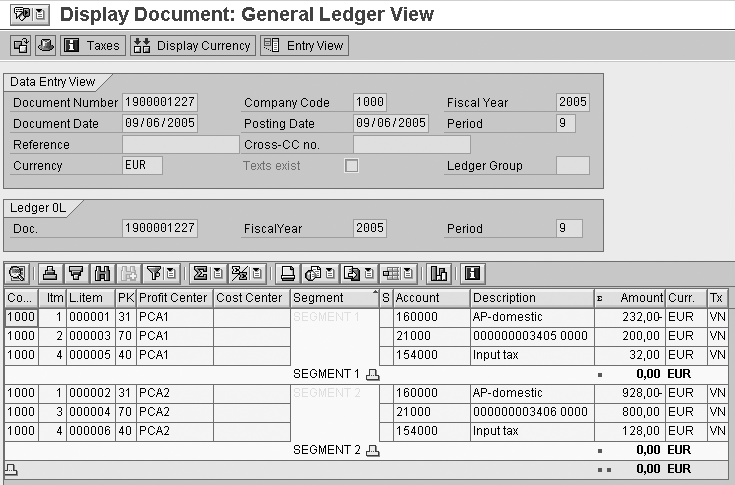
Figure 4
G/L view of asset acquisition posting showing split vendor and tax lines
The Segment and Profit Center fields are initially empty in the vendor and tax lines in the data entry view of the document. As a result of the new G/L splitting functionality, the vendor and tax lines have been split to the relevant profit centers and segments in proportion to the assets’ acquisition values (Figure 4). In other words, the total asset postings are EUR 1000 or EUR 200 to SEGMENT 1 and EUR 800 to SEGMENT 2. Therefore the total payables of EUR 1160 are split EUR 232 to SEGMENT 1 and EUR 928 to SEGMENT 2. The total tax of EUR 160 is split EUR 32 to SEGMENT 1 and EUR 128 to SEGMENT 2.
Note
The cost center information is not transferred to G/L line items at all, as it is normally not needed. If you have a business requirement to get the cost center to the asset transaction posting lines, refer to SAP note 395762.
The new G/L updates segment and profit center details for asset postings in real time so you do not need to transfer asset values to Profit Center Accounting (transaction 1KEK) during the period-end closing process. You now can use the new G/L functionalities to streamline the segment reporting rather than waiting until period-end close and using complicated methods and error-prone programs to get asset balances for segment reporting.
As you saw in Figure 2, the account assignment type depreciation run should be assigned to relevant account assignment objects to populate the profit center and segment details for depreciation. The splitting functionality also works in the depreciation run to support segment reporting.
Figures 5 and 6 show an example of how splitting works with a depreciation run.
In the asset depreciation test run (Figure 5), the depreciation is posted against two assets (3407 and 3408), showing the decrease in value of the asset due to obsolescence or use. As you see, the Segment and Profit Center fields are updated in the depreciation postings in Figure 6. Note that Figure 6 shows two asset depreciation postings: Asset 1 has a depreciation value of EUR 20 and Asset 2 has a depreciation value of EUR 33.
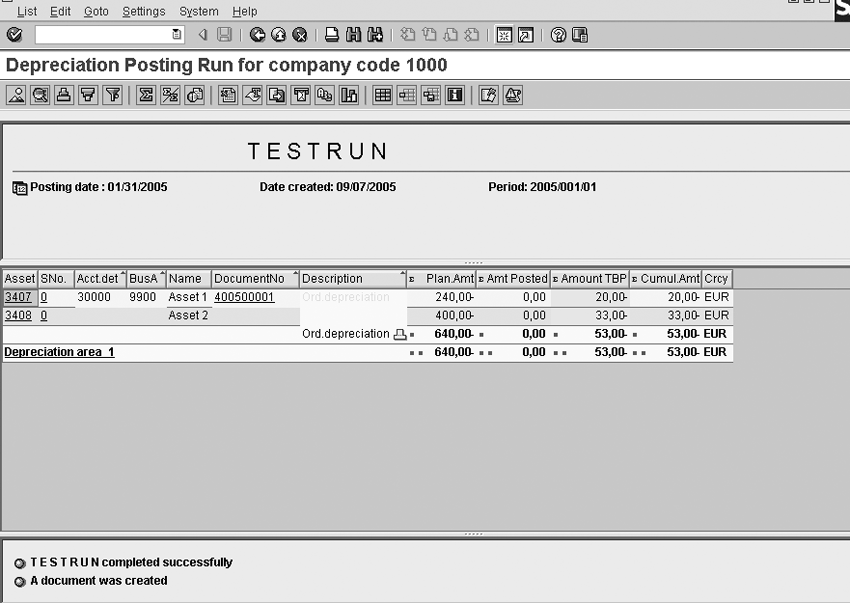
Figure 5
Execute the asset depreciation TESTRUN

Figure 6
Asset depreciation posting with updated Segment and Profit Center fields
Note
Program RAPOST2000 posts depreciation for FI-AA in Release R/3 Enterprise and later. This program is the successor to program RABUCH00. The main difference between RAPOST2000 and RABUCH00 is that the newer depreciation posting program does not support batch processing, but instead posts depreciation through the G/L accounts immediately during the program run. Thus, the new G/L depreciation program is the same but it supports the new G/L functions of splitting and balancing to produce segment reporting.
Aylin Korkmaz
Aylin Korkmaz is a manager in Accenture’s Global Energy practice specializing in finance streamlining and management reporting. She has seven years of experience working in global multi-stream projects containing challenging business process designs and change management issues. Aylin has deep process architecture and design skills, and is one of Accenture’s leading practitioners in the area of Financial and Strategic Enterprise Management modules. She has led design and configuration teams within complex SAP solution environments and delivered cutting-edge finance and business intelligence solutions.
You may contact the author at aylin.korkmaz@accenture.com.
If you have comments about this article or publication, or would like to submit an article idea, please contact the editor.




 Premium