Learn the configurations for various formats for Brazilian electronic bank statements (EBS). Follow step-by-step instructions for preparing a payment run for banking receivables and payables specific to Brazilian banks.
Key Concept
Brazilian banking involves various formats, including FEBRABAN and Bradesco. FEBRABAN is the most popular format used for most of the banks in Brazil. Bradesco is another important format used for any document transactions used in Brazil. It is also called Banco Bradesco.
An electronic bank statement (EBS) varies from country to country, and in general, an electronic document sent by the bank provides details of the transactions done by the account holder. A bank can remit an EBS in the following formats: SWIFT, Multicash, or BAI. In an SAP system this statement is used to perform an automatic reconciliation. However, for Brazil, the format of an EBS is different. My examples are based on the requirements of an implementation project that I executed in the US. Later, the BRAIL EBS was used when this project was rolled out in Brazil.
Based on my experience I found that the Brazil configuration was complex owing to the different formats used. Some of the Brazilian formats that were used in this project were FEBRABAN and Bradesco. I used the entire EBS-based FEBRABAN format as a reference for the configuration shown in my examples.
During the rollout in Brazil, I noticed that banks that had used the FEBRABAN format do not always use the codes the same way. The payment and transaction codes were derived based on various business transaction events that the customer had with the bank. The format used in Brazil involves many new payment codes that are required to be tested during the implementation phase.
The test phase also had to undergo extensive testing on bank statements as payment codes are always a part of any files. This requirement for the implementation phase posed a real challenge in the rollout. We had to make sure we understood the requirement for business processes for Brazilian customers.
I adopted the following approach for the aforementioned issue: To have all bank transactions being posted according to their nature and per the business’ requirements, I proposed the solution to create two different posting rules for FEBRABAN: FEBRABAN and FEBRAI.
Note
Posting rules are mainly related to posting transactions. In an SAP system, posting rules denote whether a business transaction is related to any accounting transactions in a bank. Posting rules also indicate whether a business transaction affects subledger postings.
I now discuss the details for preparing a payment run for an EBS in Brazil in four steps:
- Set up a payment method per country (e.g., Brazil) for a payment transaction
- Set up a payment method per company code in Brazil
- Define the sets of instructions to be executed for a payment run
- Define a house bank and payment program determination for Brazil
Step 1. Set Up a Payment Method per Country for a Payment Transaction
Specify the various payment methods that are used for various vendor payments in Brazil. This configuration is required from a payables perspective. To carry out the activity, follow IMG menu path Financial Accounting > Accounts Receivable/Accounts Payable > Business Transactions > Outgoing Payments > Automatic Outgoing Payments > Payment Method/Bank Selection for Payment Program > Set Up Payment Methods per Country for Payment Transactions (Figure 1).

Figure 1
Specify a payment method
I now discuss the concept of Boleto, which is a commonly used format specific to Brazil. You need to specify the type of payment method in question (such as check or bank transfer) and any other features or attributes of that payment method (the payment method is used for personnel payments or payment of any type of services or agents, for example). When you select a payment method, only the characteristics that are appropriate for that payment method are displayed, and the payment method becomes a controlling feature. Thus, you can only select fields that are relevant for the selected payment method. You can make fields hidden or visible based on the status profile. Also the payment medium program that was used in this configuration contained specific documentation related to Brazil.
Per the business requirement, in this list you need to enter the currency that is permitted for this payment method. Follow menu path Financial Accounting > Accounts Receivable/ Accounts Payable > Business Transactions > Outgoing Payments > Automatic Outgoing Payments > Payment Method/Bank Selection for Payment Program > Set Up Payment Methods per Country for Payment Transactions (Figure 2).
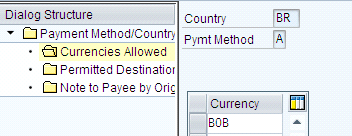
Figure 2
Maintain currencies as per the payment method
The business wanted the payment method to be used as a destination country for Brazil. The business also wanted the payment method in the list to be restricted to Brazil only and therefore the entries shown in Figure 3 were maintained.
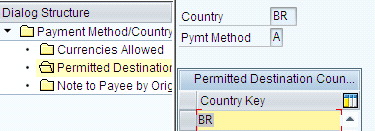
Figure 3
The destination countries allowed and maintained in an SAP system
Note
In my example, the client wanted to specify the destination country so that the payment method is restricted to Brazil only and not any other country.
The Boleto method involves the following steps:
- Perform the sales operation that leads to sales creating accounts payable (AP) in the SAP system
- Execute the routine to print Boleto
- The customer receives Boleto and then proceeds to Boleto payment. The customer needs to receive the bank statement that is in the Brazilian Boleto form to originate the AR process. When the customers receive the statement, they proceed with the payment mechanism. Banks then generate the collection file. Based on that a collection program is devised through a technical program coded by ABAP that extracts various data from the EDI file. Thus, the file that was transmitted to the bank via EDI was converted to an Intermediate Document (IDoc) and then based on setting up of a new BAdI, the results were received followed by the updating of the collection file.
Note
The file from the customer comes in the form of EDI, and the SAP system has various middleware interfaces (e.g., SAP NetWeaver Process Integration) that convert the EDI into an IDoc so that the SAP system can understand it.
The collection file was later integrated with payment postings. (A payment posting is the mechanism routed through during the time of payment. An SAP system has various payment posting methods for AP and AR.) Thus, the mapping of the aforementioned scenario through the standard SAP system was rather complex and posed a challenge for implementing it.
Step 2. Set Up a Payment Method per Company Code in Brazil
This step defines which payment methods can be used per company code and determines the conditions under which a payment method should be used. Follow IMG menu path Financial Accounting > Accounts Receivable/Accounts Payable > Business Transactions > Outgoing Payments > Automatic Outgoing Payments > Payment Method/Bank Selection for Payment Program > Set Up Payment Methods per Company Code for Payment Transactions.
The various forms for the Boleto payment advice need to be customized as per the requirement for the development of various SAP script forms that are not provided in a standard SAP system. These forms need to be maintained in the configuration shown in Figures 4 and 5.
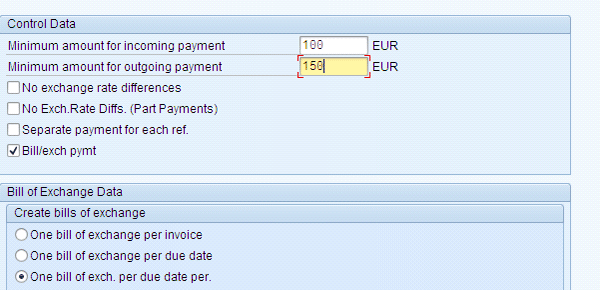
Figure 4
The assignment of an amount that is reflected in the output of the payment program

Figure 5
The assignment of a form based on the payment method maintained in the SAP system
Step 3. Define Sets of Instruction to Be Executed for a Payment Run
Define the instruction that is used during posting of transactions. Different countries have various posting methods, and based on these methods, the SAP system provides some basic instruction code that needs to be in place so that transactions follow the country-specific regulations. The mode of payment is determined based on the control feature in the instruction code. For Brazil the instruction code is used to identify the operation on the batch file sent to the bank. This key is of paramount importance because any payment methods related to an invoice involve vendors, and in any vendor master data, you maintain house banks. Based on the country code the batch file is sent to the banks of the respective vendors for posting accruals to a vendor account.
Follow IMG menu path Financial Accounting > Accounts Receivable/Accounts Payable > Business Transactions > Outgoing Payments > Automatic Outgoing Payments > Payment Media > Data Medium Exchange > Define Instruction keys. Maintain the data for the following menu path: A > 01 > DUPLICATA - FEBRABAN / ITAÚ > 1 > 3. The components of this path are explained in Table 1.

Step 4. Define a House Bank and Payment Program Determination for Brazil
Similar to any standard country settings required for an AP perspective, the house bank needs to be set up and also needs to be assigned in the vendor master as part of payables processing. Apply the following rules when creating the house banks:
- Ctry (Country) (e.g., BZ for Brazil)
- Bank key (e.g., XXXXYZZZZ)
- Bank code (e.g., XXXX). A bank code is a rule that varies from country to country. It acts as an identifier for the banks that may have several branches in different countries.
- Bank digit (e.g., Y). A bank digit is the bank’s own personal identification number so that any user can refer to this digit when executing transactions in another bank.
- Branch code without digit (e.g., ZZZZ). Every bank in its own jurisdiction area has a code that enables the same bank in a different branch area to identify the other bank. In case the branch doesn’t have five digits, a 0 needs to be placed on the left (the first Z). Brazil uses this nomenclature. Thus, I now describe the rules that were used for the configuration of the house bank in Brazil.
Note
For any payment posting via check to a vendor, a house bank needs to created. The house bank needs to be assigned to the vendor master using transaction code XK01. For any consumer product-oriented industry a vendor can be treated as a customer and vice versa, especially for business processes such as returns when the vendor is treated as a customer – as the receiver of defective goods, for example.
The following rules were used to create the Bank Key (BK), the Control Key (CK), and the Bank Account (BA). A bank key is an identification of bank account that varies from country to country. A control key is a combination of the bank number and bank account that denotes the bank control key and is useful for any transactions affecting subledger postings. A bank account is the account number of any individuals who have to be referred to when they deposit or withdraw money from the account they have in the bank.
When the bank account just has one digit use the format shown in the following example (this format is the one most commonly used by Brazilian banks):
- BK: 45680029 where 456 is the bank number, 8 is the bank digit, and 0029 is the branch number
- CK: 67 where 6 is the branch digit and 7 is the bank account digit
- BA = 4567 is the bank account number without the digit
When the bank account has two digits, use the format shown in this example:
- BK: 48766789 where 487 is the bank number, 6 is the bank digit, and 6789 is the branch number
- CK: 5 <blank>. The CK usually has the branch digit + bank account digit, perhaps when the account has two digits, the second position from the control key (CK) must be blank.
- BA: 4567-89 where 4567 is the bank account and 89 the bank account digit. When the digit is filled out with the bank account, it needs to be separated by the hyphen (-).
Every bank has to execute a payment program for making payments from the bank. This program enables you to select banks or bank accounts from which payment is to be made. To carry out the activity, use transaction code FBZP or follow IMG menu path Financial Accounting > Accounts Receivable/Accounts Payable > Business Transactions > Outgoing Payments > Automatic Outgoing Payments > Payment Method/Bank Selection for Payment Program > Set Up Bank Determination for Payment Transactions Establish Functions and Processes.
This step was done as per transaction F110, the standard payment transaction that SAP provides. For each payment method that is assigned for Brazil, a payment medium country was designed that was used for creating payment media for the country. Here against each payment method and country a program was devised and based on the output media Boleto was deemed as the major component being printed by company.
To carry out the activity, follow IMG menu path Financial Accounting > Accounts Receivable and Accounts Payable > Business Transactions > Outgoing Payments >
Automatic Outgoing Payments > Payment Media > Make Settings for Classic Payment Medium Programs > Assign Payment Forms for Payment Method in Company Code.
Creating the program was customized a lot to incorporate Boleto features. (The customization involved extensive programming in ABAP, and is beyond the scope of this article.) Using transaction code SE38 we created various variants with program name RFFOBR_D. The major components were Boleto lot No, file name and an alternate BOLETO form that was completely customized. The preceding setting was a real deviation from a standard SAP system, and it was specific to Brazil.
Note
SAP has standard forms available for the Boleto program. You can access them via transaction F110 in AVIS.
Rina Mukherjee
Rina Mukherjee is an FI consultant and has worked mostly as a freelancer. He has expertise working in the area of AP, AR, and integration of finance with material management. He also covered some areas of SAP ERP HCM. He has worked on country-specific projects and has been involved in testing, rolling out, and upgrading SAP modules.
You may contact the author at editor@financialsexpertonline.com.
If you have comments about this article or publication, or would like to submit an article idea, please contact the editor.



