Learn how to leverage the planned compensation infotype by maintaining compensation data at the job or position level using different planned compensation types.
Key Concept
Personnel Development (PD) infotype 1005 (planned compensation) can be used to define the planned compensation at the job or position level. The information can be stored according to a company’s pay scale structure or pay grade structure. If integration with master data is active, the information stored in this infotype suggests default values on infotype 0008 (basic pay) records. There may be multiple planned compensation records created for a job or position for different countries. Infotype 1005 is also used as a benchmark to compare planned compensation data with real compensation data. If any information in this infotype is changed, there are ways to automatically or manually update infotype 0008 (basic pay) with the changed information.
An efficient compensation model design is not complete without proper remuneration planning, which, in turn, dictates the pay strategies of your organization. The proper design also provides a baseline to help decision-makers control costs and gives them the flexibility to establish pay grades according to company policy. Pay structure and the associated salary ranges are the most powerful components of compensation design. The planned compensation infotype (1005) is used primarily to keep person-dependent compensation data in line with your company’s unique pay structure. This infotype also can be used for personnel cost planning.
There are three ways you can maintain planned compensation data in infotype 1005 for a job or a position:
- Pay scale structure
- Pay grade (salary) structure
- Direct input of salary range
Each option has a tab in infotype 1005. You can maintain only one tab at one point in time. The system displays pop-up messages that data will be lost when navigating from one tab to another after maintaining data in the earlier tab. Changing tabs also changes the remuneration type.
Pay Scale Structure
A pay scale structure is mostly used by companies at which pay scale grades are more rigidly defined and maintained in various regions. In this case, there are different pay scales for different groups depending on whether they are hourly or salaried employees. A pay scale structure also takes into account any collective agreement provisions when creating pay scales for different types of employees.
If you are using a pay scale structure for your company, you need to enter data in the Pay Scale tab of infotype 1005 (Figure 1). The data entered in the Country Grouping, P.scale (pay scale) type, PS (pay scale) Area, ESG for CAP (employee subgroup grouping for collective agreement provision), Pay Scale Group, and PS level fields are automatically validated from table T510. The prerequisite for using this tab is that you need to configure table T510 based on your company’s pay scale structure. Table T510 can be configured by following IMG menu path Personnel Management > Personnel Administration > Payroll Data > Basic Pay > Revise Pay Scale Groups and Levels. Infotype 1005 also displays the minimum and maximum wage configured for the pay scale structure attached to the job or position.

Figure 1
Pay Scale tab
The data entered in this tab for a job or position can suggest the default values of pay scales (Figure 2) in infotype 0008 (basic pay).
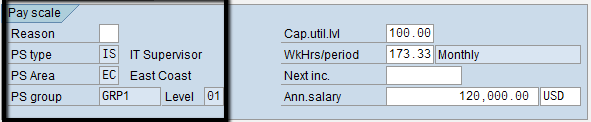
Figure 2
Pay scale default values in basic pay record
Pay Grade (Salary) Structure
Salary grades are more suitable for salaried employees who are in an unstructured environment as they specify salary ranges for different grade levels.
Salary (pay grade) structure consists of pay grade type, area, group, and level. To use the grade functionality of this infotype, first you need to store pay grades and respective salary ranges in table T710. You maintain table T710 by following IMG menu path Personnel Management > Personnel Administration > Payroll Data > Basic Pay > Check Total Salary Against Salary Range > Define Pay Grades and Levels. You can also configure table T710 by maintaining cluster table view V_T710CL using transaction code SM34. In this configuration step, you can specify the minimum, maximum, and reference salary ranges for the combination of pay grade type, area, grade, and level. Infotype 1005 displays the salary ranges configured for the pay grade structure attached to the job or position. Depending on configuration, the system can display warning or error messages in infotype 0008 if the base salary is outside the set range.
To store information from the salary structure, you use the Pay Grade tab of infotype 1005 (Figure 3).
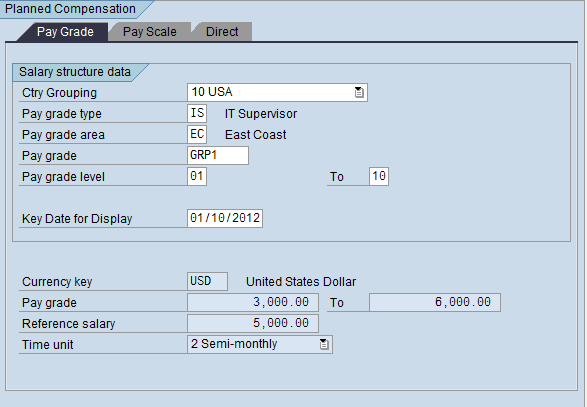
Figure 3
Pay Grade tab
Similar to the data for pay scales, the data entered in this tab for a job or position may propose default values of pay grades in infotype 0008 (Figure 4).

Figure 4
Pay grade default values in the basic pay record
Tip!
If you plan to implement SAP Enterprise Compensation Management, you have to switch from maintaining table T510 to maintaining table T710.
Note
The planned compensation type (field P0008-CPIND) is automatically set, and can be changed from pay scale to pay grade using the Edit menu of infotype 0008 (Figure 5). If the type of planned remuneration is salary (pay grade), the P0008-CPIND value is S. When the type of planned remuneration is pay scale, the P0008-CPIND value is T. The planned remuneration type value also can be defaulted by maintaining feature TARIF.

Figure 5
Switch between pay scale and pay grade structures
Direct Input of Salary Range
Using the Direct tab, you can enter the minimum and maximum planned amounts paid for a job or position, along with the currency and time unit (Figure 6). This option is used when there is no well-defined salary structure for the job or position (e.g., executive salary ranges).

Figure 6
Direct tab
Integration with Basic Pay
The integration between planned compensation and basic pay is controlled by the PLOGI BSPAY entry in table T77S0. The value should be X (Figure 7) in order to default the planned compensation data (pay grade or scale type, area, group, and level) to the corresponding fields of infotype 0008 while creating a basic pay record. The value is left blank if no integration is active.

Figure 7
Integration between planned compensation and basic pay
When only one planned compensation record exists for a job or a position, planned compensation information from infotype 1005 is defaulted directly to infotype 0008. When you have multiple planned compensation records for a job or position, you can configure the feature TARIF to default to the correct pay scale type and area based on country grouping, enterprise structure, and personnel structure. You can always change the default values in infotype 0008 to any valid entries based on your pay scale or pay grade structure.
To compare the base salary of the employee with the planned compensation assigned to the job or position of the employee, run report RHCMPCOMPARE_ACTUAL_PLANNED (compare actual base salary to planned compensation). This report is also available on the SAP Easy Access screen under Human Resources > Personnel Management > Compensation Management > Information System > Reports > Employee Compensation Data > Compare Actual Base Salary to Planned Compensation.
Report RHECM_UPD_0008_FROM_1005 (update basic pay from planned compensation) can be used to update pay scale or pay grade fields of basic pay infotype 0008 when infotype 1005 is changed for the assigned job or position (Figure 8).

Figure 8
Update Basic Pay from Planned Compensation selection screen
Note
It is a common practice to develop a custom report to a compare the infotype 0008 record with the infotype 1005 data assigned to the job or position. The report output can be used for auditing purposes. Based on the report output you can manually correct master data in basic pay or change planned compensation information in infotype 1005. Report RHSOLO00 (planned labor cost report) provides the planned compensation information per position of selected organizational units by reading planned compensation data from infotype 1005.
You can use standard Business Add-Ins (BAdIs) definition HRBAS00INFTY to customize infotype 1005 process logic. You can write code in the PBO (process before output) or PAI (process after input), and update methods of this BAdI to validate the values being displayed or saved while the infotype 1005 record is being processed.
Debanjan Chattopadhyay
Debanjan Chattopadhyay specializes in SAP HCM (Personnel Administration, Organizational Management, Compensation, Payroll, ESS, and MSS). He has worked on multiple SAP HR/Payroll projects comprising full-cycle implementations, upgrades, post-implementation support, and outsourcing engagements since 1997. He currently works as a senior SAP HR manager and solution architect for Citrix Systems.
If you have comments about this article or publication, or would like to submit an article idea, please contact the editor.



 Premium