/HANA
Gain an understanding of how SAP HANA works with SAP NetWeaver BW, and examine the business process changes that come from the release. Learn about how SAP NetWeaver BW powered by SAP HANA differs from SAP NetWeaver BW on a traditional relational database management system, and the new capabilities that are available within the release. In addition, find how this offering provides a simpler environment to manage when compared to traditional relation database management systems.
Key Concept
SAP HANA is a multipurpose, data-source-agonistic, in-memory appliance that combines SAP software components optimized on hardware provided by SAP partners. SAP HANA provides capabilities for real-time operational analytics and use as an Agile data mart. It is also available to be deployed as a database for SAP NetWeaver BW.
Historically, SAP customers who were looking to manage large volumes of data have deployed SAP NetWeaver BW. Generally, SAP NetWeaver BW requires traditional relational database management systems such as Oracle DB, Microsoft SQL Server, or IBM DB2. In these environments, SAP NetWeaver BW provides a foundation for enterprise data warehousing, supporting data from SAP and third-party source systems. However, now SAP offers a new data warehouse product: SAP NetWeaver BW powered by SAP HANA.
What follows is an overview of how SAP NetWeaver BW has changed with the introduction of SAP HANA as a database option. I assume the reader already has SAP NetWeaver BW knowledge.
With HANA running on top of SAP NetWeaver BW, there are changes to the IT landscape to consider, as well as a need to understand how these IT changes lead to specific business benefits. For the business, the key changes are improved reporting performance, real-time data access, and the ability to simulate and plan faster. For IT, there is cost savings through improved loading performance, simplified maintenance, and greater modeling flexibility. Within this article, I focus on the key business benefits. In a follow-up article, "3 Time-Saving Results of Using SAP HANA with SAP NetWeaver BW," I outline the key IT benefits.
Improved Reporting Performance
First and foremost, let’s get the red herring out of the way. Everyone always asks, “Is SAP HANA just about performance? Is it just a speeds-and-feeds world?”
Although SAP HANA is not just about performance, as I discuss later, the reporting performance is a key capability that is enhanced by the in-memory appliance. Companies running SAP NetWeaver BW on a relational database management system (RDBMS) can see dramatically improved performance by moving to the SAP HANA appliance. Beyond performance improvement, yortant?”
SAP first introduced in-memory acceleration for reporting with SAP Business Warehouse Accelerator (BWA). While SAP BWA allowed users initially to accelerate InfoCubes, and then DataStore Objects (DSO), this led to end users getting drastically different experiences when working with the SAP NetWeaver BW environment.
If a dataset used for reporting happened to be in BWA, users got fast response times on the full granular dataset, regardless of what dimension they drilled down on. However, if a user were reporting on a dataset not indexed into BWA, the user experienced suboptimal performance compared to BWA. This discrepancy, while understood well by IT, didn’t make much sense for business users. Business users instead expect consistent performance regardless of the dataset they report on or the granularity of drill-down they use.
SAP has addressed this discrepancy by putting the SAP NetWeaver BW instance on SAP HANA. In this case, all InfoCubes and DSOs store their datasets directly in memory (Figure 1).
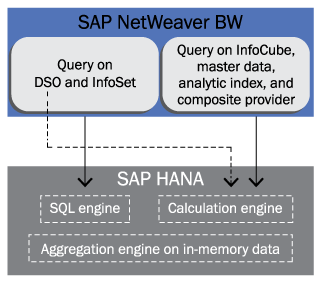
Figure 1
All queries on DSOs and InfoCubes operate in-memory
However, it is not just the memory that improves performance. The massively parallel processing (MPP) architecture of SAP HANA allows you to use parallel processing across nodes, datasets, and even CPU cores within SAP HANA. MPP refers to the ability to parallelize queries and computation to take advantage of discrete memory and CPU compute power.
MPP, coupled with the dataset being stored in a columnar format, helps reduce the I/O for analytical queries. The combination of MPP, in-memory, and columnar storage are the three key technologies that provide consistently improved performance.
However, if you put a faster database under SAP NetWeaver BW, wouldn’t you just get faster database read times? A lot of query response times are specifically dedicated to OLAP processing in the ABAP tier. One of the key ideas to note is that with SAP NetWeaver BW on SAP HANA, SAP did more than just certify SAP HANA as a database. SAP has rewritten the SAP NetWeaver BW stack to take advantage of SAP HANA.
Whenever possible, OLAP operations and aggregation operations that were previously implemented in ABAP have been pushed into the SAP HANA database. In this way, SAP HANA performs the bulk of the processing and execution of queries, and the ABAP tier carries significantly less workload for queries. The key premise is that data-intensive operations occur close to where the data is stored and the core MPP, in-memory, and columnar constructs are used for both data persistency as well as query processing. This is outlined in Figure 2.
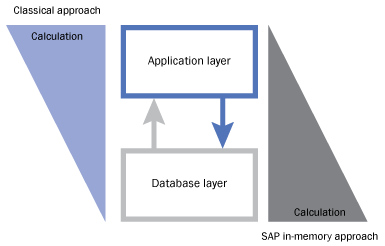
Figure 2
Movement of calculations to the in-memory database layer
The net result is users get consistently improved performance on all of their SAP NetWeaver BW data, not just some of it. The query response times are similar to that of SAP BWA.
However, one point to note is the generation of hardware for SAP HANA, which has progressed since the SAP BWA days. While BWA certified Intel Nehalem (8 core) processors, SAP’s current generation of hardware for SAP HANA uses Intel Westmere (10 core) processors, and will likely use 12-core processors in the near future. Additionally, the smallest certified configuration of memory for SAP HANA is a 128 GB server with scale-up configurations up to 1 TB of memory. Further, as of this writing, vendors already have certified configurations for scale-out up to 8 TB of memory. These newer systems are significantly larger than SAP BWA environments today. See the sidebar, "Scale-Up and Scale-Out," for more details.
Scale-Up and Scale-Out
Below are brief details about scale-up and scale-out for SAP HANA:
- Scale-up: Today, rack servers can easily support up to 64 cores and 2 TB of memory per server. Companies can scale up their racks to the maximum configuration certified on a rack server. See the list of certified hardware at services.sap.com/pam > SAP HANA for more details. As the hardware technology improves, vendors will likely provide configurations with larger numbers of cores, CPUs, and memory per server.
- Scale-out: SAP can have the SAP HANA software support scaling through distribution across multiple instances. This is either rack or blade, and SAP works with hardware partners to certify the optimal configurations for customer environments. Distribution of workloads basically works on the concept of having a single master instance and having many other “slave” instances to share the workload (similar to BWA today).
Real-Time Data Access
Beyond improved reporting performance, businesses also want more timely data. Today, with SAP NetWeaver BW on a traditional RDBMS, the process to get data into the environment is typically a nightly batch job of running extraction from the SAP Business Suite or other, third-party sources into SAP NetWeaver BW. However, SAP HANA provides the capability to consume data in real time by replicating the transactions as they happen from the SAP or third-party transactional source system (Figure 3).

Figure 3
Using real-time data within SAP NetWeaver BW
The major benefit from real-time reporting comes from understanding that real-time data helps augment existing SAP NetWeaver BW environments. For example, companies typically have sales order data in SAP NetWeaver BW that includes sales order header and sales order line item details, which are combined in a MultiProvider in SAP NetWeaver BW. However, if you’re interested in open order reporting, you cannot get this from SAP NetWeaver BW on a traditional RDBMS today, as SAP NetWeaver BW has nightly batch windows for loading, and by those times, an order status could have changed.
Prior to SAP HANA, the only way to get open orders reporting was to conduct this reporting in SAP ERP Central Component (SAP ECC). However, with SAP HANA, the open orders data is logically made available in the SAP NetWeaver BW environment by using transient providers. This data can be merged with sales order data in SAP NetWeaver BW through a MultiProvider or composite provider. This provides a full end-to-end view of sales order data, whether it be a historical year-over-year view for 10 years or an up-to-the-second status on any given order.
While SAP NetWeaver BW previously has provided real-time extraction, usually this information was extracted into the inbound layer (e.g., DSOs). The data was not made available immediately for reporting due to requiring activation of the data, then the data being pre-aggregated into InfoCubes or aggregates (for reporting performance reasons). Fundamentally, the data coming from SAP ECC was also never really real time, but more near real time because there was usually a five-minute polling interval for the real-time extractors. Additionally, the real-time extractor approach also had the disadvantage of putting extra strain on the network, both SAP NetWeaver BW and SAP ECC, due to the continuous polling mechanisms.
SAP HANA’s real-time reporting provides the benefit of having a full, up-to-the-minute view of data along with the full transactional history in SAP NetWeaver BW. This also means that your consolidated master data in SAP NetWeaver BW (e.g., customer hierarchies, product hierarchies) can be used when reporting on this real-time data.
Again, what makes all of this possible is the real-time replication capabilities of data brought into SAP HANA and the ability of in-memory, MPP, and columnar database technology that allows reporting on the transactional data as it happens, without pre-aggregation or materialization.
Additionally, companies can use SAP NetWeaver BW as a unified reporting access layer for any type of reporting, whether it is analysis, exploration, or dashboards. This becomes important as they plan their data authorization strategy; SAP NetWeaver BW analysis authorizations can help secure all of their data, including the real-time data.
Simulate and Plan Faster
Another result of running SAP HANA under SAP NetWeaver BW is the ability to achieve better budgets and forecasts through faster planning and simulation. Traditionally, SAP NetWeaver BW provided the capabilities of SAP BW Integrated Planning (BW-IP) as a toolset for building planning applications. In this toolset, data is read from the underlying RDMBS for SAP NetWeaver BW and is moved into the SAP ABAP application tier. Within ABAP, deltas are calculated, planning logic is executed, and the data is written to the database. However, when SAP NetWeaver BW uses SAP HANA as an underlying database, there is an additional component available called the Planning Application Kit, which moves the planning logic into SAP HANA (Figure 4).
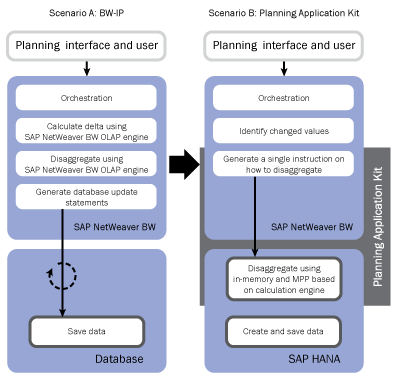
Figure 4
The Planning Application Kit provides planning logic implementation in SAP HANA
The result of executing planning operations close to where the data resides is that the system does not spend time transporting large datasets back and forth from the database to the application tier. The system also uses the multi-core, in-memory-based engine to execute the planning logic, which is compute intensive.
For example, in Figure 5, assume that a business planner wants to change the FY 2011 plan for Germany from 250 Euros to 300 Euros.

Figure 5
Sample planning dataset
Key assumptions of the data model include:
- 52 weeks per year
- 500 branches for which you need to plan
Assume you want to execute this plan based on the Scenario A architecture in Figure 4. Within BW-IP, the operations occur as follows:
1. Determine the delta > +50
2. Disaggregate (in the application server):
- Per week (52)
- Per branch (500)
- 26,000 combinations and values
3. Send 26,000 values to the database to save
When testing this scenario in the lab, it took about three minutes to complete all the logic as stated above.
Now let’s look at the same planning cycle based on Scenario B in Figure 4, for which the Planning Application Kit is enabled. The operations occur as follows:
1. Determine the delta > +50
2. Send one value to the database with instruction to disaggregate
3. Disaggregate (in the database engine):
- Per week (52)
- Per branch (500)
- Create + save 26,000 values
In the lab, this scenario with the Planning Application Kit enabled only took 22 seconds.
Largely, what this means is that you can iterate on your forecasts and budgets more quickly, and run more simulations of your forecast, before settling on your numbers. This likely yields better forecasts and improved business productivity because you can plan how you operate your business with greater precision.
Also, one of the traditional problems in planning is the granularity at which you plan. Customer- and stock-keeping-unit-level plans for profitability have traditionally been troublesome due to performance limitations. When SAP NetWeaver BW is on SAP HANA with the Planning Application Kit enabled, the performance improvements allow you to plan at a greater level of granularity.
For example, when planning customer and product level profitability, the sheer processing required for a top-down plan to disaggregate to 100,000 customers and 50,000 products can generate 5 billion record combinations for a disaggregation operation. In the past, this type of processing would have taken — at the very least — an overnight process to calculate the customer- and product-level granular plan. This approach is largely impractical prior to using the Planning Application Kit, in which calculations have been moved into memory.
Prakash Darji
Prakash Darji is an experienced professional with more than 10 years of end-to-end experience in enterprise software. He has a broad depth of experience including corporate strategy, sales, product management, architecture, and development. He has experience in product launch activities, including positioning, packaging, and pricing. He has delivered numerous product releases in a variety of capacities through his career. He thrives on building high-performing, scalable teams to achieve strategic deliverables, whether they close strategic sales deals, roll in product features, or roll out new releases. He is a recurring author for several publications and a speaker at SAP conferences around the world. Prakash is on LinkedIn at https://www.linkedin.com/in/prakashdarji.
You may contact the author at editor@BIexpertOnline.com.
If you have comments about this article or publication, or would like to submit an article idea, please contact the editor.




 Premium
