Reducing supplier schedule variability is critical to reducing total supply chain costs for the aftermarket service parts industry. Learn how distribution requirements planning (DRP) stability rules in SAP Service Parts Planning (SPP) can reduce schedule variability and optimize planning from order to delivery. Learn how to configure DRP stability rules.
Key Concept
Supply chain schedule stability is critical to keeping costs down, but the ability to change supplier schedules, as part of a rapid response to changing conditions, can be equally important. Distribution requirements planning (DRP) stability rules determine DRP’s responsiveness to changing requirements. These rules ensure that schedule changes are made only within certain predefined parameters, thereby maintaining optimal supply chain performance.
Supplier schedule variability is one of the major challenging factors to supply chain optimization. Minimizing that variability can be exceptionally difficult, and some factors, such as weather or volume of traffic during transportation within your supply chain, can’t be controlled. However, you can avoid other factors to improve the efficiency of the supply chain.
One such factor is the frequency of schedule changes communicated to the supplier. Frequent schedule changes result in additional supply chain costs and lower efficiency. These changes also can affect the relationship between the supply chain partners.
Distribution requirements planning (DRP), part of SAP Service Parts Planning (SPP), is a time-phased requirements planning system that centrally procures material for the distribution network. DRP includes stability rules to reduce schedule variability to suppliers by requiring that a series of thresholds pertaining to shortage or excess be exceeded before DRP can make any schedule changes.
We explain the concept of DRP stability rules based on our understanding of implementing this functionality and explore how DRP stability rules are used by supply chain analysts to effectively reduce the schedule variability to the suppliers.
DRP Horizons
- Freeze. This represents the period in which the supplier is not able to adequately react to schedule changes.
- Limited freeze. This represents the supplier lead time.
- Plan submission. This represents the DRP planning period when schedules are visible to the supplier as planned schedules.
- Planning. This is the total length of DRP planning from the current date until the end of the planning horizon.
Basic Configuration for DRP Stability Rules
Different stability rule profiles are used for different product attributes. Each of these profiles contains horizon-specific stability rules, within which are parameters that determine the threshold for schedule changes.
You can assign the stability rule profile either to the Product/Location through the product master or to the DRP service profile. Following are the four horizon stability rules profiles:
- Limited freeze (De-expedite)
- Limited freeze (Expedite)
- Planned submission (De-expedite)
- Planned submission (Expedite)
To configure the stability rules follow menu path SPRO > Advanced Planning and Optimization > Supply Chain Planning > Service Parts Planning > Distribution Requirements Planning (DRP) > Define Stability Rules for DRP Horizons or use the transaction code S_AP7_60000403 (Figure 1).
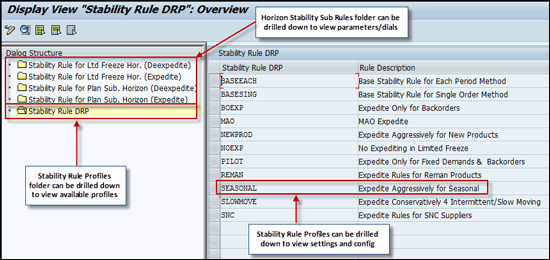
Figure 1
Structure for defining stability rule profiles and horizon stability rule profiles
It helps to think of the DRP stability rule profile in three sections. For example, click SEASONAL in Figure 1 to drill down into that particular stability rule profile (Figure 2).
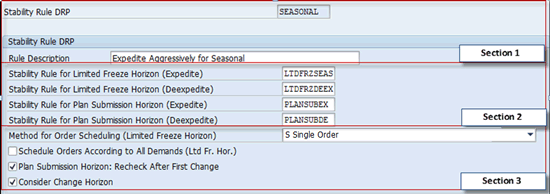
Figure 2
DRP stability rule profile
For the purposes of illustration, this screen is divided into three sections. Section 1 contains the name of the stability rule profile and a description of its function. Each stability rule profile has different horizon stability rules assigned to it.
Section 2 contains the different horizon stability rules assigned to the stability rule profile. You can assign the following horizon stability rules to the stability rule profile:
- Stability Rule for Limited Freeze Horizon (Expedite). Apply this rule when a shortage occurs within the limited freeze horizon. DRP uses these settings to determine whether the processed product location is eligible for expediting during this time horizon — that is, whether schedules can be added or increased to resolve the shortage.
- Stability Rule for Limited Freeze Horizon (De-expedite). Apply this rule when scheduled quantities exceed requirements within the limited freeze horizon. DRP uses these settings to determine whether the processed product location is eligible for de-expediting in the limited freeze horizon — that is, how much schedules can be reduced or canceled within this time horizon.
- Stability Rule for Plan Submission Horizon (Expedite). Apply this rule when a shortage occurs within the plan submission horizon. DRP uses these settings to determine whether the processed product location is eligible for expediting during this time horizon.
- Stability Rule for Plan Submission Horizon (De-expedite). Apply this rule when schedule quantities exceed requirements within the plan submission horizon. DRP uses these settings to determine whether the processed product location is eligible for de-expediting within this time horizon.
The pull-down menu and boxes in Section 3 determine how the stability rule profile is configured to do the planning and allow schedule placement. In the next section I discuss the settings to use to determine these profiles.
Method for Order Scheduling (Limited Freeze Horizon)
This pull-down menu offers three options:
- Single Order. This option allows only one expedite in the limited freeze horizon. Multiple de-expedites can occur, but only as full-schedule cancellations. Single-order de-expedites never decrease an existing schedule quantity. Therefore, if a schedule can’t be fully cancelled without causing a shortage, the schedule remains.
- Each Individual Period. This option allows multiple expedites and de-expedites based on the stability rules applied period by period. With each individual period, the de-expediting logic is allowed to either cancel an entire schedule or decrease the quantity of the existing schedule.
- No Change of Order Quantity. This option does not allow changes to the schedule quantities (expedite or de-expedite) in the limited freeze horizon.
The Schedule Orders According to All Demands (Ltd. Fr. Hor.) check box is considered only if Each Individual Period is selected as the method for order scheduling in the above pull-down menu. If this indicator is set and there is an excess or shortage within the limited freeze horizon, the system replans rounded net demand (constrained) for every period starting with the excess or shortage through the end of the planning horizon without considering stability rules.
When the Plan Submission Horizon: Recheck After First Change box is checked, the plan submission horizon stability rules are applied every time DRP plans.
When the Consider Change Horizon box is checked, DRP makes no schedule changes within the change horizon.
Limited Freeze Horizon (Expedite) Stability Rule
To access the Limited Freeze Horizon (Expedite) stability rule, click the second folder in the dialog structure shown in Figure 1. Click the row with Seasonal Aggressive rule, as shown in Figure 3.
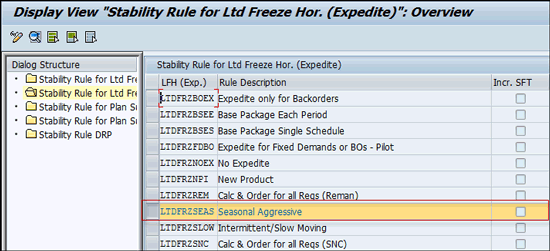
Figure 3
Click Seasonal Aggressive to get to the Limited Freeze Horizon (Expedite) stability rule
This takes you to the screen shown in Figure 4. There are four sections in the Limited Freeze Horizon (Expedite) stability rule, as shown in Figure 4.
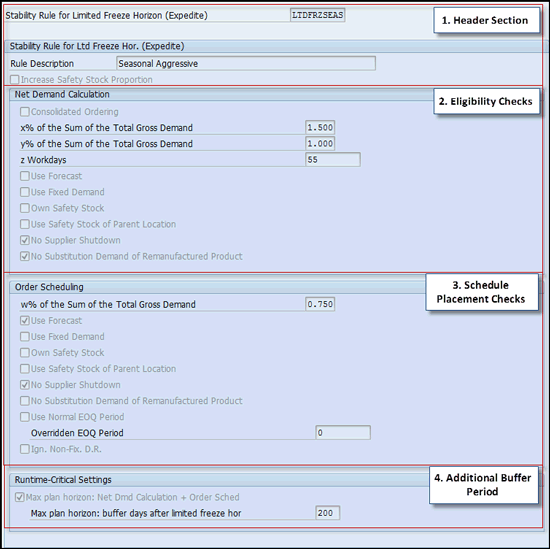
Figure 4
Horizon Stability Rule Limited Freeze Expedite
Again, for the purposes of illustration, this screen is divided into sections. Section 1, Header Section, contains the Stability Rule for Limited Freeze Horizon (Expedite) profile ID and a brief description of the profile. The Increase Safety Stock Proportion box controls whether safety stock is prorated from the first period of the planning horizon up to the end of the limited freeze horizon. You use the prorated safety stock to calculate the net requirements and the schedule delivery line quantity. For example, if the user has 10 pieces of safety stock and a 10-day limited freeze, the calculation uses one piece the first day, two pieces the second day, three pieces the third day, and so on. This is valid only for the Each Individual Period method for order scheduling.
Section 2 of Figure 4, Eligibilty Checks, contains figures that you use to determine if there is a need to expedite schedules during the limited freeze horizon. The system calculates total net demand and compares it with the x%, y% , and z parameters for eligibility check.
The first parameter x%, determines if the need is significant enough to expedite during the limited freeze horizon. The value of x is determined by adding the total gross demand of the period being reviewed to the next 20 periods and multiplying this amount by % of x, the amount entered in the x% of the Sum of the Total Gross Demand field in Figure 4.
For example, if the profile says x% = 0.75 and the sum of total gross demand for the current period + the next 20 days = 20, then x = 15 pieces.
Note
The value of 20 days for calculating the total gross demand depends on the scaling factor defined in Customizing for Advanced Planning and Optimization at Supply Chain Planning > Service Parts Planning (SPP) > Forecasting > Make General Settings for Demand History.
The second parameter, y%, reviews z work days and validates if the total net demand is within y. To determine y, add the total gross demand of the period being reviewed to the next 20 periods and multiply the sum by % of y, which is the value entered in the y% of the Sum of the Total Gross Demand field in Figure 4.
The value of z is set by the user in the limited freeze expedite profile. The period being reviewed based on z days equals the current date plus (z-1). If the profile says y% = 0.50 and the sum of total gross demand for the period being reviewed plus the next 20 periods = 20, then y = 10 pieces.
The total net demand of period z equals the projected supply shortage of the previous period in which a shortage occurred, plus all checked requirements in review through period z, minus any receipts through period z. If the total net demand in period z is greater than y, and z days is less than or equal to the end of the limited freeze horizon, then this product is eligible for expediting during this time period.
Specific Requirements
The specific requirements check boxes can be used to identify which requirements are considered by the Limited freeze horizon (Expedite) stability rule. For example, if the Use Forecast box is not checked, the forecast is not considered for the net demand calculation.
Section 3 of Figure 4, Schedule Placement Checks, determines the quantity and the period in which the expedited schedule is placed.
The value of w is determined by adding the total gross demand of the period being reviewed to the next 20 periods and multiplying this amount by % of w, the amount entered in the w% of the Sum of the Total Gross Demand field in Figure 4.
For example, if the profile says w% = 0.25 and the sum of total gross demand starting from the period being reviewed + the next 20 periods = 20, then w% = 5 pieces.
Determine the total net demand as described above in the description of Section 2, Eligibility Checks, of Figure 4. When you are using the single-order method of ordering, if the total net demand is greater than or equal to w, place the schedule in that time period for the quantity that equals largest total net demand in the limited freeze horizon. The system carries out this calculation in the background and expedites the quantity. Otherwise, loop time periods until the total net demand is greater than or equal to w.
Note
The user can only notice the expedited quantity placed in the DRP matrix. To understand how that quantity was derived, you need to understand these calculations that the system carries out in the background.
When you are using the each individual period method of ordering, if the total net demand is greater than or equal to w, place the schedule in that time period for the quantity that equals largest total net demand in the Economic Order Quantity (EOQ) period. Otherwise, loop time periods until the total net demand is greater than or equal to w.
The first period in which total net demand is greater than or equal to w% is when DRP places the schedule. However, it does not use the total net demand calculated for that period. Instead, it uses the largest total net demand in all periods in the limited freeze.
The value of w% should not be set higher than that of x% or y% . If it is, you risk not placing the schedule when the net demand calculation determined it should be.
If a shortage within the limited freeze horizon is eligible for a schedule change, the next step is to determine the date and quantity of the schedule line. The period in which the order is scheduled is not necessarily the same period in which the first shortage was eligible. It might be earlier because if the order is inside the limited freeze horizon, it might as well be ordered early enough to cover an earlier shortage that was not significant enough to qualify for an expedited schedule.
The Use Normal EOQ Period check box and Overridden EOQ Period field are used to determine when the order change is scheduled. If the box is not checked, the system uses the overridden EOQ period entered in the field. If you are not using the single-schedule ordering method, multiple schedules result, which may be undesirable.
The Ign. Non-Fix. D.R. (ignore non-fixed distribution receipts for rounding to EOQ period) box determines whether the system ignores or considers non-fixed distribution receipts for the supplier for rounding to EOQ periods. This means any existing schedule that is not due within the limited freeze horizon or that is not marked fixed is not used during planning.
Section 4 of Figure 4, Additional Buffer Period, contains the check box Max Plan Horizon: Net Dmd Calculation + Order Sched. This check box is used to consider a buffer period over and above the limited freeze horizon for calculating net demand and order scheduling. The value for the buffer period is entered in the Max plan horizon: buffer days after limited freeze hor field. This value is used to limit the period considered for calculations that improve runtime performance.
Total Net Demand
Total net demand is the sum of the projected stock or supply shortage of the previous period plus all checked requirements of the period in review through the EOQ period, minus any receipts through the EOQ period.
For example, suppose the period for which total net demand is being calculated has a supply shortage of 100. You would have to go to each location under this entry location and identify what needs to be excluded. If safety stock is not checked in the configuration, then you would have to subtract safety stock for each location to come up with the true supply shortage.
After you determine the true supply shortage, add all the checked requirements for each period in the limited freeze horizon (if your method of ordering is single order) or through one EOQ period (if your method of ordering is each individual period).
If total net demand is greater than or equal to x, proceed with checking the y parameter within z days. If total net demand is not greater than or equal to x, expediting is not done for this product during this time horizon.
Configuration Parameters on the DRP Run
To understand the concept of expediting schedules in the limited freeze horizon, consider a
scenario with gross demand for a seasonal product in various periods, and schedules placed to the supplier in the limited freeze horizon to fulfill this demand. Stability rules are defined and assigned to products according to their attributes. Use transaction code /SAPAPO/MAT1 to assign the stability rule SEASONAL to the product location (Figure 5).
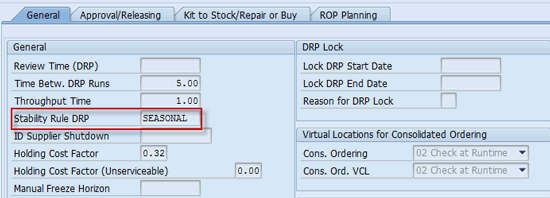
Figure 5
Stability rule assigned to the product location
The SEASONAL stability rule has the rule LTDFRZSES assigned for expediting in the limited freeze horizon, as shown in Figure 2. You maintain the parameters for the rule LTDFRZSES in customizing, as shown in Figure 6, which is the same screen shown in Figure 4.
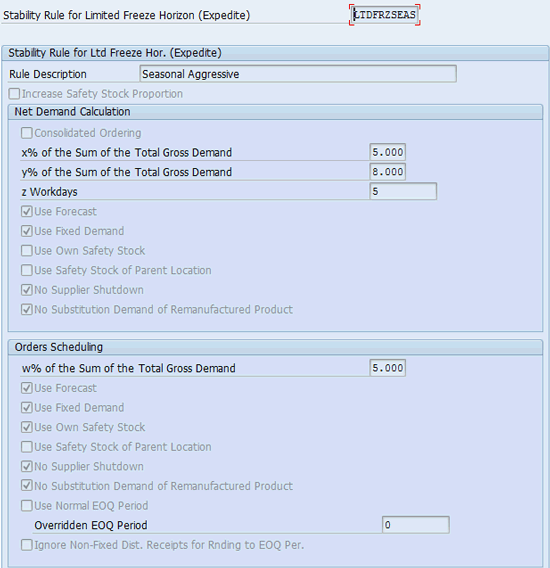
Figure 6
Stability rule for limited freeze horizon (expedite) with various parameters
Parameter x is derived and compared with total net demand before proceeding with further checks. As seen in Figue 6, x% = 5%, and the method of ordering, as indicated in Figure 2, is single order. In our example, the data indicates a shortage on the last day of the freeze horizon. Figure 7 (transaction code /SAPAPO/DRPM) is a mock-up of the DRP matrix displaying the total gross demand, in which the column headings are periods in the limited freeze (LF) horizon and plan submission horizon (PSH).

Figure 7
Total gross demand in the DRP matrix
The DRP matrix contains various receipts and requirement elements of a product location that are used for the calculation of the net demand. Calculate x by starting in LF1 and adding the next 20 days (scaling factor) of total gross demand. Multiply this number (65) by the % of x indicated in Figure 6 (5 percent), and you get x = 3.25 pieces, meaning there is sufficient need to expedite during the limited freeze horizon if the shortage during this period exceeds 3.25 pieces.
Note
LF 1 = first period in Limited Freeze horizon, LF 2 = second period in Limited Freeze, and so on. The column … after LF 4 represents the period from LF 5 to PSH 20 (Plan submission horizon).
Derive Total Net Demand
Figure 8 is a mock-up of the DRP matrix (which can be accessed in the system through transaction code /SAPAPO/SPPDRPM) showing the various key figures that are considered in the calculation of the total net demand through the end of the EOQ period. Some of the columns, such as the Use column that indicates the inclusion of the key figure in the calculation of total net demand, are provided for the better understanding of the concept and are not available in the system. The inclusion or exclusion of a key figure is controlled in the configuration of the stability rule as shown in Figure 6. The steps for calculating the total net demand are as follows.
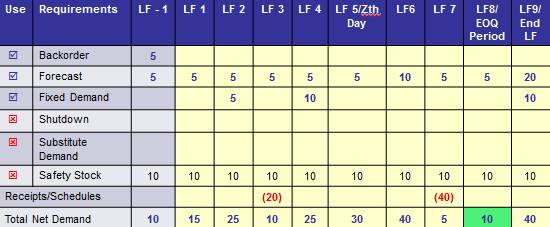
Figure 8
A mock-up of the DRP matrix
Add all the backorders, forecast, and fixed demand to calculate the total net demand for the period LF-1 (limited freeze minus one day). Add all the checked requirements from LF 1 (limited freeze day one) until the end of the EOQ period. The backorder is a given and always is added if the stability rule is not set to No Change of Order Quantity
You start with the plan period before the limited freeze, including the backorder, and go through each period up to the EOQ period. Add the the backorder, forecast, and fixed demand numbers for the period from before the limited freeze horizon (LF - 1) until the EOQ period (LF8/EOQ Period), subtracting any receipts received during the period. This leaves you with a total net demand of 10 pieces.
Compare the total net demand with x, which, in our example, is 3.25 pieces. Because the total net demand is greater than x, proceed to derive y within z workdays and determine if the total net demand is eligible to be expedited within the limited freeze horizon.
As shown in Figure 6, y is 8 percent, z is five workdays, and the method of ordering is single order, as indicated in Figure 2. Recall that the data in our example indicates a shortage in the last day of the freeze horizon. Calculate y as follows.
Starting in LF1, add the next 20 days of total gross demand (see Figure 7 for the values), which gives you a sum of 65. Multiply this by the % of y (8 percent, as indicated in Figure 6). This yields a product of 5.2 pieces.
To determine the value of y within z days, the total net demand, from Figure 8, starts at 10 in LF -1 and increases to 15 in LF 1. Stability rules continue to check the requirements until LF 5, because z indicates a period of five days.
At the end of the five-day period indicated by z, the total net demand (30) is still greater than y, (5.2). Because no period within z was able to recover to within y, expediting within the limited freeze horizon is necessary to prevent shortage, and this product is eligible for schedule placement w% calculation.
To determine the date and quantity to be expedited in the limited freeze horizon, you must calculate w. As shown in Figure 6, w% = 5% and the method of ordering, as seen in Figure 2, is single order.
As when calculating x and y, start with LF1 and add the next 20 days of total gross demand (see Figure 7 for the values). The sum is 65. Multiply this total by the % of w, 5%. You end up with a product of 3.25 to compare with the total net demand.
To derive total net demand, place the expedited schedule for the largest quantity in first period in which the net demand calculation exceeds x% and y%. The safety stock is now part of the calculation for total net demand, as seen in Figure 9, which is a mock-up of the DRP matrix. You can access the DRP matrix using transaction code /SAPAPO/DRPM.
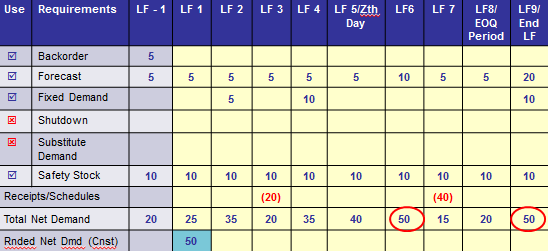
Figure 9
Key figures in the DRP matrix
Place the expedited schedule in the first period in the limited freeze horizon in which total net demand is greater than w. In this case, LF 1 had a total net demand of 25 pieces, which is greater than w (3.25). Find the largest total net demand quantity in the limited freeze horizon. In this case the period after LF 5 shows a total net demand of 50 pieces. Stability rules use this quantity to place the order. This is reflected in the rounded net demand.
After the schedule is expedited, the system can be configured to generate and send out alerts to suppliers so that they can take action.
This article contains general information only and Deloitte is not, by means of its publication, rendering accounting, business, financial, investment, legal, tax, or other professional advice or services. This article is not a substitute for such professional advice or services, nor should it be used as a basis for any decision or action that may affect your business. Before making any decision or taking any action that may affect your business, you should consult a qualified professional advisor.
Deloitte shall not be responsible for any loss sustained by any person who relies on this article.
As used in this document, "Deloitte" means Deloitte Consulting LLP, a subsidiary of Deloitte LLP. Please see
www.deloitte.com/us/about for a detailed description of the legal structure of Deloitte LLP and its subsidiaries. Certain services may not be available to attest clients under the rules and regulations of public accounting.
Copyright © 2014 Deloitte Development LLC. All rights reserved.
Murali Krishna Karra
Murali Krishna Karra is an SAP supply chain consultant at Deloitte Consulting LLP with expertise in materials management, Warehouse Management, and SPP. He has been a part of multiple global implementation projects and has more than five years of consulting experience. He holds a master’s in technology from the Indian Institute of Technology, Bombay.
You may contact the author at mkarra@deloitte.com.
If you have comments about this article or publication, or would like to submit an article idea, please contact the editor.
Abhijit Kadam
Abhijit Kadam is a manager at Deloitte LLP. He serves in the aftermarket industry and specializes in SAP Service Parts Planning, SAP Advance Planning and Optimization, and Supply Network Collaboration process consulting. He has worked on several SAP implementation and Application Management Services (AMS) projects and has more than 14 years of IT and consulting experience.
You may contact the author at abkadam@deloitte.com.
If you have comments about this article or publication, or would like to submit an article idea, please contact the editor.


 Premium