Learn how to use the HCM Management of Global Employees component to control every aspect of sending an employee to work abroad — from the planning phase to repatriation.
Key Concept
The HCM Management of Global Employees component is designed to streamline the processes involved in moving employees between countries. It contains a set of infotypes and actions that controls the key processes of international assignments. The component is designed for use by multinational companies that use SAP HCM in both home and host countries; it is not designed to interface with third-party HR systems. This component first appeared in SAP Release 4.7 and is available in every release after that.
Packing up your home and moving to some strange and exotic country for an international assignment is stressful enough without having to worry if the HR department has everything ready. Stories of employees arriving at the airport to find visas have not been finalized, the right accommodation was not organized, and the children were not enrolled in a local school are all too common among the expatriate community.
The HCM Management of Global Employees component helps you avoid these situations. It takes your existing processes and helps you increase their efficiency and accuracy by giving you a framework for processing, recording, and monitoring international assignments. As with all components of HCM, the more time you invest working out what your requirements, current practices and processes, and goals are, the more it will meet your company’s requirements.
You can find the settings for implementing Management of Global Employees under the Personnel Management section in the IMG and at https://help.sap.com. Before you can implement this component, you need to activate it for your system by performing the activity Activate Management of Global Employees in the section Global Settings of the IMG. Though not a particularly large component, it requires a lot of groundwork before the build stage begins to ensure that the requirements are adequately documented and the new solution meets the needs of the countries that will work with it.
Using the framework provided by the Management of Global Employees component, the entire process of negotiating, transferring, and repatriating employees is controlled using a combination of infotypes, actions, and processes. The period when the employee is on assignment is also managed and the key information for HR departments from both the home and host countries is available for them to see and manage. The link between the Management of Global Employees component and payroll processing allows payments and deductions from the host country payroll to be transferred into the home payroll, ensuring that key payments and deductions are never missed.
Note
The key to successfully managing international employee assignments begins outside SAP HCM. Taking the time to develop and implement standard processes and procedures ensures that all the key steps in the assignment process are performed in a timely manner. Controlling and monitoring the assignment process is the first step to getting the most out of the Management of Global Employees component.
Now I’ll look at the key parts of the Management of Global Employees component:
- Actions
- Payroll integration
- Tools
- Infotypes
Personnel Actions
Personnel actions are used in HCM to streamline and manage common HR processes such as hiring, transferring, and terminations. They are essentially a way of ensuring that all of the necessary infotypes that are required to complete a process are completed in the correct order. Each process is configured as an individual personnel action and has the required infotypes assigned to it that are then processed sequentially. For example, the hiring process could include the creation of the following infotypes:
- 0000 (actions) to capture the hiring date
- 0001 (organizational assignment) to capture details of the employee’s location and employment type
- 0002 (personal data)
- 0006 (address)
- 0007 (planned working time)
- 0008 (basic salary)
- 0009 (bank details)
- 0016 (contract elements)
- 0006 (absence quotas)
Management of Global Employees delivers a set of standard actions that allows you to complete all the key processes for managing international assignees. Figure 1 shows the link to the specific personnel actions.
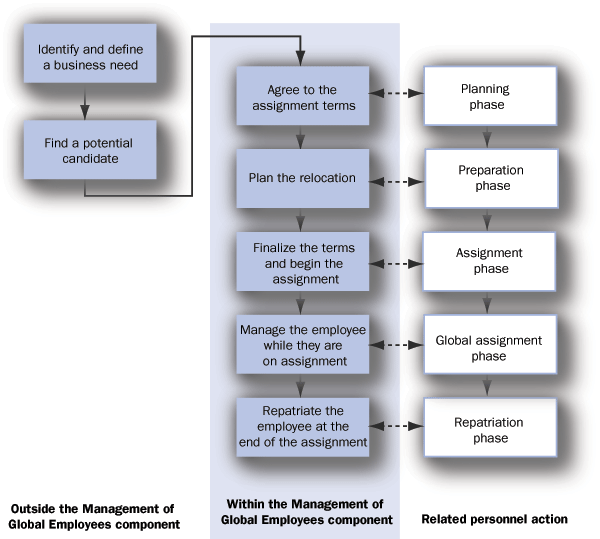
Figure 1
The key steps and personnel actions in the international assignment process
The first steps consist of identifying a business need for an international assignment, defining the skills required to complete the job, and then matching this requirement against potential employees to find the correct employee. While this process is done outside of Management of Global Employees, it is still completed within HCM. For example, you can match job requirements to employees through the Succession Management or Project Resource Planning components, both of which have the ability to identify employees against requirements criteria such as qualifications, skills, or experience, depending on what the requirements for the role are.
Agreeing on the terms of the assignment: The Management of Global Employees component is designed to follow after the matching process has been completed, and the initial discussions with the employee — which typically include location, duration, remuneration, and details relating to family members — take place. The Planning phase action is executed during this period. This action is used to record that the planning of the employee’s international assignment is currently under way.
Planning the relocation: After the employee has been selected and agreed in principle to take the assignment, the Preparation phase action signals that all of the tasks involved in organizing the relocation are under way. Typical tasks involved in this phase include booking flights, arranging accommodations, organizing places in local schools for dependents, and beginning the process of arranging local visas and documents. When the employee’s compensation package and all of the other details of the assignment have been agreed on, the system can generate a formal offer letter. This functionality reads the information relating to the compensation package from the employee’s master data and uses a preformatted layout to produce a letter that can be generated as either an Adobe or Word document sent to the employee and the host manager for formal signoff.
Finalizing the terms and beginning the assignment: The employee and all other parties have now agreed to the formal offer detailing the terms of the assignment and the start of the employee’s transfer is imminent. The Assignment activation action records that the assignment is technically active.
This step is generally used as the trigger for the final steps in the host country. They include hiring the employee as a new employee in the local SAP HCM instance, or in the relevant local personnel area if it is a global instance, and setting the employee up for processing in the local payroll. The employee now exists as two records – the existing record in the home country and a new active record in the host country. Many companies also implement the Concurrent Employment component that enables employees to hold multiple positions within the company controlled through one central personnel record.
Managing the employee while he or she is on assignment: Once the employee is overseas, the Global assignment phase action is used by the HR administrator in either country to record any changes to employee details during the assignment. This is typically used to record changes in pay, promotions, family status, and the duration and conditions of the assignment.
Repatriating the employee at the end of the assignment: The term of the assignment is now almost complete, and you need to start the process of reintegrating the employee back into the home country. This Repatriation phase action is used to trigger the list of steps that need to be taken to ensure that the employee’s return is smoothly managed. Typical tasks include setting a date for the employee’s return to work, identifying the role to be performed upon return, and managing the relocation of belongings.
Payroll integration for global employees: Using the strong integration between the HR and Payroll components is one of the key benefits of the Management of Global Employee component. Often, employees sent on an international assignment still have obligations such as Social Security and superannuation contributions in the home country. Payroll for global employees allows payments and deductions to be calculated for the employee in the home payroll system. Then these payments and deductions can be paid or deducted through the employee’s host country payroll results.
For example, an employee who normally lives in Britain has been transferred to New Zealand for a three- year contract. The employee is legally obligated to continue National Insurance contributions in Britain and still wants to contribute to the superannuation fund while away. When the home country runs payroll, the amounts of National Insurance and superannuation that need to be contributed for each period are calculated by the British payroll. The system stores these results in special wage types that are then transferred to the employee’s New Zealand employee record. The next payroll run picks them up and deducts them from the employee’s pay in New Zealand. The employee’s deductions are processed as normal in Britain. The employee is able to keep up contributions with a minimum of fuss, no manual adjustments, and no awkward international cross charges.
Tools for the Management of Global Employees
Several tools are available to help you manage global employees, including the following.
Processing policy changes: When your employees are away on international assignment, it is important that any changes to your HR policies that may affect your globally mobile workforce’s compensation are carefully managed. The Management of Global Employees component gives you a tool that allows you to test the impact of policy changes relating to expatriate compensation packages before they are applied to the production system. This tool (known as Policy Tracking) allows you to change your policies in your test system, then use the real employee data from your production system to compare the current compensation package values with the new values after the new policy is applied.
Once you have analyzed the impact, you can decide if the policy is going to be acceptable to employees or if you need to review it. When you are happy with your revised policy and its impact on expatriates, then you can move the new policy into your production client. You can use a standard report known as Mass Activation to apply the policy changes to all of the expatriate employees. It automatically creates new compensation packages and infotype records for the affected employees, then makes the changes instantly available to payroll.
Notifying global employees of policy changes: The Management of Global Employees component also provides a standard tool for generating notification letters for employees when policy changes affect them. Much like the automatic letter generation used to generate the compensation package confirmation letter mentioned earlier, HCM provides you with the ability to generate what is known as a Global Employee Compensation Calculation Overview (GECCO). This document, which can be created as an electronic PDF or Word document, can be generated automatically according to a predetermined format for all affected employees when compensation packages change. These notifications can then be emailed or posted to the employees, which quickly and efficiently informs them of the policy changes.
Global Employee compensation overview: To aid the quick processing of employee requests for compensation statements, the Management of Global Employees component contains a program for automatically generating compensation overview letters (again in either PDF or Word format) for employees. The document summarizes employees’ compensation while they are on international assignment. The report uses compensation information stored in the Compensation Package Offer (infotype 0706), which is used exclusively within Management of Global Employees.
Infotypes
The following infotypes were created to store expatriate employee information. They are either maintained individually or used in specific actions:
0710 Global Assignment Details
Infotype 0710 is the main infotype for this component. It provides an overview of all of an individual employee’s international assignments. In this infotype, you can store the following information related to the employee’s assignment:
- Future assignment details: This section stores information on the expected duration of the assignment, if the assignment results in a promotion, if the employee’s family is joining him or her, and details of the HR administrator who is managing their assignment from both the home and host countries. You can also record details of the career sponsor who is the official point of contact for the employee.
- Assignment attributes: If your employee is working in more than one role while on assignment, this section allows you to assign the appropriate percentages to the different roles.
- Current assignment details: As your employee needs to be hired as a new employee in the destination country, this section is used to link the employee’s various personnel numbers.
0715 Global Assignment Status
This infotype allows you to track the entire expatriate process. It has the statuses shown in Table 1. This infotype is based on the personnel action that is being processed. The statuses are updated depending on the personnel action being performed.
| Planned |
Planned The initial stage of the process |
| Submitted |
The terms and conditions of the assignment have been submitted for approval by the host country |
| Approved |
The terms and conditions have been approved by the home and the host line managers |
| Declined by manager |
The compensation package has been rejected by either of the line managers |
| Accepted |
The employee has accepted the compensation package |
| Declined by employee |
The employee has declined the package |
| To be activated |
All of the necessary information has been gathered in the relevant infotypes |
|
| Table 1 |
Possible statuses and descriptions of a global assignment |
0702 Documents
Almost all international transfers require numerous documents to be applied for, produced, verified, or copied during the preparation phase. Infotype 0702 allows you to store copies of the documents against an employee record for easy access. Common types of documents stored in this infotype include passports, visa applications, work permits, and inoculation certificates.
The process for applying and receiving some of these documents can be quite lengthy, so the infotype allows you to record the processing status of the document by recording if the document is currently:
- Posted
- In Progress
- On Hold
- Accepted
- Rejected
Once the documents and electronic copies stored in the digital personnel file have been produced, you can also store information pertaining to the document such as:
- Document type
- Issue details including location
- Document number
- Expiration date
- Status
0703 Documents on Dependents
Much like infotype 0702, infotype 0703 allows you to record all of the details of the documents required for an employee’s dependents who are joining the employee overseas. You can create a separate record for each dependent, tracking the processing status of the respective documents and all of the details of the documents when they are received.
0704 Information on Dependents
A key part of any international assignment, infotype 0704 is used to record the details of an assignee’s family and dependents. A separate infotype record is created for each dependent. This record can be based on the information already stored in the existing infotype 0021 (family/related persons). Once you link them, you can then record if the dependent is going to join the employee on the assignment or remain in the home country. If the dependent will be attending school while overseas, it records what level of schooling is required.
0705 Checklist Information
Infotype 0705 is designed to help the HR administrator ensure that key steps are not missed in the expatriate process. It allows the HR administrator to define a checklist of tasks that needs to be completed to ensure the transfer is successful. This could include booking accommodations, booking air tickets, confirming school enrollments, or booking language training.
HR administrators can define their own tasks and then compile a task list based on them. Lists and tasks can differ from employee to employee and help the HR administrator ensure that nothing is forgotten.
0706 Compensation Package Offer
One of the key parts of any expatriate program, infotype 0706 is used to bring together all the parts that make up the employee’s compensation package while on assignment.
This infotype allows you to define the individual elements of the compensation package that you are offering the employee and how they are calculated. The individual elements that are combined into the compensation package might include the following types of payments:
- Base salary
- Relocation allowance
- Housing allowance
- Remote location allowance
- Expatriate allowance
- School fees allowance
- Repatriation allowance
Depending on your company’s requirements, different elements can be defined as required. All items can be defined as being paid and controlled by either the home or host sides of the arrangement. This assignment of elements to specific countries ensures that neither the home nor host parties can see the total package unless authorized to.
Once you have defined the payments, you can define the rules that control their values. These are generally related to currency rules and cost of living rules. Often when an employee is sent overseas, some of the payments will be paid in the local currency and some will be paid in the home currency. To work out the value of these payments, you can either use an exchange rate at a set date, or you can define your own artificial rate if you prefer. Another great aspect of SAP ERP’s broad integration is that it allows you to use the same foreign currency exchange rates that the finance team maintains in its part of the system instead of defining your own HR specific table of exchange rates.
Often when an employee is sent somewhere that is more expensive to live in than the home country, a cost of living factor is applied to some or all payments. Individual items in the compensation package can be determined as being relevant or unrelated to the cost of living. The cost of living factor can then be assigned as at a certain date so that all of the elements are increased by this factor. As with all of the other parts of the compensation offer, this is a date- based field allowing ongoing changes in the cost of living factor to be quickly added without affecting historical records.
Once a compensation package is agreed to by all parties, you can map the elements that make up the package to payroll wage types so that they can be paid automatically through payroll in either the home or host country.
0707 Assignment Activation Details
When you agree to pay an employee payments in a local currency, the actual value of these payments can fluctuate based on the prevailing exchange rate. Infotype 0707 is used to control these fluctuations by assigning currency fluctuation protection to some or all of the individual elements of the compensation package.
For example, if your employee is being sent to France, you could determine that their expatriate premium allowance is paid 100% in the host country currency (in this case Euros) at the prevailing exchange rate. You could also determine that the salary, which was negotiated as a value in Euros, should be paid as 50% Euros and the other 50% should be converted to USD and paid at the prevailing rate.
These payments will then be transferred to payroll processing where the system can automatically check prevailing exchange rates and adjust the employee’s pay. This tool also allows you to ensure that deductions such as tax or Social Security that need to be paid in the home country can be set up in the home currency. This ensures that no matter what happens to the exchange rate, the correct deduction is always made.
0708 Global Commuting Types
Many countries’ tax laws are dependent on the number of days that a person is present in the country. Infotype 0708 is used to track an employee’s absences so that they can be used to determine an employee’s tax residence. For example, if you work more than 18 days in the United States, you are legally obliged to report your worldwide income and have it taxed in the United States.
Greg Newman
Greg Newman is originally from New Zealand, and has been implementing and supporting HR and Payroll systems since 1999. He has worked on numerous SAP HR and Payroll implementations for Great Britain, the Republic of Ireland, Australia, New Zealand, and several other international rollouts. Currently Greg is a managing consultant working for Newhit HR and Payroll Solutions in England.
You may contact the author at greg.newman@saphr.com.
If you have comments about this article or publication, or would like to submit an article idea, please contact the editor.