Discover the answers to some common questions about migrating Computer Aided Test Tool (CATT) test cases to extended Computer Aided Test Tool (eCATT) test scripts and leverage your existing investment in CATT.
Many companies that have invested heavily in building Computer Aided Test Tool (CATT) test cases and are now planning to upgrade to SAP ERP Central Component (ECC) have questions and concerns regarding their existing CATT development. In terms of compliance, it is important to have testing plans in place to assure the internal and external regulatory authorities that you are properly testing your processes and functionalities. I’ll answer three common questions related to CATT development.
Will CATT test cases, especially from R/3 Release 4.5 and below, be lost during the upgrade to ECC? Existing CATT test cases from an R/3 4.5 system or below are not lost during the upgrade and remain functional in ECC 6.0. However, note that CATT test cases work for individual transactions only. extended Computer Aided Test Tool (eCATT) test scripts can test a business process across multiple SAP systems such as R/3, SAP Advanced Planning and Optimization (APO), SAP Customer Relationship Management (CRM), and more, as shown in Figure 1.
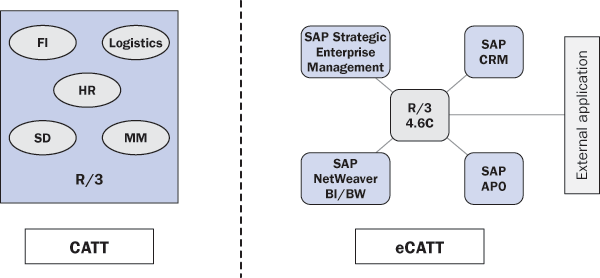
Figure 1
CATT and eCATT
How do you manage the mix of CATT test cases and eCATT test scripts? CATT test cases and eCATT test scripts can co-exist in the new ECC 6.0 environment. I suggest companies continue using existing CATT test cases migrated from the previous release and also create new eCATT scripts, as required. You may need to create new eCATT test scripts in ECC 6.0 for scenarios that cross multiple systems. For example, you may have a scenario to create a sales order in SAP CRM, create delivery in ECC, and pass the shipment information to SAP APO. CATT test cases can test the transaction within R/3 only and cannot test a scenario across multiple systems.
Can you migrate CATT test cases to eCATT automatically? If you want to manage all the test scripts under the new eCATT environment, you can use an automatic migration tool. The tool also converts CATT test cases to eCATT test scripts. Use transaction code SECATT and follow menu path eCATT Object > Migrate CATT to migrate your CATT objects to eCATT objects as shown in Figures 2 and 3. The system converts CATT test cases to eCATT structures, so they can work with eCATT objects going forward.
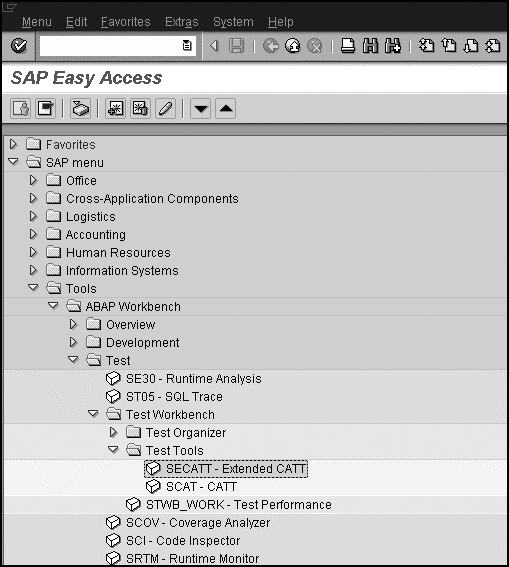
Figure 2
Call eCATT
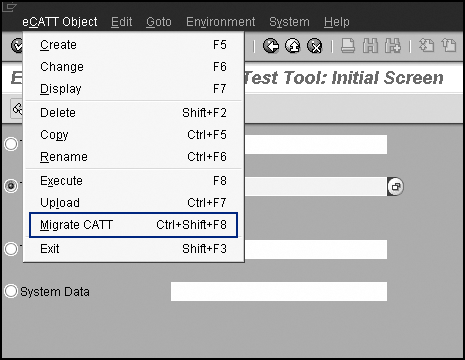
Figure 3
Migrate CATT objects to eCATT

Mitresh Kundalia
Mitresh Kundalia heads the SAP practice at Quality Systems & Software (www.QSandS.com), a consulting firm specializing in SAP S/4HANA, SAP General Ledger, and complex System Landscape Optimization (SLO)-type reorganizations. Mitresh is widely acknowledged as a leading SAP expert, with multiple publications and an SAP-PRESS book to his credit. He has published more than 50 peer-reviewed articles and white papers, and he has given presentations at various SAP conferences and events. Mitresh is the chief solutions architect of General Ledger Migration Optimizer (GLMO), a leading product to accelerate and jump-start the SAP S/4HANA and SAP General Ledger initiatives; SAP Data Reorganization Optimizer (SDRO), an SLO-type product for managing complex system landscape reorganizations; and Group Currency Activation and Conversion (GCAC), a product suite to manage introduction of parallel currencies and conversion of data in a live SAP system.
You may contact the author at Mitresh@QSandS.com.
If you have comments about this article or publication, or would like to submit an article idea, please contact the editor.