Learn about the enhanced functionality of the check returns process in Contract Accounts Receivable and Payable with respect to the process involved in posting the checks that are returned from a bank.
Key Concept
The cash desk is a functionality in which payments are accepted at a company counter or company-specified counters when customers walk in for payment of their outstanding dues.
The payment process is an integral part of Contract Accounts Receivable and Payable (SAP FI-CA). The payment can be processed either by using the cash desk or by creating a payment lot and executing a payment run. Most utility payments are made by check. Banks frequently dishonor checks owing to various reasons such as insufficient funds in a customer’s account or inadequate or incorrect information available on the check. The return lot is posted through standard transaction code FP09. However, the SAP system does not allow you to post a check return through the return lot, in which the payment has been received through the cash desk. To post the check return through the return lot, you need to apply two SAP Notes and complete some configuration.
Consider an example of a utility company processing a check return. Utility companies face a challenge in dealing with such cases as they already account for check returns as payment received. The payment documents need to be cancelled, the returns charges have to be posted, and the creditworthiness of the customer needs to be adjusted accordingly. In my example, a US-based water utility found it difficult to post the return of the check payment when the cash desk is closed. To post the return on time and be able to perform the reconciliation, the company had to reset the clearing manually and process the outgoing payment. This workaround to the return process caused dunning and billing issues. I explain the configuration and SAP Notes that the company followed to resolve these issues later.
It is even more challenging when the check payment is received through the cash desk. Because a cash desk is closed at the end of the day, you cannot make any adjustments to the payments received or paid after they are closed. For a US-based utility company an average of 6 percent of the total returns (value and count) results in check returns for which payment has already been accounted. Out of this amount 2 percent of the total check returns come from the cash desk functionality.
Companies aim to post these returns as soon as possible to reconcile their bank balances and nullify the effect of payment on consumer accounts (i.e., to reverse the posting of payments). Payment has to be reversed, so to remove the effect of payment posting, you need to reverse that through check return posting. Posting of returns within due time can help a company in several ways (e.g., possible interest loss, timely reconciliation, or further follow-up for payments). Returns in cases when payments are posted through the cash desk component can be posted using enhanced functionality of returns that simplifies the returns process.
A Return Process
The purpose of a return is to nullify the effect of a payment that has been received, later dishonored by a bank, and therefore cancelled. As this has a financial impact, care has to be taken while posting the return. Return is a mass process that implies that multiple returns can also be processed at one time.
A return process determines the following:
- The payment document to be reversed or the posting of a new receivable without reversing the payment document using the enhanced returns functionality
- The return reasons and respective return charges configured against each reason
- The return activities and updates to a customer’s creditworthiness
Figure 1 shows the various stages of the check return process.

Figure 1
The process flow of a return
When you create a return lot, you need to enter return items (return information for all accounts) and close the return lot. After you process the return lot, if it contains any errors, you need to post-process the lot, correct the lot, and then complete the lot.
For standard return processing, you use activity keys in customizing. You can define the activities to be performed in the event of a return for each return reason, such as the following:
- Handling charges
- Setting dunning or payment locks along with the duration of locks
- Setting or changing payment methods
- Creating correspondence or changing master data
Companies also have the option of calculating return charges in addition to bank charges. Multiple options are available to calculate return charges. For example, in addition to the bank charge that the bank levies, companies can also levy a return charge for handling the check and posting that to account.
Enhanced return processing has some additional features that differentiate this process from the usual way of posting check returns in FI-CA by auto cancellation of the payment document and posting a return document in the consumer account through return lot posting (transaction code FP09). The enhanced features provide more flexibility in posting the returns using various options.
Enhanced return processing includes a few new features. For example, because the cash desk is closed at the end of each day, if any check returns are applied to those payments, the system displays the details for processing through a return lot. Use transaction code FP09 to post a return by giving a return lot name. Figure 2 shows the error while posting the return. In the example in Figure 2 the return could not be processed because the payment document #1***69 contains items for the clearing document #17***6. This error occurs when the return is not allowed to be posted because the payment has been processed through a cash desk.
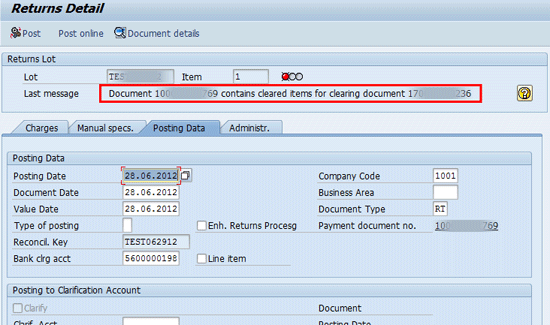
Figure 2
An error during the posting of a return
If you click the help icon (the question mark shown in Figure 2), you receive the error message shown in Figure 3.

Figure 3
An error message received during the posting of a return
In such cases, as suggested in the error message, the only alternative is to reset the clearing manually and make an outgoing payment through the cash desk. This process causes issues from a billing and dunning perspective as both these processes involve use of customized forms.
Consider this example of a billing issue. Document 31******6 is an outgoing payment posted (Figure 4).

Figure 4
Reset a payment document that has to be marked for outgoing payment
It appears in the CHARGES section of an invoice without a description (Figure 5).
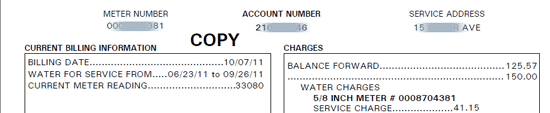
Figure 5
The description of outgoing payment is missing from the invoice
This issue has occurred because the form designed to print the invoice is not designed to display the outgoing payment made through the cash desk.
Now consider this example of a dunning issue. Disconnection notices that are usually triggered through the dunning process are customized to suit the individual utility service provider’s needs. The outgoing payment is usually not included in the design of the dunning form. In Figure 6, document 31****484 is excluded from the disconnection notice.

Figure 6
A document excluded from a disconnection notice
The Dunning History screen (Figure 7) shows that the application form for disconnection has been triggered on 08/04/2011 with a balance of $215.01.

Figure 7
Balance during the dunning run
However, the actual notice that is printed does not display the amount of $ 215.01 (Figure 8).
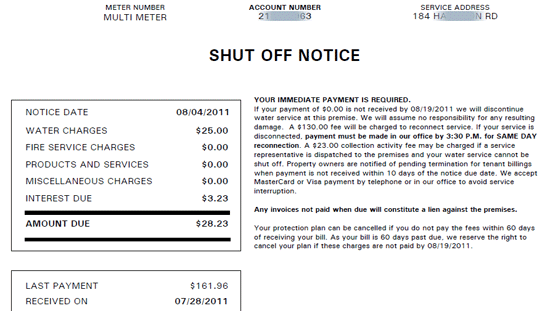
Figure 8
A dunning notice
SAP FI-CA provides functionality within returns processing to create new receivables when the original payment document cannot be reversed or reset as it is received through the cash desk that has been closed. Consequently, one return document is posted as new receivables in the account.
Figure 9 shows the four options available during return processing. Option 1 is, by default, the normal return process in which payment is cancelled and the return is processed. Options 2, 3, and 4 post new receivables and can be activated if SAP Notes 1459852 and 1360701 are implemented.

Figure 9
Options for processing a return
Further, to enable the posting to a relevant general ledger account, you need to maintain account determination in posting area 0111 through standard transaction code FQC0 (Figure 10).
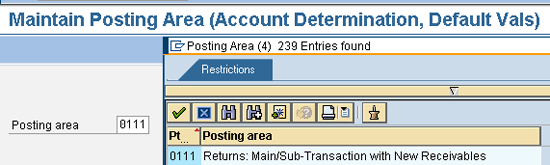
Figure 10
Maintain entries in the posting area relevant to returns
Once you configure the posting area and implement SAP Notes 1459852 and 1360701, you return to the screen shown in Figure 9 and post the return by selecting the options shown in that screen.
When you execute transaction code FQC0, the screen to maintain returns appears (Figure 11). Select the Debit MT (standard debit main transaction) as 0070 (MT) and Debit ST (standard debit sub-transaction) as 0010.
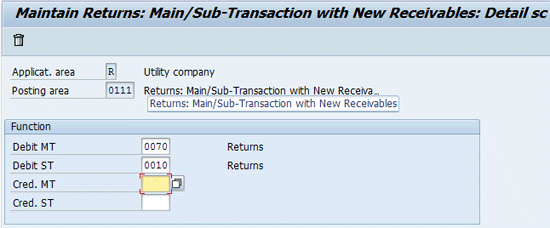
Figure 11
Maintain the returns debit main transaction and sub-transaction
After you complete the posting configuration and implement SAP Notes 1459852 and 1360701, execute transaction code FP09 to return to the same lot. Click Postprocess as indicated (Figure 12).
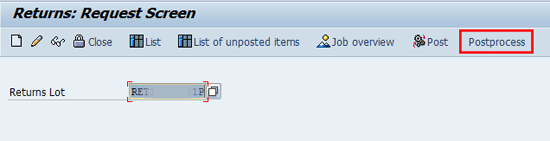
Figure 12
Postprocessing the return lot
Select the line item and click the Clarify icon (Figure 13).

Figure 13
Clarify the line item
Post the return document by clicking Post (Figure 14).
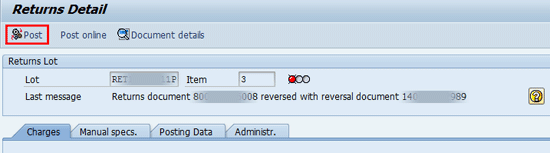
Figure 14
Post the return document
In the next screen you see a message that indicates that the return document was posted and its status. Note that the return is posted under document number 14****495 (in the Last message field), and the Type of posting is 2 (Figure 15).
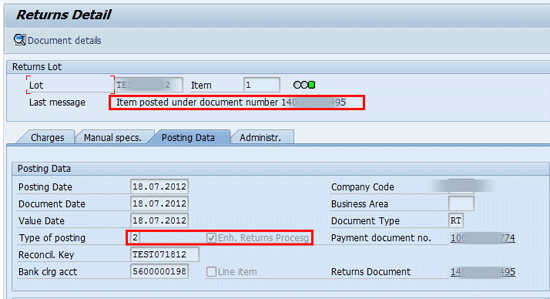
Figure 15
The status of a posted return with the return document 14****495
Implementing enhanced features of returns has three prerequisites:
- The cash desk is implemented.
- The check payments are accepted at the cash desk.
- The cash desk is closed at the end of the day.
Case Study
A US-based water utility found it difficult to post the return of the check payment when the cash desk is closed. To post the return on time and be able to perform the reconciliation, the company had to reset the clearing manually and process the outgoing payment. This step was just a workaround to the return process that resulted in billing and dunning issues.
The company was not using the enhanced functionality that could be achieved by implementing the SAP Notes 1459852 and 1360701. After implementing the Notes, the company was able to post the return using the option for a posting and the option for new receivables, according to explicit entry. After posting the return for payment document, the company received an error message (Figure 16).
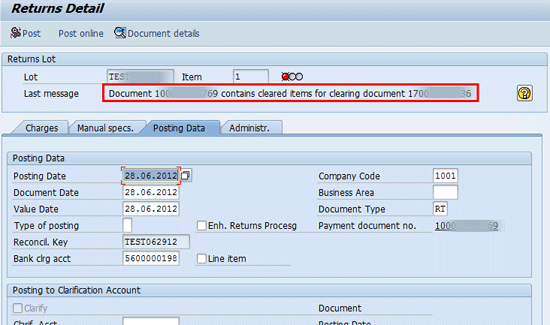
Figure 16
Error message received after a return for payment document was posted
After the company implemented SAP Notes 1459852 and 1360701 and completed the configuration for the posting area, it was able to post the return using the option for new receivables, according to explicit entry (Figure 17). The configuration steps for posting the return lot were explained in the preceding steps.
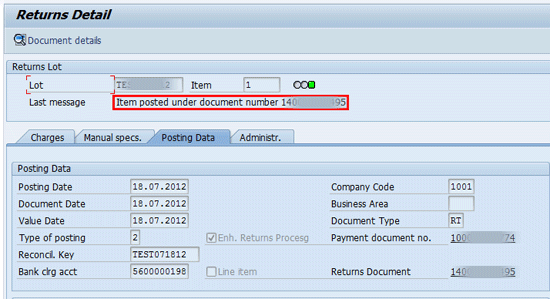
Figure 17
Successful posting of a return through document 14****95
Roshan Agrawal
Roshan Agrawal is a member of The Institute of Chartered Accountants of India (ICAI). He has around 11 years of overall experience including nine years of SAP-ISU consulting experience with deep expertise in FI-CA. His consulting experience spans utilities industries including electricity, water and gas. His project exposure includes three end-to-end implementations, rollouts, technical upgrades, and application support assignments.
You may contact the author at rosagrawal@deloitte.com.
If you have comments about this article or publication, or would like to submit an article idea, please contact the editor.
Ravikanth Veda
Ravikanth Veda has 14.5 years of overall experience, including 6.5 years of SAP FI-CO consulting experience with deep expertise in FI-CA, product costing, and Financial Supply Chain Management (FSCM). His consulting experience spans consumer, manufacturing, energy, and utility industry sectors. He has worked on one implementation, one upgrade, and four application support assignments.
You may contact the author at ravikanthveda@gmail.com.
If you have comments about this article or publication, or would like to submit an article idea, please contact the editor.