Process chains in BW have a built-in process type that allows you to execute ABAP programs. However, the process chain has no way of knowing whether the ABAP program succeeded or failed. You can create a custom process type that executes ABAP programs and returns a success or failure code to the process chain.
Key Concept
A process chain is a scheduled sequence of processes that BW executes in a specified order. A process type is the kind of process being executed, such as starting an InfoPackage to load data from one object to another, combining two different process chain parts in one depending on the outcome of one of the parts, or starting an ABAP program.
Process chains play a vital role in maintaining a BW system. Process types exist for most typical BW tasks, from loading data to deleting data target contents to rolling up aggregates. One type even calls ABAP programs. This offers a large degree of freedom and creativity when designing process chains because the BW administrator can incorporate very sophisticated logic in the ABAP programs. A drawback to the ABAP process type is that it does not return a success or failure notification to the process chain. This means that the process chain cannot make conditional logic choices based on the outcome of the ABAP program.
You can overcome this limitation by creating your own version of the ABAP process type that returns a success or failure indicator to the process chain. All you have to do is copy the existing ABAP process type and make a single configuration change to the copied process type. I’ll demonstrate the capability with the example of a data load that is conditional upon the date.
Create a New ABAP Process Type
Open the process chain maintenance screen via transaction RSPC. Create a new process chain by clicking on the create icon (Figure 1). Give the new process chain a technical name and description. In this example I’m using the technical name ZPCTEST001 and the description Test process chain for ABAP program (Figure 2). The system then assumes you want to create a start process and automatically displays Figure 3. Create a new start variant for the process chain by clicking on the create icon.
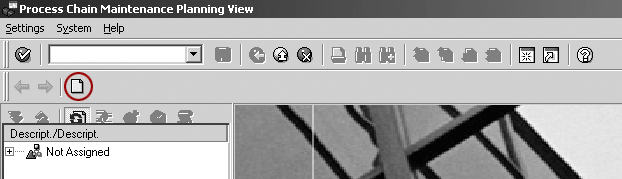
Figure 1
Create a new process chain

Figure 2
Name the new process chain

Figure 3
Create a new start process
Give the start process a technical name and description. In this example I’m using the technical name ZPCTEST001START and the description Start process for ZPCTEST001 process chain (Figure 4). Click on the Change Selections button (Figure 5) and set the process chain start time to Immediate (Figure 6). Click on the save icon shown in Figure 7 to save the start process and then accept it by clicking on the green arrow (Figure 8).

Figure 4
Name the start process
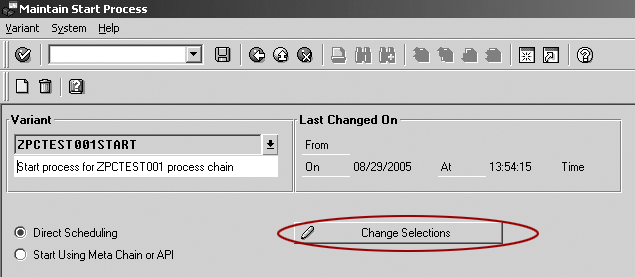
Figure 5
Change the start process selection

Figure 6
Set the start process to begin execution immediately
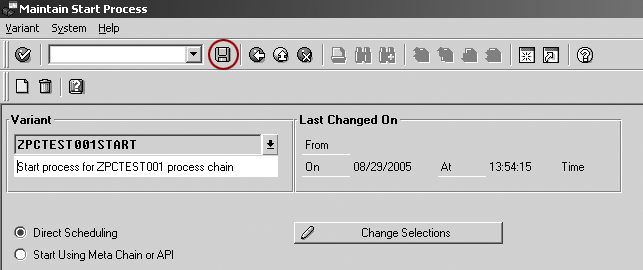
Figure 7
Save the start process

Figure 8
Accept the new start process
You now have a simple process chain with a start process. Click on the process types icon (Figure 9) to see the list of available process types. Drop down the General Services category (Figure 10) to see the ABAP Program process type. To create a copy of the standard ABAP process type, click on Settings>Maintain Process Types from the menu.
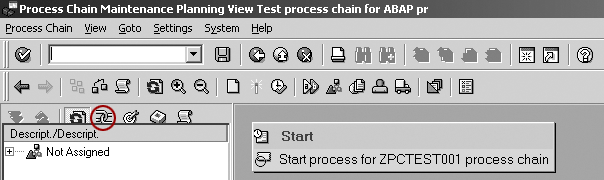
Figure 9
Switch to the process types view
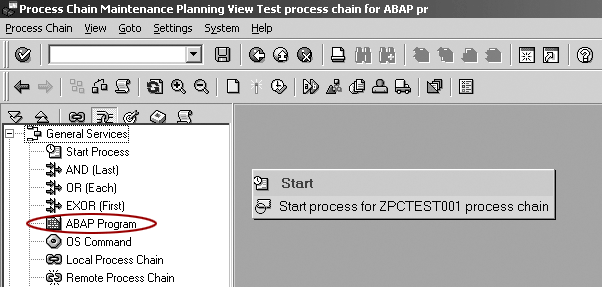
Figure 10
The ABAP Program process type
The next screen (Figure 11) shows the current process types available in your system. To create a copy of the ABAP process type, highlight it and select Edit>Copy As... or press F6. This opens the process chain configuration screen with a copy of the ABAP process type (Figure 12). Give the process type a new name (ZABAP in my example) and a new short and long description of your choice. Change the Possible Events setting to 2 Process ends “successful” or “incorrect”.
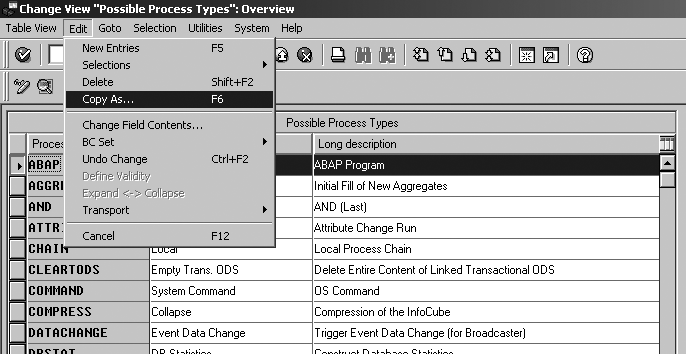
Figure 11
Create a copy of the existing ABAP process type
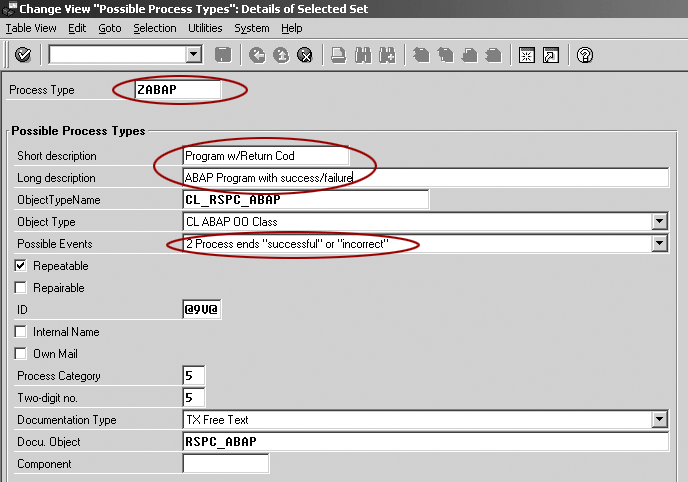
Figure 12
Configure the new ZABAP process type
Press Enter to confirm your changes and then save the new process type (Figure 13). BW then prompts you to create a transport for the new process type. Now when you return to the process chain screen, you see your new process type available for use in your process chains (Figure 14).
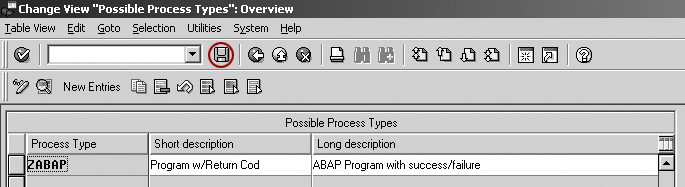
Figure 13
Save your new ZABAP process type
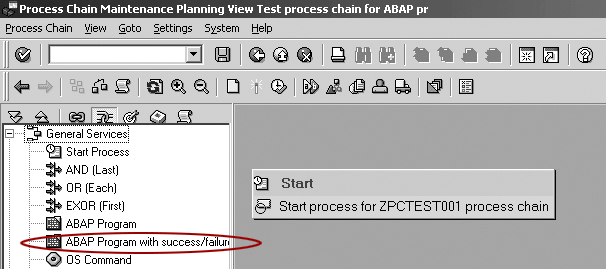
Figure 14
New ABAP program with success/failure process type
You can use this new process type to execute ABAP programs. If the ABAP program completes without returning a message or returns a message with class I (information) or S (status), then the process type returns success. If the process chain returns a message with any other class (A for Abend, E for Error, W for Warning, or X for Exit), the process type returns failure. This allows your process chain to branch conditionally on the success or failure of the ABAP program.
Example ABAP Program with Return Code
The code in Figure 15 is an example of an ABAP program that returns a failure message to the calling process chain. You can download this code by clicking this link. This ABAP code checks to see if the current day is the first day of the fiscal period. If not, it returns an error to the calling process chain. This lets the process chain continue processing only if it’s the first day of the fiscal period.
*& *
*& Report ZBW_CHKFIRSTDAYOFPERIOD *
*& *
*& *
*& *
*& *
*& * REPORT ZBW_CHKFIRSTDAYOFPERIOD . *************************************************
* Date: 5/3/2005
* Author: David Eady
*
* This program is intended to be called by BW
* process chains. It should check if today is
* the first day of the *fiscal period. If so, it
* should do nothing (complete successfully). If not
* it should return message ZBW 003 as an error.
* This should terminate process chain execution.
* data: wfirstday like sy-datum.
data: wbuper like t009b-poper.
data: wgjahr like t009b-bdatj. * get today’s fiscal period
CALL FUNCTION ‘DATE_TO_PERIOD_CONVERT’
EXPORTING
I_DATE = sy-datum
* I_MONMIT = 00
I_PERIV = ‘V9’
IMPORTING
E_BUPER = wbuper
E_GJAHR = wgjahr
EXCEPTIONS
INPUT_FALSE = 1
T009_NOTFOUND = 2
T009B_NOTFOUND = 3
OTHERS = 4. * get the first day of the period
CALL FUNCTION ‘FIRST_DAY_IN_PERIOD_GET’
EXPORTING
I_GJAHR = wgjahr
* I_MONMIT = 00
I_PERIV = ‘V9’
I_POPER = wbuper
IMPORTING
E_DATE = wfirstday
EXCEPTIONS
INPUT_FALSE = 1
T009_NOTFOUND = 2
T009B_NOTFOUND = 3
OTHERS = 4. * if today is not the first day of the period,
* return an error.
if sy-datum <> wfirstday. * Date is not the first day of the fiscal period.
MESSAGE E003(ZBW). endif. * otherwise complete successfully
|
| Figure 15 |
Example ABAP code with failure message |
Use the New ABAP Process Type
As an example of how to use the new process type, I’ll modify my test process chain that I created earlier. I will include the custom ABAP process step to execute the ABAP program shown in Figure 15. If the ABAP program returns success, then the process chain continues with a master data attribute load. If the ABAP program returns failure (if it’s not the first day of the fiscal period), the process chain halts execution.
First, drag the new ABAP program with success/failure process type into your process chain. Next, create a new process variant to execute the ABAP program by clicking on the create icon as shown in Figure 16.

Figure 16
Create a new variant for the ABAP program with success/failure process type
Give the variant a technical name and description. In my example I’m using the technical name Z_ABAP_CHKFIRSTDAYOFPERIOD and a description of Call custom ABAP to check if first day of fiscal period as shown in Figure 17.

Figure 17
Name and describe the variant
Specify that the process chain should execute the ZBW_CHKFIRSTDAYOFPERIOD ABAP program and click on the save icon (Figure 18). Click on the green arrow to move back to the process variant creation. Confirm the new process step by clicking on the green check mark (Figure 19). Connect the Start process to the Program w/Return Cod process as shown in Figure 20.
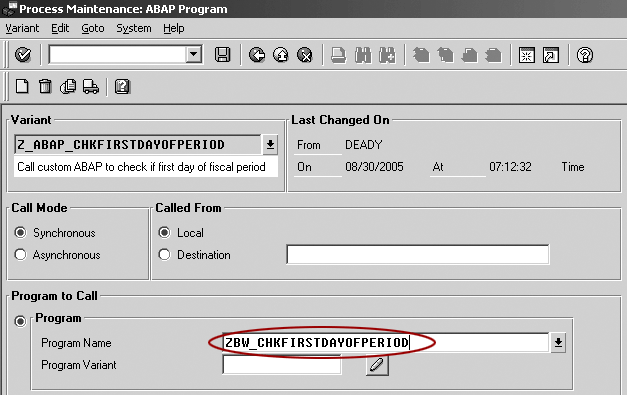
Figure 18
Specify the ZBW_CHKFIRSTDAYOFPERIOD ABAP program

Figure 19
Confirm the new process step

Figure 20
Connect Start process with Program w/Return Cod process
Next you insert a new process step to execute a master data load. Drag in the Execute InfoPackage process (located in the Load Process and Post-Processing section in Figure 21). Select an existing InfoPackage using the drop-down arrow and choose the InfoPackage to execute (Figure 22).
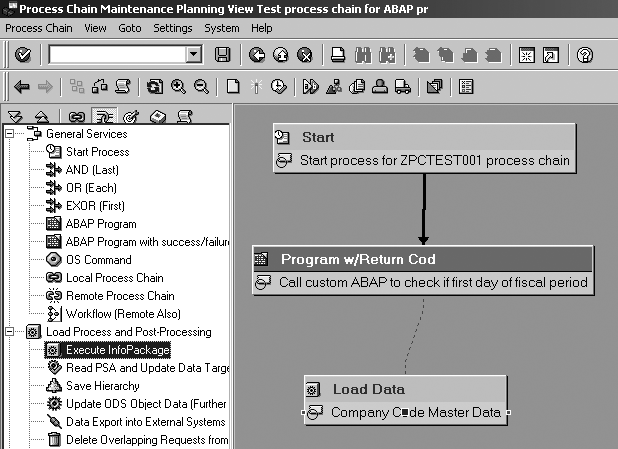
Figure 21
Connect the Load Data process step
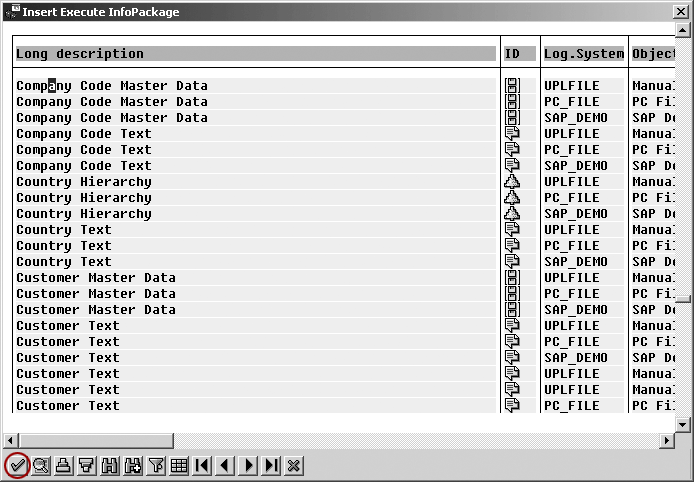
Figure 22
Select the InfoPackage to execute
Accept the new Execute InfoPackage process step by clicking on the green arrow.
Connect the Program w/Return Cod process step with the Load Data process step as shown in Figure 21. You only want the Load Data process to execute if the ABAP program returns a successful return code (Figure 23). The process chain only executes the Load Data process step if the ABAP program does not return an error code.
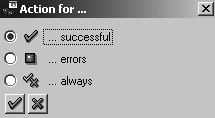
Figure 23
Select condition for execution of next process step
The test process chain is now complete (Figure 24). The process chain executes the ABAP program first. If it returns as a success, the process chain executes the master data attribute load. If the ABAP program does not return a success, then the processing stops. If you want to add error-handling logic to the process chain, you could include additional process steps that the process chain would execute if the ABAP program returns an error.
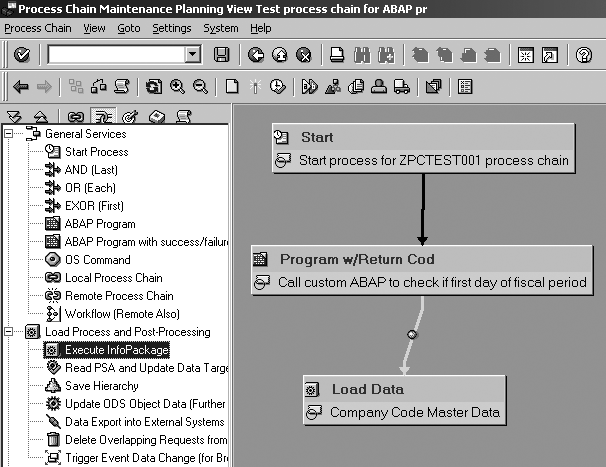
Figure 24
Final test process chain
David Eady
David Eady is the reporting team lead of the SI Corporation MIS team headquartered in Chattanooga, TN. The reporting team is responsible for all aspects of SAP information delivery. David has been with SI Corporation for six years and has been involved with BW for the last four years. He has a BS degree in industrial engineering from Mercer University and lives with his wife and two daughters in the foothills of northwest Georgia.
You may contact the author at eadydd@comcast.net.
If you have comments about this article or publication, or would like to submit an article idea, please contact the editor.




 Premium