Erroneous data in time characteristics that appears in query selections often confuses users. You can resolve this issue by changing a configuration option either in the InfoCube itself or in the InfoObject. However, when reporting from an ODS, this option is not available. Discover how you can resolve this issue by cleaning up the master data of time characteristics and getting rid of those unused records.
Key Concept
In BW, master data tables may have dirty data, or extraneous records, caused by incorrect format of input data. For instance, the date format might be MMYYYY, not YYYYMM. Instead of creating a master data ID for 200510 (October 2005), the system creates an entry for 102005 (May 1020). Another possible cause is incorrect mapping in the transfer or update rules. For example, the system might map the document number to the calendar day because of a programming error. Reporting with dirty data from the source system can contaminate BW.
As you load dirty data into BW, your load may fail. If not, the system assigns a master data ID (SID) to each field value and stores the record in the master data tables. The system never uses these values since they are really errors, but they remain in the SID tables and clutter the system.
These invalid entries in the SID tables generally do not cause problems until users decide to drill down on a characteristic. They then see all the entries in the SID tables (unless they select from possible entries in the InfoCube for the drop-down box, which is not always possible with a line-item dimension or an ODS, as I’ll discuss later). Depending on where the invalid value is on the SID tables, users might have to scroll through many invalid values before they see the value that they want to select.
You can apply very simple solutions when it happens to a regular characteristic such as 0CUSTOMER, 0MATERIAL, and 0VENDOR. However, SAP delivers no functionality to remedy this situation for time characteristics such as 0CALMONTH, 0CALDAY, and 0FISCYEAR (Figure 1).
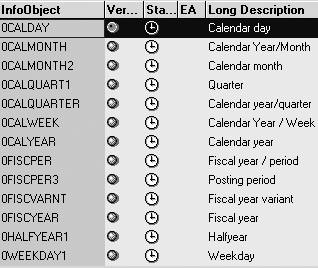
Figure 1
Complete list of time characteristics
Figure 2 displays the first of a few hundred values of the SID table of 0CALMONTH when a user drills down on the 0CALMONTH time characteristic. Most business environments do not display the calendar months of years 1001, 1002, and so on. These records probably exist because of incorrect loads. It is extremely annoying for a user who wants to filter on a query to have to go through several pages of invalid calendar months.

Figure 2
The 0CALMONTH time characteristic including junk values
Option 1: InfoCube/InfoProvider Solution
The easiest solution to this problem lies in the InfoObject definition of the time characteristic InfoObject. Set Query Def. Filter Value Selection to Only Values in InfoProvider so that BW doesn’t display erroneous SIDs (Figure 3). This solution works very well for queries against InfoCubes and you can use it with BW Release 2.0 and up.
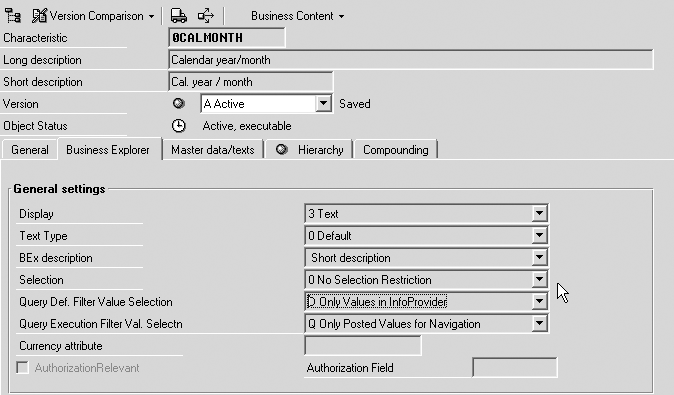
Figure 3
Set Query Def. Filter Value Selection to Only Values in InfoProvider
Option 2: ODS Solution
However, the first solution does not work when writing queries against an Operational Data Store (ODS) because an ODS has no dimensions. This setting does not apply to ODS. Thus, regardless of this setting, the F4 drop-down values of a query against an ODS still display all SID table records. In this case, you need to use the solution I’ll explain next.
As I mentioned earlier, for a regular characteristic InfoObject, you can perform simple operations to hide incorrect data. You can delete the invalid values in the master data tables by right-clicking and executing the Delete master data function in the context menu of a characteristic in the Administrator Workbench (Figure 4). Note that the system only deletes data that other objects do not use to clear all unused master data for that InfoObject. Unfortunately, the system does not offer that option for time characteristic InfoObjects.
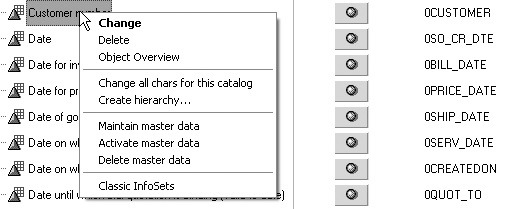
Figure 4
Select Delete master data from the context menu
Option 3: Manually Delete Master Data
Therefore, your only choice to resolve this issue in the time characteristics is to use a manual program that deletes other master data: RSDMD_DEL_BACKGROUND via ABAP Editor, transaction SE38 (Figure 5). This option is available in BW Release 2.0 and higher.

Figure 5
Use program RSDMD_DEL_BACKGROUND to delete invalid SIDs
Execute this program and enter the following in the selection screen (Figure 6):

Figure 6
Enter these parameters while running program RSDMD_DEL_BACKGROUND
P_IOBJNM: InfoObject (e.g., 0CALMONTH)
P_CHABNM: InfoObject (e.g., 0CALMONTH)
P_DELSID: selected
P_DELTXT: unselected
P_OBJ: RSDMD
P_SUB: MD_DEL
P_EXT: BG_0CALMONTH
P_NOPROT: unselected
To make sure that the program executed correctly, open Application Log (transaction SLG1) and enter the following:
Object: RSDMD
Subobject: MD_DEL
See Figure 7 for the selection screen and Figure 8 for the log results.
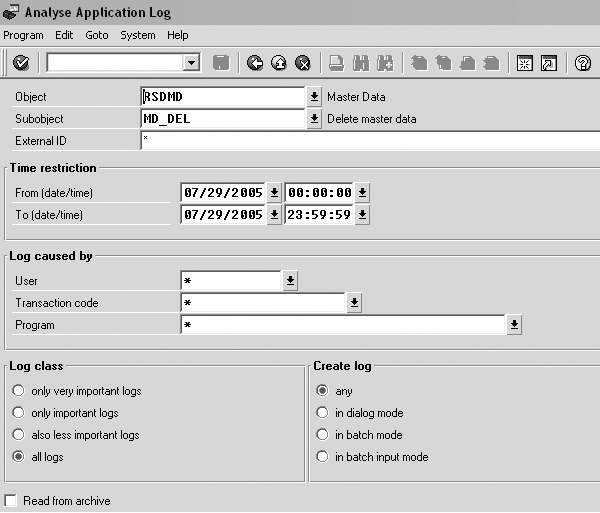
Figure 7
Application Log selection screen
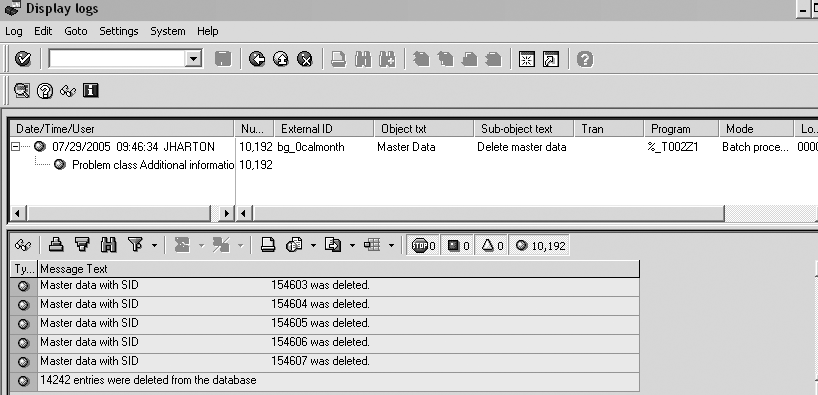
Figure 8
Log results for program RSDMD_DEL_BACKGROUND
This program checks the entire system for any used SIDs and then deletes the unused entries from all the master data tables of the InfoObject. This program searches for InfoCubes, ODSs, InfoObjects (compound and navigational attributes), aggregates, queries, and hierarchies.
See Table 1 for a list of the function modules that program RSDMD_DEL_BACKGROUND uses.
| Function module |
Purpose |
| RSD_IOBJ_GET |
Displays all information about InfoObject |
| RSDDCVER_USAGE_MDATA_BY_SID |
Shows where-used list of master data values |
| RSD_IOBJ_USAGE |
Displays where-used list of InfoObject in the system, including InfoCubes and queries |
| RSD_CUBE_GET |
Shows all information about InfoCube |
| RSDRD_DIM_REMOVE_UNUSED |
Deletes dimension entries that are no longer in use |
| RSD_FIELDNM_GET_FOR_DIME |
Displays all fields in a dimension |
| RSD_SIDTAB_GET_FOR_CHA_BAS |
Shows all master data tables for an InfoObject |
| RRI_REPORT_IMPORT |
Displays query definition |
| RSDDCVER_USAGE_MDATA_HIERA |
Shows where-used list of master data in hierarchies |
|
| Table 1 |
Function modules related to program RSDMD_DEL_BACKGROUND |
Note
A short-dump problem exists with program
RSDMD_DEL_ BACKGROUND. Refer to SAP note 856546 or the following support packages:
- Support Package 27 for BW 3.0B
- Support Package 21 for BW 3.10
- Support Packages 12 or 13 for BW 3.5
- Support Package 02 for BI 7.0
Prevent Inconsistencies
To prevent any inconsistencies resulting from deleting master data, I recommend performing an RSRV check (and repair, if necessary) for the list of InfoCubes and ODS objects that use the time characteristics (Figure 9). This checks that all records in the InfoCube have an SID and if not, it creates SIDs for any missing records. For InfoCubes, execute Consistency of the Time Dimension for an InfoCube. For ODS, execute Foreign Key Relationship of Reporting-Relevant ODS Object and SID Table Characteristics.

Figure 9
List of InfoCubes and ODS objects that use time characteristics
It is a good idea to run the master data delete (RSDMD_DEL_BACKGROUND) program periodically to clean up the master data in the system. I recommend that you write a shell program to serve as a call function to call another program —for example, perform (rname) in program (pname) — to provide RSDMD_DEL_BACKGROUND with the list of all the InfoObjects in the system. This way you can execute the program once for everything in the system. You can schedule this shell program to run regularly. You can get the list of all InfoObjects in the system from table RSDIOBJ, a directory of all InfoObjects.
Julie Hartono
Julie Hartono has more than six years of experience as an SAP BW consultant. Currently with Alpha Net Consulting, LLC, she has helped several large clients implement BW. Data conversion and extraction, development of custom DataSources, and data modeling are among her best skills. Julie received mySAP.com Delta Certification for Business Information Warehouse last year.
You may contact the author at julyhartono@sbcglobal.net.
If you have comments about this article or publication, or would like to submit an article idea, please contact the editor.



 Premium