Want to increase participation in your company’s 401(k) plans? Consider offering 401(k) loans. These are easy to configure in SAP.
Key Concept
You can use United Way wage types M720 (donation — United Way), M721 (donation balance — United Way), and M722 (donation total — United Way) to create 401(k) loans. Because SAP’s documentation doesn’t mention this alternate use for United Way wage types, many people are unfamiliar with this easy way to track 401(k) loans in R/3.
The most popular form of retirement savings plans that employers offer in the United States is a 401(k) plan. Many US-based companies allow employees to contribute pre- or post-tax dollars. By allowing employees to participate in a 401(k) plan, employees can lower their taxable income. Employee participation in the plan also saves the employer money on the taxes that they must pay on behalf of the employee. To increase participation in 401(k) programs, some employers have granted employees access to money in their accounts by allowing them to take out 401(k) loans.
Employees can always access their 401(k) funds if they qualify for a hardship withdrawal. To do this, employees must provide proper documentation stating that they qualify for a hardship and may have to pay taxes on the money they receive. In some cases, they may also owe a 10 percent early withdrawal penalty fee. In states like California, an additional early withdrawal state penalty fee of a few percentage points also applies.
Loans allow employees to withdraw a portion of their 401(k) account without suffering penalty fees. They must repay the principal balance and any interest. If employees do not repay the principal amount back, the unpaid portion of the loan is taxable and they have to pay penalty fees on this balance.
Employees contribute 35 percent more to their 401(k) on average than participants in plans that don’t allow the loans, according to a 1997 US General Accounting Office report. The same report found that offering a loan created more of an incentive to contribute to the plan than even an employer-matched contribution.
To take out a 401(k) loan, employees contact the 401(k) administrator (in the company or at an outside firm) to request a loan packet. Employees complete the information and return the packet to the 401(k) administrator. The administrator sends employees a check from their plan as well as a coupon booklet to submit their repayment.
Alternatively, the administrator could set up an automatic payroll deduction. If your company automates the repayment process, you could easily set this up in SAP R/3 Release 4.0 and later, as well as in mySAP ERP Central Component (ECC).
Wage Types
SAP delivers a set of wage types that you can use for a 401(k) loan repayment. United Way wage types M720, M721, and M722 are model wage types that a functional configuration team member can copy into the customer name space for you. This means that the wage types must begin with a number instead of a letter to ensure that SAP does not override your wage types in future releases or with a Support Package. You can indicate the next three spaces of the wage type as a letter or a number. When you copy wage types over to your name space, you can rename them with more meaningful text. Make sure you rename the copied version of the wage type and not the SAP standard wage type called the model wage type.
Configuration Steps
It is easy to configure the wage types for a 401(k) loan. First, log on to SAP R/3 and go to transaction SPRO. Press F5 to display the IMG. Use transaction OH11 or menu path Personnel Management>Personnel Administration>Payroll Data>Recurring Payments and Deductions>Wage Types>Create wage type catalog. In the Wage Type Maintenance pop-up screen, select Copy (Figure 1). Then click on the execute icon.
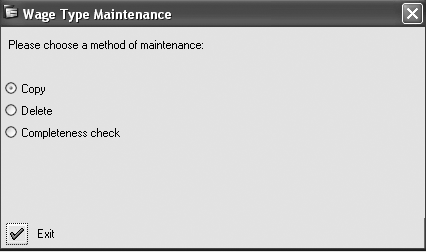
Figure 1
Wage Type Maintenance pop-up screen
Highlight wage types M720, M721, and M722 in the OWType column (Figure 2). If you do not see them, enter them there. Do not check the Test run check box. Then, on the right side of the screen, enter three new wage types in the CWType column, name them in the ShText column, and describe them in the Wage Type text column (Figure 2). Click on the Copy button. Verify that you did not receive any errors and that the wage types copied successfully to the SAP standard tables listed in Table 1.
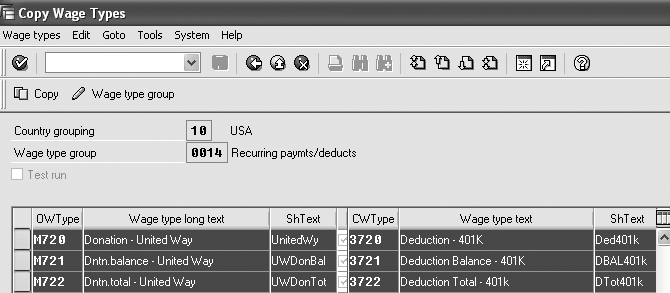
Figure 2
Copy SAP standard wage types
| Table |
Description |
| T511 |
Wage types |
| T512T |
Wage type texts |
| T512W |
Wage type valuation |
| T512Z |
Permissibility of wage types per infotype |
| T51P1 |
Wage type assignment |
| T51RA |
Derivation of HR creditor from wage type |
| T52D7 |
Assign wage types to wage type groups |
| T52DZ |
Assignment: customizing — model wage types |
| T52EL |
Posting of Payroll wage types |
| T52EZ |
Time dependency of wage type posting |
| T591B |
Time constraints for wage types |
|
| Table 1 |
SAP standard table for wage types |
Test Your Configuration
Now that you have configured the wage types, go to transaction PA30 (maintain master data). Enter a test employee’s personnel number and select infotype 0014 (recurring payments and deductions). The infotype’s subtype is the copy of the M720 wage type, 3720 in this example (Figure 2).
Enter a begin date for the infotype record in the From field, 1/1/2006. Use 12/31/9999 as the to (end) date. Type the loan repayment value per pay period in the Amount field, 50.00 USD in this example (Figure 3). Click on the save icon and R/3 automatically displays infotype 0015, additional payments. Because you copied from wage types M720, M721, and M722, the system remembers that they link to the original wage types.
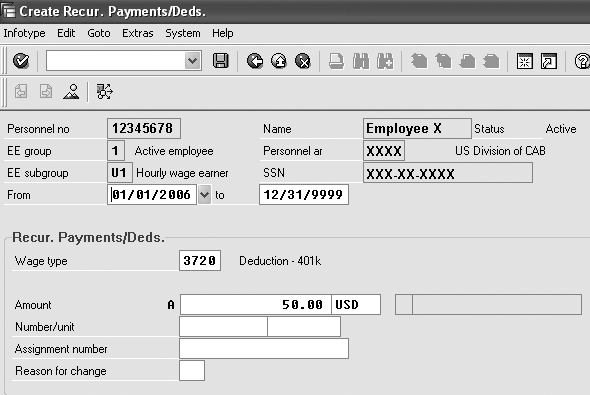
Figure 3
Configure infotype 0014, recurring payments and deductions
Note
If the copy wage type screen shows a country grouping other than the one for which you want to register the wage types, select Tools>Change country group. This ensures that the new wage types that you create apply to the United States (country group 10), not a country that does not offer 401(k) loans. If you do not see the wage type group (infotype 0014 in this case, as you are placing the copy of wage type M720 on the recurring payments and deductions infotype), select Tools>Change Wtype group. The same applies to wage type group 0015, because you want to ensure that this group lists your copy of wage types M721 and M722.
Note
Check with your business department to determine how your company should handle 401(k) loans in the event of arrears processing. If you want to change this processing procedure, update table V_51P6_B (characteristics of arrears deductions).
Tip!
If your company offers multiple types of 401(k) loans, you must create additional copies of the wage types to differentiate among them. You might use wage types 3720, 3721, and 3722 to track the first 401(k) loan and wage types 4720, 4721, and 4722 to track the second 401(k) loan.
In the Amount field of infotype 0015, enter the repayment loan amount including the amount of the loan plus the interest and processing fees (Figure 4). Employee X borrowed $275.00 from his 401(k) and the processing fees and interest total $25.00. The total amount of the loan is $300.00, so enter 300.00 USD. You do not need to change wage type 3721 because the system automatically populates the dates from infotype 0014.
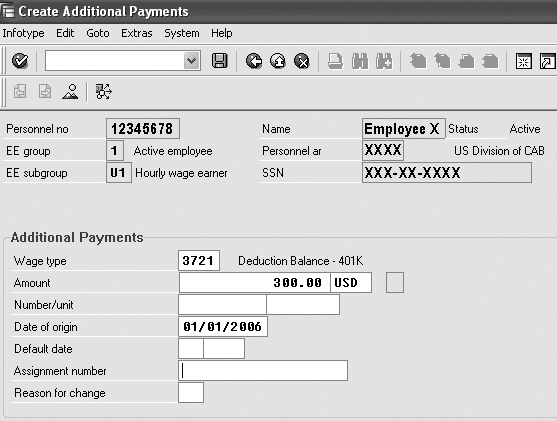
Figure 4
Configure infotype 0015, additional payments
Run payroll for the test employee for the payroll period that includes 1/1/2006. Wage type 3720 displays $50.00- in the results table (RT). Wage type 3721 shows the amount remaining for the employee to repay. Wage type 3722 displays the total of all collected payments, a negative number that tracks how much money the employee paid toward the loan. If this were the second payroll period of the year and the second employee payment, the system would display wage type 3720 as $50.00-, 3721 as $200.00, and 3722 as $100.00- (Figure 5).
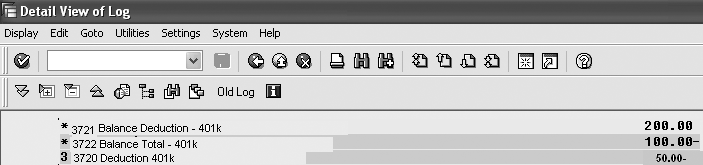
Figure 5
RT table
Continue to run payroll for the test employee until wage type 3722 equals the original repayment amount from infotype 0015 ($300.00) and the balance wage type 3721 equals 0. Once the employee repays the loan, table RT no longer displays wage types 3720, 3721, and 3722.
Some companies do not permit employees to contribute to their 401(k) plans until they have repaid their 401(k) loans. For more information about how to set up this type of payment with a dynamic action, see the sidebar “Dynamic Action Entries.”
You can use a copy of the United Way M720, M721, and M722 wage types to track United Way deduction information. For example, if an employee wants to contribute $10.00 per pay period up to $100.00, you would follow the same steps you performed for the 401(k) loan. Be aware that payroll ends the deduction, so the 401(k) saving plan deduction does not automatically start again. Therefore, you might need to run an SAP query to see what 401(k) loans the system delimited within a specified period on infotype 0014. To ensure that you copy the old infotype 0169 (savings plan) to a new record with a validity, make the date one day more than the end date from infotype 0014.
If employees pay their 401(k) loans early, the company may need to set up additional wage types to offset the 401(k) loan amounts. It may also require that the payroll administrator update the 401(k) wage types in infotype 0221 (create payroll results adjustments). Such adjustments may be necessary for employees who are terminated or rehired. The payroll administrator may want to delimit the 401(k) deductions.
Tip!
To add 401(k) loan information to the payroll remuneration form, add the 3720 wage type information to this form via transaction PE51. You must also update the appropriate evaluation class information in table V_512W_0.
Tip!
Some companies prefer to use more creative naming conventions than my example. You could use wage type 3D01 for the loan deduction, 3B01 for the loan balance, and 3T01 for the total repaid amount. If you have a second series of 401(k) loans, you could name them 3D02, 3B02, and 3T02.
Note
SAP R/3 automatically stops this deduction after employees repay the loan.
Some companies do not want the company’s payroll system to track 401(k) loan balances. If this is the case, you can always set up a recurring deduction on infotype 0014, based on information that you receive from your 401(k) administrator. In this case, your company would stop this deduction when the 401(k) administrator notifies you that the employee has repaid the loan amount. You would set this up as a deduction only on infotype 0014 — you would not track this using infotype 0015.
Note
If you are unfamiliar with dynamic actions, refer to the July 2003 article, “Unleash the Power of Dynamic Actions: Tips and Tricks to Get the Best Results,” by Rehan Zaidi.
Dynamic Action Entries
Some companies have a policy that if you take out a 401(k) loan, then you cannot contribute to your 401(k) plan until you have repaid the loan. If this is the case, you could set up a dynamic action for table T588Z that displays infotype 0169 (savings plan) when you create an infotype 0015 record with the appropriate wage type.
Using my example from the article, Table 1 shows wage type 3721. In dynamic actions table T588Z, enter the information exactly as shown in each column.
This simple dynamic action states that whenever you add an infotype 0015 subtype 3721 record to the database for a US-based employee, the system modifies the existing infotype 0169 record with an end date that matches the infotype 0015 end date. Note that infotype 0015 has only one date that doubles as the begin date of the loan.
If you have multiple 401(k) loans, consider how dynamic actions might impact the infotype 0169 record. A simple dynamic action might not be enough to help determine the true delimit date. In this case, you might need to call a function within the dynamic actions table to help determine the date that you want to use.
| Infotype |
STy. |
FC |
No |
S |
Variable function part |
| 0015 |
3721 |
04 |
1 |
P |
T001P-MOLGA=’10’ |
| 0015 |
3721 |
04 |
1 |
I |
MOD,0169,,, |
| 0015 |
3721 |
04 |
9 |
W |
P0169-ENDDA=P0015-ENDDA |
| 0015 |
3721 |
04 |
10 |
W |
P0169-BPLAN=’401K’ |
Table 1
Dawn Burns
Dawn Burns is an SAP-certified human resources senior consultant and Quality Assurance Manager and HR Consultant with Howrey LLP. She is a former SAP Human Resources instructor for SAP America and has more than 12 years of experience in human resources and information technology.
If you have comments about this article or publication, or would like to submit an article idea, please contact the editor.




 Premium