Learn about the User Interface Framework of SAP’s Business Suite, the Floorplan Manager (FPM), and its basic concepts. See how to use the FPM for enhancements and to create individual applications.
Key Concept
The Floorplan Manager (FPM) is SAP Business Suite’s User Interface (UI) Framework. The FPM takes care of UI guideline compliance and provides a complete runtime and design time environment as an application framework for developers, business experts, and end users.
The Floorplan Manager (FPM) is used in the different application areas within the SAP Business Suite to give users a homogeneous user experience independent of the particular business case. By offering standardized and configurable templates for the most common UI components, such as forms, lists, and searches, the FPM can be used for any business case and adapted at each stage of the application life cycle from development to end-user personalization.
The Floorplan Manager for Web Dynpro ABAP was first released with SAP NetWeaver 7.01. This release is the foundation for SAP Business Suite Enhancement Package 4. Starting with this release, the FPM is the standard User Interface (UI) Framework for newly created Web applications in SAP’s Business Suite.
Note
The screenprints and information are from SAP NetWeaver 7.31 and the corresponding Business Suite Enhancement Package 6. The coding examples are developed in ABAP using Web Dynpro UI technology.
SAP UI Guidelines
Application development in the SAP Business Suite follows rules and principles to keep applications consistent over the involved application areas such as:
- Enterprise Resource Planning (SAP ERP)
- Supply Chain Management (SAP SCM)
- Supplier Relationship Management (SAP SRM)
- Product Lifecycle Management (SAP PLM)
- Several industry solutions (e.g., SAP for Retail)
These rules ensure the code for all applications is robust and well structured. They also facilitate a distinct appearance and application behavior. In this context, SAP has defined a universal guideline to describe the structure and alignment of all visual application aspects. This guideline is officially published as SAP UI guideline for internal development and customers as well. It is available at https://scn.sap.com/docs/DOC-16886.
To define a UI guideline is an ongoing process because UIs change constantly. This means that the description of the UI guideline is always specific to a certain point in time. Depending on the latest trends and customer requirements, the UI guideline considers all requirements according to the current application release.
The FPM implements the UI guideline continuously in the current release of SAP’s Business Suite. All applications using the FPM are automatically based on the latest definition of the UI guideline. Additionally, all SAP partners, consultants, and external users are able to take advantage of the guideline easily through the FPM.
Character of a Floorplan
Following an approach of serving as a design template, the FPM provides a framework as a set of instruments, such as an editor, the runtime environment, and application interfaces. The instruments allow the implementation of these design templates to cover the general application aspects, such as UI assembly, content provisioning, and message handling. Every FPM application includes a number of typical elements as shown in Figure 1 that represent the SAP standard application for compensation planning. These elements can be found in the following areas:
- Identification region (1)
- Toolbar (2)
- Roadmap and tab sheet (3)
- Building blocks (4)

Figure 1
The structure of a FPM application used to submit compensation requests
The FPM as a framework offers three basic types of floorplans:
- Object Instance Floorplan (OIF)
- Guided Activity Floorplan (GAF)
- Overview Page Floorplan (OVP)
While the GAF is intended to facilitate a step-based process, the OIF and OVP are built to represent an activity around a certain object. The overview in Figure 1 shows a GAF.
The decision for a certain floorplan type depends on the particular application scenario. The GAF is mostly used for linear application cases in which a number of steps need to be fulfilled next to each other. The typical example shown in Figure 1 is intended to process a compensation planning scenario. This application uses three steps. A manager selects a certain employee at the first step and assigns the compensation budget at the second step. In the third step, the entered information is reviewed and sent.
A common OIF application shown in Figure 2 renders the SAP standard application for the compensation profile. It provides an overview about the available compensation data for an employee. Here you can see the typical tab strip right to the short profile with the photo, in which the end user can switch between the different content blocks (such as Overview or Employee Data). While the employee acts as the central business object in this application, the OIF can be used for each other business area with its particular business objects, such as sales orders, purchases, and debit orders.

Figure 2
An example of an OIF application
The OVP covers as a floorplan similar application scenarios as the OIF. Unlike OIF, all content blocks are assembled bottom down in one or two columns without further structuring. Figure 3 shows an SAP Employee Profile application, in which you can review and edit all employee-related master data.

Figure 3
An example of an OVP application
Configuration
The FPM uses Web Dynpro ABAP as its underlying UI technology. In this context, it inherits the general concepts for implementation and configuration. This means that each FPM application is implemented as a Web Dynpro ABAP application.
Depending on the selected floorplan for a particular application, the following Web Dynpro components need to be used and configured via Web Dynpro component configuration:
- FPM_OIF_COMPONENT (OIF)
- FPM_GAF_COMPONENT (GAF)
- FPM_OVP_COMPONENT (OVP)
An FPM application is configured as a Web Dynpro ABAP application configuration using one of the three components. Each application benefits from a consistent implementation logic that is applicable for all floorplans. The use of these components also guarantees that the application is in accordance with all guidelines. To facilitate different specific application cases, each application can be enriched by an individual component configuration. This configuration determines how the application content is assembled within the FPM component (e.g., number of roadmap steps or availability of toolbar buttons).
A Web Dynpro configuration can be adapted on different hierarchy levels, as shown in Figure 4. This allows all involved parties to make individual changes to the application.

Figure 4
Configuration hierarchy levels
The personalization at the highest level does not require any special authorization. It is available to all users in a system. Customizing is typically done by administrators or consultants. It is done to adapt a generic application to specific customer requirements. In order to use these features, you need to assign authorization object S_WDR_P13N or S_DEVELOP. The configuration is typically done by a developer or an implementation partner who wrote the application. This requires the authorization object S_DEVELOP.
From one level to the next, the possibilities to change the application behavior and appearance decrease. Configuration allows changes to all settings while customizing offers a limited set of options, and personalization offers even fewer options.
To understand how to adapt an FPM application, we start with a small enhancement of an existing FPM application. For this purpose, we use a demo application from Package S_EPM_UX. This package includes a number of applications to demonstrate several user experience (UX) cases. Additional test and demo applications with a more technical background can be found within the packages APB_FPM_Test and APB_FPM_DEMO.
These packages are included in the root package APB_FPM that delivers the complete FPM content. This should help to get an overview of the FPM. A company using SAP Business Suite has access to all available content because the FPM is delivered as part of SAP NetWeaver Basis starting with release SAP NetWeaver 7.01. If you do not have SAP Business Suite, you can make use of an ABAP trial version that is available at https://scn.sap.com > Downloads > Software Downloads > SAP NetWeaver Main Releases.
In the first scenario, we demonstrate a simple adjustment via customizing. In this context we run the UX demo application S_EPM_UX_SO_PAGEMASTER. To access it, start transaction SE80 (Developer Workbench), select the package S_EPM_UX, and follow the depicted path: Embedded Package S_EPM_UX_SO > Web Dynpro > Web Dynpro Application S_EPM_UX_SO_PAGEMASTER.
According to the hierarchy levels, you need to be an administrator to perform customizing. To do that, you start the application from menu path Web Dynpro Configuration > Test > Execute in Administration Mode. Alternatively you could press Shift + F8 or run the application with URL-Parameter sap-config-mode=X in the browser.
Once the application starts, you should see the application screen with a header labeled Customizing Mode on top. This indicates that you are now able to perform customizing tasks. Before starting to customize, it is advisable to understand how the application is working. To achieve that, you can test the application a couple of times. Note that the details on the right side change when you select another sales order from the list on the left (Figure 5).

Figure 5
The FPM application running in customizing mode
When you understand the application logic and the available fields on the screen, you can click the small wrench icon in the toolbar section. This shows the customizable areas. Subsequently, you see three ghosts that cover the blocks for the Sales Order Details, Items, and Open Sales Orders. Ghosts are transparent markers that highlight specific screen areas.
As a first step, you remove the field Lifecycle Status from the form Sales Order Details. To do so, click the ghost for this block. It becomes active when you move the mouse over it.
You need to create a new configuration object by clicking the New button when you have not used customizing before. You can use the predefined configuration name and decide whether you want to be able to transport your changes to other systems. For this local test case, it is advisable to choose No Transport Request. This avoids unwanted transports in your ABAP system landscape.
Once this step is done, you see the FPM Editor for the first time. You should see basic settings, such as the layout type on top, a preview area directly connected to a schema, and finally the element configuration area. Most of the available settings are self-explanatory. Playing around with the available settings should give you an overall understanding of what you can do with the editor and what the impact is on the application UI.
To make the Lifecycle Status field unavailable in the Sales Order Details region of the screen, mark the Lifecycle Status field in the preview area (Figure 6). Alternatively you can click the element with the same name in the schema. Clicking the garbage can icon as highlighted in Figure 6 removes this element from the form.
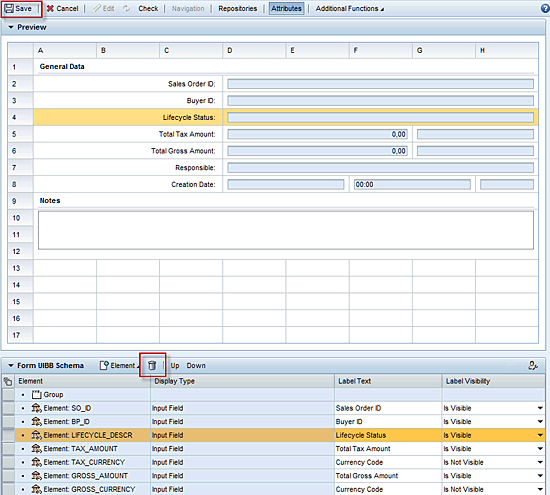
Figure 6
The FPM Editor showing the configuration of a form with highlighted Save and Delete Buttons
Once you click the save button on top of the screen, the system stores the configuration as customizing. Now all users of the application on this ABAP system in this client will not see the Lifecycle Status field. That means with this step you have finished your first FPM customizing.
Technically speaking you have removed a field of a Form UI Building Block (UIBB). The meaning of this term and how UIBBs are integrated to the FPM application is explained in the section that describes the FPM phase model.
Phase Model and UI Building Blocks
When looking back to the customizing applied to your FPM application in the previous section, you might wonder where the coding is placed. To get a clear picture, it is necessary to understand the FPM phase model (Figure 7). Because the FPM is implemented on Web Dynpro, the event system is integrated into the standard Web Dynrpo event handling.

Figure 7
The FPM phase model
The diagram in Figure 7 illustrates the methods that are processed by the following objects:
- FPM component: FPM_GAF_COMPONENT, FPM_OIF_COMPONENT or FPM_OVP_COMPONENT
- Core class: CL_FPM
- UIBBs
- Web Dynpro framework
The phase model is always executed when an event related to the FPM is raised (e.g., moving from one roadmap step to the next). The ABAP class CL_FPM can be viewed as a central anchor interacting with the corresponding application component (represented by UIBBs) and the FPM component. The FPM component handles all floorplan aspects not related to UI Building Blocks. The box named UIBB1 represents any UIBB that is part of the current UI assembly. This UIBB is actually rendered within the floorplan. The box marked UIBB2 represents a UIBB that will be initiated with the upcoming event. This UIBB is rendered within the floorplan as a result of the UI assembly.
Any WebDynpro component can act as an UIBB, given that it implements the interface IF_FPM_UI_BUILDING_BLOCK. This means that an existing WebDynpro component can be easily converted to a FPM UIBB by simply implementing this interface. In the FPM demo package APB_FPM_DEMO, you can find a few examples for UIBBs. You can have a look at either the WebDynpro Component FPM_GAF_BOOK_FLIGHT or FPM_DEMO_FLIGHT_OVERVIEW. These components are part of the demo applications FPM_DEMO_MEAL_SURVEY and FPM_DEMO_FLIGHT_OVERVIEW.
Table 1 lists the methods of the interface IF_FPM_UI_BUILDING_BLOCK, their typical implementation, and what they are used for.

Table 1
Methods of interface IF_FPM_UI_BUILDING_BLOCK and their uses
The FPM offers GUIBBs for these common UI templates:
- List
- Form
- Search
- Hierarchical tree
While GUIBBs encapsulate the UI, the developer is still required to provide the application content and business logic. This is encapsulated in feeder classes.
The processing of GUIBBs by the FPM phase model is no different from the processing of other UIBBs. To function correctly, the feeder class interfaces need to be implemented for providing a field catalog and process logic. The concept of the field catalog was introduced in the configuration example when you removed a particular field from the Form GUIBB with the editor. Figure 8 shows the configuration editor that offers all available fields from the catalog. This information is delivered by the feeder class.

Figure 8
Editor showing the field catalog when adding fields
The feeder class interfaces for the available GUIBBs are:
- IF_FPM_GUIBB_LIST (List)
- IF_FPM_GUIBB_FORM (Form)
- IF_HRTMC_SEARCH (Search)
- IF_FPM_GUIBB_TREE (Hierarchical tree)
The process of providing the field catalog is similar for all feeder classes. The field catalog informs the GUIBB about all available data fields and their format. To get an understanding of the typical logic implemented in the corresponding feeder class method, look at the implementation of the method GET_DEFINITION of the class CL_EPM_SO_PM_HDR_FORM_FEEDER. This implementation is responsible for delivering the field catalog definition to the Form GUIBB with the sales order details that we configured as an example in the previous section.
A developer can implement a complete FPM application without ever getting in contact with Web Dynpro logic by only implementing feeder classes in ABAP Objects. Providing application content through feeder classes that are connected to FPM GUIBBs is a perfect choice for offering the flexibility to adapt the content to business needs by using configuration through the editor. In combination with the configuration of the surrounding floorplan itself, the FPM provides a fully configurable framework that completely covers all application aspects.
The configuration example introduced in the previous section is only a starting point. It demonstrates the general concept of adapting a FPM application. The FPM offers the flexibility to configure any other application part. This starts with the overall UI arrangement and ends with the adjustment of certain fields on each building block. All content is rendered according to the official SAP UI guideline.
Kay Eidner
Kay Eidner graduated in economics and computer science at the University of Technology in Magdeburg. He has worked with and at SAP AG since 2000. He is currently working on IMS Development for SAP ERP HCM. His diverse areas of expertise include Java, ABAP, mobile technology, applications such as ESS, MSS, and DFPS, and several other focus areas in the context of SAP technology.
You may contact the author at .
If you have comments about this article or publication, or would like to submit an article idea, please contact the editor.

Thomas Frambach
Thomas Frambach graduated in engineering and computer science at the University of Applied Science HTW Berlin. He has worked as a developer for SAP AG in Walldorf, Germany since 2004. As member of the FPM development team, he was responsible for the implementation of Floorplans. Currently, he is working on IMS Development for SAP ERP HCM with a focus on Talent Management.
You may contact the author at thomas.frambach@sap.com.
If you have comments about this article or publication, or would like to submit an article idea, please contact the editor.


 Premium