As of mySAP ERP 2005, SAP has delivered a new depreciation calculation in Asset Accounting. This algorithm introduces new depreciation concepts as well as new functionality — period interval-based parameters and time-dependent depreciation parameters.
Key Concept
The new depreciation calculation available with mySAP ERP 2005 is 100% compatible with the older one. No configuration changes are required as part of this process and you do not need to migrate data, either. Included in this new calculation is a piece of functionality that now makes it possible to invoke changes to an asset’s depreciation calculation on a period basis. Several new Business Add-Ins allow further customization of the depreciation calculation.
As part of the functional enhancements in the mySAP ERP 2005 release, SAP has changed the underlying depreciation calculation that the Asset Accounting (FI-AA) subledger uses to depreciate fixed assets. The justifications for making such a fundamental change were to make the depreciation calculations easier to understand and roll out new functionality that was required in various countries. Some of these country-specific requirements were related to their unique accounting rules and currencies. The main items SAP included in this release are:
- Period interval-based calculation
- Time-dependent depreciation parameters
- Depreciation method changeover on period level
- Base value determination on a period level
- New transaction type groups
- New fixed asset depreciation trace
- Improved handling of group assets and assets under construction
- The introduction of several new Business Add-Ins (BAdIs) that allow greater flexibility and customer control over the depreciation calculation
Of these items, the first two — period-based depreciation calculation and time-dependent depreciation parameters — will likely be of the most interest to SAP users who have implemented FI-AA.
Before I go into detail about each one, let me review a couple of items related to mySAP ERP 2005 and some items to consider if you are upgrading to this release.
In terms of availability, the new depreciation calculation functionality is delivered as of the mySAP ERP 2005 release and is not downward-compatible. Merely having a mySAP ERP 2005 system does not mean that the new logic is in place. First, you must ensure that Enterprise Add-on Financials (EA-FIN) is active in the system. If it is, then the system uses the new depreciation calculation; If it is not active, the system uses the existing old depreciation logic. Keep in mind that SAP’s Add-ons to the ERP Central Component (ECC) contain significant functionality across a wide area ¾ all of Financials in the case of EA-FIN. The EA-FIN Add-on contains functionality that affects more than just FI-AA, so deactivating it to switch back to the old depreciation logic may not be suitable for all customers. For instance, EA-FIN also contains several improvements in the Treasury module.
To see if you have the EA-FIN Add-on active, go to transaction code SFW5 or menu path IMG>Activate SAP ECC Extensions and verify its status as seen in Figure 1.
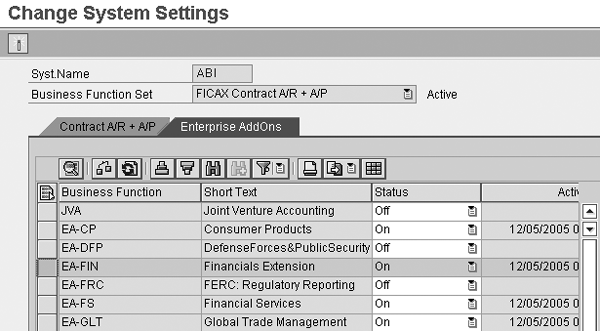
Figure 1
Enterprise Add-ons in ECC
From an upgrade process point of view, SAP recommends that you perform a recalculation of values using program RAAFAR00 immediately after the technical upgrade to ECC 6.0. I’d also recommend that you execute RAAFAR00 in the legacy environment before the upgrade ¾ you probably would do this as part of the period-end process that most likely would occur prior to the system upgrade.
If executing RAAFAR00 on a periodic basis is not part of your process, then my reasoning for suggesting it is that it’s always best to confirm the accuracy of the depreciation data before embarking on any major change to the subledger. This is true of configuration-based changes, mass changes to asset records, or new functionality implementations caused by requirements such as the bonus tax depreciation requirement that was introduced in the United States in 2002. Either way, I always want to be assured that the subledger is calculating and storing correct values before any significant undertaking.
Note that SAP does not support a deactivation of the new depreciation calculation using any standard methods. Once you upgrade to ECC 6.0 and activate the EA-FIN Add-on, you cannot use the old logic.
Note
In general, if the EA-FIN Add-on is active, the system does not use the old depreciation logic in all asset processing. However, SAP has delivered transaction AW01_AFAR, which displays the values of an asset using the old depreciation calculation even if the new one is active. This is helpful when, for example, you want to view an asset using the old logic for confirmation purposes. Keep in mind that if the asset that you’re evaluating has a defined time-dependent depreciation parameter, the AW01_AFAR transaction displays the calculation using the most current interval.
Now I review some of the key developments in this area and their impact on your SAP systems.
Period Interval-Based Calculation
As you can see in the above list of functional enhancements, I used the word “period” frequently and with good reason — this highlights a major fundamental change in how to calculate depreciation.
In prior releases, SAP based depreciation on asset transactions and therefore calculated the depreciation amounts on a line item basis. If you look in the asset line item table ANEP in R/3, you’ll notice the record string of each asset transaction includes several calculated amounts for depreciation, as well as some others such as interest. As you can see in Figure 2, the system calculates the amounts for each transaction regardless of its type ¾ acquisition, transfer, or retirement.

Figure 2
Asset line item table ANEP showing calculated ordinary depreciation amounts
With the new calculation, SAP changed the logic to a period interval focus, so the system collects and calculates all transactions influencing the same period interval in one step. The system assigns each line item within a fiscal year to a period and then sums it up on a period basis. This means that the system no longer tracks the values in ANEP for planned ordinary depreciation (ANEP-NAFAB) and planned special depreciation (ANEP-SAFAB). To be clear, the table remains the same but the values are no longer populated.
By default, the system uses a single period segment per year. The system creates additional segments whenever something changes that affects the asset’s value, such as:
- Transactions within the fiscal year. Each posting, whether it is an acquisition, transfer, or retirement, generates a new interval if it occurs in a period that does not contain an interval already.
- Certain time-dependent changes to the assets such as shutdowns and multiple shift factors. In either case, if the asset has multiple time intervals defined in its master record to specify its offline state (i.e., shutdown) or its increased operational capacity (i.e., multiple shift factor), then the new depreciation logic translates the period intervals.
- Depreciation method change. Examples would be a change to the multi-level method within a fiscal year, an automatic method changeover at the end of the asset’s useful life, or an automatic method changeover within the asset’s useful life.
- Change of a depreciation parameter within a fiscal year. I’ll discuss this later in the “Time-Dependent Depreciation Parameters” section.
To illustrate how this period concept works, let’s walk through an example showing different transactions and their effect on the calculated depreciation amounts. Assume that this is a normal calendar year-based fiscal year running from January to December. Depreciation is straight line and based on the asset’s useful life and its base amount.
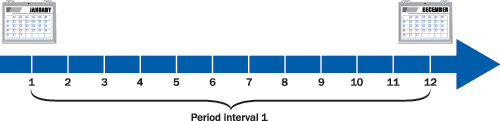
As mentioned previously, the asset always has a single interval to start off with, an interval containing 12 periods in this case. In this example, Company XYZ acquired an asset at the beginning of the year for $1,000 and is set to depreciate over 10 years.
Based on this activity, the new depreciation calculation defines a single period interval and calculates the depreciation using the base value ($1,000), the depreciation rate (10%), and the period factor of 1 (12 applicable periods in the interval/12 fiscal periods). This results in an annual depreciation amount of $100 (Table 1).
|
Date
|
Type
|
Amount
|
Period interval
|
Base value
|
Depreciation per interval
|
Calculation of depreciation
|
|
Jan 1, 2006
|
Acquisition
|
1,000
|
1 (= 12 months)
|
1,000
|
-100
|
1,000 * 10% * (12/12)
|
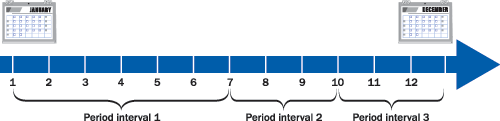
Table 1The asset is then partially retired in July and receives a subsequent acquisition in October, as shown in Table 2.
|
Date
|
Type
|
Amount
|
Period interval
|
Base value
|
Depreciation per interval
|
Calculation of depriciation
|
|
Jan 1, 2006
|
Acquisition
|
1,000
|
1 (= 6 months)
|
1,000
|
-50
|
1,000 * 10% * (6/12)
|
|
July 1, 2006
|
Partial retirement
|
-400
|
2 (= 3 months)
|
600
|
-15
|
600 * 10% * (3/12)
|
|
Oct 1, 2006
|
Acquisition
|
200
|
3 (= 3 months)
|
800
|
-20
|
800 * 10% * (3/12)
|
Table 2The calculation is easy to follow, as shown in Table 2. The additional postings result in the creation of two more period intervals. Note that the first interval now has been reduced from 12 periods to six, which results in a reduction in its planned depreciation from $100 to $50. You evaluate each resulting posting, or potentially, a series of postings, within that same time interval in the same manner. The final annual depreciation for this asset is the summation of each period’s planned depreciation ¾ $85, in this case.
Under the old logic, the system would carry out the calculation sequentially for each transaction and then aggregate the amounts to arrive at the final annual value. Each subsequent posting to an asset serves, more or less, as a correction to the initial calculated figure. As you see in Table 3, the initial calculation using the old logic is $100 and then is adjusted by the subsequent posting by backing out $20. The third posting adds another $5 of annual depreciation, resulting in the final amount of $85.
|
Date
|
Type
|
Amount
|
Depreciation rate
|
Period factor
|
Calculated depreciation
|
|
Jan 1, 2006
|
Acquisition
|
1,000
|
10%
|
12 / 12
|
-100
|
|
July 1, 2006
|
Partial retirement
|
-400
|
10%
|
6 / 12
|
20
|
|
Oct 1, 2006
|
Acquisition
|
200
|
10%
|
3 / 12
|
-5
|
Table 3Table 3 shows the breakdown using the old depreciation logic for the same series of transactions.
Figures 3 and 4 show you what is happening in the system for the same example asset. The first one shows the depreciation calculation using the old logic and the second one shows the new calculation. Notice that the line items do not contain any calculated amounts in Figure 4 since they are no longer stored on a line item basis.
Note
Since asset depreciation is no longer calculated on a line item basis, the asset transaction reports does not display any depreciation amounts. Or more precisely, they’ll display $0.00 as the calculated amount. To fix this, look at SAP Note 949701.
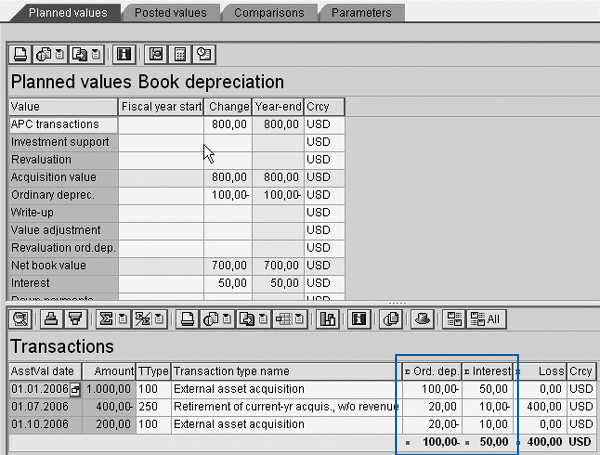
Figure 3
Old logic which calculates on line item basis

Figure 4
New logic which calculates by period intervals
The final calculated amount is the same ¾ except for some special cases, the results between the two approaches to compute the annual depreciation are identical. If this were not the case, there would be a significant difference in your depreciation figures after your upgrade and this would not be correct. There are some small differences that might occur after the upgrade but these are well documented in SAP Note 965032.
This new period-based calculation results in a couple of key improvements. First, the calculation should be easier to understand. This technique also is more logical and easier to follow when you have to investigate depreciation calculation issues. The previous process was not as intuitive because of the constant adjustment to the initial depreciation figure that was baselined by the first posting.
This new calculation also is more accurate related to certain rounding issues, particularly with currencies that have no decimal places, such as in Japan. If your system contains assets valued in currencies such as these, there is a chance that the initial recalculation of values that I recommended earlier results in changes based only on rounding differences to the asset values. Lastly, the system performs the calculation more quickly in some scenarios because it first aggregates and treats as a single number any transactions that fall into the same time interval before performing the calculation. This should be beneficial in the cases in which a particular asset has a large amount of transaction activity.
Now that you understand the period interval-based calculation logic, let’s look at the next significant change in the new depreciation logic — time-dependent depreciation parameters.
Note
In past releases, SAP delivered several enhancements to process and manipulate asset depreciation further. An example was user exit AFAR0003 (changeover method for depreciation calculation) that you can use to specify a customer requirement of changing over to a different phase. These user exits are no longer interpreted by the new depreciation calculation. In their place, SAP has delivered four new BAdIs. They allow you to manipulate the calculated amounts for depreciation, interest, and revaluation based on customer-specific requirements. If you have implemented some of these user exits in your system, you’ll have to migrate their logic to the new BAdIs.
Time-Dependent Depreciation Parameters
The new time-dependent depreciation parameters make it possible for you to specify certain depreciation parameters on the fixed asset master record as of a point in time during the fiscal year.
In past releases, the old depreciation logic did not allow for changes to an asset’s depreciation parameters to be made on a point-forward basis. What I mean by this is that the system would always calculate any changes to a depreciation parameter calculated for the entire year, or, to be precise, all open years. Values that you previously calculated and posted to the G/L would be included in the new annual amount, which would result in the need to make an adjustment. To understand this better, let’s walk though another example.
Company A acquires an asset on January 1 for $6,000 and the asset depreciates based on a useful life of five years. The system bases the depreciation on the asset’s original acquisition and production costs (APC) and total useful life, which results in a planned annual amount of $1,200 — $100 per month.
After four months of running depreciation, $400 has been expensed to the G/L. In the month of May, the useful life changes from five years to four to accelerate the depreciation so the asset is extinguished as of a particular date.
Using the old calculation logic, the system would recalculate the depreciation amount on an annual basis as if the useful life of four years had been in place for the entire year. This would result in a new annual calculation of $1,500 — $125 per month.
To back into a new annual figure of $1,500, it first must adjust the under-expense of depreciation that occurred in periods 1-4. With a useful life of four years, periods 1-4 should have been expensed $500, not $400. To account for the delta of $100, the system can do one of two things. It can immediately post the adjustment of $100 in the next depreciation posting run or spread out the adjustment over the remaining depreciation periods of the current fiscal year.
Those of you who work in FI-AA know that I’m referring to the smoothing indicator that you can configure at IMG>Financial Accounting>Asset Accounting>Integration with G/L>Specify Intervals and Posting Rules. If smoothing is active, then the adjusted amount of $100 is “smoothed” over the remaining periods of the current fiscal year and would result in an additional debit of $12.50 — $100/eight remaining periods — with each depreciation run. Combined with the new monthly depreciation of $125, a total of $137.50 would be posted to the G/L each month.
If the indicator is not active — SAP refers to this as the “catch-up” method — the system adds the full adjustment of $100 with the next depreciation run. Combined with the new monthly figure of $125, the final depreciation posting for period 5 would be $225, followed by the expected debit of $125 for the remaining periods 6-12.
Either calculation would aggregate into a total annual depreciation of $1,500, which is what would be expected with the depreciation terms under the old depreciation logic. Figure 5 provides a graphical view of the calculated depreciation for this example.

Figure 5
Depreciation graph for subsequent changes to an asset’s depreciation parameters
While this explanation makes sense, it is rarely desirable among my clients. They routinely ask how they can invoke a change in depreciation as of a particular date and not take into account the prior periods. Basically, they don’t want the change to be retroactive to the beginning of the year and trigger the adjustment calculation. With the new time-dependent depreciation parameters, you can make this change with the more expected depreciation calculation. Let’s look at making this change in the mySAP ERP 2005.
Access the asset master data screen using transaction code AS02. Navigate to the last tab to see the list of available depreciation areas. By double-clicking on area 01, you’ll see Figure 6.
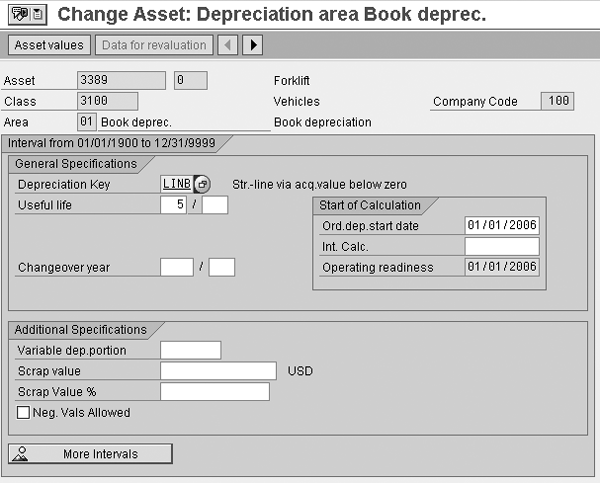
Figure 6
Detail view of depreciation area 01 on the asset master record
The first thing you should notice in mySAP ERP 2005 is that the sub-screen has a title that says Interval from 01/01/1900 to 12/31/9999, which is similar to the Time-Dependent Data tab found earlier on the asset master. This gives you an idea that you now can change these parameters on a period basis as with the attributes on the Time-Dependent Data tab, such as cost center and plant. Click on the More Intervals button to get an overview of the defined time intervals. At this next screen, click on the Add Interval button.
The system prompts you to enter the From date. This is the starting point of the new time interval for which you want to define a change in the asset’s depreciation parameters.
After entering in the value 05/01/2006, the system returns me to the interval overview screen where I can enter one of the supported depreciation parameters for this time interval. The supported parameters that you can change are depreciation key, useful life in years and periods, scrap value amount and percentage, and proportional depreciation (Figure 7).
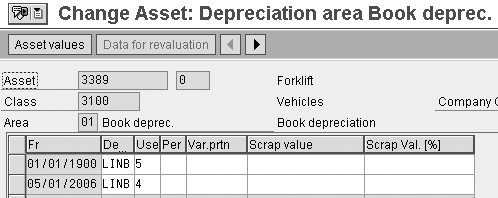
Figure 7
Specify depreciation parameter on a time-dependent basis
In accordance with my example, I’ve changed the useful life to four years and saved the asset (Figure 7). Similar to earlier releases, changing a depreciation parameter automatically triggers a recalculation of the asset’s value so I can jump immediately to a report if necessary.
To view the final calculated values, let’s look at Asset Explorer, which you can access via transaction code AW01. You can see that the system has adjusted the depreciation from period 5-12 to reflect the new useful life of four years from $100 to $125 without incurring the “catch-up” adjustment of $225 in period 5 (Figure 8). The depreciation that you posted in periods 1-4 of $400 remains unchanged as well.

Figure 8
Asset Explorer displays the posted and planned amounts
Nathan Genez
Nathan Genez is an SAP FI/CO- and SAP BW-certified consultant who has worked with SAP ERP since 1996, with an emphasis on the capital accounting modules: PS, IM, and FI-AA. A former platinum consultant with SAP America, Inc., he has worked with SAP BW since release 1.2B. He is currently a managing partner at Serio Consulting in Houston, Texas.
You may contact the author at nathan.genez@serioconsulting.com.
If you have comments about this article or publication, or would like to submit an article idea, please contact the editor.






 Premium