Management
Data migration activities are critical in any SAP implementation or roll-out project. Every year, billions of dollars are spent by organizations on data migration activities while implementing enterprise applications. Because of the cost and time involved, sometimes it is necessary to have one team for multiple projects performing data migration activities. It becomes critical to have a proper data migration plan in place. Walk through a simple but efficient matrix that can help a project manager plan for the execution of multiple data migration projects.
Key Concept
With business-driven planning, a well-managed data migration process can produce significant business gain across the enterprise. Meanwhile, a poorly managed migration process likely results in significant time and cost overruns and a lack of integrity in the converted data.
Consider a large tablet and notebook manufacturing organization that has multiple business units and is already on an SAP system, but is upgrading to the latest version. It decides to perform this SAP upgrade first on its two biggest business units — its tablet manufacturing unit (project P1), and its desktop and laptop manufacturing unit (project P2). Although these units manufacture different products, most of the master data is common between them: Both units purchase raw materials from the same suppliers, both units have common material that is used in manufacturing the finished product, and both units have common subcontractors. Therefore, one single data migration team is going to perform data migration activities for both projects.
I’ll show you a matrix that can help in the planning and executing of a multiple-migration project situation such as this. This way, you can keep track of data that may belong to multiple projects and processes to make sure mistakes are not made and the projects run efficiently. For more about data migration, see the sidebar, “Primer on Data Migration.”
Create a Matrix
The matrix I’m creating has the columns Project, Task Grp (task group), Task Name, and Vol. Apprx. (approximate volume) as shown in Figure 1.

Figure 1
Example columns in a matrix
Now let’s look at the contents of each of these columns. Figure 2 shows them filled in with entries from projects P1 and P2. The Project column holds the project number and the Task Grp characterizes which type of master data you’re using. The Task Name covers the name of the conversion object and Vol. Apprx. contains the number of records under each object per project.
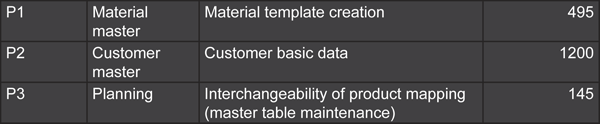
Figure 2
Example values in the columns
Figure 3 shows a calendar matrix. This matrix has day-by-day details based on a workweek (WW) calendar. It uses the global calendar format WW XX.Z, where XX represents the workweek number (in this case 36) and Z represents the day of the week (0 to 6). For example, Friday, January 1, 2010, would be represented as WW 1.5, with 1 representing the first week and 5 representing Friday. Figure 4 shows an example further along in the year: Wednesday, June 16, 2010, would be represented as WW 25.3 (25 for the 25th week of the year and 3 for Wednesday. You can use any representation depending on your company’s calendar.

Figure 3
An example calendar matrix
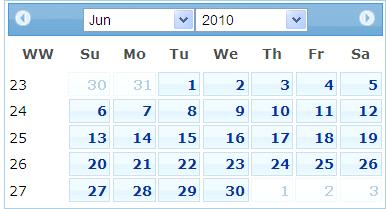
Figure 4
Example calendar
Color Coding
After you create the matrix, you can use color coding to help certain elements stand out. In my example, I’ve used the colors shown in Figure 5:
- Dark blue box with an X: The corresponding activity that needs to be executed on this particular day
- Light gray box: Activities can be shifted to these days and the associated risk is acceptable
- Dark gray box: The conversion activity does not require approval from finance before execution. For example, procurement master data such as the creation of a purchase information record does not require any approval from finance. However, activity stock migration does require finance approval.
- Light blue box: No conversion activity is allowed that has direct financial impact. For example, if a red box is there, you cannot execute a stock upload as it directly affects the initial stock upload general ledger account.
- Black box: No conversion activity is allowed unless it has already been communicated to the project management team
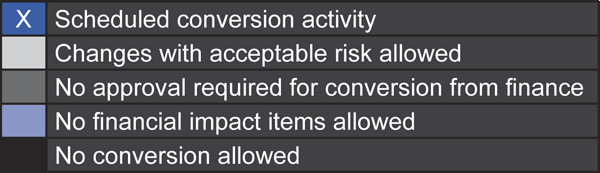
Figure 5
Example color coding
Now that you are familiar with the various fields and color coding, let’s use an example and try to understand how the matrix can help the project manager plan conversion activities precisely and accurately during cutover.
Example Matrix
Figures 6 and 7 show a matrix with more detail. Look specifically at the rows marked with arrows at the bottom of each figure. The row in Figure 6 represents the purchase order conversion for P1, which is scheduled on WW 41.5 and WW 41.6. The row in Figure 7 represents the purchase order conversion for P2, which is scheduled on WW 41.5. These are shown with boxes with Xs in them, corresponding with the image in Figure 5. The largest block of rows in each figure (in light blue) is for items that have no financial impact allowed; the light gray on the weekend days represents an acceptable risk. You can also see on Wednesday in Figure 7 that no conversion is allowed in the blocks shown in black.
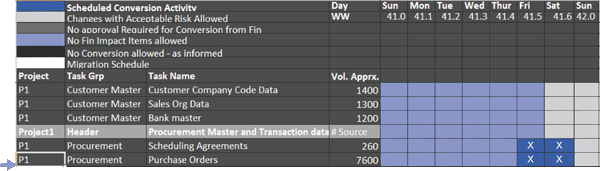
Figure 6
P1 purchase order conversion
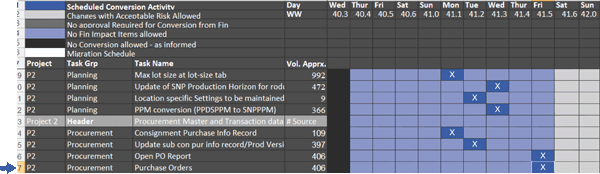
Figure 7
P2 purchase order conversion
Looking at Figures 6 and 7, you can easily see that both projects have purchase order conversions scheduled for WW 41.5. This could cause you to ask the following questions:
- If you are using the same program to execute purchase order conversions for both P1 and P2, do you have open purchase order lines that have common material between P1 and P2? If so, this could result in the chances of an SAP lock, which means you cannot perform any activity on a specific material in the SAP system as the same material is being used by another program.
- Do you have the same resource performing purchase order conversions for both P1 and P2?
- How much time will it take to complete the conversion?
- If the number of open purchase order lines for P2 is smaller than for P1, can you complete P1 purchase order conversion before starting P2 purchase order conversion on WW 41.4?
- Do you have the same resource from the technical team to support purchase order conversions for both P1 and P2?
You can see how powerful this matrix is. Without going into much detail, you can easily highlight these points and avoid lots of trouble during cutover. It is very important that the project manager put all the effort to get every detail from the respective object owner to complete this matrix as even a single miscue can lead to trouble.
Primer on Data Migration
A well-managed data migration process must have the following important elements:
- A carefully thought-out and well-executed plan
- Analysis of source and target system data
- Objects to be migrated
- Mapping for source objects
- Conflicting objects
- A plan for executing multiple migration projects at the same time
This list only covers macro-level bullet points that a project manager needs to consider while managing a migration project.
A typical data migration project consists of four steps:
- Extracting data from the source system
- Transforming data
- Loading data into the SAP system
- Reconciling data
Example of data migrations objects are:
- Data related to sales and distribution (e.g., customer master, sales data, material master)
- Data related to procurement (e.g., vendor master, source list, purchase orders)
- Data related to planning (e.g., transportation lanes, routes)
Yogesh Lohiya
Yogesh Lohiya is a senior SAP MM consultant with Infosys. He is currently working on a large data migration project for a Fortune 500 client. He has more than nine years of consulting experience. He also has worked on various SAP global rollouts and data migration projects in the materials management area.
You may contact the author at ymlohiya@gmail.com.
If you have comments about this article or publication, or would like to submit an article idea, please contact the editor.


 Premium