Analyze access considerations for your users and transaction SU53. Examine its capabilities as compared to other transactions and how auditors perceive it when they are looking at your organization’s system.
Key Concept
SAP security administrators use transaction SU53 to troubleshoot. Regular users of any SAP system use it to access information about an authorization failure. It has been available since the earliest SAP release.
Authorization error analysis is an important troubleshooting component within an enterprise’s SAP security framework. It is not unusual for users of an SAP system to execute business processes to which they do not have access rights. If your enterprise has implemented a role-based security model, this situation may have arisen because the business process that the user was trying to execute was not within the scope of his role. He may have run into a segregation of duties (SoD) conflict.
Transaction SU53 facilitates authorization error analysis. Despite its widespread use, confusion abounds regarding its exact nature, capabilities, and audit-related implications. I have also found that there is not enough documentation in this area and that insights are generally gleaned from encountering problems and issues. I will look at this transaction from various angles, including how administrators and auditors deal with it, in an effort to demystify its purpose and proper usage. I’ll also provide some recommendations and helpful SAP Notes.
Transaction SU53 After Access Is Denied
Figure 1 displays transaction SU53 after an end user (with ID XXX123) ran transaction PFCG (role maintenance). This is an example of a user being correctly denied access to an activity that is outside the scope of his or her responsibilities. It could also be the case that the user was erroneously denied the ability to execute the business process. Regardless of the cause, a user who encounters a You are not authorized to carry out this function or No authorization for… type of message is likely to approach the SAP security administrator for troubleshooting help and, possibly, remedial action. The latter is almost guaranteed to ask the user to provide him or her with a screenprint of the results of transaction SU53.
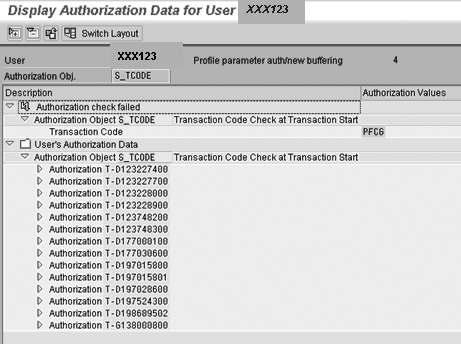
Figure 1
Results of authorization check
Upon running this transaction (following the running of the transaction that resulted in the denial of access error), the system displays the authorization hierarchy (including the authorization class, object, and field) of the last authorization that resulted in the denial. The user can display this information in either tree layout (as shown in Figure 1) or classic layout. The Switch Layout button on the menu bar of this screen lets users switch between these two layouts. Because the amount of information that users need to send to the security team is usually large and therefore may not fit into one screen, users can download this information into a file.
Note
A common notion is that transaction SU53 should display the authorization hierarchy that is checked when a user is authorized to execute a transaction in the same way that it displays the hierarchy when there is an authorization failure. This is not the case. If you are able to successfully execute a transaction, running transaction SU53 displays nothing and this is the correct behavior. It is a troubleshooting tool and only information pertaining to authorization denials is available.
What Happens Behind the Scenes
When a user runs transaction SU53, the system loads data into table USR07. The table is populated with a single record containing information relevant to this denial. In the case of the situation displayed in Figure 1, the system created a new entry in this table (Figure 2). To browse the data in this table, run transaction SE16 (table browser), and enter your user ID in the BNAME field.
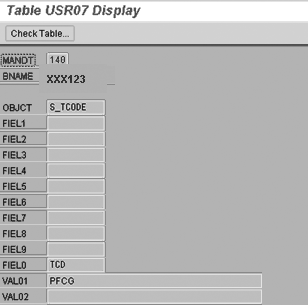
Figure 2
Contents of table USR07
Upon receiving the relevant information, the security administrator sets about investigating whether this was the correct behavior or not. If it is, the administrator needs to make the necessary changes in the user’s authorization profile to enable him to successfully execute this transaction. Before making the necessary changes, it is important for the security administrator to carry out due diligence.
Based on the information in the transaction SU53 screenprint and the information that the user provided regarding the business process that was being executed, the security administrator needs to work closely with business owners to determine whether the user needs this authorization. If the user does not need this authorization, then the administrator does not need to perform any further action.
If it is determined that the user needs this authorization, after you observe the appropriate change control procedures and the appropriate stakeholders sign off, the administrator should use his judgment (and standard enterprise-wide guidelines) in deciding how to provide the user with the necessary access. One method is by doing a search for existing roles (both standard SAP and customized) containing this authorization object. If the administrator finds such a role and deems it more commensurate with the user’s job responsibilities, he or she can assign the user this new role. Another method is by directly identifying the roles in this user’s profiles that contain this missing authorization and then adding this authorization object.
Note
A typical misconception is that you can only change those roles that the system displays in transaction SU53 (by adding, deleting, or changing authorizations). This is not correct. You can make authorization adjustments to any role in a user’s profiles.
The situation illustrated in the previous example was a straightforward one. However, things aren’t always that transparent in an SAP system, especially when you are running a process that integrates functionalities across different modules. In such a scenario, the user needs to check a diverse set of authorization objects and may not have authorizations to one or more of these. Even though you see the last authorization failure in transaction SU53, the root cause may lie deep down in the hierarchy of functions that you executed in this particular process. The administrator needs to carry out systematic analysis to find the root cause armed with knowledge and understanding of the process or activity that triggered this denial. Several tools and techniques in standard SAP help in this process, including authorization trace (transaction ST01) and the various reports in the User Information System (transaction SUIM).
Audit Considerations
Despite its capabilities, transaction SU53 is a controversial transaction, especially from an audit perspective. Auditors frequently question the amount of information it provides when an end user has the ability to run it. The controversy often is about whether end users should be able to run it and if so, which end users should have this access. You should consider a number of things before deciding its access.
As seen in Figure 1, transaction SU53 allows you to view your authorization data in a detailed manner. In fact, you can display authorization data of other users. It is reasonable for auditors to ask why regular users need to view this data. In other words, is access to this transaction being granted because a user needs to view authorization data (personal or others’) or is it that the display of this data is a by-product of something else?
Looking at the issue from a different angle: what risk does an enterprise run if users are able to view this data? In transaction SU53, they can’t add any authorizations that they do not currently have or delete one that they have. The ability to make these changes resides only with a select group of individuals (the SAP security team). Hopefully, your organization follows a well-documented and stringent process for approving or rejecting any change. Users’ ability to view authorization data may only lead to requests for additional authorizations and not any direct material effect on the system. Where is the risk from a regular user standpoint?
Let’s assume that an enterprise has around 10,000 regular users of its SAP systems and that no user has been given authorization to run transaction SU53. This means that each time there is a denial, a member of the security team has to run this transaction and try to obtain information from the user carrying out this activity. I can easily visualize a scenario in which all that the security team does is run transaction SU53 and authorization traces. I have also seen the other model wherein users have authorization to transaction SU53 and there is an established process of the user providing the security team the transaction SU53 screenprint, a description of the business process he was executing, and relevant data at the time of this denial. The security team then does the troubleshooting and analysis.
My recommendation is that regular users should have access to transaction SU53. This helps an enterprise leverage the competencies of both sides — the users provide all the functional and business inputs and the security team uses its knowledge of SAP authorization objects, roles, and profiles to troubleshoot and make changes, if required. This strategy complies with SoD requirements and therefore does not contradict the spirit of the Sarbanes-Oxley Act.
You can introduce a level of caution by preventing regular users from accessing transaction SU56. This transaction displays all user authorizations in the user buffer regardless of success or failure of the last check. In my mind, this one is riskier (even though you cannot make any changes). It should be noted though that if a user has access to transaction SUIM, he can access all user-related information. In this situation, curtailing access to transaction SU56 may not make a difference. You should control access to transaction SUIM and not allow regular end users to have access to it.
Another approach I recommend is one that sits somewhere in the middle of the other two approaches. If your enterprise has power users and super users within its user base, you might want to limit access to transaction SU53 (and of course transaction SU56) to them. Power users and super users in an enterprise are supposed to be both more functionally and technically savvy than regular users and serve as intermediaries between the departments and the support team. Regular users should use this group as their first line of defense when they encounter an authorization check failure. When regular users work together with super users and power users, they can handle some of these authorization failures and do not have to consult the security team to analyze them.
You should also note that in an SAP NetWeaver system, you can also run transaction SU56 indirectly from the results screen of the transaction SU53 check, as shown in Figure 3. If you have authorization to run transaction SU56, the system displays the results in the user buffer, and if not, you see the authorization error message You are not authorized to run transaction SU56.
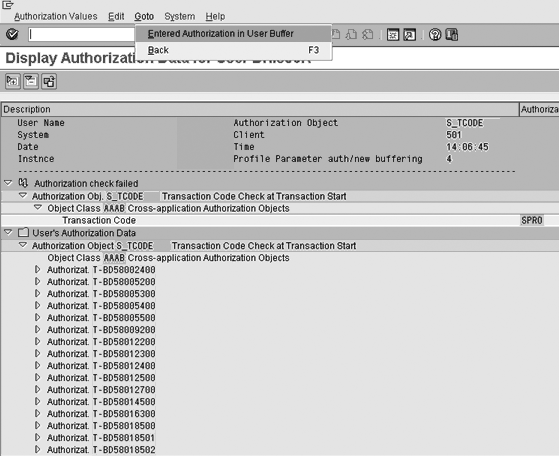
Figure 3
Transfer control to transaction SU56 from the transaction SU53 screen
Important SAP Notes
Numerous SAP Notes in the SAP Service Marketplace provide you with information pertaining to various aspects of transaction SU53. What follows is a list of a few important ones that deal with the workings of the tool and usability issues. You need a valid Service Marketplace user ID to retrieve this information. For each of these notes, make sure that you understand the release validities and the prerequisites. If you need each of these notes, make sure that someone has not already been applied them.
- SAP Note 968915: If you implement this note, you get some additional functionality in the realm of display and printing in transaction SU53
- SAP Note 1033149: It contains several changes that provide additional display functionality in transaction SU53
- SAP Note 664764: It discusses accessibility considerations for transactions SU53 and SU56
- SAP Note 1008990: It corrects problems that were introduced by SAP Note 968915
- SAP Note 23342: This note applies to older SAP releases. It provides a good explanation and remedy for some common authorization errors.
Anurag Barua
Anurag Barua is an independent SAP advisor. He has 23 years of experience in conceiving, designing, managing, and implementing complex software solutions, including more than 17 years of experience with SAP applications. He has been associated with several SAP implementations in various capacities. His core SAP competencies include FI and Controlling FI/CO, logistics, SAP BW, SAP BusinessObjects, Enterprise Performance Management, SAP Solution Manager, Governance, Risk, and Compliance (GRC), and project management. He is a frequent speaker at SAPinsider conferences and contributes to several publications. He holds a BS in computer science and an MBA in finance. He is a PMI-certified PMP, a Certified Scrum Master (CSM), and is ITIL V3F certified.
You may contact the author at Anurag.barua@gmail.com.
If you have comments about this article or publication, or would like to submit an article idea, please contact the editor.