Learn the importance of the connection between personnel planning functions and structural authorizations through these integration tips.
Key Concept
Personnel planning is the authorization object PLOG, which is included in general authorizations (roles). Personnel planning is used for checking authorizations for specific fields in the Personnel Management components (Organizational Management, Personnel Development, Training and Event Management, and Learning Solution). Structural authorizations, which are defined in table T77PR, are the structural authorization profiles used within SAP ERP HCM only. Structural authorizations are used for checking authorizations for specific fields in the structural authorization profiles on Organizational Management, Personnel Development, Training and Event Management, and Learning Solution.
It is of utmost importance to understand authorizations, and yet, most people do not. Understanding structural authorizations is important when users run into problems with missing authorizations. In many cases, the reason for the problem is that some authorizations are missing either in personnel planning or in structural authorizations. One of them may hold authorizations that the other one does not. However, instead of being able to quickly fix the problem, many people feel as if they are facing a brick wall.
In the following sections, I explain personnel planning and structural authorizations, the connection between them, and the concept of equal authorizations.
Personnel Planning
Personnel planning includes the following fields, which are checked during an authorization check:
- Plan version: Specifies which plan versions the user is authorized to access. Personnel planning allows you to manage scenarios in parallel in various plan versions. The one most often used is 01 (current plan), but you could also use 02 (alternative plan) in parallel with it.
- Object type: Specifies which object types the user is authorized to access. For example, the user may need access to organizational units (object type: O), positions (object type: S), and persons (object type: P).
- Infotype: Specifies which infotypes the user is authorized to access. For example, the user may need to have access to specific objects (infotype 1000), relationships between the objects (infotype 1001), and descriptions of the objects (infotype 1002).
- Subtype: Specifies which subtypes of given infotypes the user is authorized to access. For example, the user may need to have specific access to relationships between the objects. The user may need to be able to have access to reporting relationships (subtype A002 for infotype 1001) and relationships for different object types belonging to each other in the personnel planning structure (subtype A003 for infotype 1001).
- Planning status: Specifies the planning status in which the user is authorized to access information. It is possible to work with different personnel planning structures at the same time. Most often, companies need to work with the active status (value 1). This status holds information for the current active personnel planning structures. Additionally, it may be necessary to authorize some users with planned status (value 2). This means that these users plan the new personnel planning structures, which are launched in the future. It may be that these users are authorized with either planned status or both active and planned status.
- Function code: Specifies the processing mode for which the user has authorization. For example, some users need to have display access to the personnel planning structures. Some other users may need to make changes to the structures (maintain), while others may need to build new structures (create) and delete some existing structures, which are not active any more.
For example, you may need to get an authorization to maintain (create, change, delete, and display) personnel planning for organization units, positions, jobs, persons, qualifications, qualification groups, appraisals, course groups, course types, and courses. This could be a case for anyone responsible for building and maintaining the personnel planning structures in any company. It is necessary to maintain all relationships between these objects and descriptions for all subtypes with the current plan according to all planning statuses. To enable proper authorizations for personnel planning, you need to include the following authorizations in authorization object PLOG:
- Infotype: 1000 (object), 1001 (relationship), and 1002 (description), which enable the user to maintain the object types, their relationships, and description
- Planning status: All planning status fields
- Object type: O (organization unit), S (position), C (job), P (person), Q (qualifications), QK (qualification group), BA (appraisal), L (course group), D (course type), and E (course)
- Plan version: 01 (current plan)
- Function code: INSE (create), AEND (change), DEL (delete), and DISP (display)
- Subtype: All subtypes for listed infotype fields
In PLOG, there is no field to restrict the user’s authorizations according to specific hierarchical personnel planning structures. If the user’s authorizations need to be restricted according to these structures, you need to implement structural authorizations.
Structural Authorizations
The following fields are used in table T77PR to define authorizations for SAP ERP HCM objects:
- Plan version: Determines the plan version for which the defined profile is valid. If a system that integrates Personnel Administration and Organizational structure components is used, the plan version 01 is generally the integrated plan version.
- Object type: Determines the object types for which the defined profile is valid. Any object types related to Organizational Management, Personnel Development, Training and Event Management, and Learning Solution can be specified.
- Object ID: Defines the start object using evaluation paths. For each specific authorization to any personnel planning structure, a specific ID number needs to be specified. This ID number highlights the starting point for the user’s authorizations. The user is authorized with all the structures underneath this specific ID number. This field does not work alone, though. Authorization to Object ID, Object type, and Evaluation path all together define the user’s authorizations.
- Maintenance: Controls whether a read or write authorization should be assigned to a user for the corresponding set of objects. This field corresponds to the function code in the PLOG authorization object (table T77FC).
- Evaluation path: Entering a specific evaluation path in this field authorizes a user to access only objects along this evaluation path. You also need to assign a root object. You can either enter this root object directly in the corresponding field of table T77PR or use a suitable function module to determine it dynamically. Root object and evaluation path determine the access together. The root object defines the start for the evaluation, and the evaluation path defines all objects belonging to the user’s authorizations.
For example, a user may need to have authorization to specific organizational structures in the company’s personnel planning structures or to specific organizational units, positions, and persons. To authorize this access, specify an ID number for the organizational unit. This organizational unit is the starting point for the evaluation. In the evaluation path, the system is informed about all the object types, which need to be included in the user’s authorizations. In my example, the user requires authorization to organizational units, positions, and persons. To authorize this, a specific evaluation path (SAP standard: O-S-P) needs to be defined for the Evaluation path field. As a result, the evaluation starts from a specific object type (O = organizational unit) with a specific ID number (some specific number), and the evaluation path (O-S-P) defines all the object types (in this example, all organizational units, positions, and persons) that need to be included in the evaluation.
- Status vector: Determines which relationships are considered when the structure is created. The possible values are 1-5 (just like the values in the PLOG object for planning status). You can find the defined statuses in table T778S.
- Depth: Determines which level of a hierarchical structure a user is authorized to access. The start object is always level 1 in the hierarchy. If the value is 0, the corresponding tree is completely built (i.e., there is no limit to the depth of the tree).
A user may need to have authorization to a specific number of levels in the personnel planning structures. For example, a top executive may need to get access to the first four levels of the structures, but does not need to have access to all the people in the lowest levels of the personnel planning structures. By specifying number four (4) in the Depth field, this user gets access to the first four levels only.
- Sign: By entering a – (minus) sign in this field, you can determine that the structural authorization profile structure should be processed bottom up (normally it is processed top down). If nothing is entered in this field, the system gives authorization according to the standard SAP way. This means that the personnel planning structures are read from top to bottom. On the other hand, it may be needed to authorize some users with personnel planning structures from bottom up (to top). In this case, you need to apply a specific sign (–) to this field.
- Period: Defines the validity period of the structure. Possible values are: key date, current year, current month, current day, current and future, past, and all. If current day is selected, the structural authorization is restricted to the structures of the current day. If a structural authorization for a manager is defined as current day, for example, the manager is authorized to access data on all persons who are currently in the manager’s group. No entry in this field means that the structure is not limited by validity period. The system outputs whether a user has authorization for a specific object during a specific period. It is possible to authorize users with specific time-related data in the personnel planning structures. Some users may need to have access to the all existing and future data (value F), while other users may need to have access to all historical data (value P). Some users may need to have access to all time-related data (no value at all in this field).
- Function module: Specifies a function module that determines the root object dynamically at runtime. No entry in the Object ID can be made. However, a plan version and object type is specified. Two function modules are delivered in the standard system. RH_GET_MANAGER_ASSIGNMENT is the organizational unit assigned to the user as a manager by position and by relationship; A012 is determined as a root object. RH_GET_ORG_ASSIGNMENT is the organizational unit that is organizationally assigned to the user determined as the root object.
For some users, specifically employees and line managers, it is possible (by SAP standard) to authorize access to their own data (employees) or their directly reporting subordinates (line managers) dynamically. This means that only one structural profile is required for employees and another structural profile for line managers to give authorization automatically. This functionality requires the use of SAP-standard function modules (one function module for employees and another function module for line managers).
If for some reason the organizational management assignment changes while the manager is logged on to the system, the user needs to log out first and log on again to make certain that the new authorizations take effect as required.
Relationship Between Personnel Planning and Structural Authorizations
The personnel planning authorization object (PLOG) does not include a field that you can use to restrict the user’s authorizations according to personnel planning hierarchies. If you use the PLOG authorization object and the user’s authorizations need to be restricted according to personnel planning hierarchies, you also need to set up a structural authorization profile (structural authorizations) for the user to restrict the user’s authorizations according to specific hierarchical structures (organizational hierarchies in Organizational Management, Personnel Development, Training and Event Management and Learning Solution). The user’s overall authorizations are always defined as the common denominator between the general and the structural (in this case > PLOG) authorizations (Figure 1).
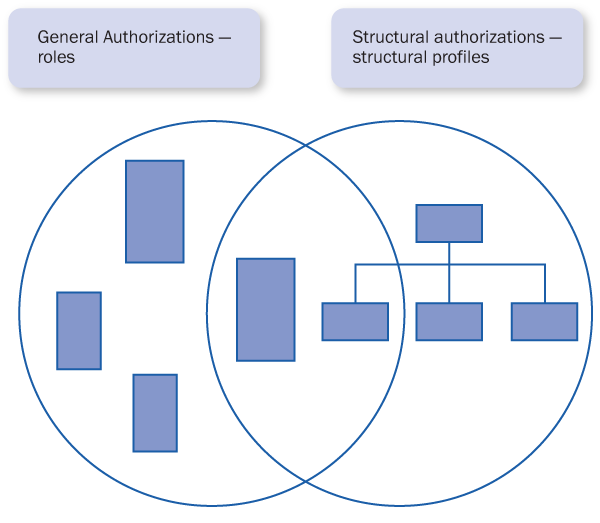
Figure 1
The connection between the general authorizations (PLOG) and the structural authorizations (structural profile)
This leads to three scenarios:
- Together, the PLOG and the structural authorizations define the user’s authorizations
- According to the authorization check, if a user receives some authorizations in PLOG that are not included in the structural authorizations, these authorizations are returned as “not authorized”
- Similarly, if any authorizations are included in structural authorizations but not in PLOG, these authorizations are also returned as “not authorized” according to the authorization check
In Figure 1, you see three scenarios:
- Authorizations defined only in PLOG
- Authorizations defined in both PLOG and structural profile
- Authorizations defined only in structural profile
The authorizations, which are defined in both PLOG and structural profile, are the ones that the user eventually receives. I will now explain these scenarios in more detail.
Relationship Between Personnel Planning and Structural Authorizations
Table 1 illustrates the contents of a possible combination of authorizations with both the general authorizations as roles (specifically PLOG in this case) and the structural authorizations as structural profiles. The user receives those authorizations, which are the same in both the role and the structural profile. The top horizontal column defines the subjects (Authorization, PLOG, Structural profile, Common, Difference, and Authorized). The vertical columns define the specifications for each subject. Under Authorization, the column highlights the fields within the authorizations. Under PLOG, the column defines the actual authorizations defined in object PLOG. Under Structural profile, the column defines the actual authorizations defined in the Structural profile. Under the fields Common and Difference, the table highlights the common and different authorizations between the two concepts, PLOG and Structural profile. Finally, under Authorized, the vertical column defines the authorizations that the user gets according to the specifications in PLOG and Structural profile.
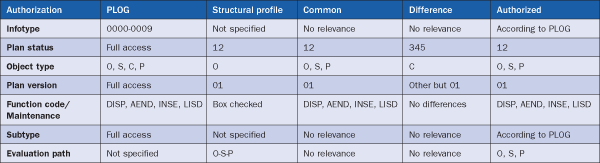
Table 1
Possible authorizations defined in PLOG and the structural profile
The Relationship Between PLOG and the Structural Profile in Detail
I will now highlight the common and different values that are included in the different fields of the corresponding concepts. If some values are valid for only one of the two, these authorizations are always authorized according to the one including some authorizations. For example, if the infotype values are included in PLOG only, the user is authorized according to the PLOG values.
If there are common values in both fields, the user is authorized according to the common values. For example, if the plan status value is exactly the same in both fields, the user is authorized according to the plan status value.. If there are any different values between the concepts (e.g., one authorizing wider authorizations), these authorizations are not authorized.
- Infotype: Only valid for PLOG (general) authorizations. This does not affect overall authorizations. Authorizations are defined according to authorizations in PLOG.
- Plan status: Full access for PLOG.. Specify access as 12 for structural authorizations (overall authorizations as the common denominator > 12).
- Object type/Evaluation path: Authorization is defined as: O, S, C, P (for PLOG). Start with O according to evaluation path O-S-P (for structural authorizations). Overall authorizations is the common denominator > O, S, P.
- Plan version: Full access in PLOG. Authorization is defined as 01 for structural authorizations (overall authorizations as the common denominator > 01).
- Function code / Maintenance: For PLOG defined as DISP (display), AEND (change), INSE (create), and LISD (list with display). Check the Maintenance box for structural authorizations (overall authorizations as the common denominator > DISP, AEND, INSE, and LISD). The maintenance box checked equals everything defined in PLOG.
- Subtype: Only valid for PLOG (general) authorizations. This does not affect overall authorizations. Authorizations according to PLOG are authorized.
Equal Authorizations in Personnel Planning and Structural Authorizations
The common denominator between general (PLOG) and structural authorizations defines the user’s authorizations. You can also specify the common denominator as equal authorizations. If there are any differences with the common functions between the general and structural authorizations, the users are not authorized to work with these in the SAP system. There are some specific fields for both general (e.g., infotypes, subtypes) and structural (e.g., depth, sign, period, function module) authorizations that do not affect the overall authorizations and the relationship between the two. To understand and set up both the general (PLOG) and structural authorizations, knowledge of Personnel Development data models (Organizational Management, Personnel Development, Training and Event Management, Learning Solution) is required.
Tero Tukiainen
Tero Tukiainen is the managing partner of SAPORT Consulting Inc, which he founded in 2009. He is an SAP HR-certified consultant who has specialized in SAP security and authorizations since 2000. Tero has spoken at SAP HR conferences in both Europe and the US since 2005.
You may contact the author at tero.tukiainen@saport.fi.
If you have comments about this article or publication, or would like to submit an article idea, please contact the editor.