Cost values sent to the R/3 General Ledger and the CO-PA ledger can be based on different logic if you do not properly maintain the cost and future price in the material master. The key is to understand the relationship between the R/3 future price feature and condition type VPRS.
Key Concept
VPRS is one the most well-known condition types used in typical pricing procedures. Although pricing procedures are generally used to calculate the selling price of the product to the customer, VPRS is also included in pricing procedures to determine the expected profit margin.
You probably know that VPRS is an R/3 condition type that determines the cost of the material, either standard or moving average depending upon the valuation of the product. However, you might not be aware that a feature in the R/3 material master called "future price" influences how the VPRS cost is determined. If you do not understand this relationship correctly, you risk posting different cost values in R/3 General Ledger (G/L) and the CO-PA ledger. This causes inconsistencies in financial reports. Even if you are not concerned about inconsistencies in financial reports, the VPRS condition type is one of the most important in most pricing procedures, and this information will help you to better understand how it works.
As the source of the transaction, the logistics team is responsible for maintaining consistency in this area. Understanding the mechanics of how all R/3 releases — and in particular the future price feature — determine the condition value of VPRS will help you avoid reconciliation issues. Let's review the R/3 components involved in determining product cost, and then I'll show you how easy it is to properly maintain them. I'll start with the basics of the material master view and VPRS.
Product Cost from Material Master
The product cost is stored in the material master accounting view as standard cost or moving average price (Figure 1). This view is popularly called the "valuation segment" of the material master, and technically it is stored in SAP table MBEW (material valuation). The Price control field determines whether R/3 uses standard cost or moving average price as the cost of the product. In this case, the cost of the product is 8.00 because the products are valued at standard (Price control S).
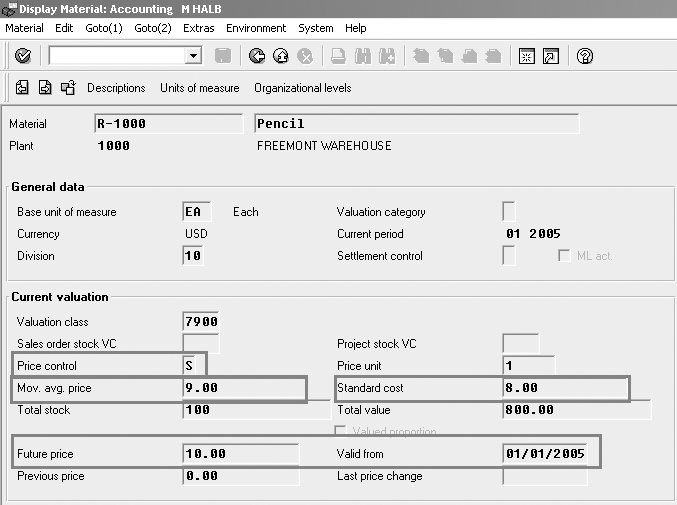
Figure 1
Set the S flag in the Price control field to indicate that Standard cost should be used
The Price control field in the material master determines how R/3 valuates the material transactions. The S flag valuates the product at standard cost and the T flag valuates the product at moving average cost. Say the standard cost is 8.00 and the moving average price is 9.00. Because the Price control flag is set to S in Figure 1, the material transactions will be valued at 8.00.
Hereafter, when I say cost, it means the standard cost, as Price control is set to S. Note that if you have your products set to Price control T, the cost is moving average cost.
Note
The way that SAP uses the word price on the material master screen may cause confusion. Usually, price denotes the selling price to the customer. Price on the material master screen actually refers to the cost of the product.
Product Cost and Financials
As a logistics analyst, you don't have to understand accounting technicalities or so-called T-accounts entries, but it is a good idea to understand the basics of accounting for such a material movement transaction. In my example, when a single unit of the product is delivered to the customer, R/3 deducts 8.00 from an inventory G/L account and posts 8.00 to a cost of goods sold (COGS) G/L account.
Cost Condition Type VPRS
I'm assuming that you have a basic understanding of condition types and pricing procedures. VPRS is a SAP-delivered condition type that R/3 uses to calculate material cost. What makes VPRS the cost condition is the flag Condition category on the condition type screen. Use transaction V/06 to view the VPRS settings. Note that Condition category is set to G Cost (Figure 2). Two other Condition category values make the VPRS related to costs: S Standard cost and T Moving cost. Figure 3 shows all three cost-related values.

Figure 2
Typical settings for condition type VPRS, with Condition category set to Cost
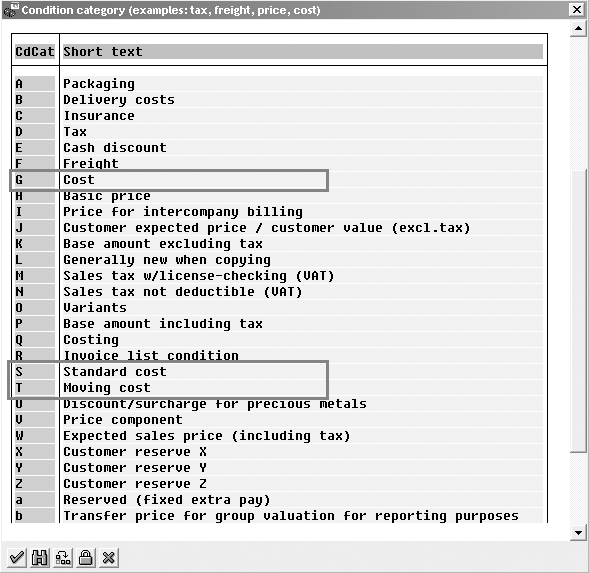
Figure 3
Condition categories G, S, and T represent costs
How R/3 Determines VPRS Condition Values
Within a pricing procedure, the condition value for VPRS is neither determined manually nor by the condition technique. For such special condition types, R/3 uses the following predefined logic:
- If the Condition category of the condition type is S Standard cost, R/3 determines the condition value from the standard cost of the product. In my example, the condition value is 8.00.
- If the Condition category of the condition type is T Moving cost, R/3 determines the condition value as the moving average price of the product. In my example, the condition value is 9.00.
- If the Condition category of the condition type is G Cost, as is the case for the standard condition type VPRS, R/3 determines the condition value based on the price control of the material master. If the price control is S standard price, the condition value is 8.00. If the price control is V Moving average price, the condition value is 9.00. Remember! While both settings represent moving average price, V is a price control while T is a condition category.
The condition types are integrated with R/3 Financials in the following way. The condition type values are transferred to the R/3 Controlling-Profitability Analysis (CO-PA) ledger as value fields. Condition type VPRS is usually mapped to a value field. In my example, the VPRS condition value of 8.00 is transferred to the CO-PA ledger as the cost.
Future Price and Cost Calculations
Now that I've reviewed how R/3 determines the condition value for VPRS, I'll show you how the future price feature affects cost calculations. As the name suggests, the future price is the expected price of a product effective at an upcoming date. Figure 1 shows that the product price will be 10.00 starting 1/1/2005.
Note that if you are processing the invoice on or after 1/1/2005 — i.e. the pricing date is on or after 1/1/2005 — R/3 calculates the condition value of the cost by the Future price field rather than the standard cost or moving average price. In this case, the condition value for VPRS will be determined as 10.00 and not 8.00.
If the Valid from date is really in the future, then R/3 determines the value based on standard cost or moving average price. If the Valid from date is in past, however, then the future price becomes effective and influences the condition value. Confusion over which field is in effect might result if the standard cost and future price are not the same.
You would think that once you pass 1/1/2005, the future price would be effective and standard cost or moving average price would become invalid. However, you would be unpleasantly surprised to know that the SAP system posts similar transactions with different logic, causing different cost values to be posted to the R/3 G/L and to the CO-PA ledger. Posting to G/L is done via standard price, so R/3 posts 8.00 to the G/L. Posting to the CO-PA ledger is done via condition value, which is derived from future price. In this case, R/3 posts 10.00 to the CO-PA ledger.
Though the future price can influence the cost condition value, the amount posted to the G/L account, as shown in Figure 1, is still based on the standard cost and not on future price. This difference in posting methodology to the G/L and CO-PA ledger is the issue that can cause significant financial discrepancies.
You would think that values would be posted to both ledgers using the same logic. This is not the case. The crux of the matter is that the values going to the G/L are posted via the Standard Cost field, whereas those posted to the CO-PA ledger are done via VPRS, which turn in are influenced by the future price.
The fact that the logic for how these values are determined is not well documented contributes to the confusion. Finding the logic that determines the VPRS condition value is hidden in the ocean of millions of lines of SAP code.
If you are comfortable with debugging, you can put the breakpoint in routine XKOMV_KBETR_ERMITTELN within program LV61AA46 and perform pricing for the sales order to discover how R/3 determines the value based on standard cost, moving average price, or future price. Figure 4 is an example of the typical R/3 code. If you are not comfortable with debugging, Figure 5 shows the system logic for how R/3 determines the cost condition values in the form of a flowchart.
*——————————————————————————————————-*
*       form xkomv_kbetr_ermitteln
*
*——————————————————————————————————-*
*       ermitteln konditionsbetrag-/prozentsatz
*
*——————————————————————————————————-*
*  —>  komk   segment belegkopf
*
*  <->  xkomv  segment belegkonditionen
*
*——————————————————————————————————-*
form xkomv_kbetr_ermitteln.

  if ( xkomv-kntyp = ‘G’ and komp-wavwr = 0 ) or xkomv-kntyp ca ‘ST’.
     tables: mtcom, mbew.
     data: begin of dummy occurs 0.
     data: feld.
     data: end of dummy.

    mtcom-kenng = ‘MBEW ‘.
    mtcom-bwkey = t001w-bwkey.
    if komk-kappl eq ‘M’ and komk-reswk ne space.
     mtcom-bwkey = *t001w-bwkey.
   else.
     mtcom-bwtar = komp-bwtar.
   endif.
   mtcom-matnr = komp-matnr.
    call function ‘MATERIAL_READ’
         exporting
              schluessel    = mtcom
         importing
              matdaten      = mbew
         exceptions
              error_message = 04
              others        = 04.
....
....
....
    if sy-subrc = 0.
      xkomv-kpein = mbew-peinh.
* Check for Price Control
      if mbew-vprsv = ‘V’.
        xkomv-kbetr = mbew-verpr.
      else.
        xkomv-kbetr = mbew-stprs.
      endif.
* Check for Condition Category ‘S’ or ‘T’
      if xkomv-kntyp = ‘S’.
        xkomv-kbetr = mbew-stprs.
      elseif xkomv-kntyp = ‘T’.
        xkomv-kbetr = mbew-verpr.
      endif.
* Check for valid Future Price
* falls zuk#nftiger Preis eingetragen, diesen abh. vom Preisdatum nehmen
      if mbew-zkdat le komk-prsdt and not mbew-zkdat is initial.
        xkomv-kbetr = mbew-zkprs.
      endif.
     else.
       message s228 with komp-kposn.
       xkomv-kinak = ‘X’.
       xkomv-fxmsg = ‘228’.
       komp-fxmsg  = ‘228’.
     endif.
   endif.
|
| Figure 4 |
Typical R/3 code to determine the cost condition. Note: The program and routine names are assigned by SAP, and they can change in future releases without notice. |
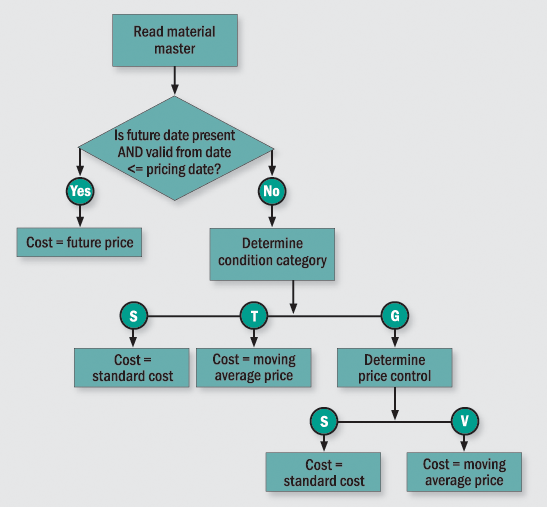
Figure 5
Flowchart explaining how R/3 determines the cost condition
Financial Inconsistency
In my example of the future price being effective on 1/1/2005, R/3 determines the value of VPRS as 10.00 (assuming the pricing date on the invoice is on or after 1/1/2005). However, if the standard cost of the product is still set at 8.00, the cost posted at the time of delivery remains 8.00 in the G/L, whereas the costs transferred to the CO-PA ledger will be 10.00. As Figure 6 shows, the cost posted to the G/L is determined from the valuation segment of the material master record (standard cost of 8.00). The cost posted to the CO-PA ledger is transferred from VPRS, which is determined by the future price of 10.00.
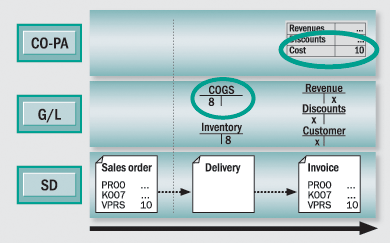
Figure 6
Financial inconsistency for costs
The issue of different costs arose because the valid from future price date was in effect and the future price was different than the standard cost. If this actually did happen in the future, the system would have ignored the future price and the cost condition would have been calculated as 8.00 to the CO-PA ledger as well.
A Simple Solution
The simple solution to avoid this inconsistency is to make sure that the valid dates of future price are really in the future. Once the effective dates of future prices pass, correct the valid future price dates. For example, if you use the R/3 Product Cost Controlling (CO-PC) module, it automatically copies the future prices to standard costs and clears the future prices once you release the cost estimate. If you are not using the cost estimate features of CO-PC and maintain future prices manually, make sure that the future price fields are manually cleared to make standard prices and future prices consistent.

Mitresh Kundalia
Mitresh Kundalia heads the SAP practice at Quality Systems & Software (www.QSandS.com), a consulting firm specializing in SAP S/4HANA, SAP General Ledger, and complex System Landscape Optimization (SLO)-type reorganizations. Mitresh is widely acknowledged as a leading SAP expert, with multiple publications and an SAP-PRESS book to his credit. He has published more than 50 peer-reviewed articles and white papers, and he has given presentations at various SAP conferences and events. Mitresh is the chief solutions architect of General Ledger Migration Optimizer (GLMO), a leading product to accelerate and jump-start the SAP S/4HANA and SAP General Ledger initiatives; SAP Data Reorganization Optimizer (SDRO), an SLO-type product for managing complex system landscape reorganizations; and Group Currency Activation and Conversion (GCAC), a product suite to manage introduction of parallel currencies and conversion of data in a live SAP system.
You may contact the author at Mitresh@QSandS.com.
If you have comments about this article or publication, or would like to submit an article idea, please contact the editor.





 Premium