Learn how to control retroactive calculations in the time evaluation schema and limit time and pay policy changes to specific time periods.
Key Concept
The time evaluation schema can be used to process raw time data from a source such as the Cross-Application Time Sheet (CATS) and produce results to be used by Payroll processing to determine an employee’s pay. Through the use of personnel calculation rules, the time evaluation schema can be used to apply an organization’s policies and directives regarding time and leave.
SAP software has the ability to perform retroactive calculations on time and payroll data based on changes to source data such as the Cross-Application Time Sheet (CATS) and HR master data. There are times, however, when it is necessary to prevent or otherwise limit retroactive calculations based on specific time periods. Suppose your organization’s policies regarding time and pay change are only meant to affect data from a specific point in time forward, when a new policy went into effect. Retroactive application of the new rules they require is undesirable. Instead, you need to place new rules based on specific time constraints in a time evaluation schema as of a particular date.
This sounds quite easy, but users soon learn that placing a new rule in a time evaluation schema as of a particular date is only half the battle. Changes to a timesheet or master data that occur before the rule’s effective date can trigger a retroactive evaluation of time. Therefore, it is critical that you implement a methodology to prevent new rules from being applied to old data.
In this article, I will show you how to create a simple personnel calculation rule that can serve as a date trigger. By employing this methodology, you can implement new business policies based on date constraints, thereby controlling retroactive changes to time and pay data. This rule, and the time evaluation schema which it contains, were created in SAP version ECC 6.0.
Guidelines
Prior to making any changes to your time evaluation schema or personnel calculation rules, it is important to map your decision tree based on the effective date of your policy changes. In my example, I use standard date operations in the SAP system to change the threshold for accrued comp time payout as of January 1, 2009. Prior to that date, hourly employees were entitled to accrue up to 150 hours of comp time before any new accruals were paid out automatically. The organization’s new policy states that as of January 1, the threshold drops to 100 hours. Comp time is accrued at a rate of 1.5 hours of leave for every hour of overtime worked. Figure 1 illustrates the simple date decision I wish to implement on the comp time payout process.
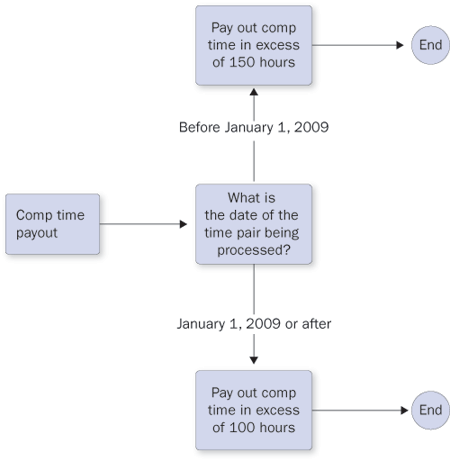
Figure 1
Decision tree for comp time payout
Configuration
The schema editor can be accessed by running transaction PE01 and inputting the schema name. In this instance the schema name is ZM04, which is a customized version of the out-of-the-box schema TM04, but you can use any four-character name you want. If you look at the current syntax of the time evaluation schema, you can see personnel calculation rule ZCT9 is the routine used to pay out comp time in excess of 150 hours (Figure 2).

Figure 2
Call of personnel calculation rule ZCT9 from time evaluation schema
To implement a new routine to change the comp time payout limit to 100 hours maximum, you must implement an IF condition in your time evaluation schema (Figure 3).

Figure 3
IF routine to call appropriate comp time payout rule based on year of time pair
In the above example, I have created a new personnel calculation rule called ZCTY, which returns a T (for True) or F (for False) condition based on the year (Figure 4).
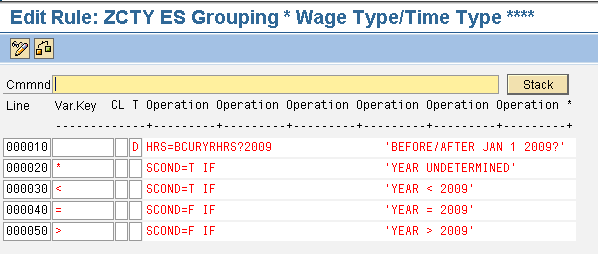
Figure 4
Personnel calculation rule ZCTY
Allow me to explain this by analyzing the rule line-by-line. Take a look at Figure 5. It uses HRS, which is a standard operation to change the number of hours field or to compare it with other values. I’m using it to store the year of the time pair being read from the timesheet and to compare it to the year 2009.
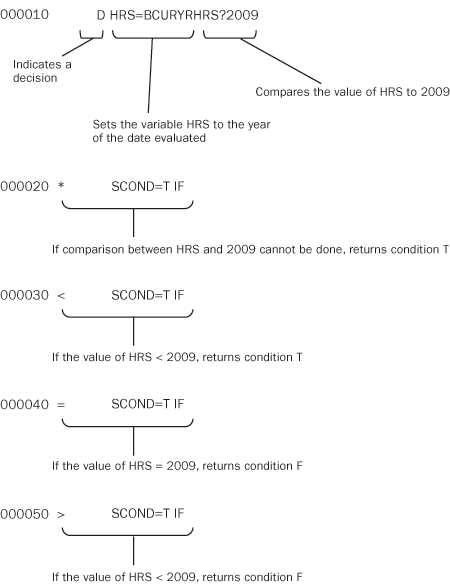
Figure 5
Step-by-step analysis of personnel calculation rule ZCTY
The condition returned by operation SCOND in rule ZCTY determines which comp time payout rule is called in the time evaluation schema, either ZCT9 for the payout at 150 hours, or ZCT8 for the payout at 100 hours. My IF condition in the time evaluation schema has been set up in such a way that a T condition triggers the 150-hour rule (ZCT9) and a condition of F triggers the 100-hour rule (ZCT8).
You can now test the modified schema and rules with an employee’s data. For this example, I used an employee who will accrue comp time that causes his balance to exceed 100 hours but fall short of 150 hours. You can view employee leave balances by running transaction PT50 and selecting the Absence quotas tab. The employee currently has 75 hours of comp time remaining (Figure 6).
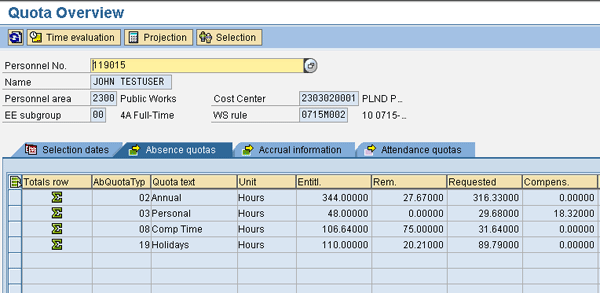
Figure 6
Comp time balance in transaction PT50
First make overtime entries to the timesheet that occur before the cutoff date of January 1, 2009 (Figure 7).

Figure 7
New CATS2 entries prior to January 1, 2009
In Figure 7, attendance type OV02 represents overtime at 1.5 times the employee’s hourly rate. The 1 in the OC column indicates that this time should be accrued as comp time, rather than paid as overtime.
If you run the time transfer via transaction CAT6, then time evaluation via transaction PT60, these are the results you receive in transaction PT66 (time evaluation results). The ZL (time wage type) table shows no overtime pay for the dates of the time entry above (12/13/08 through 12/15/08) (Figure 8).
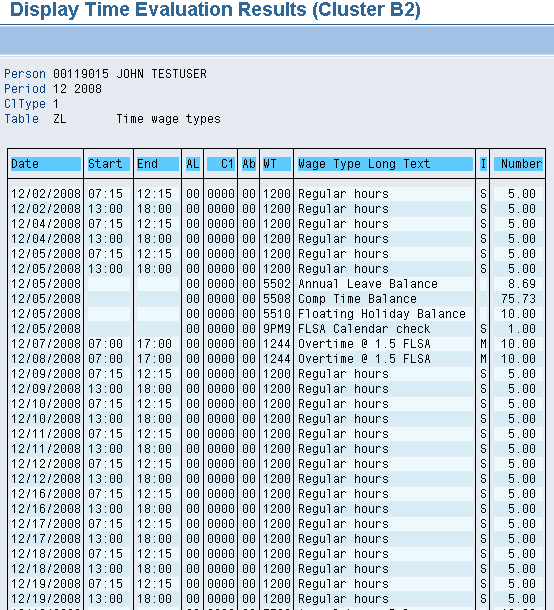
Figure 8
ZL table in the time evaluation results
However, table QTACC (absence quota generation) does show the accrual of comp time (absence quota type 8) for 12/13 through 12/15 (Figure 9).
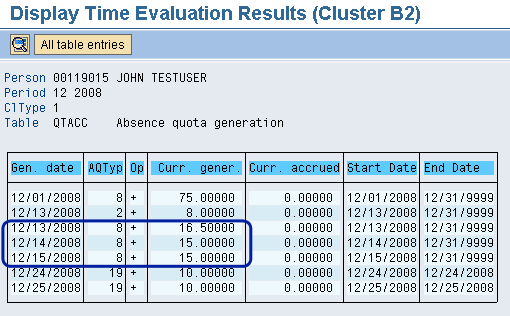
Figure 9
QTACC table in the time evaluation results
In Figure 7, the hours of overtime worked and coded on the timesheet for 12/13, 12/14, and 12/15 were 11 hours, 10 hours, and 10 hours, respectively. You can see in Figure 9 that the comp time accrued at a rate of x 1.5. The new comp time balance can be seen in transaction PT50 (Quota Overview screen). The balance now exceeds 100 hours (Figure 10).
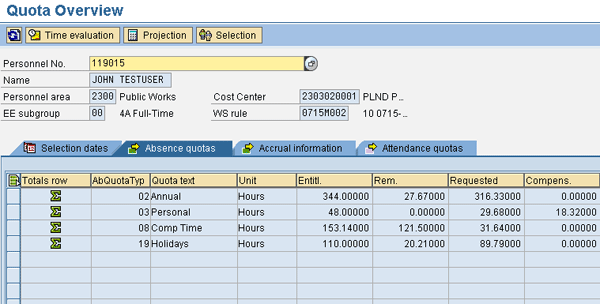
Figure 10
Comp time balance in transaction PT50
Next, enter the time after January 1, 2009, still keeping the accumulated comp time balance under 150 hours (Figure 11).
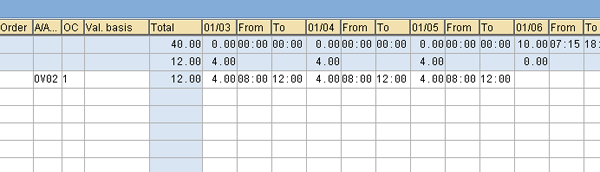
Figure 11
New CATS2 entries after January 1, 2009
If you now run time transfer and evaluation and look at the ZL table for January 2009 in the time cluster, you see that the new comp time is being paid out instead of accrued. That is because the balance has already exceeded 100 hours, the new threshold as of January 1 (Figure 12).
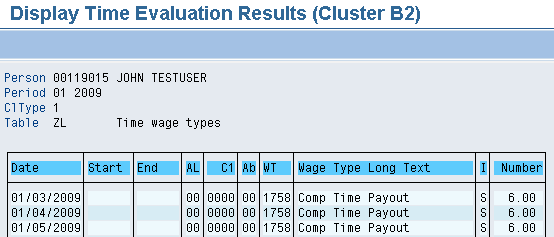
Figure 12
ZL table in the time evaluation results
If you now look at the comp time balance in transaction PT50, you can see that no further comp time has accrued because it was instead paid out (Figure 13).
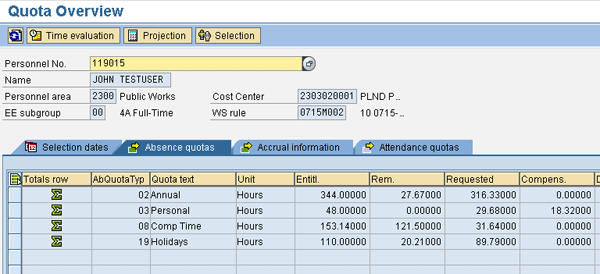
The results show that the date of the timesheet entry is the determining factor in which of the two comp time payout rules is applied. You have therefore controlled retroactive processing of the new rule via standard date operations.
April Lerner
April Lerner is an ERM specialist on the payroll/time management team in the City of San Antonio’s IT services department. April has more than five years of SAP experience in CRM and R/3 HR Time Management and is an SAP Certified Solutions Consultant in the mySAP CRM Interaction Center (IC) and mySAP CRM Service. She has worked in diverse positions in the IT industry for over 15 years.
You may contact the author at alerner@sanantonio.gov.
If you have comments about this article or publication, or would like to submit an article idea, please contact the editor.



 Premium