SAP recently introduced some programming changes in payroll function UGARN, including a feature named UEQPY to give customers control over the new logic. Learn how to properly configure this new feature for correct proration of child support and alimony garnishment deductions.
Key Concept
UEQPY allows companies to determine under which circumstances the received on date should be considered in the payoff process. The default feature delivered with this change turns off proration of support garnishment deductions in a low net pay situation. Proper configuration of the feature is necessary to retain your current processing logic.
On May 5, 2009, SAP released SAP Note 1301931 US Garnishments: Feature UEQPY (Equal Amt. Pay Proc.). The purpose of this Note is to accommodate new laws in the state of Kansas that alter the treatment of the received on date in the calculation of payment to multiple recipients. The law and the changes are aimed at the calculation of equal amount payoff, but the system changes implemented by SAP affect normal proration (i.e., equal percent payoff) as well.
You may be tempted to dismiss this Note when you read that it addresses garnishments in Kansas, but be aware that the contents of this Note can alter the calculation of all garnishments. Everyone needs to pay attention because this Note alters the default calculation of all support order proration. Refer to Table 1 to determine which HR Support Package contained this Note for your SAP release.
|
SAP R/3 4.7
|
97
|
|
SAP ERP 5.0
|
61
|
|
SAP ERP 6.00
|
41
|
|
SAP ERP 6.04
|
07
|
|
| Table 1 |
Support Packages that contain SAP Note 1301931 |
Equal percent payoff or equal amount payoff is triggered when a person has more than one garnishment order and does not have enough disposable net pay to cover all the orders. The UGARN function distributes the available net pay across multiple orders. In the case of equal percent payoff, each order is given a portion of the available funds according to the relative percentage of the order’s value compared to the total of all orders. For example, suppose one order was for $100 and the other order was for $200, but the available net was only $150. Normal proration would allocate $50 for the first order and $100 for the second order. The amounts of each order represents 1/3 and 2/3 of the total. The distribution follows this same allocation.
Equal amount payoff is an alternative method of calculating the reduced payments. It is activated by selecting the Equal Amount Pay Processing check box in the garnishment rule on table T5UG4. Figure 1 shows a rule with this option activated. If the equal amount rule were used in the above example, each order would have been paid at $125. This rule simply divides the available funds equally by the number of orders.
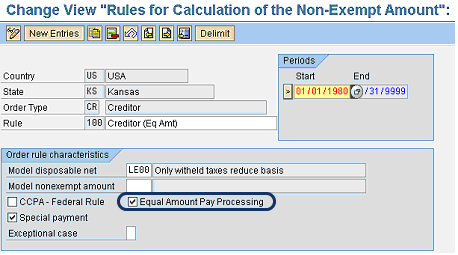
Figure 1
Table T5UG4 with equal amount processing set
Processing Before SAP Note 1301931
Proration is done in groups of orders that share a common priority. If each order has a different priority, the orders are paid off in priority sequence and no apportionment happens. Apportionment only happens when there are two or more orders with the same priority.
Garnishments are divided into five categories as listed in Table 2. Prior to SAP Note 1301931, there was a distinct difference in the processing of support type orders versus other types of orders. The Date Received field in infotype 0194 was ignored for all support type orders. Figure 2 shows the portion of program RPCPIUU0 that ignored the received-on date for support type orders. This means that all support orders (child support and alimony) were grouped by the priority field from infotype 0194 without regard for the date received.
|
C
|
Creditor
|
|
F
|
Federal tax
|
|
S
|
Support
|
|
T
|
State tax
|
|
V
|
Voluntary
|
|
| Table 2 |
Garnishment categories |
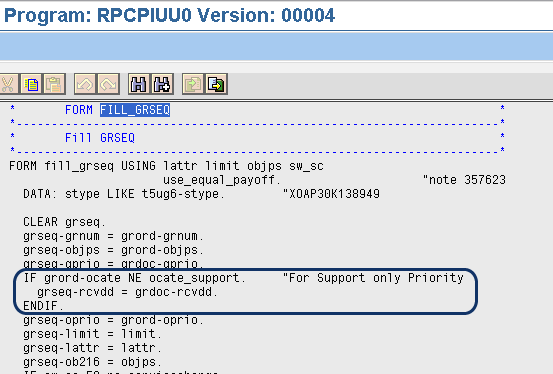
Figure 2
Program RPCPIUU0 before implementing SAP Note 1301931
Processing After SAP Note 1301931
Kansas introduced a rule that requires the received-on date to be considered when setting priority for certain support orders. SAP Note 1301931 enables companies to configure this option by using a new feature, UEQPY. You maintain UEQPY directly in transaction PE03. The documentation for feature UEQPY describes it as a way to activate the Equal Amount Pay Processing option. However, the feature activates and deactivates both equal amount and equal percent payoff processing.
Figure 3 shows program RPCPIUU0 after the installation of SAP Note 1301931. By comparing the before and after versions of this program you can see that the received-by date is now ignored only when the UEQPY feature returns value X whereas it was ignored for all support orders before.
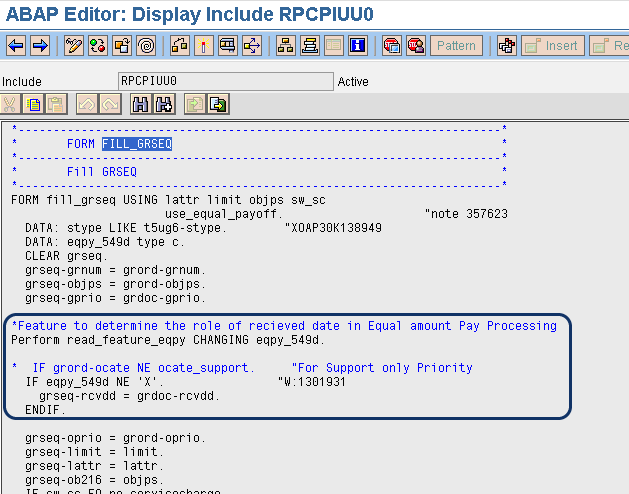
Figure 3
Program RPCPIUU0 after implementing SAP Note 1301931
SAP Note 1301931 contains a default decision tree for feature UEQPY (Figure 4). All support orders (except for those in Kansas) return a blank value. This means that if you simply install the HR Support Package that contains SAP Note 1301931 without also maintaining the UEQPY feature, multiple support orders no longer prorate unless they share a common received-on date. This can make some support deductions taken in your system out of compliance with the relevant rules. If you wish to retain the previous system function that ignores the received-on date for all support orders, you must change the return value in this feature to X at the area circled in Figure 4.
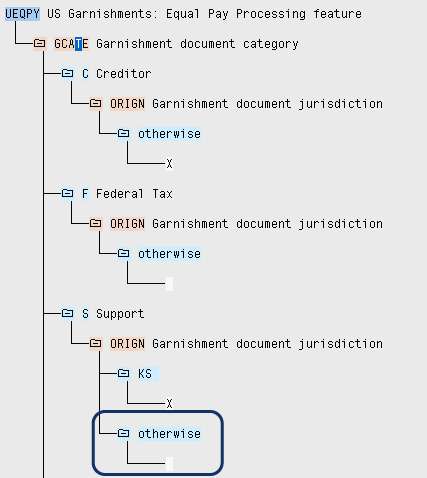
Figure 4
Default feature UEQPY
As you install the Support Package that contains SAP Note 1301931, be certain that you perform a number of test cases that examine the proration of garnishment deductions in low net pay situations. Verify that the allocation of disposable net still works correctly for various combinations of order category, priority, and received-on date. Failure to perform adequate testing could lead to incorrect deductions on live paychecks.
Clay Molinari
Clay Molinari has 20 years of experience in the IT industry and has been working as an SAP HR consultant since 1997. He is currently president of C&C Savant, Inc., an SAP consulting firm that specializes in combining standard SAP configuration and custom ABAP programming to help its clients solve unique or complicated requirements.
You may contact the author at claymolinari@comcast.ne.
If you have comments about this article or publication, or would like to submit an article idea, please contact the editor.