You can use the distribution of usage variances function to simplify data collection for variance analysis and the valuation of inventory at actual costs, and avoid recording each transaction on its own. An example shows the steps and takes you through the process of what to do in Customizing.
Key Concept
Distribution of usage variances is a function that debuted in SAP R/3 Release 4.7 and is now available in mySAP ERP Central Component (ECC). It processes physical inventory (PI) documents and automatically assigns new values to the production orders reflecting accurate data captured in the PI document concerning the materials used in production.
When it comes to implementing Product Costing, there are two schools of thought. One says that if you want proper variance analysis and accurate stock valuation, especially if you are working with actual costs, then you have to make sure that your confirmations are as accurate as possible by recording machine time at operation level and posting goods issues to each production order individually. However, such accuracy requires effort to record the data — and, of course, some production processes quite simply refuse to submit to such a rigid approach.
The other school of thought prefers to confirm using backflushing. You make all goods issues and confirmations with standard values in the bill of material (BOM) and routing as you post the goods receipt. This accelerates the postings to the production orders, but if your BOMs and routings are less than perfect, you soon find that the inventory values in R/3 and the values of each stock count start to diverge.
Starting with Release 4.7, you can occupy the middle ground between accuracy and efficiency by recording the differences between the stock values derived from a physical inventory and the inventory values in R/3 Release 4.7 and mySAP ERP Central Component (ECC). You can use the distribution of usage variances function to assign these differences to the production orders in proportion to the quantities of goods issues to each order since the last stock count. That way, you can perform variance analysis and value inventory at actual costs without the inconvenience of having to record every transaction separately. For information about how costs can be distributed in previous versions, see the sidebar, “The Forerunner: Cost Object Hierarchy.”
How It Works
Before looking at how to record physical inventory, consider how the inventory values in R/3 can become out of sync with the inventory values counted in a physical inventory. If you’re using backflushing, then inaccuracies in the BOMs and routings can mean that the standard values do not reflect what is happening on the production line accurately. In the chemical and process industries, consumed quantities might not be rigid, but instead are affected by environmental parameters or the properties of an ingredient.
If you’ve ever baked bread, you know that the amount of water you need to get a decent lump of dough is never the same from one batch to the next. The same principles apply on a larger scale to many production processes. While the recipe might state that you need 400 ml of water, you might find that a different batch of flour needs 450 ml to form a decent dough. If you backflush using standard values, then you record a goods issue for 400 ml (the quantity in the recipe) and find that when you perform a stock count, 50 ml (the extra water you had to add) is missing. Typically, you won’t count the missing stock after every loaf, so you might have baked several hundred loaves between stock counts.
The distribution of usage variances function takes the difference between the stock values in Materials Management (MM) and the stock values from the physical inventory, which is the sum of the missing ingredients. It then assigns the costs for these ingredients to the loaves baked since the last stock count.
Assign Inventory Differences
Continuing with a more concrete example, I’ll walk you through the posting steps in the system and then show you how to configure the system for this process. Say you have 1,000 units of an ingredient in stock at the start of the period. You issue 200 units to three production orders. The first order receives 100 units, the second order 50 units, and the third order 50 units. Let’s assume that you have not purchased ingredients in the meantime and that there are no new goods receipts.
At the next stock count, instead of 800 units remaining at the storage location, as the sum of the goods issues would imply, the count finds only 540 units. You first must post the difference of 260 units as an inventory difference to the financial accounts and then assign it to the three production orders to ensure that you include it in management reporting. The system proposes that the first order should receive 130 units, the second order 65 units, and the third order 65 units based on the values of the original goods issues. You either can save the proposal as it is or adjust the values if you know which order caused the difference.
Record Physical Inventory
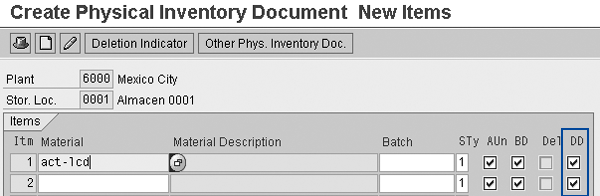
To record the 260-unit difference in my example in R/3 (or ECC), you first have to create a physical inventory (PI) document. This is the header for all activities associated with PI and documents for the auditors that a count has taken place. To create a PI document, follow menu path Logistics > Materials Management > Physical Inventory > Physical Inventory Document > Create, or use transaction MI01. Enter the document date, plant, and storage location.
The document contains a list of the materials and batches that you can include in the count, which takes place per storage location. The system includes only quantities recorded in PI documents for which the distribution of physical inventory differences (DD) is active in the distribution (Figure 1). You can perform physical inventory daily, weekly, or even monthly, though I do not recommend you let more than a month elapse if you are doing variance analysis at month-end or want to include the follow-on costs in actual costing.
Enter the Inventory Count
Then you have to record the difference of 260 units for the material in question. This extends the PI document to record exactly how much material is missing or in excess. Follow menu path Logistics > Materials Management > Physical Inventory > Inventory Count > Enter, or use transaction MI04. Enter the number of the PI document you just created. Enter the inventory count for each of the materials in the PI document (Figure 2). Note that this document does not affect the financial accounts.
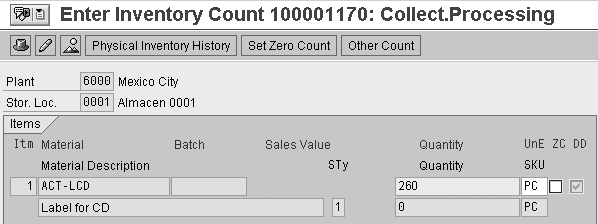
Figure 2
Record inventory count for missing material
Post Inventory Differences to FI
Finally, follow menu path Logistics > Materials Management > Physical Inventory > Differences > Post or use transaction MI07 to post the inventory differences to FI (Figure 3). This posting adjusts the stock level and posts the costs associated with the missing materials to the profit and loss from physical inventory differences account. It also makes the physical inventory count available for the distribution of usage variances function so you can assign the value of the 260 units to the production orders later.
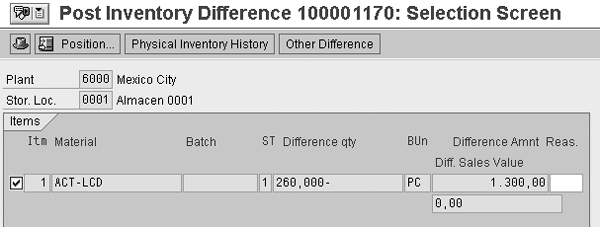
Figure 3
Post physical inventory difference to FI
Distribution of Usage Variances
Once you record the 260-unit difference for the storage location, you distribute it to the production orders that used that material in the period. To do this, follow menu path Accounting>Controlling>Pr oduct Cost Controlling>Actual Costing/Material Ledger>Actual Costing>Distribution of Usage Variances>Distribution of Inventory Differences or use transaction CKMATDUV. Enter either the PI document (if you know it) or the materials for which you wish to select differences. Select Distribute and then Include Posted Docs in Display. You see a list of the PI documents processed together with the status New (Figure 4).
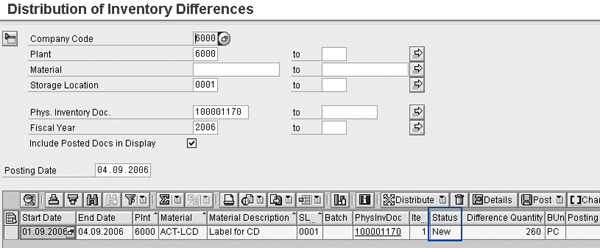
Figure 4
Distribution of Inventory Differences initial screen
Now click on the distribute icon. This causes the status New in Figure 4 to change to the status Distribution completed (Figure 5). Click the distribution line to see how the system distributed that value to the orders that used the ingredient in that period. In Figure 5, you can see that the quantities of ingredient withdrawn to the orders are 100, 50, and 50, shown in the Withdrawn quantity column. The system proposal for the distribution of the 260 units is 130, 65, and 65, shown in the Default quantity column.
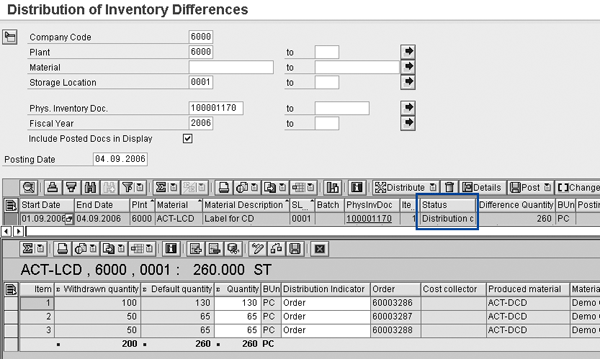
Figure 5
Distribution of Inventory Differences detail screen
Generally you accept the system’s proposal by clicking on the Post button in the lower half of the screen. Then click on the Post button in the upper part of the screen to post the goods movements. However, if you need to correct the proposal, you can change the quantity by overwriting the figure proposed with a different figure in the Quantity column in Figure 5. You might do this if you observe that one order had caused particularly high variances. You also can change the type of receiver by selecting the item and double-clicking on it (Figure 6).
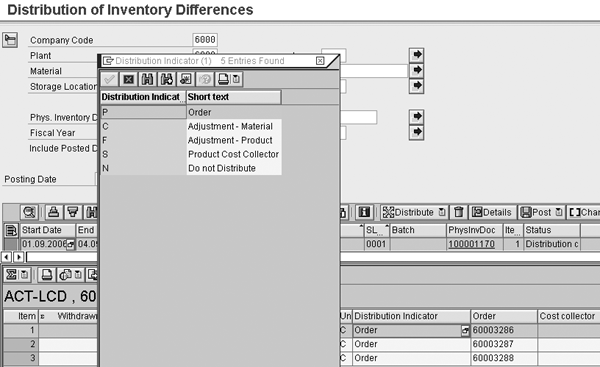
Figure 6
Distribution receiver
Assign Activity Differences
If you want to correct the machine or labor time in the routing, you can use the same mechanism to assign differences to the production orders. This might be the case if you are posting standard time to your orders but find that the machine ran for more hours than the sum of the standard values suggests.
First, follow menu path Accounting>Controlling>Pr oduct Cost Controlling>Actual Costing/Material Ledger>Actual Costing>Distribution of Usage Variances>Enter Actual Activity Quantities or use transaction CKMDUVREC to record the time differences based on workers’ time sheets, machine hour counters, or electricity consumption meters in CO. Note that the system only saves the data if you select Item OK (Figure 7) for each row on the screen.
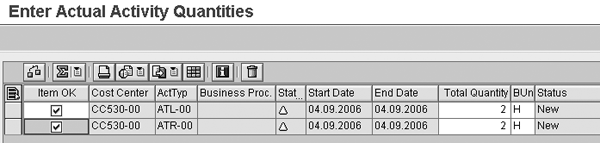
Figure 7
Enter actual activity quantities
Then, follow menu path Accounting>Controlling>Pr oduct Cost Controlling>Actual Costing/Material Ledger>Actual Costing>Distribution of Usage Variances>Distribution of Activity Differences or use transaction CKMDUVACT to assign the times to the production orders using that activity in the same way as for the materials. Figure 8 shows the actual activity quantities being distributed instead of the quantities from the PI documents.
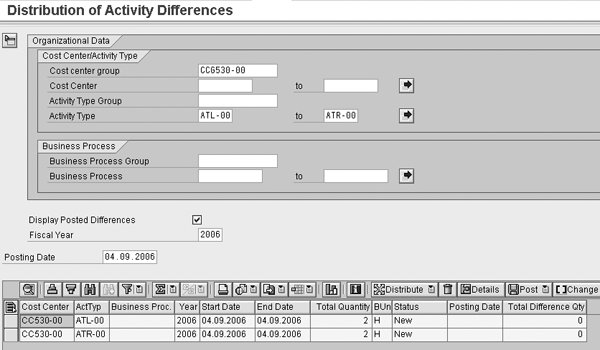
Figure 8
Distribute activity differences
Customizing
Now I’ll show you how to activate the functionality you have just seen. First, activate the distribution functions in Customizing (Figure 9). Follow IMG menu path Controlling > Product Cost Controlling > Actual Costing/Material Ledger > Actual Costing > Activate Distribution of Consumption Differences to activate distribution by plant and storage location. This ensures that the DD flag (Figure 1) appears when you create your PI document.
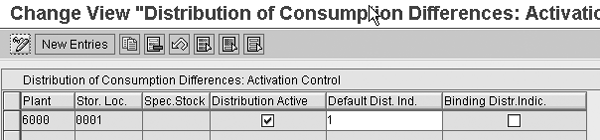
Figure 9
Activate the distribution of consumption differences
Then you have to specify the movement types that are relevant for these postings. Specify which movement types you used to post goods issues to the production orders initially (usually movement types 261 and 262). Use transaction SM31 to include these movement types in table TDUVN156. Enter the function code DUV and the numbers of the relevant movement types (Figure 10). The distribution of usage variances function selects these movements to determine which goods you issued to the production order in the first place.
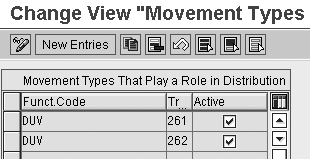
Figure 10
Enter function code numbers of the relevant movement types in table TDUVN156
Next, set up movement types for the reversal of the inventory goods movements (movement types 701 and 702). You cannot reverse these in standard SAP, so you need to create new movement types (e.g., Z11 and Z12) by copying movement types 711 and 712. To do this, follow IMG menu path Materials Management>Inventory Management and Physical Inventory>Movement Types>Copy, Change Movement Types and copy movement types 711 and 712 to Z11 and Z12. Make sure that you copy all dependent entries. Do not select Inventory posting for these movement types. Then assign them as follow-on movement types to movement types 701 and 702 by selecting movement types 701 and 702 and choosing Reversal/follow-on movement types, as shown in Figure 11.

Figure 11
Follow-on movement types for the reversal of the inventory posting
Then create new movement types for the posting of the material usage variances to the receiving orders. Create new movement types such as Z61 and Z62 by copying movement types 261 and 262. To ensure that Warehouse Management ignores the copied movement types, set the reference movement type to 999. Define movement types Z61 and Z62 as follow- on movements for Z11 and Z12 with the function code DUV as shown in Figure 12.
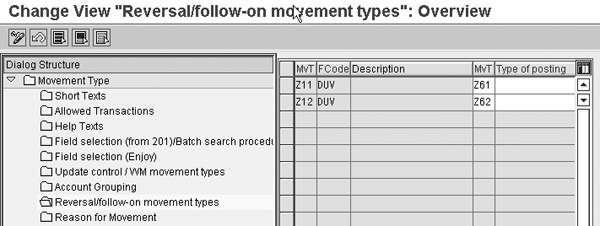
Figure 12
Follow-on movement types for the posting of the differences to the production orders
The Forerunner: Cost Object Hierarchy
If you’ve worked with Product Costing for a while, you may remember a feature called the cost object hierarchy. This allowed you to set up nodes for a production line or material, and assign inventory differences to these hierarchy nodes. At period close, the system would distribute these to the assigned production orders in proportion to the target costs per order. While the distribution of usage variances function is rooted in the cost object hierarchy, it differs from the latter in three critical respects. First, you don’t need to set up any hierarchy nodes; you just need to activate distribution for the material and storage location. Second, you can run the distribution of usage variances at any time — though you should run it at least once a month — whereas distribution within the cost object hierarchy runs strictly at period close. Finally, you can adjust the quantities proposed by the system with the distribution of usage variances.
Janet Salmon
Janet Salmon joined SAP in 1992. After six months of training on R/2, she began work as a translator, becoming a technical writer for the Product Costing area in 1993. As English speakers with a grasp of German costing methodologies were rare in the early 1990s, she began to hold classes and became a product manager for the Product Costing area in 1996, helping numerous international organizations set up Product Costing. More recently, she has worked on CO content for SAP NetWeaver Business Warehouse, Financial Analytics, and role-based portals. She is currently chief product owner for management accounting. She lives in Speyer, Germany, with her husband and two children.
You may contact the author at janet.dorothy.salmon@sap.com.
If you have comments about this article or publication, or would like to submit an article idea, please contact the editor.