Understand the limitations of SAP validation and substitution functionality to ensure correct data capture and learn how to complement them using proactive formula builder functionality in a Business Add-In and a periodic reactive method of report automation.
Key Concept
Various business transactions feed data into the SAP system. Ensuring data quality results in more meaningful reporting. This can aid in managerial decision making. The SAP system provides tools for checking the value to ensure that only valid information is entered into the system. Identifying incorrect data at the source is the key to a cleaner system.
Companies focus on cost leadership to maintain an edge over the competition. Organizations take multiple measures in cost identification and proper allocation for effective optimization of resources to remain competitive. SAP ERP systems are designed to help organizations achieve this goal. However, all downstream SAP ERP analysis that guides decision making depends on the integrity of the data fed to the system. Transactional data is usually fed to the system by shop floor managers, retailers, and procurement managers who work under time constraints and service-level agreement (SLA) boundaries. This transactional data can sometimes be incorrect due to functional myopia – in other words, a shop floor manager who is in charge of a smooth-running production line may not be aware of margin-based pricing, while that is the concern of a marketing manager.
Many times organizations use multiple systems for shop floor, warehouse, procurement, and sales, which consolidate data into the SAP system for management and external reporting. This again introduces a threat to data integrity. The SAP system provides control measures that, coupled with proper accounting processes, can capture the cost correctly.
There are two ways to capture costs correctly: the proactive method or the reactive method. I’ll discuss SAP’s standard controls and checks to prevent incorrect postings proactively, such as validations and substitutions and Business Add-Ins (BAdIs). I’ll also discuss the limitation of standard SAP validation and substitution rules and customization that can complement them. Businesses usually also use reactive methods during period end to allocate cost correctly from dummy cost buckets to correct cost centers via allocations using various cost drivers and reports. I’ll also go over report automation for financial analysts to ensure reactive correction at period end.
The key to effective cost capture is to catch the inaccuracy at the earliest stage possible. However, financial documents are generally created halfway through capturing the business process in the SAP system. For this reason, companies using SAP Warehouse Management use free text fields in transactions such as transfer requirement or transfer order creation to capture cost objects and apply business rules to them.
Validations and Substitutions
The standard SAP system provides validation and substitution functionality to limit incorrect posting by using guiding business rules. These rules are used at various call-up points to validate or substitute the values in a field. However, the stage of the program in which these rules are called up often limits the parameters on which you can apply checks. As an example, line item validation and substitutions are called at the time of the CO account assignment. At this stage the general ledger account determination is not complete, and you cannot have a rule for cost centers based on general ledger accounts. SAP Note 350966 covers this issue in detail.
CO validations and substitutions are initiated at three points:
- During the CO postings resulting from accounting interface
- Manual posting of CO documents using transaction KB**
- Automatic posting for activity allocation.
Validations and substitutions are limited in use – they can’t be initiated for planning, order settlement, allocations, target-actual activity allocation, variance calculation, confirmations, surcharges, and imputed cost calculation. In case of negative posting, the posting information is picked from the document that is to be reversed. Therefore the validations and substitutions are not initiated. SAP Note 392273 provides details as to where you can use validations and substitutions.
BAdI Implementation
As mentioned earlier, the FI and CO validations and substitutions are initiated in case of manual or automatic actual FI and CO document postings. However, cost objects are also used in materials management (MM) and warehouse management (WM) documents that do not necessarily have any follow-on FI or CO documents. For example, say an organization uses a third-party logistics system and creates reservations automatically using an interface. Users may also directly log in to the SAP system to create reservations when the interface is down. I’ll show you how to use a control mechanism to capture costs correctly when you are creating reservations.
Reservations are used to ensure that materials are available for a specific requirement in the future. Reservations are created to inform the warehouse to keep materials ready for a specific future movement using a BAdI. This has an advantage over having a validation or substitution rule created at the actual goods movement because any error identified at actual goods movement needs a correction for both the reservation and goods movement documents. In this example, there is an interface creating the reservation in the SAP system, so you can design the system to produce an error message at the stage of reservation creation. The interface then shows the error message to the third-party source system where corrective actions can be taken.
Typically, there are multiple plants and cost centers in a company code. I’ll show you a simple example to demonstrate that the interface or users creating reservations in the SAP system should not be able to post a reservation with an incorrect plant/cost center combination. I’ll also show you the BAdI approach for incorrect postings within a company code. For a prototype, assume only the following to be valid:
- For Plant DM01 all consumption should be posted to cost center CDM01
- For Plant DM02 all consumption should be posted to cost center CDM02
In my example, you can use the standard BAdI MB_RESERVATION_BADI to populate or validate the fields in transactions MB21 and MB22 (create and change reservation, respectively).
You can maintain and activate the BAdI by following IMG menu path Materials Management > Inventory Management and Physical Inventory > Maintain Customer Exits and Business Add-Ins > BAdI: Checking/Supplementation of Dialog Data for Transactions MB21/MB22 (Figure 1).
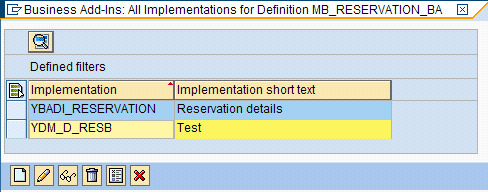
Figure 1
BAdI activation
Tip!
To see the list of BAdIs that can be used behind any transaction, use transaction SE93. Enter the transaction code for which you need the BAdI and click the Display button. Note the package information from the transaction display and use it to populate the package field in BAdI information system transaction SE84. Execute to get the list of BAdI definitions and enhancements available for the transaction.
The BAdI has two methods:
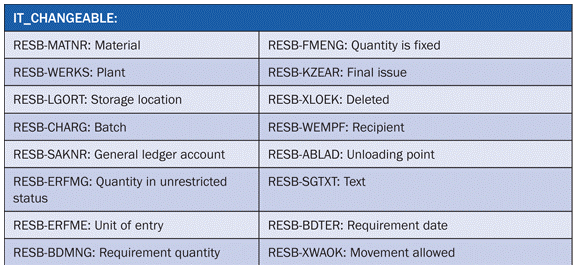
- DATA_MODIFY: This is similar to the substitution functionality for FI and CO documents. The method is called before the user starts making entries in a detail screen (e.g., program SAPMM07R, screen number 510). You can use it to prepopulate fields and avoid user confusion. You can also use it to correct wrong entries in the multiple entry screen (e.g., program SAPMM07R, screen number 521). The parameter IT_CHANGEABLE contains all the fields on the detail screen that allow changes (Table 1).
- DATA_CHECK: This is similar to the validation functionality for FI and CO documents. The method checks the entries in the header and item fields and triggers an exception to generate information, warning, status, and error messages. This method is called after DATA_MODIFY and any other user inputs in the detail screen 510.
Note
The standard SAP system comes with inactive BAdIs. Some BAdIs (e.g., MB_MIGO_BADI) allow you to create multiple implementations and others (e.g., MB_RESERVATION_BADI) allow a single implementation. This characteristic is stored in the BAdI definition.
As you execute the IMG activity mentioned above, the system produces a pop-up screen containing all the active and inactive implementations on MB_RESERVATION_BADI. This pop-up screen allows you to define new implementations and to display and change existing implementations. The system also provides a color legend to differentiate active and inactive implementations on the BAdI. Active implementations are yellow and inactive are blue (Figure 1).
Note
You can also create BAdI implementations in BAdI builder transaction SE19. Newly created implementations are in the inactive state. The SAP system only allows the addition of business logic in an inactive BAdI. After the incorporation of business logic, you need to activate the BAdI by pressing Ctrl+F3 or clicking the activate icon so it is functional.
To create a new implementation, click the create icon on the screen shown in Figure 1. Provide a suitable name for the implementation and press Enter. The SAP system reserves the namespace for the implementation. In this example, I activate a BAdI definition under the implementation name YDM_D_RESB. Implementation names starting with Y or Z are created in a local package. Therefore, the general naming convention is to prefix the name with Y or Z. If you name the implementation without a Y or Z prefix, you can only create the implementation object in an SAP package. A package groups together related objects in the ABAP workbench, and all packages are contained in table TDEVC.
Inside the BAdI builder, you have all methods applicable for the BAdI in the Interface tab. The standard system provides two implementation types for implementing any method.
- ABAP Code: Write a piece of ABAP code that is executed while the method is called
- Formula: SAP provides the formula builder tool for this implementation type. Double-clicking the method with the implementation type Formula takes you directly to formula builder.
Formula builder is GUI based and can be used by functional users. It uses the trace functionality provided by SAP to check the control flow to validate if the check is happening at the point of code. Refer to Table 2 for a comparative analysis of BAdIs and validations and substitutions.
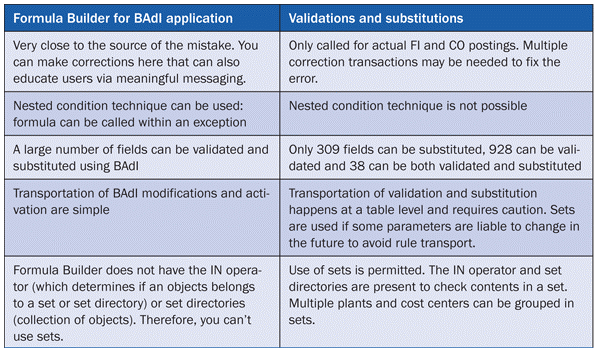
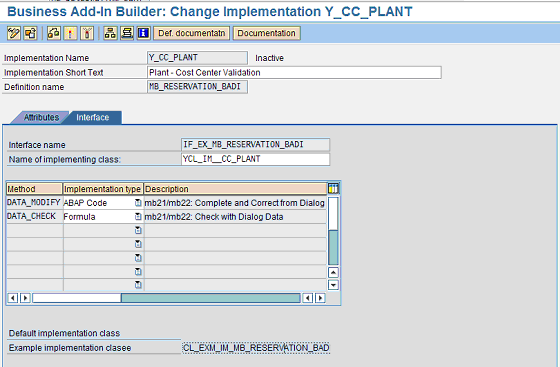
Figure 2
BAdI implementation methods
Companies generally start SAP implementations attempting to have minimal custom code and to use as many native SAP features as possible so as to ensure cost savings on maintenance of custom developments over a five- to 10-year period. Many companies have a dedicated customization approval board to approve custom solutions only if it is absolutely necessary. Moreover, there are instances in which custom developments are switched off by successive SAP technical upgrades. Custom validations, which work in the background, generally produce error messages if there is an incorrect input and sometimes if they are switched off, they are not detected until it’s too late. BAdI validation has an advantage here because you can monitor their activation (mentioned above) as a post-upgrade checklist item. Again, BAdIs have upward compatibility and aren’t turned off by any successive upgrades.
I will be using the formula builder to insert the validation logic. As the validation finds an erroneous posting, you can customize the error message to give the user the correct cost center that should be used. This ensures that the shop floor manager can stay within his SLA timelines to move the goods and the system should act as a helping hand and not a hurdle.
In the formula builder, create a new folder called Plant-Cost Center Validation to logically group validations and substitutions based on purpose (Figure 3). Create a new condition within this folder to check the plant/ cost center combination. Create an exception if there is a mismatch found by condition. As you activate an implementation in MB_RESERVATION_BADI, the implementation is called by a standard SAP application program when you create or change a reservation using transactions MB21 or MB22, respectively. Customer-specific checks and field change logic put in the implementation method are executed, and consequent information or warning or error messages are displayed. In the case of a BAdI implementation using formula builder, the check and field change logic are put in various steps in the method. Exceptions are created in formula builder to make sure that no further steps follow and the SAP application program that called the implementation continues to run, in accordance with the exception, to create or change a reservation or to display a hard-stop error.
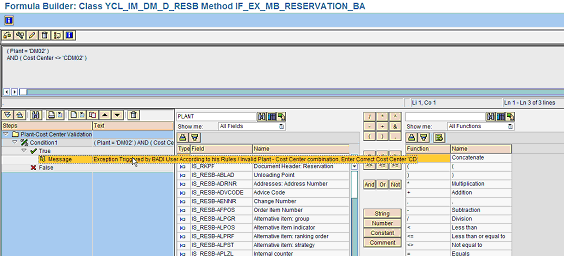
Figure 3
Formula builder
You can use transaction SM30 to maintain a custom message in table T100, which stores all the messages (Figure 4).
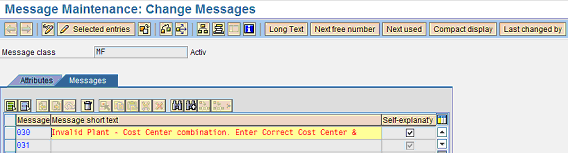
Figure 4
Maintain messages
Then double-click the exception icon in Figure 3 to get to the screen in Figure 5. You can call the message and categorize it as an error, warning, status, or information message. Note the placeholder & in the message in Figure 4. This is loaded by the correct cost center information mentioned in the message variables. The message variable 1 replaces the first &, message variable 2 replaces the second placeholder, and so on.
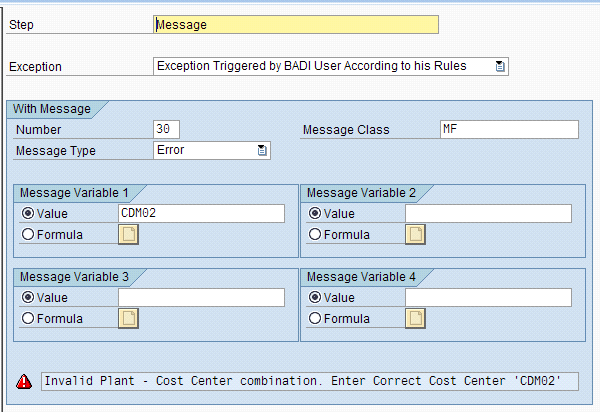
Figure 5
Maintain an exception
Creating or changing a reservation using transaction MB21 or MB22 with an incorrect cost center causes the system to produce an error message and provides pointers to the correct cost centers (Figure 6).
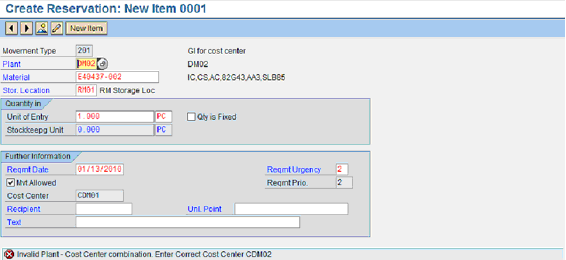
Figure 6
Error output in a reservation
Many companies also decide to go for periodic reactive monitoring and validation of the financial data fed to the system. If they encounter any erroneous postings they manually make adjustment postings at period end. They also communicate with the users and provide informational manuals to minimize future errors. I will describe a batch automation that you can set up in the SAP system that periodically sends a report containing the consumption postings made within the period to various finance analysts in a format that can facilitate easy data validation using office applications. As a result, business users familiar with Microsoft Office applications may not need to log in to the SAP system.
Coming back to our business problem, you can run standard SAP transaction KSB1 for a cost center line item to check the cost center postings for specific plants entered as input criteria. However, the number of transactions in a period can be so high that an online report run may issue time-out errors. Therefore, you can schedule the underlying program RKAEP000 for the cost center line item report to run in batch to generate the postings in a spool file. Use transaction SM36 to schedule the batch job (Figure 7).
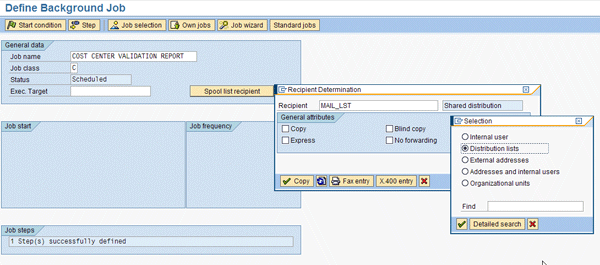
Figure 7
Batch job
Using transaction SO15, you can define the mail distribution list containing the mailing information of all the analysts involved in reactive maintenance (Figure 8). This distribution list is populated in the Spool list recipient button in the batch job. In the Distr. list content tab, users can subscribe or unsubscribe to distribution lists via the Subscribe and Cancel sub buttons, respectively (Figure 9). Here you also need to specify the folder in which you can store the distribution list. Folders are used to structure private and shared distribution lists. In the Distr. list content tab, you can populate the recipient mail address and select the Recip. type as via Internet.

Figur 8
Subscription list attributes
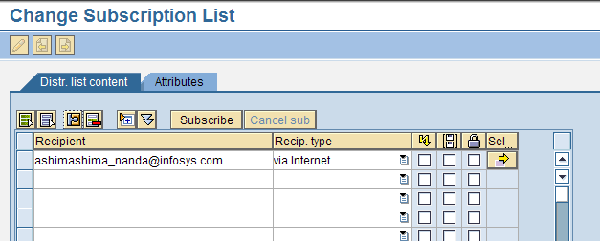
Figure 9
Distribution list
As the batch job runs successfully, it sends the spool output to the mailing queue that you can view with transaction SOST. Usually there is a batch setup for periodically pushing the emails from the queue into users’ mailboxes in the production environment. You can also select lines in the message queue and start the mail send process by clicking the execute icon (Figure 10). The green status shows that the mail has been sent out of the mail queue.
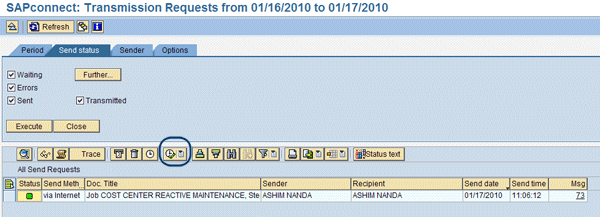
Figure 10
Message queue
Users can download batch job spool output in the system-generated mail attachment to their local systems and open the file with Office applications for quick validation using data filter operations.
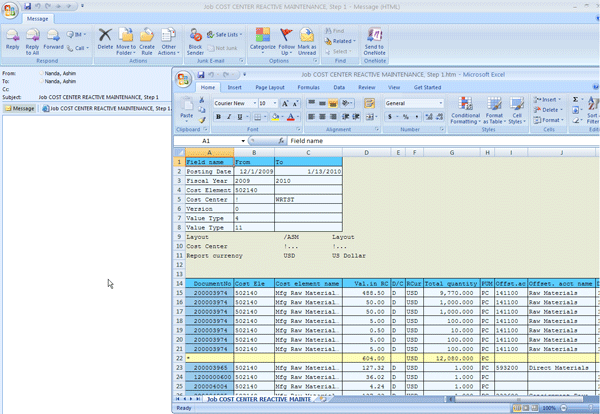
Figure 11
Office applications
If there is an incorrect posting, use transaction KB11N (Figure 12). Input the incorrect cost center in the receiver Cctr (old) field and the correct cost center in the receiver Cctr (new) field. The cumulative correction amount is input in the Amount field to do the reposting.
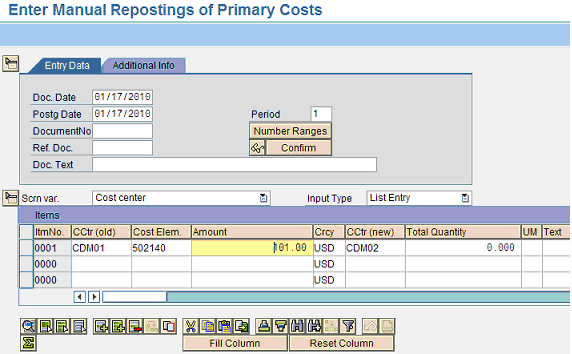
Figure 12
Manual reposting
Ashim A. Nanda
Ashim A. Nanda is a managing consultant in SAP FI/CO working with IBM Global Business Services. He has more than eight years of experience with implementation, global rollout, and maintenance projects for clients in the pharmaceutical, telecommunication, automotive, and high-tech industries. Ashim holds an MBA in finance and systems from Xavier Institute of Management, India, and a degree in electrical engineering from University College of Engineering, India.
You may contact the author at ashim.nanda2001@gmail.com.
If you have comments about this article or publication, or would like to submit an article idea, please contact the editor.



 Premium