Introduce yourself to several new features in SAP BusinessObjects Dashboards 4.0, including what’s available in the new Dashboard Design start page and a tour of user enhancements for query browsing.
With its user friendliness and common Web design elements, SAP BusinessObjects Dashboards 4.0 looks and feels like a modern product.
The latest word is that SAP will release BusinessObjects 4.0 on September 16, 2011, although the release date has already been delayed a few times this year.
Several features of the upcoming Dashboards 4.0 release are attractive to front-end users. Let’s look briefly at these features as detailed by Chris Hickman, senior business intelligence consultant at Decision First Technologies, during a Webinar on September 8 about Dashboards 4.0. Click here to see the webinar on demand.
The Start Page Gets a New Look
The Dashboard Design start page shown in Figure 1 is a new landing page for users when they log in to Dashboards 4.0. From this page, users can create a new dashboard, open a recently used dashboard, or open an existing dashboard from a local drive or the BI launch pad (a feature formerly known as InfoView in Xcelsius).
The start page takes advantage of tabs, allowing users to switch between Highlights (e.g., sample dashboards), Key Resources (e.g., blogs and support), and eLearning (e.g., dashboard tutorials). Drag-and-drop functions are also in place, so users can move and adjust panels to customize their viewing.
Meanwhile, by clicking the Start Page button near the top of the screen, users can easily toggle between the start page and an open dashboard, Hickman said.
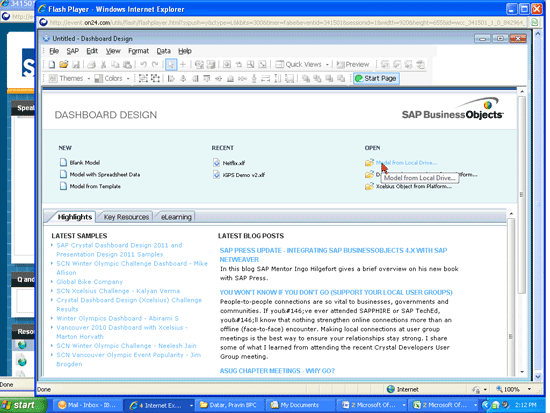
Figure 1
The BusinessObjects Dashboards 4.0 start page
An Easy-to-Use Query Brower Panel
The Query Browser panel—a new window in the Dashboard Designer—allows users to create, edit, or delete universe queries, Hickman said. Users can access the panel by following menu path View > Query Browser (Figure 2). The panel window is easily dragged to any position on the screen, and it also permits users to view multiple queries at once.
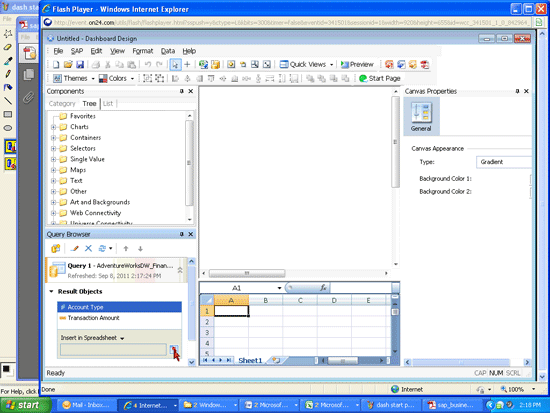
Figure 2
The Query Browser panel shown in its default position in the lower left of the screen
Meanwhile, the actual Query Browser is accessible by clicking the add query icon in the Query Browser Panel. In BusinessObjects Dashboards 4.0, the Query Browser can directly connect to existing universes, so it streamlines the Query as a Web Service process users may be familiar with in BusinessObjects XI 3.1, Hickman said.
Another new feature is the Query Refresh button, which, as you can guess, allows users to quickly refresh queries. Also note the Query Prompt Selector (available in the Components > Category window that defaults to the bottom of the left column). It updates the prompt values for a component and refreshes all dependent objects, he added.
Older Dashboards Are Supported in New Release
It is possible to re-use existing dashboards from BusinessObjects Enterprise XI 3.x within Dashboards 4.0. The key is that BusinessObjects 4.0 is able to open XLF files from older dashboards and then save the files using newer Dashboard Design Objects, Hickman said.
However, dashboards can’t “move backwards” from 4.0 to XI 3.x, he added. In other words, it is not possible to take a dashboard created in 4.0 and open it in XI 3.x.
Other new highlights to note in Dashboards 4.0 include the following:
- Direct data binding is now an option in Dashboards 4.0, which was a highly requested feature from users, Hickman said. Direct data binding permits users to bind components directly to universe queries, which lets users perform more actions in dashboards and eliminates the need to bind data in spreadsheet cells. In previous releases of BusinessObjects, users must employ the embedded spreadsheet for designing dashboards, but now users can integrate with the semantic layer. As example, by integrating to the semantic layer, users can bind a chart directly to dimensions and measures from the layer.
- Dashboards can now contain translated text via the Translation Manager. “Translating text is as easy as opening a dashboard,” Hickman said.
- Regional data formatting now takes places place when a dashboard is published to the BI launch pad. The formatting is based on the user’s locale rather than being set explicitly within Dashboard Design, he said. For example, Dashboards 4.0 converts dates, times, and currency by drawing calculations from settings made in the BI launch pad.

Scott Wallask
Scott Wallask was the managing editor for the BI, BusinessObjects, and HANA content of SAPexperts. He has covered SAP for WIS since May 2010, with a focus on SAP NetWeaver BW, HANA, BusinessObjects, customer relationship management, supply chain management, and human resources. He has spent 19 years as a writer and editor, including stints as a reporter at several newspapers in the Boston area. For 12 years starting in 1998, he created in-depth content about fire safety and OSHA regulations in hospitals while working at HCPro, a healthcare publishing company. In 2005, he won a first place award for best instructional reporting from the Specialized Information Publishers Association for his series on fire protection efforts in nursing homes. He graduated magna cum laude from Northeastern University in 1994 with a BA degree in print journalism.
You may contact the author at editor@biexpertonline.com.
If you have comments about this article or publication, or would like to submit an article idea, please contact the editor.