Organizations need to design and develop effective testing strategies to comply with Sarbanes-Oxley and industry-specific requirements. These testing strategies and methodologies need to cover both normal day-to-day maintenance of business scenarios and major initiatives such as upgrades, fresh implementations, and more. See how to build and follow a five-phase plan to perform testing on your system and ensure compliance.
Key Concept
extended Computer Aided Test Tool (eCATT) provides automated testing of a variety of SAP transactions. It can test across multiple systems on multiple formats for many users. It uses test scripts, the updated version of Computer Aided Test Tool (CATT)’s test cases. You can build these test scripts to be flexible and reusable for end-to-end processes.
Testing in the past was primarily considered a one-time activity, usually a focus of fresh implementations or major upgrade initiatives. Testing was expensive, but because it was usually a one-time activity, companies didn’t emphasize it. Testing is no longer a one-time phenomenon: It’s a day-to-day activity and requires a well-thought-out, repeatable testing strategy. Various business drivers — such as mergers and acquisitions, business reorganization, or the implementation of new modules and functionality — require sophisticated testing methodologies.
In addition to business and technological drivers, compliance drivers such as Sarbanes-Oxley and FDA regulations also mandate that organizations enact thorough testing strategies. The compliance requirements state that you need to thoroughly test and document any changes to business processes for the purposes of providing an audit trail.
When it comes to designing the most effective testing strategies, such testing methodologies must cater to two critical criteria: testing coverage and test automation. I’ll discuss these first and then move on to the five phases of an effective testing strategy.
Testing Coverage and Automation
One of the most critical aspects of testing strategies is to make sure that all business processes are entirely covered in the scope of testing. Coverage means that you test various scenarios of each process. It is common to find that though a company tested business processes, it missed an exceptional situation.
For example, the process of creating a customer could have different scenarios for creating customers with different partner functions, such as sold-to customer, ship-to customer, bill-to customer, and payer customer. In this example, the scope of testing methodology should not only include the process of testing the customer but should also cover these multiple scenarios for partner functions.
Automation is another critical aspect of an effective testing strategy. Rather than manually repeating the tests, you can use automated testing tools, such as Computer Aided Test Tool (CATT) or extended Computer Aided Test Tool (eCATT) to automate these tests. The approach of automated testing requires additional efforts in the beginning — for example, to design and build the eCATT test scripts. After you build these scripts, though, you can execute them multiple times, saving significant time.
Figure 1 shows a comparison of efforts associated with manual versus automated testing. Efforts associated with the manual testing remain essentially the same every time you perform testing during multiple test cycles. Using automated testing, the efforts may be higher in the beginning, especially to build the library of test scripts. Next time, when you want to do testing, you only need to put forth effort for processes that changed. You reduce overall testing efforts over multiple test cycles with automated testing.
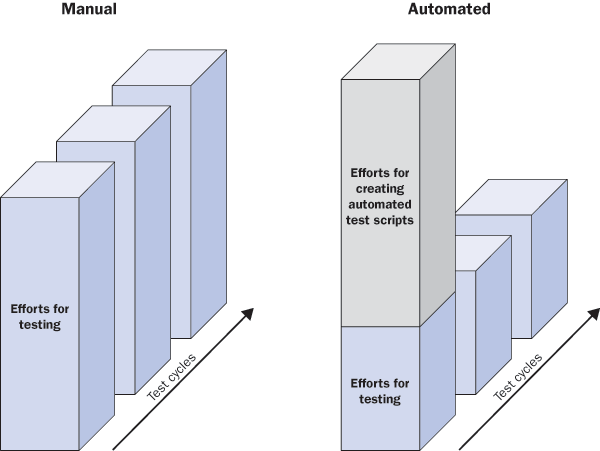
Figure 1
Testing approaches — manual or automated testing
Now that I’ve discussed these components of testing, I’ll move on to the methodology.
Testing Methodology
Based on my experience implementing the testing strategies for different customers, I’ve developed an effective testing strategy for SAP business processes. The testing methodology covers the two critical aspects of coverage and automation and consists of the following five phases:
- Plan
- Design
- Build
- Test
- Maintain
These phases of the testing methodology are similar to ASAP methodology phases (project preparation, blueprint, realization, go-live, and post-go-live support).
The key activities associated with the plan phase are to scope all the possible testing scenarios in the organization. At the end of the plan phase, you deliver the scope document. The scope document lists all the key business processes along with the possible scenarios that you’ll test. I described the phases, activities, and deliverables in Table 1.
| Plan |
Scoping the testing processes |
Scope document, which lists all the key processes, subprocesses, and scenarios |
| Design |
Preparation for designing the test cases and test scripts |
Design document, which lists the testing designs for processes |
| Build |
Developing the test scripts |
Test scripts using an automated testing tool |
| Test |
Executing the test scripts |
Test logs of the test scripts |
| Maintain |
Supporting and maintenance activities |
Documentation and how-to training manuals |
|
| Table 1 |
Phases, activities, and deliverables for testing methodology |
Now I’ll explain a bit more about each phase.
Plan Phase
The purpose of this phase is to provide initial planning and scoping of the key business processes for testing. The key task in this phase is to identify the scope of the testing. As mentioned earlier, the scope of the testing should be exhaustive. Every company has its own unique and customized processes. Therefore, scoping the processes must also include the customized business processes.
In the plan phase, you should perform these activities.
- Establish standard baseline processes
- Add customized processes
- Determine key metrics
- Determine possible scenarios
- Fine-tune testing scope
Establish Standard Baseline Processes
To begin the scoping for testing scenarios, start with the standard baseline processes. For example, for an order-to-cash (OTC) initiative, the key baseline processes could be:
- Standard quotations
- Standard order management
- Pricing
- Available-to-Promise (ATP)
- Credit management
- Delivery process
- Invoicing or AR
- Cash application
For each key process, you can identify the subprocesses and functions. For example, for the quotations process, you can list the subprocesses of inquiry, quotations, subsequent follow-up actions, and more. Using OTC as an example, you can see some sample baseline processes as shown in Figure 2. There would be similar lists of processes for other initiatives, such as purchase-to-pay.
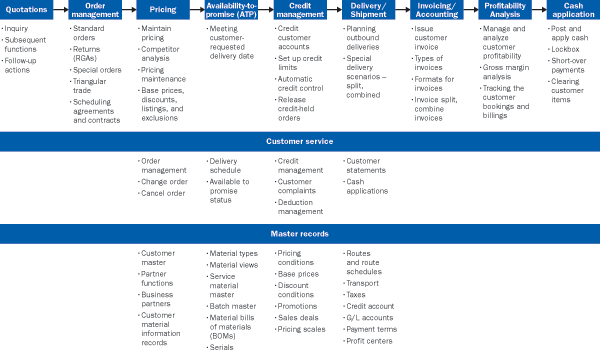
Figure 2
Sample baseline processes for OTC initiative (Source: QS&S)
Add Customized Processes
Use the baseline scope for testing. You can then augment the testing scope by adding customized processes, such as custom sales order types or custom item categories.
Determine Key Metrics
Determine key enterprise structural and organizational elements. The enterprise structure elements could be various sales organizations, distribution channels, divisions, and more. Other organizational elements could be sales offices, sales districts, customer groups, and more. In addition, different order types, item categories, and material types also could play an important role.
The idea is to list the critical key metrics for which you need to test the key processes. For example, if you have three sales organizations in your company, you may need to test the create sales order process three times ? one for each sales organization.
Determine Possible Scenarios
In this activity, determine all possible combinations of scenarios for the key processes. Each of the key processes might have multiple combinations or variations. For example, creating a standard sales order can vary:
- Standard order for various sales organizations (North America, Europe, Asia)
- Standard order for different distribution channels
- Standard order for various divisions
- Standard order for top N customers
Determine all possible testing scenarios for all the processes. The list of processes and all the possible scenarios forms the basis for the scope document.
Fine-Tune the Testing Scope
In this activity, you can fine-tune the scope of the testing by determining whether you can automate the testing of the process and scenario or whether you have to do it manually. For example, if the process is too complex, or if it requires too much time and too many resources for you to automate it, you may choose to test it manually. After you complete this activity, the scope document is ready, including the exhaustive list of processes and scenarios to be tested.
Design Phase
After you’ve finalized the scope, you begin the design phase and focus on the automation tool, such as eCATT.
Note
In this article, I refer to eCATT as an example automated testing tool. You can use any other automated testing tool suitable for your organization. For more on eCATT, see Jayesh Narwaney’s article,
“Speed Up Security Testing Using eCATT.” Rather than directly jumping to build and create the test scripts, the idea is to plan and design the common building blocks of the test components so that they are reusable. For example, build the common eCATT components, such as test scripts and test data containers, so they are reusable across multiple test scenarios. Master data management functions or AP functions could use a create vendor test script, and then purchase-to-pay functions could reuse the script.
Note
In CATT, what eCATT calls test scripts were known as test cases, so you may see the terms used similarly. I’ll use test scripts in this article because I’m dealing mainly with eCATT as an example.
Follow these best practices to design the test scripts. A good test script does more than test a transaction, it:
- Is reusable across other processes, especially end-to-end processes
- Verifies the results are as expected
- Is flexible and uses parameters (import and export parameters)
- Checks database tables to confirm the transaction was successful
If you’re using eCATT, you should design various eCATT components as shown in Figure 3.
- Test script
- Test data containers
- System data containers
- Test configurations

Figure 3
eCATT components
Build Phase
During the build phase, you build the eCATT test scripts. For each of the key processes and subprocesses identified in the plan phase, create a set of test configurations and build multiple scenarios as test cases, scripts, or data containers. Based on the test scripts, you then design and build end-to-end test configurations. The test scripts and configurations are unit-tested in the development environment and migrated to the quality assurance system for final testing.
Note that you create the test scripts for all the possible scenarios of the key process. For example, for the create customer process, considering sold-to and ship-to partner functions, you can see possible combinations of scenarios as shown in Figure 4.

Figure 4
Possible scenarios for the create customer process
Similarly, for the key process of creating a sales order, you can see possible multiple combinations of scenarios in Figure 5.

Figure 5
Possible scenarios for creating a sales order
At the conclusion of the build phase, create the test scripts for all the possible combinations of scenarios scoped in the plan phase.
Test Phase
In this phase, you execute test scripts and configuration for all the key processes and combinations and the system logs the test results. You can then review the testing results to assess for success or failure.
eCATT saves the test logs and you can retrieve them later for review and analysis. The test logs provide useful information on the parameters used during the execution, test results, exceptions and error situations, system messages, and more. In the environment where compliance has taken the major focus, the testing results and logs could provide sufficient assurance, if required.
It is common that you have to adapt the scripts for changes you’ve made to configurations. Typically, the situations are when you’ve changed configuration after creating the test scripts. For any such corrections or bug fixes, you then modify or recreate the scripts and retest the test scripts.
Maintain Phase
The maintain phase covers the post-go-live support activities. After successful completion of testing and acceptance of the testing results, you can perform support activities such as maintenance, documentation, and routine support. You can also prepare detailed documentation, for example, how-to documents for maintenance or step-by-step guides for creating and changing the test scripts.

Mitresh Kundalia
Mitresh Kundalia heads the SAP practice at Quality Systems & Software (www.QSandS.com), a consulting firm specializing in SAP S/4HANA, SAP General Ledger, and complex System Landscape Optimization (SLO)-type reorganizations. Mitresh is widely acknowledged as a leading SAP expert, with multiple publications and an SAP-PRESS book to his credit. He has published more than 50 peer-reviewed articles and white papers, and he has given presentations at various SAP conferences and events. Mitresh is the chief solutions architect of General Ledger Migration Optimizer (GLMO), a leading product to accelerate and jump-start the SAP S/4HANA and SAP General Ledger initiatives; SAP Data Reorganization Optimizer (SDRO), an SLO-type product for managing complex system landscape reorganizations; and Group Currency Activation and Conversion (GCAC), a product suite to manage introduction of parallel currencies and conversion of data in a live SAP system.
You may contact the author at Mitresh@QSandS.com.
If you have comments about this article or publication, or would like to submit an article idea, please contact the editor.



 Premium
