Find out how to approach the final phases of an SAP NetWeaver BW Accelerator implementation, including cutover, go-live, and support. In addition, learn some tasks that you can carry out after the accelerator go-live to get the most out of your investment.
Key Concept
Go-live is the most critical phase of your SAP NetWeaver BW Accelerator implementation. Flawless roll-out fosters the initial confidence in the tool within the business user community. After the initial success, you need to continue building on that confidence and strive for excellence when it comes to the accelerator daily operations and support.
What follows are the critical steps, undocumented tips, and lessons learned from multiple successful customer implementations of the SAP NetWeaver BW Accelerator. We focus on the critical steps and lessons learned during the accelerator go-live and post-go-live support phases. We provide BI practitioners and project managers with hands-on advice to ensure a smooth go-live and optimal support of the accelerator.
This article applies to SAP NetWeaver BW (release 7.0 and later) and SAP NetWeaver BW Accelerator (revision 49 and later). It assumes that you are already familiar with all fundamental concepts of SAP NetWeaver BW and the accelerator. Detailed technical instruction related to the accelerator installation and SAP BusinessObjects Explorer is outside the scope of this article.
We’ve organized the content based on the key activities and milestones during the final stages of the SAP Project Methodology: final preparation, cutover, go-live, and support. Table 1 provides an overview of these activities and milestones. Refer to the sidebar “Tools and Programs for Accelerator Administration” for a list of useful transactions and SAP Notes related to these activities.

Final Preparation
At this point, you should be done with all the activities from the blueprint and realization phases that we described in our previous article. Your SAP NetWeaver BW Accelerator hardware is installed and checked. You completed the changes to the process chains and authorizations, and perhaps optimized data models as well as queries. You tested the accelerator and all transportable changes into the test environment. Everyone in your BW functional (applications) and technical (Basis administration) teams is trained and familiar with changes in the support model and change management procedures resulting from the accelerator implementation. Here are some tips to ensure a sound and smooth go-live.
Go-Live Strategy
You may choose to go live with the accelerator using a big-bang implementation (all InfoCubes and all users at once) or you may want to select a phased approach (some InfoCubes and some users live during the initial go-live and additional go-lives scheduled thereafter). As with any other IT project, an accelerator implementation should actively involve the business users in the key decisions, such as the go-live strategy. Each strategy has its benefits and risks.
- Activating all InfoCubes and all users at once provides all users with immediate performance improvements and return on investment. If problems are identified for certain InfoCubes, with the flip of a switch, you can deactivate the accelerator.
- When staggering the rollout of SAP NetWeaver BW Accelerator to multiple InfoCubes, the risks may be decreased but the process to roll out to all InfoCubes takes much longer. Performance gains are experienced in some areas and not in others, often leading users to question if the accelerator is working.
- Special maintenance scenarios: Depending on your environment, special maintenance scenarios — such as deleting old queries, adjusting query read modes, or optimizing process chains and data loads — may be applied during the final preparation to improve the overall system’s performance and user experience
Note
The deletion of queries from the system does not necessarily improve the performance of the queries run with the accelerator, but it helps improve the end user’s experience. The list of queries loads faster when opening or searching queries, and there are fewer queries to search. To help you decide which queries to delete, you may want to run SAP NetWeaver BW statistics to find the date that the query was last used. Concentrate on eliminating queries that have not been used in more than one year.
Backup and Recovery Strategy
Backup and recovery pertains to both the accelerator and the SAP NetWeaver BW system.
- SAP NetWeaver BW system backup and recovery: Although there is minimal risk involved in the implementation of SAP NetWeaver BW Accelerator, it is a best practice to perform a backup of your production SAP NetWeaver BW system before any major technical changes are transported to production.
- Accelerator backup and recovery: It is important to remember that data in the accelerator is a copy of the data residing in SAP NetWeaver BW InfoCubes and master data. This means that you can always recreate the accelerator indexes from SAP NetWeaver BW contents and that the backup and recovery of the accelerator is not a critical requirement. Nonetheless, you may want to create and document a contingency process to cover cases in which you may need to recreate the content of the accelerator, including a communication plan and what indexes should be rebuilt first.
Note
At the time of this article, backup and recovery solutions for SAP NetWeaver BW Accelerator are available for pilot customers only. If your company is interested in participation, contact your SAP representative. Otherwise you can keep monitoring SAP Note 1077439 “BWA Backup and Recovery” for an update about when this functionality will be released for general availability.
SAP Go-Live Check
After you have tested and feel that you are ready to go live, you should schedule a go-live check with SAP. The go-live check informs you about your readiness to go live with the accelerator. It also tells you any adjustments that may be required for optimal performance.
Go-Live
Here are some tasks you should consider after your go-live check is successful and you are ready to go live.
Deactivation of Selected Users or Queries (Optional)
After you have filled the accelerator index for a given InfoCube, this index is automatically applicable for all users and for all queries reading the data from that InfoCube.
Initially, you may want to limit the use of the SAP NetWeaver BW Accelerator to the technical team and power users and release it to all users only when the performance optimization has been confirmed in production. To switch off the usage of the accelerator for individual users, your security administrator needs to maintain parameter NO_BIA_USE in the user profile using transaction SU01 (Figure 1) or transaction SU10 if you want to maintain multiple users at once.

Figure 1
Switch off usage for individual users
Also, you should deactivate the accelerator usage for queries that are not good candidates for the accelerator, such as queries used in the Application Process Designer (APD) or queries returning large result sets for analysis carried out outside of SAP BusinessObjects Explorer. To switch off the usage of the accelerator for selected queries or users, you need to use the NOHPA indicator (using the ZZ_SET_QUERY_NOHPA_FLAG). For more information, refer to SAP Note 1161525, “Do not use BIA queries: Setting the NOHPA Indicator.”
Transports
When the environment is ready for go-live, the next step is to import previously created and tested transport requests related to the accelerator, such as process chains and data model changes. Some data model changes may require a reload of the data into InfoCubes, so you should allocate time and resources accordingly for such activities in your project plan.
Accelerator Index Creation
The creation of the accelerator indexes consists of filling them with the data from the InfoCubes. The index filling process is resource intensive, so you should execute it during periods when no user queries or data loads are taking place in the system. For optimal performance during index filling, remember to apply published performance optimization techniques such as SAP Note 1161395, “Parallelization of the data indexing in the BIA.”
The main factors influencing the duration of the initial indexing process include:
- Number and size of the InfoCubes and master data tables that you want to index
- The amount of master data shared by the InfoCubes being indexed. Step 2 in the accelerator maintenance wizard (Fill a BIA Index) provides the details of already-indexed master data (Figure 2)
- System resources available in the SAP NetWeaver BW servers including the number of available work processes
- Configuration parameters of the SAP NetWeaver BW and accelerator servers

Figure 2
Indexed master data
Based on the pre-production testing done in the test environment, you should have an estimate of how long it would take to index data for all the InfoCubes in scope in the production environment (assuming that the data volumes in the test environment are significant relative to the data volumes in production). You can manually kick off the indexing process using the Accelerator Index Maintenance transaction (transaction RSDDV) for each InfoCube you plan to index. If you want to automate the index creation process, you may also want to create a set of process chains for all the InfoCubes you index. This set of process chains can be useful after the initial go-live during support and maintenance phases, as described in the “Backup and Recovery Strategy” section.
Make sure you understand parallelization during the initial indexing. For optimal results, it is important to have a good understanding of the initial indexing process. During this process, data is read from the InfoCube tables when transferred from SAP NetWeaver BW to the accelerator and converted into the accelerator format (i.e., converted from a record into a column format). These steps are sequentially executed for all indexed InfoCubes and for each of the following tables:
- SID and master data tables (S, X, and Y tables)
- Compressed and uncompressed fact tables (F- and E-tables)
- Dimension tables (D-tables)
Of the three types of tables listed above, the fact tables are then only ones processed in parallel by multiple background work processes. Because master data has to be indexed only once, master data tables are locked for both writing and reading during the initial filling process. Thus the indexing of two InfoCubes with shared master data may lead to the failure of the competing job, as illustrated in Figure 3. For optimal results during the initial indexing, minimize or avoid creating initial indexes in parallel for providers that share master data.

Figure 3
Failure of a competing job
On the SAP NetWeaver BW side, the parallelization degree is controlled by the global parameters available in the SAP NetWeaver BW Accelerator Monitor (transaction RSDDBIAMON). You can find this parameter by following menu path BI Accelerator > Index Settings > Change Global Parameters.
Note
SAP enhancement package 1 for SAP NetWeaver BW 7.0 (commonly referred to as 7.01) introduces support for SAP BusinessObjects Explorer. If you are using SAP BusinessObjects Explorer, you need to carry out some additional steps to use the enhanced accelerator indexes in the SAP NetWeaver BW Accelerator that are outside the scope of this article.
Alerts Configuration (Optional)
The accelerator includes an alert server that offers various basic checks related to the operations of the accelerator including Remote Function Call (RFC) connection settings, availability of the services, and an index consistency check. You can view and monitor these alerts within the SAP NetWeaver BW Accelerator monitor (transaction RSDDBIAMON) or the central monitoring system (transaction RZ20). You can also configure alerts for email notifications. To configure the accelerator alerts, log on via the TREX Admin tool on the accelerator and select the alerts to activate. For optimal accelerator performance, it is critical that a member of the technical team monitor these alerts and review the accelerator system’s health. You must coordinate the creation of these alerts with the Basis team.
Note
Some error messages that the accelerator reports may be visible on end users’ reports. For instructions on how to eliminate these messages, refer to a great tip shared by Marc Bernard of SAP in his blog post “
How To Suppress Messages Generated by BW Queries.”
Go-Live Announcement
During go-live communications, it is important to set the users’ expectations with regard to performance improvements with the accelerator. Specifically, users can expect little to no improvement with the accelerator for the following scenarios:
- Queries already running fast without the accelerator
- Reports with high network time (e.g., SAP NetWeaver BW Web templates run in wide area networks without http compression) or high front-end time (e.g., reports with lots of formatting)
- Complex authorization checks usually involving external hierarchies
- Transferred amount of data is more than 500,000 cells
- OLAP/calculation time such as conversions, display hierarchy, exception aggregations, formula calculations before aggregation, and some conditions such as top-n or bottom-n
If you deactivated the SAP NetWeaver BW Accelerator for selected end users as described previously, now it is time to release the accelerator functionality to all users.
Administration and Support
The accelerator requires some minimal effort for optimal performance, including:
- Regular tasks: activities that you need to plan and schedule on a regular basis
- Occasional tasks: activities that you may need to perform proactively or on an as-needed basis
- Performance tuning: activities that are recommended to achieve optimal accelerator and query performance
The good news is that you can perform most of the accelerator’s administration and monitoring activities on one index or one blade at a time, which results in minimal end-user impact or disruption.
Regular Tasks
Some administration and support activities are needed on a regular basis, such as ongoing monitoring or data management.
Monitoring the accelerator’s usage is available through standard statistics tables and accelerator-specific tables:
- Table RSDDSTAT_DM records Data Manager calls to the accelerator indexes when a query is executed. The accelerator is used when the AGGREGATE column contains an InfoCube technical name ending with $X. Details in this table are populated when the SAP NetWeaver BW statistics collection is switched on for level All in transaction RSDDSTAT.
- Table RSDDSTATTREXSERV contains low-level statistics of RFC calls to the accelerator that may be helpful when troubleshooting accelerator issues. You can find query calls to the accelerator by selecting records in which the CALLTYPE is equal to Q.
- Table RSDDSTATBIAUSE stores data indicating whether the query reads the data from the accelerator or from the database for each InfoCube (as of SAP NetWeaver BW 7.0 SPS 18).
Monitoring the accelerator use is extremely important. You need to keep an eye on the accelerator blades’ memory use all the time to identify and react to growth trends. Figure 4 shows the load monitor is available in the SAP NetWeaver BW Accelerator Monitor.

Figure 4
Load monitor is available
Multiple factors may cause accelerator memory use growth:
- Growing amount of indexed data, including orphan indexes
- Growing user population and use of the accelerator
- Memory leaks
To ensure optimal and continued performance of the accelerator, you may need to take appropriate actions such as rebuilding indexes, restarting services, installing new revisions, or reviewing the sizing of your SAP NetWeaver BW Accelerator.
Consistency check tests are available to monitor and analyze the accelerator. You can run these tests using transaction RSRV (Figure 5).

Figure 5
Run tests via transaction RSRV
Tip!
For convenient background scheduling and notification, you can find a consistency check center in transaction RSDDBIAMON as of SAP NetWeaver BW 7.0 Patch 12.
Occasional Tasks
Some administration and support activities may be needed on an occasional basis for optimal accelerator performance. The accelerator is updated with revisions in the same fashion that SAP NetWeaver BW is updated with SAP support and enhancement packages. Each new revision contains new features and fixes. New features can deliver significant improvements in the performance of querying and indexing or in enhanced monitoring capabilities. These new features are always deactivated by default. To benefit from them, your accelerator administrators need to activate them manually and usually fine-tune new parameters. Whenever possible, we recommend that you to test these new features in your pre-production environment first.
Changes to Metadata
Changes to metadata, such as InfoCube redesign or remodeling, require changes in the accelerator indexes that contain both the metadata and the actual data. SAP NetWeaver BW performs these changes automatically during InfoCube activation or remodeling. To have better control over this process, you can delete the accelerator indexes prior to the metadata changes and then rebuild the indexes after the changes are in the production environment. In the scenario in which a new InfoProvider is added to the data model of the SAP NetWeaver BW system, queries on the new InfoCube do not leverage the accelerator until that InfoCube is added to the accelerator and associated indexes are created and filled.
Production System Copy
After your test environment has been refreshed with a production system copy, the procedure must include one additional step related to the accelerator: correcting the accelerator RFC connection in the SAP NetWeaver BW test environment that was refreshed from production. After the refresh is complete, correct the RFC connection in transaction SM59 (configuration of RFC connections) and in transaction RSCUSTA (RSADMINA global settings).
Tip!
When you need to contact SAP support with a question or an issue related to SAP NetWeaver BW Accelerator, we recommend that you precisely define that the SAP Customer Message is related to the accelerator by specifying these components as needed:
- BW-BEX-OT-BIA: when the issue is related to the accelerator software on the SAP NetWeaver BW server
- BC-TRX-BIA: when the issue is related to the accelerator software on the SAP TREX server
Following this simple tip can save your support organization a lot of time by quickly routing the customer message to the appropriate SAP support team and avoiding any confusion.
Active Accelerator Indexes Management
As briefly mentioned, you achieve optimal accelerator performance if you closely monitor its use and proactively manage the indexes. A basic rule of thumb is to keep only the priority data (i.e., InfoCubes actively used for data analysis) in the accelerator. You need to reflect this rule in your data model whereby the old data should be stored in a separate InfoCube, because you cannot index only a portion of an InfoCube’s data.
In some cases, you may need to rebuild the indexes for optimal performance. The most obvious case is when the number of records in the accelerator index is higher than the number of records in the fact tables for a given InfoCube. This scenario may happen if you compress the InfoCube fact table or you delete data packages (e.g., load requests). Data package deletion causes deletion of the entry from the dimension table index, but not from the fact table index. Unused data is deleted from the accelerator index only after rebuild. The rule of thumb is that the accelerator index should be rebuilt when the number of records in the accelerator index is 30% more than the number of records in the fact tables of the corresponding InfoCube.
Index Reorganization
Indexing large amounts of data might lead to suboptimal performance due to data skew. Data skew is the uneven distribution of otherwise evenly distributed data across a number of devices while the data is in transition (i.e., uneven distribution of the accelerator indexes across the blades of the SAP NetWeaver BW Accelerator). Reorganization changes index assignments on the blades to improve the load on the accelerator. During the reorganization, it is still possible to query the data, but the accelerator is locked against other actions such as indexing.
Performance Tuning
The accelerator is designed for high performance and availability, which means minimal performance tuning efforts are required. You may be able to achieve further performance enhancements with your accelerator by adopting the following performance tuning best practices:
- Delta indexes
- Parallel indexing
- Loading accelerator data into memory
- Managing settings for large data volumes
Delta Indexes
A delta index allows you to further optimize performance of indexing into SAP NetWeaver BW Accelerator. We found this concept is often confusing because it has a similar name to delta extraction. Rather than rebuilding a very large index, you can use a delta index only with the data changes to reduce the index optimization step during rollup. If a delta index exists, data is not written to the main index, but rather changed data is written to that delta index, which has the same structure but is much smaller in size.
Good candidates to enable delta indexing are indexes that have more than a million records and are frequently updated (e.g., three or more times a day). To decide what indexes to set up as delta indexes, run the Propose Delta Index check in transaction RSRV.
To ensure optimal querying performance, the delta index should be regularly merged with the main index (e.g., weekly for large delta loads). If a delta index becomes very large, the accelerator query has to execute more separate reads. A check of index size is available in the accelerator monitor (index check) and transaction RSRV (performance). Three methods are available to merge delta SAP NetWeaver BW Accelerator indexes:
- Manual execution of program RSDDTREX_DELTAINDEX_MERGE: Manually run this program after large loads run
- Scheduled process chains: Automate the process of merging delta accelerator indexes using the program above. To minimize load during business hours, schedule these process chains to run every weekend.
- Execution of the size of delta index elementary test from transaction RSRV: Choose Correct Error to access the repair mode and then execute the merge function for these indexes
Parallel Indexing
Data indexing in the accelerator can be done in parallel to minimize the time needed for the initial indexing process. Make sure that you do not overload the system because this option requires that sufficient system resources are available. For more information about parallel indexing, refer to SAP Notes 11613985, 1023843, and 1158597.
Load Accelerator Data into Memory
For optimal performance, data is loaded into the main memory of the accelerator’s blades. All data update processes, such as rollup, change run, or metadata realignment, normally remove the affected indexes from the main memory of the accelerator’s blades. You need to reload them before you can use them again.
For the most critical InfoCubes, you may want to use the option to Always Keep All Accelerator Index data in Main Store (keep in main memory). You can set this option during the index creation process under the Index Property options. Normally, if the accelerator is correctly sized, all the data can reside in memory. If it is incorrectly sized, the accelerator swaps data out to a file system if it runs out of space in memory. If a query hits an accelerator index, which is only stored on the file system, it loads the relevant data into the main memory before processing it, which results in reduced query performance.
Large Data Volumes
When reading high data volumes with the accelerator, consider activating the following options:
- Package-Wise Read: Ensures that all data can be read without memory overflow
- Formula Element Selections (FEMS) compression: Eliminates redundant data in query results on the accelerator side and reduces data transfer costs of the queries. For more information, refer to the SAP Notes mentioned in the sidebar at the end of the article.
When your SAP NetWeaver BW Accelerator is up and running, you should plan to have a monthly or bi-monthly meeting with all stakeholders (e.g., business user community, BW functional team, Basis team, hardware provider, and SAP). In this meeting you should discuss:
- Statistics of query performance with the accelerator
- Data modeling (i.e., need for redesign of InfoCubes)
- Usage and plan for data volume growth
- Review of SAP Marketplace, such as new SAP Notes and accelerator revisions
- New business cases related to the accelerator, such as SAP enhancement package 1 for Release 7.0 of SAP NetWeaver and SAP BusinessObjects Explorer
The goal is to have a shared view on the current status and future plans of your SAP NetWeaver BW Accelerator.
Tools and Programs for Accelerator Administration
Several tools are available through standard SAP transactions to perform routine administration and support tasks for the accelerator.
Table A provides a list of the main transactions required for these tasks.
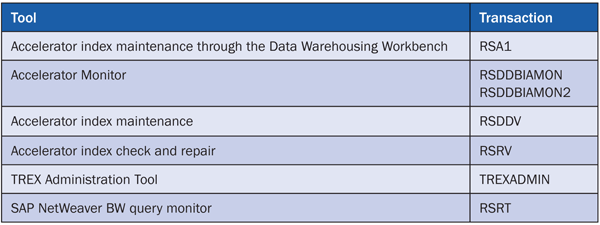
Table A
Main transactions
Additionally, you may also need functionalities that may not be part of the standard menu in the current accelerator’s release.
Table B provides a list of the main SAP programs that you may require for the administration and support of the accelerator.
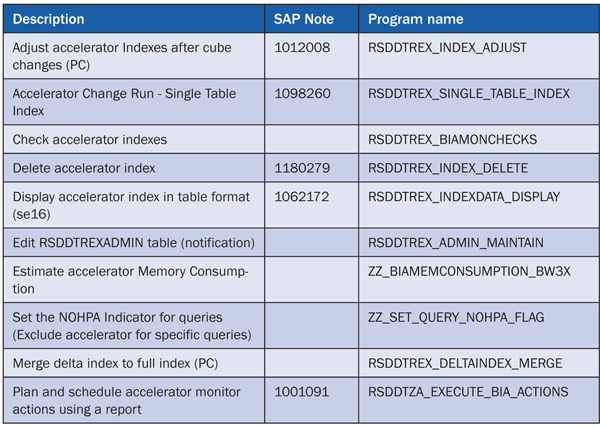
Table B
SAP programs

Vitaliy Rudnytskiy
Vitaliy Rudnytskiy is a senior SAP NetWeaver BW consultant with Hewlett-Packard Enterprise Services. He has more than nine years of experience in SAP and non-SAP data warehousing and business intelligence. His strategic focus is SAP NetWeaver BW enterprise architecture. During the last three years Vitaliy contributed to more than 25 installations of SAP NetWeaver BW Accelerator in USA, Canada, Mexico, Germany, and Singapore. Vitaliy presented at multiple conferences and he is the top contributor to the SAP NetWeaver BW Accelerator forum on the SAP Community Network (SCN). Vitaliy holds a degree in computer science from Wroclaw University of Technology, Poland. Vitaliy expresses his thanks to colleagues Jens Doerpmund, Hans Blok, and Sarah Plunkett for their review and feedback.
Vitaliy will be presenting at the upcoming SAPinsider HANA 2017 conference, June 14-16, 2017, in Amsterdam. For information on the event, click
here.
You may contact the author at vitaliy.rudnytskiy@hp.com.
If you have comments about this article or publication, or would like to submit an article idea, please contact the editor.

Catherine Roze
Catherine Roze is a senior BI consultant with more than seven years of full life cycle experience in SAP reporting and SAP NetWeaver BW with special focus on SAP NetWeaver BW enterprise reporting, performance optimization, and SAP NetWeaver BW Accelerator. A seasoned BI professional, she has contributed to more than 15 SAP NetWeaver BW implementation projects for Fortune 500 companies. Catherine holds an MBA and MS (industrial technology) and is the author of SAP BW Certification: A Business Information Warehouse Study Guide.
You may contact the author at cmroze@yahoo.com.
If you have comments about this article or publication, or would like to submit an article idea, please contact the editor.




 Premium