Learn how semiconductor industries are making use of batch derivation functionality to reduce time and effort spent on searching information through their supply chain. Examine a business scenario and use it as a guide for configuring SAP’s batch derivation.
Key Concept
Semiconductor manufacturing companies are moving from their traditional in-house manufacturing model to a fabless semiconductor model. A fabless semiconductor manufacturing model is based on outsourcing the semiconductor manufacturing processes to key vendors, while at the same time keeping research and design in-house. The design specifications are passed on to the business partners who do the manufacturing for a fabless semiconductor company. Then they transfer the semi-finished goods to the next business partner. The supply chain is managed by the fabless semiconductor company.
Batch derivation, also popularly known as batch inheritance, is a part of SAP’s Batch Management module and is integrated with SAP materials management (MM), quality management (QM), production planning/process integration (PP/PI), sales and distribution (SD), and Managerial Accounting (CO) modules. Batch derivation is used to transfer and copy batch master and characteristics values downstream in the supply chain.
Usually businesses decide to derive characteristics values which help them to make business decisions. Through batch derivation functionality they can get consolidated information at the finished goods level. This eases the data mining task for the user, who otherwise would have to search for the information throughout the supply chain. It also reduces the need to write complicated reports, which would search the database for information and add to the system load.
In this article, I will show how batch derivation works at the test/finished goods level and how you can copy batch characteristics values over into test/finished goods batch characteristics from a package assembly material’s batch characteristics. Finally, I will demonstrate how batch characteristics – fab code and foundry lot number – take part in batch derivation. Refer to the sidebar in this article to understand the data used to demonstrate the functionality.
Business Scenario
Before I begin my explanation, I need to give some background on batch derivation functionality with an example from the fabless semiconductor industry. Broadly, fables semiconductor manufacturing passes through the processes shown in Figure 1.
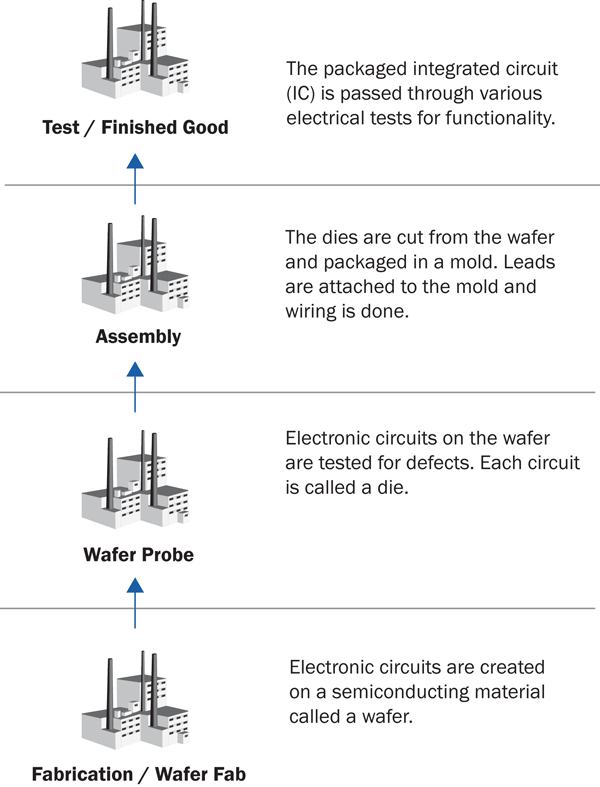
Figure 1
Supply chain overview for fabless semiconductor manufacturing process
The manufacturing process for the semiconductor industry begins with a wafer as the raw material produced by vendors known as foundries or fabrication houses (fab). Wafers are thin disks on which an integrated circuit (IC) pattern is engraved. A state-of-the-art semiconductor fab can produce wafers with 8-inch to 12-inch diameters. Each wafer yields a couple of hundred to thousands of integrated circuits.
The manufacturing process passes through the wafer probe, package assembly, and package test processes. Normally, these processes are performed at separate subcontracting vendor sites, but based on capacity and capability of the subcontracting vendor, they can be performed at one vendor’s manufacturing facility. In the context of this article, the fit-form-function of the product changes at each stage of manufacturing. Those changes are represented by a new material and batch number in an SAP system. The subcontracting vendor transmits manufacturing process information via EDI feed, which is stored as batch characteristics values in the SAP system.
From a finished goods perspective, companies make business decisions based on the information captured at wafer fab, wafer probe, and package assembly manufacturing levels. For example, a customer might want to buy a finished good based on the particular package-assembly site or fab site from which the raw material has been produced or fabricated. To cite another example from a quality control perspective – if the electrical tests at finished goods show a high failure rate, the business would want to trace the genealogy from wafer fab up to finished goods. Also, it would like to search the data sent by the fabrication vendor, which is stored in its system as batch characteristics.
Since these manufacturing process levels are represented by a separate material number and batch number, the information is captured and stored at each manufacturing stage as the SAP batch characteristics values. Because of this, the manufacturing information is dispersed along the supply chain. If this information is readily available at the finished goods level, then it eases the task of data mining from the lower levels of manufacturing and substantially reduces system load. This now brings me to the business requirement of transferring batch characteristics values from lower levels up to the finished good level.
Step-by-Step Guide Configuration for Batch Derivation
Now that you have a good understanding of the supply chain model for fables semiconductor manufacturing process and batch derivatives, I will walk you through the configuration and master data steps required for batch derivation. I will also demonstrate an example of batch derivation with shop floor control of production orders.
Overall, there are five steps to the process in this section:
Step 1. Activate batch derivation in SAP ERP Central Component (ECC) configuration
Step 2. Activate the batch Where-Used List (BaWU) synchronous posting indicator
Step 3. Assign search procedures to derivation events
Step 4. Define the receiver search strategy for receiver condition type (BDR1)
Step 5. Define the sender search strategy for sender condition BDS1
Step 1. Activate batch derivation in SAP ECC configuration. Access the configuration through transaction code DVSP or by following menu path SPRO > Logistics-General > Batch Management > Derivation of Batch Data > Activate Batch Derivation. By default, the system sets batch derivation as Derivation Not Active. To activate it, simply select the Derivation Active radio button (Figure 2).

Figure 2
Configuration to turn on batch derivation
Step 2. Activate the Batch Where-Used List (BaWU) synchronous posting indicator. Access the configuration through menu path SPRO > Logistics-General > Batch Management > Batch Where-Used List > Make settings for Batch Where-Used List. The purpose of the BaWU List is to record the goods movement transactions posted against a batch. Your SAP ECC system comes preconfigured with the BaWU List activated for all the plants.
In this configuration, you need to decide whether you want to build the BaWU file synchronously (indicated by BaWU synchronous posting title) along with the posting of the goods movement transactions. Building this file synchronously with goods movement puts an additional load on the system, and you have to weigh whether your system can take this additional load. Also, as this setting is at the plant level, you have to check the box for the plants in your organization for which you want synchronous postings.
If you choose not to build the BaWU file synchronously, you can compile the file at a later point in time. You can do so through transaction code MB57 (Compile BaWU file). This transaction can be executed manually in the foreground mode, or you can schedule this transaction in the background. As shown in Figure 3, you can deactivate the BaWU List generation for a Plant. Under most business circumstances, you may not need to deactivate BaWU List generation. I’m just showing that this functionality is available in the system.
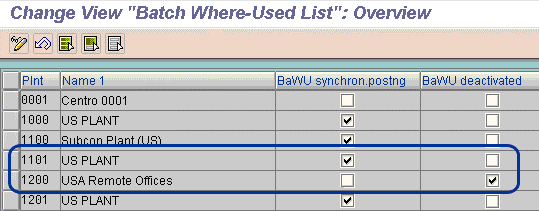
Figure 3
Configuration for BaWU file generation
Step 3. Assign search procedures to derivation events. Access the configuration through transaction code DVC8 or by following menu path SPRO > Logistics-General > Batch Management > Derivation of batch data > Define derivation events. Derivation Events are used to define the trigger points for batch derivation. Whenever a predefined event occurs, the system initiates the batch derivation search procedures. The result of batch derivation is that the system sends a copy of the sender batch characteristics values to the receiver batch characteristics values.
Let me explain this concept with an example. Suppose you have decided to manage your shop floor business processes through production orders. A production order passes through various system statuses such as Created (CRTD), when a production order is created, or Released (REL), when a production order is released to start a job on the shop floor. One of the pre-defined events available in configuration for batch derivation is Release (REL) of production order. When you set the production order to status Released, the system triggers batch derivation search procedures in the background. The result copies the batch characteristics values from the component batch to the receiving batch.
I’m sure you’re wondering at this point; what is a batch search procedure? A batch search procedure is used to search for characteristics values for receiving and sender batches. It makes use of the conditions technique functionality in SAP. The condition technique is used at various other places, for example, to define pricing in SD, account determination, or output control. Condition technique determines the sequence of events which result in identifying the valid business data maintained for a transaction.
In the context of this article, I make use of Standard Batch Search Procedures defined in SAP ECC. These procedures are:
- BDR001 – Receiving Batch Search Procedure
- BRS001 – Sender Batch Search Procedure
Figure 4 shows how the assignment of search procedures to derivation events is configured. Select a derivation event under the Time column. Select the Receiving and Sending Search Procedures for your configuration. In the Type column, define whether the derivation has to be Static (copy and save batch characteristics in the receiver batch) or Dynamic (batch characteristics are not saved in the receiver batch; they are only displayed). In the Window column, configure if you want to see a pop-up window after batch derivation. You can also choose to see the pop-up window in case you encounter errors.
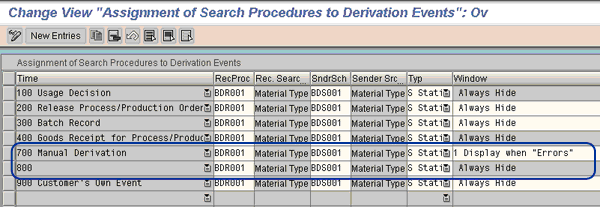
Figure 4
Configuration to tie a search procedure with a derivation event
BRD001 and BDS001 are search procedures that make use of BDR1 and BDS1 as the search conditions, respectively. The search conditions help to identify valid records, which can take part in batch derivation. In this example, the search procedures are defined for the Material Type of the receiver and sender material. All batches that are created for material of Material Type ZASM can take part as the sender material. Similarly, all batches created for material of Material Type ZTST can take part as the receiver material. Later in this article, I will show you how to maintain the condition tables.
Step 4. Define the Receiver Search Strategy for Receiver Condition Type (BDR1). You can access this master data maintenance through transaction code DVR1 or by following menu path SAP Menu > Logistics > Central Functions > Batch Management > Batch Derivation > Recipient Condition records > Create – DVR1. This step defines:
- Search strategy for receiver condition type BDR1
- Create a condition record for material type – ZTST (receiver material)
- Add batch characteristics for the condition record
- Define rules of batch derivation for each batch characteristics
This is a very important master data maintenance step. In this step, you have to maintain the material type and batch characteristics for which you want to derive characteristics values from the component. Select your strategy as BDR1 (Figure 5).
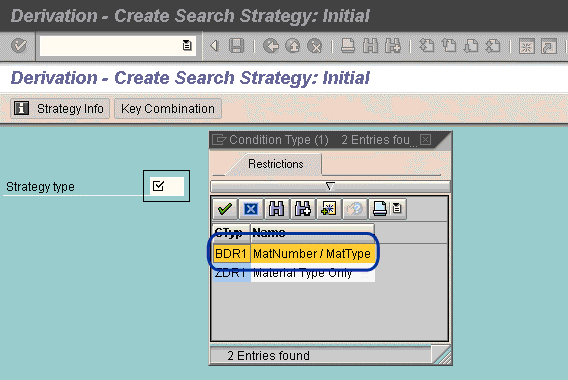
Figure 5
Maintain a search strategy for the receiver batch
In the next screen (Figure 6), enter material type ZTST in the RecMatType column and click the details icon.
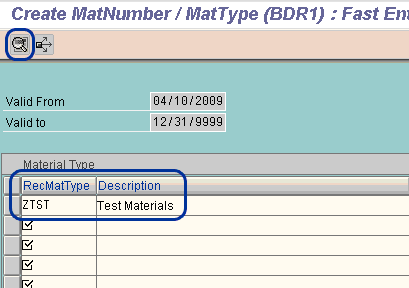
Figure 6
Condition record for receiver material type
In the Details screen, (Figure 7) enter your batch characteristics. Make sure that you enter only those batch characteristics that you want to take part in derivation. I will focus on the following batch characteristics for derivation:
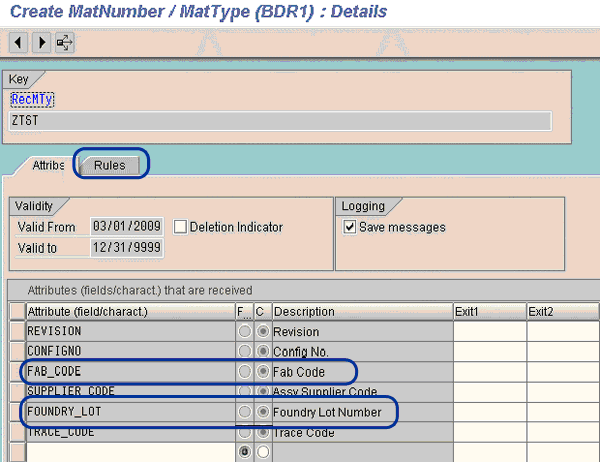
Figure 7
Receiver batch characteristics for derivation.
Fields Exit1 and Exit2 (shown in Figure 7) have been provided as placeholders for customer-specific logic. In case you want to enhance the system capabilities to meet your unique requirement, you can write a custom code to validate or inherit values as per your business need. Select your batch characteristics and click the Rules tab (Figure 8).
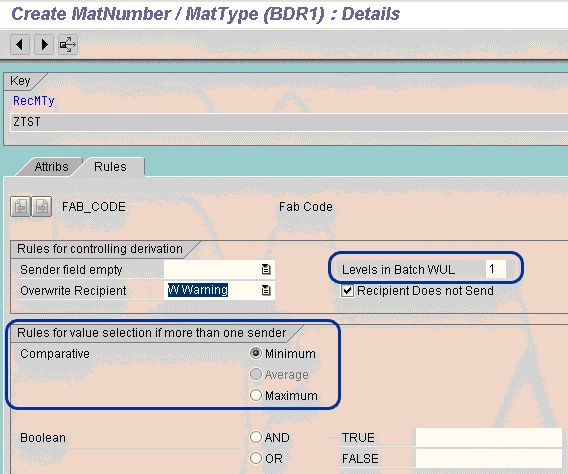
Figure 8
Rules of derivation for each batch characteristics
The following is one of the critical master data maintenances for batch derivation. In this section, you apply the business rules for batch derivation.
For the Rules for controlling derivation section in Figure 8:
- Sender field empty/Overwrite Recipient fields. If the batch characteristics value for the sender batch is empty or if the receiver batch already has a value, then define whether the system should overwrite the derived value, give a warning, or send an error message.
- Levels in Batch WUL field represents the level up to which system should search for batch characteristics value in the BaWU list
To explain the Rules for value selection if there is more than one sender, let me give you an example. Suppose you work in a chemical industry where the finished product is made by mixing two or more components. Temperature is one of the critical attributes for each component, and you are storing this value in the batch attributes of each component. Your business rule is to store the minimum of the two values for the finished product. At the time of batch derivation, the system does a comparative check of the temperature values and it selects the minimum temperature value for inheritance.
- Comparative: Batch characteristics values are compared and a minimum, maximum, or average of values is derived
- Boolean: Logical operand AND/OR can be used to derive values
Step 5. Define the Sender Search Strategy for Sender Condition BDS1. You can access this master data maintenance through transaction code DVS1 or by following menu path SAP Menu > Logistics > Central Functions > Batch Management > Batch Derivation > Sender Condition records > Create – DVS1. In this step, you:
- Define the search strategy for sender condition type BDS1
- Create a condition record for material type – ZASM (Sender Material)
- Add batch characteristics for the condition record.
Select your strategy as BDS1 (Figure 9).
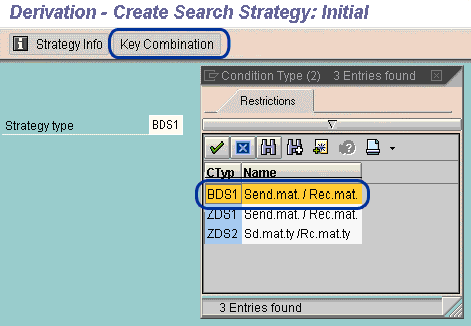
Figure 9
Search strategy for sender batch
Figure 10 shows the input material type as ZASM (which is the material type used in this example). What material type you use depends on your process. Click the details icon.
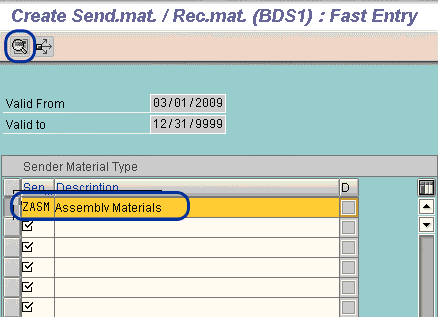
Figure 10
Condition record for material type
In the Details screen (Figure 11), enter the batch characteristics that should take part in derivation. Make sure you have the same batch characteristics in the receiver and sender batch search strategy (refer to Figure 7).
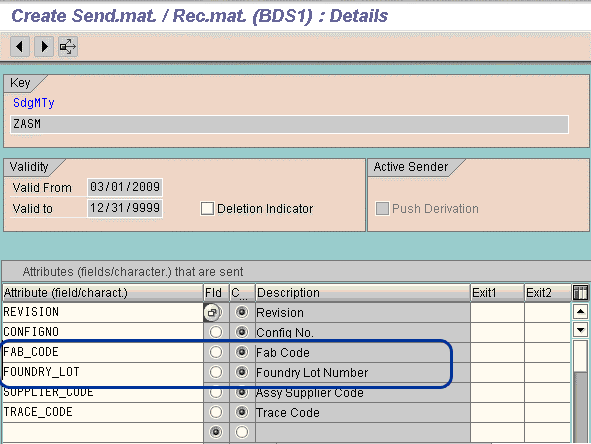
Figure 11
Sender batch characteristics for derivation
How Batch Derivation Works in Execution
You set up the configuration and master data for batch derivation in the previous section. In this section, you learn how to run batch derivation and understand how the functionality is executed at the time of release of a production order.
Broadly, this happens in five steps:
Step 1. Create a production order for material number – TEST_MATERIAL
Step 2. Input sender and receiver batch number in the production order
Step 3. Check the characteristics values for the sender batch
Step 4. Release the production order
Step 5. View the derived characteristics values for the receiver batch
Step 1. Create a production order for material number - TEST_MATERIAL. You can access this through menu path SAP Menu > Logistics > Production > Shop Floor Control > Order > Create > Create with Material – CO01, or through transaction code CO01. Create a production order for the material number TEST_MATERIAL. Go to the Goods receipt tab and put in the receiving batch. In this example, the receiving batch number is 100653.1 (Figure 12).
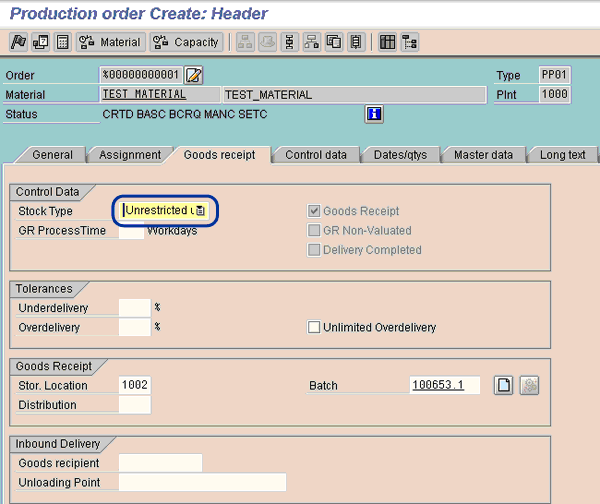
Figure 12
Header view of the production order
Step 2. Input sender and receiver batch number in the production order. In this step you need to input the component batch number in the screen shown in Figure 13. Click the Component Overview icon to access this screen (here shown in component view, so it appears grayed out). Input the batch number in the batch field. This batch is considered a sender batch for batch characteristics values derivation. In this example the batch number is 100653.1 (the two batch numbers are the same).
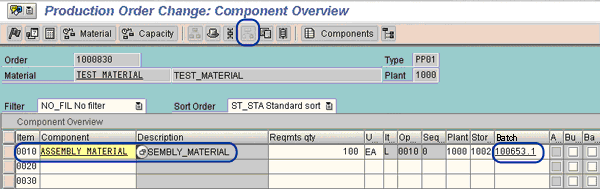
Figure 13
Component view of the production order to enter the component batch number
Step 3. Check the characteristics values for the sender batch. You can view batch characteristics values through transaction code MSC3N. The Sender Material and Batch have batch characteristics values populated before the release of the production order triggers the batch derivation (Figure 14).

Figure 14
Sender batch characteristics values
Step 4. Release the production order. Do this by clicking the Release icon (Figure 15). This triggers the batch derivation in the background and transfers batch characteristics values from the component batch to the receiver batch.
Note how the derivation icon (Figure 15) changes from passive to active by turning gray. This icon can be used to manually re-trigger batch derivation. After the first derivation you can change the component batch characteristics and update the inherited values of the receiver batch. This is useful for manually triggering the batch inheritance, particularly if the characteristics value of the component is changed and the user wants to re-inherit the characteristics values.
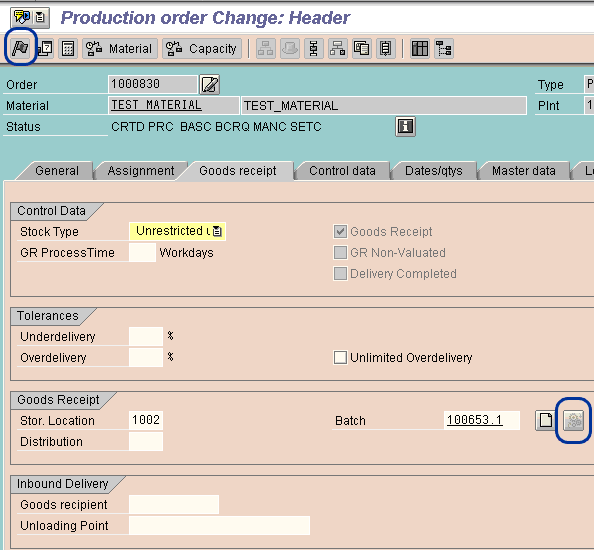
Figure 15
Production order release
Step 5. View the receiver batch characteristics for the batch derivation. You can view batch characteristics values through transaction code MSC3N. As shown in Figure 16, the characteristics values from the sender batch are copied over into the receiver batch.
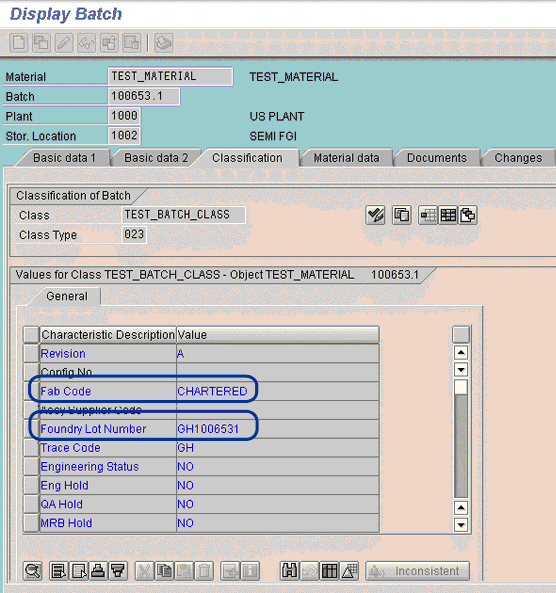
Figure 16
Receiver batch characteristics values after derivation
Understanding the Data Used
The test/finished goods level is represented by material number TEST_MATERIAL, and batch number 100653.1. The package assembly level is represented by material number ASSEMBLY_MATERIAL, and batch number 100653.1. (Refer to Table A for more information on the master data used to demonstrate batch derivation functionality.) Since the test/finished goods level receives the batch characteristics values, the master data is termed as a receiver. Similarly, the package assembly level is the sender of the batch characteristics values, and its master data is the sender.
For those of you who are new to the concept of batch management, batch characteristics is a way to store specifications/attributes for a batch. For example, if you want to store the actual temperature in the manufacturing process, you can create a batch characteristic called TEMPERAURE, and store the actual value in it. Each batch number has a list of batch characteristics assigned to it. Batch characteristics values for a batch number are part of its specifications/attributes.
A brief business explanation of batch characteristics:
- Fab code represents the wafer manufacturing vendor’s internal factory identifier. In the SAP system, this is represented by a batch characteristic FAB CODE.
- Foundry lot number represents the internal batch number at the wafer manufacturing site. In the SAP system, this is represented by batch characteristics FOUNDRY LOT.
Key terms used in batch derivation functionality are:
- Sender and Receiver batch. As the name suggests, the sender batch is the component batch from which batch characteristics values are inherited. The receiver batch is, at the higher level, where characteristics values are passed.
- Push and pull derivation. Pull derivation is triggered from the transaction that affects the product. There may be various senders of the data, but there is only one receiver. With push derivation, there is only one sender and multiple receivers. In this article, I concentrate on the pull derivation principle.
|
Material number
|
TEST_MATERIAL
|
ASSEMBLY_MATERIAL
|
|
Material type
|
ZTST
|
ZASM
|
|
Derivation characteristics 1
|
FAB_CODE
|
FAB_CODE
|
|
Derivation characteristics 2
|
FOUNDRY_LOT
|
FOUNDRY_LOT
|
|
Batch number
|
100653.1
|
100653.1
|
|
| Table A Master data used to demonstrate batch derivation |
Siddhartha Mathur
Siddhartha Mathur is a senior consultant in a supply chain management practice with a focus in the manufacturing vertical. His consulting experience spans more than five years, and he also has more than two years of domain experience. He has comprehensive industry expertise and consulting experience in the hi-tech and automotive industries. Siddhartha holds a master’s degree in business administration majoring in operations and systems. He has an engineering background at the undergraduate level. He has been awarded certifications by APICS in Certified Supply Chain professional (CSCP) and Certified Production and Inventory Management (CPIM).
You may contact the author at smathur76@yahoo.com.
If you have comments about this article or publication, or would like to submit an article idea, please contact the editor.