To keep your SCM operations running smoothly, learn how to avoid and correct these 11 common unit-of-measure errors that can bring them to a standstill.
Key Concept
The crucial role of units of measure (UoMs) in SAP is to give context to quantities. A key activity of an SAP system is maintaining clear communication with external business partners (e.g., sending a purchase order to a vendor for raw materials or sending an invoice to a customer). You can accomplish this communication in a number of ways, such as paper invoice, EDI purchase order, or XML delivery confirmation. Quantity is one of the most important aspects of that communication: You need to be sure that an order for five cases of a material is not interpreted as five pieces or five pallets.
As you roll out your SAP system across
multiple companies and countries, however,
needs like conversion from metric to
US/British Imperial measure arise that
necessitate a more detailed analysis
of the UoM configuration. Lack of attention
to the conversion factor for a UoM or
other local settings can, at least, irritate
or confuse users. At worst, miscalculated
documents can be sent to customers or
foreign customs officials, resulting
in blocked shipments or expensive disputes.
Another major area of concern is the
conversion of quantities from one UoM
to another and the problems unfavorable
rounding differences can cause. This
happens most often with conversion between
two US or British Imperial UoMs (e.g.,
pounds to ounces). In extreme cases,
this type of rounding error can bring
your warehouse operations to a halt.
What follows are the 11 most common
pitfalls to watch out for when you are
working with UoMs and quantity fields.
I’ll also give you details to help
you fix and avoid the problems.
1. Incorrect Selection
of Base UoM for a Material
Consider a company that produces fiber
optic cable and chooses kilometer (KM)
as the base UoM. In SAP all quantity
fields are maintained internally to three
decimal places, so the smallest quantity
of fiber optic cable that can be delivered
to a customer is 0.001 KM, which is 1
meter (M). So what happens when a customer
wants 10 centimeters (CM) of fiber optic
cable? This would be 0.0001 KM, which
cannot be represented in SAP if KM is
chosen as the base unit.
The base UoM defined in the material
master is the UoM, in which the material
is managed by SAP (Figure 1).
The SAP system converts all the quantities
you enter in other UoMs (e.g., alternative
UoMs) to the base UoM. In older versions
of SAP, this field was referred to as
the stock-keeping unit (SKU). For Inventory
Management (MM-IM), the base UoM is the
same as the SKU.
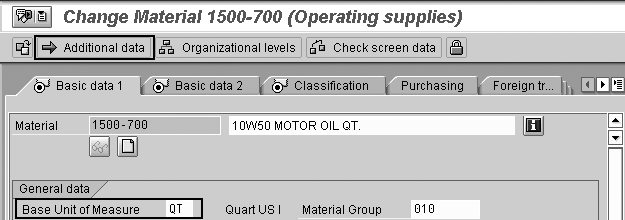
Figure 1
Base UoM is defined in the material master. Use the Additional data button to enter alternate UoMs.
Careful selection of the base UoM helps
minimize rounding errors in stock quantities.
For dimensionless UoMs, choose the smallest
UoM, such as each (EA), instead of the
larger case (CSE). For other UoMs, choose
a base unit carefully. The actual choice
depends on the nature of the material.
If your base UoM is too small, then large
quantities of the material cause an overflow
in the quantity fields. If the base UoM
is too large, accuracy is lost, since
all quantities are stored at a maximum
of three-decimal-point accuracy. For
example, for length it is often safer
to choose M over millimeters (MM) or
KM. See SAP note 362932 for more information
about rounding with UoMs. Once business
transactions have started using the material
the base UoM cannot be changed in most
cases, as explained in SAP note 138767.
The wrong base UoM can also result
in problems with batch splits in deliveries.
For example, say the UoM in the sales
order is different from the base UoM
in the material master and the conversion
factor cannot be described accurately
using three decimal places (e.g., 1 pack
[PK] = 7 EA). In some situations, the
total of the delivery batches does not
add up exactly to the sales order amount.
This results in the sales order not being
marked as fully delivered. See SAP notes
107219, 135821, and 139966 for more details.
2. Failure to Configure
Alternate UoMs for a Material
Converting quantities in one UoM to
another UoM and adding up total quantities
in multiple UoMs are frequently required
for logistics activities. For standard
SAP conversions, all UoMs must belong
to the same dimensions for regular conversion
(e.g., length is converted from inches
to M but length in inches is not converted
to weight in kilograms).
Alternate UoMs used as conversion factors
cannot be set up centrally for dimensionless
UoMs or between UoMs of different dimensions.
You can configure this on a material-by-material
basis only using the alternate UoM functionality.
For more details, see SAP note 523496.
Rounding errors in Warehouse Management
(WM) can result in blocked shipping,
as small variances between picking and
goods issue amounts prevent goods issues
from being posted. Consider the following
example: An item has base UoM EA and
alternate UoM PK, where 1 PK = 7 EA.
This becomes 1 EA = 0.143 PK. Since accuracy
for quantities goes only to three decimal
places, when this is multiplied by 7
it results in 7 EA = 1.001 PK in WM.
This is different from the 1.00 PK expected
in MM-IM goods issue. The reason for
this error is the chained conversion Alternate
UoM>Base UoM>Alternate UoM,
which results in rounding differences.
Prior to SAP R/3 Release 2.1, this
was a major problem. SAP changed WM functionality
to store quantities internally in the
entered UoM and not to automatically
convert to the base UoM. If you make
any manual quantity entries in the WM
transaction screens, however, even overwriting
a quantity with the same number, a conversion
takes place. The system behavior of quantity
conversion only upon request is implemented
in the entire transfer order processing,
so you can avoid superfluous quantity
conversions. See SAP note 5555 for more
details.
A follow-on problem encountered in
WM is almost-empty storage bins, when
0.001 of a material is left in the bin
due to rounding errors. This results
in the bin not being released for reuse.
You can correct this by making a physical
inventory adjustment or, in more serious
cases, applying SAP notes. See SAP notes
125636 and 162816 for more details.
Click on the Additional data button,
shown in Figure 1, to enter or display
alternate UoMs, in transaction MM01, MM02,
or MM03 (Figure 2).
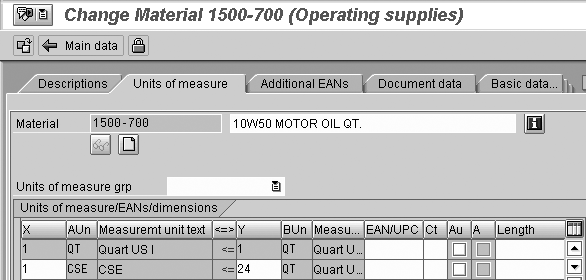
Figure 2
For an individual material, you can configure alternate UoMs to allow conversion between any types of UoMs
Alternate UoMs are commonly used at
order entry when purchasing or selling
materials. You can define UoMs other
than the base UoM in the material master
specifically for sales, purchasing, and
production, as shown in Table 1.
In the case of a base UoM with dimension,
you can use any UoM with the same dimension.
For example, you can order a material
with base UoM of M in KM or CM without
defining alternate UoMs.
| Material master field |
Description |
View |
Purpose |
| MARA-MEINS |
Base UoM |
Basic data |
UoM in which stocks of the material
are managed. SAP converts all the
quantities you enter in alternative
UoMs to the base UoM. This is the
stock-keeping UoM. |
| MARA-BRGEW |
Gross weight |
Basic data |
Gross weight of material for 1
base UoM |
| MARA-NTGEW |
Net weight |
Basic data |
Net weight of material for 1 base
UoM |
| MARA-GEWEI |
Weight unit |
Basic data |
UoM for net weight
and gross weight of material |
| MARA-VOLUM |
Volume |
Basic data |
Volume of material for 1 base UoM |
| MARA-VOLEH |
Volume unit |
Basic data |
UoM for volume of material |
| MARM-UMREZ |
Numerator for Alternative UoM Conversion
Factor |
Additional data>UoMs |
Numerator of the fraction that
specifies the ratio of the alternative
UoM to the base unit of measure.
Numerator is the number on the top
of the fraction. |
| MARM-UMREN |
Denominator for alternative UoM
conversion factor |
Additional data>UoMs |
Denominator of the fraction that
specifies the ratio of the alternative
UoM to the base UoM. Denominator
is the number on the bottom of the
fraction. |
| MARM-MEINH |
Alternative unit |
Additional data>UoMs |
Alternative UoM |
| MVKE-VRKME |
Sales unit |
Sales org 1 |
UoM used for selling the material.
Only make an entry if it is different
to the base UoM. |
| MVKE-MEGRU |
UoM group |
Sales org 1 |
Key used for grouping several UoMs |
| MARA-BSTME |
Order unit |
Purchasing |
UoM used for purchasing the material.
Only make an entry if it is different
to the base UoM. |
| MARC-FRTME |
Production unit |
Work scheduling |
When you create a production order
for a material, and a production
unit has been entered in both the
material master record and in the
routing, the system checks whether
the quantity entered in the production
order falls within the lot size range
in the routing. Only make an entry
if it is different to the base UoM. |
| MARC-AUSME |
Unit of issue |
Plant data/ stor. 1 |
UoM in which the material is issued
from the warehouse. Only make an
entry if it is different from the
base UoM. |
| MARC-LOSGR |
Costing lot size |
Costing 1 |
Basis for costing material. The
costing results are converted to
the costing lot size of the material
costed (e.g., the finished product)
to calculate the material costs for
the finished product. |
| Table
1 |
UoM-related
material master fields |
One advantage alternate UoMs have for
defining central conversion factors is
that they allow material-specific translation.
In the example of the motor oil in Figure
2, 1 case = 24 quarts, but for orange
juice you may want 1 case = 12 quarts.
One disadvantage is that the conversion
factor needs to be set up material-by-material,
which can be time-consuming and can easily
result in errors given the number of
material master records most SAP installations
have.
If you are defining a common alternate
UoM relationship for many materials,
you can use Define Units of Measure
Groups in the IMG, SAP Customizing>Logistics
- General>Material master>Setting
for key fields>Define units of measure
groups to set up the relationship
once for use in many material master
records.
3. Overlooking Costing
Lot Size
When configuring materials for production
processes and the associated product
costing, the Costing Lot Size field
(Figure 3) is often overlooked.
On a bill of material (BOM), you might
have fractions of a UoM you normally
only see as whole units (e.g., pallets
[PAL]). Rounding issues related to this
UoM can result in incorrect costing.
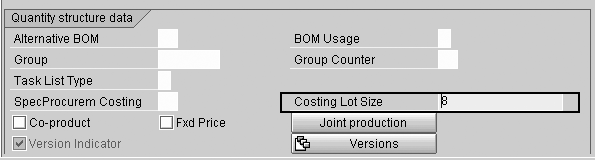
Figure 3
Costing Lot Size in the Costing 1 view of the material
Consider the following example. You
have a BOM for producing 1 EA in a box
(i.e., lamps in boxes). Usually eight
lamps go on one pallet, so you add 0.125
PAL per 1 EA lamps. For planning purposes
you can use fractions of PAL. When posting,
the number is rounded up to the next
PAL. When you produce one lamp, the production/process
order contains 1 PAL instead of 0.125
PAL. When costing such a BOM, make sure
you use the Costing Lot Size on
the material master Costing 1 view, since
costing also rounds up fractions of PAL.
If a lamp is USD 5 and the pallet is
USD 20, one lamp on one pallet would
cost USD 25, whereas if you have a costing
lot size of eight or a multiple thereof,
a lamp would cost (8*USD 5 + USD 20)/8
= USD 7.50.
4. Incorrect Conversion
Factors
Consider the following situation: A
customer orders five miles of fiber optic
cable. The quantity is entered as five
miles, which is the sales UoM, in the
sales order. However, at delivery you
find it has been converted to five meters,
the base UoM. This is due to errors in
the conversion factors. To prevent this,
make sure you review the SAP standard
conversion factors. In the R/3 4.7 IDES
system used in these images, for example,
the US mile was configured incorrectly
to be equal to one meter. For a list
of key tables used by SAP for UoM configuration,
see Table 2
| Table Name |
Short text |
| T006 |
Units of Measurement |
| T006A |
Assign Internal
to Language-Dependent Unit |
| T006B |
Assignment of commercial to internal
unit of measurement |
| T006C |
Assignment of
external technical to internal unit
of measure |
| T006D |
Dimensions |
| T006D_OIB |
Add-On for Dimensions |
| T006I |
ISO codes for units of measurement |
| T006J |
ISO Codes for
Unit of Measure Texts |
| T006M |
Units of Measure Groups |
| T006T |
Dimension Texts |
| T006_OIB |
Units of Measurement, Additional
Definitions |
| Table
2 |
List
of key UoM configuration tables |
Conversion Factors
A key factor in dimension configuration
is the definition of the UoM known as
the System Internationale (SI) UoM, for
each dimension. This is the basic unit
employed in all conversions between different
UoMs with the same dimension (Figure
4). The SI setting is made by SAP
and cannot be changed. Do not delete
the SI UoM for a dimension under any
circumstances, as conversion between
UoMs with that dimension will be impossible.

Figure 4
For the dimension length M (meter) is defined as the SI unit in transaction CUNI
In transaction CUNI (IMG path SAP
Customizing>General Settings>Check
units of measure), you can define
the conversion factor between the UoM
and the SI UoM. In the case of metric
measures, these are simple multiples
of 10, which do not introduce any complications.
Conversion Testing
To test UoM conversions when displaying
the UoM in transaction CUNI, use
the convert icon in the toolbar, and
enter the conversion you want to test
in the popup (Figure 5). If you
do not have access to transaction CUNI,
use ABAP RSBZME10 instead to test
conversions. The test popup can give
the misleading impression quantities
can be calculated to 15 DPs — in
actuality, quantity values are stored
with three DPs.
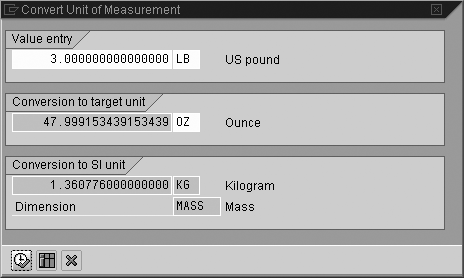
Figure 5
Example of rounding error: conversion should be 3 pounds = 48 ounces, using transaction CUNI
In an SAP system with several different
SAP instances, the conversion settings
must be the same for all UoMs used across
all SAP instances. This is of particular
relevance when using New Dimension products
like APO and SRM, which reside on their
own server but communicate with the main
R/3 system. Refer to SAP notes 492979
and 595742.
5. Rounding Errors
During Conversion of US/Imperial UoMs
When working with metric measures,
conversion factors are usually very simple
(e.g., 1 KM = 1000 M, 1 L = 1000 ML)
with no concerns about rounding. With
US/Imperial UoMs, however, the relationships
are not as straightforward and errors
can result.
As the conversion factors between US/Imperial
and metric UoMs are usually approximate
fractions, rounding differences nearly
always occur when you move between the
two systems and are even worse when converting
between two US/Imperial UoMs (e.g., pounds
to ounces). The system often converts
them via an intermediate conversion to
the metric/SI UoM (Figure 6),
adding rounding errors to what should
be an exact conversion (Figures 5 and
6).

Figure 6
Example of rounding error: conversion should be 3 pounds = 48 ounces, using ABAP RSBZME10
To add to the confusion, not all US/Imperial
UoMs are the same. For example, a US
gallon is 3.785 liters, while a UK gallon
is 4.545 liters.
If conversion factors are maintained
centrally in customized UoMs, the conversion
is always relative to the respective
SI unit. If the US/Imperial UoM in question
has a small size relative to the main
UoM (e.g., 1 inch = 0.0254 meters), it
can be difficult to maintain the conversion
factors accurately in the configuration.
One solution proposed by SAP is to
define all non-metric UoMs as dimensionless.
This allows you to define the conversion
factors with maximum accuracy in the
material master. The disadvantage is
that you have to make sure organizationally
that all materials with the same UoMs
use the same conversion factors in the
material master. Also, any combinations
you have forgotten to define cannot be
converted. This solution helps primarily
with conversion from one US/Imperial
measure to another and not with conversion
to metric units. See SAP notes 20307,
23771, and 362932 for more information.
6. UoM with Incorrect
Dimension
UoM configuration is done via transaction CUNI.
The initial screen of the CUNI transaction
lets you configure dimensions, International
Organization for Standardization (ISO)
UoM codes, and SAP UoM codes. Select
the dimension and click the Units
of measurement button to see the
overview screen in (Figure 7).
When creating a new UoM, you must choose
a dimension to which it belongs (Figure
8).
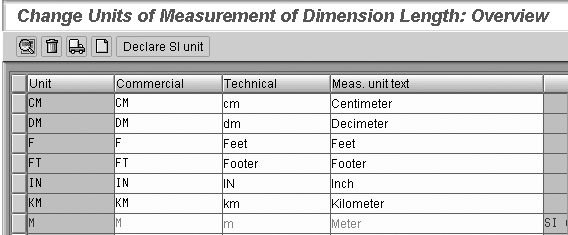
Figure 7
UoM display for dimension Length
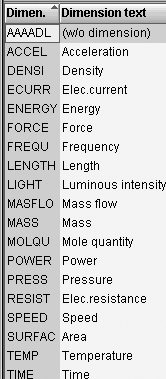
Figure 8
Sample set of dimensions in an SAP system; the specific list depends on your SAP release
A dimension is a set of categories
that group together similar UoMs and
assist in quantity conversions. There
are seven base dimensions, to which all
other dimensions can be traced back:
length, weight, time, electrical current,
temperature, molecular mass, and brightness.
Quantity conversions can only occur between
UoMs with the same dimension. Figure
8 shows a sample list of dimensions in
SAP. Using alternate UoMs (see section
2), you can define cross-dimension conversions
on a material-by-material basis.
Tip!
When using CUNI select the dimension first, before clicking on the Units of measurement button.
I often see UoMs created with the default
setting (no dimensions) when the UoM
clearly belongs to a defined dimension.
For UoMs with no dimension, common UoM
conversions (e.g., gallons to liters)
cannot be performed using central configuration,
but need to be defined on a material-by-material
basis. This can lead to a large overhead
for maintaining material master records.
It also results in error messages such
as V1 297 Quantity could not be converted
from GA to L.
The reason this occurs is that users
do not understand what a dimension is
and accept the default value (no dimensions).
For example, assigning the UoM GL for
gallon to (no dimensions) is incorrect,
because GL has the dimension of volume.
As previously discussed, there is a
scenario in which you may choose to deliberately
configure US/Imperial UoMs as (no
dimension). Be sure to make this
decision actively.
If a UoM has been configured with an
incorrect dimension, you can delete the
UoM configuration and recreate it with
the correct dimension. Be careful when
doing this, as there is no validation
on existing use of the UoM. Recreate
the UoM as quickly as possible after
deleting it, or you may have materials
with an invalid base UoM that cannot
be processed. Use report ZRBZMEFIND in
SAP note 637003 to search for UoM use
prior to deleting or changing a UoM.
When you do change a UoM dimension, you
must test that the change does not cause
any problems with logistics and manufacturing
transactions.
7. Use of US ANSI UoM
Codes Instead of ISO UoM Codes
When communicating electronically with
external parties (e.g., vendors and customers)
through electronic data interchange (EDI)
and other means, a global standard for
UoMs must be used so that all systems
interpret the UoM code consistently.
This is the function of the ISO codes.
The ISO UoM code is assigned to the SAP
UoM code via transaction CUNI (Figure
9).
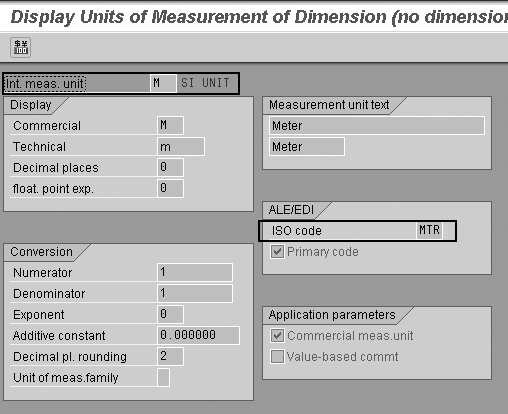
Figure 9
UoM configuration details for Meter (M)
Many modules in SAP are designed to
work with external data files using ISO
UoMs. With Supplier Relationship Management
- Catalog Content Management (SRM-CCM),
for example, you must upload an XML or
CSV format file for the SRM-CCM catalog.
In this file, the UoM field needs to
be the ISO UoM code. To ensure the upload
works correctly, you must check the following:
your input file uses ISO UoM, in transaction CUNI the
ISO code exists, the ISO code is assigned
to an SAP UoM code, and the ISO primary
code check box is set correctly. A user
logging on to the SRM system sees the
SAP UoM code displayed.
One problem area is that in the US,
the American National Standards Institute
(ANSI) UoM codes are used for EDI and
other electronic communication. The ANSI
codes don’t always match the ISO
codes (e.g., ANSI GA vs. ISO GAL for
gallon). In some cases, you may find
the ISO code field is actually populated
with the ANSI code. If you use multiple
EDI systems or standards and one calls
for the ANSI code and the other for the
ISO code, this can lead to mis-conversion
of UoM codes.
You have several methods to get around
this:
- Change the ISO field to contain
the ANSI UoM.
- Create a second SAP UoM with the
ANSI UoM in the ISO field.
- Have a custom translation table
to convert the ANSI UoM to the ISO
UoM prior to selection of the SAP UoM.
- Add a UoM translation table to any
EDI middleware you may use.
The SAP R/3 and ECC systems determine
which SAP-internal UoM is to be converted
into which ISO code. One ISO code can
be assigned to several SAP units for
outbound messages. For inbound messages,
you must also determine which ISO code
is to be converted into which SAP unit.
Use the check box Primary code for
this. A common example is the ISO code
PCE for piece, which corresponds with
SAP codes AU (activity unit), PER (persons)
and PC (pieces). The SAP code PC is chosen
as the primary code for translation of
inbound EDI messages (Table 3).
See www.unece.org/etrades/codesindex.htm for
more information on ISO UoM codes.
| SAP UoM code |
ISO UoM code |
Primary UoM |
| AU |
PCE |
|
| PER |
PCE |
|
| PC |
PCE |
X |
| Table
3 |
Example
of use of Primary UoM checkbox |
8. Incorrrect
Number of Decimal Places
When calculating quantities or displaying
quantities on documents such as a commercial
invoice, you may be under a legal or
contractual obligation to calculate or
display the quantities using a specific
number of decimal places. It is also
common practice in certain industries
to use a specific number of decimal places.
If you fail to configure UoMs to yield
the correct amount of decimal places,
at the very least, your output might
look a little odd. At worst, a foreign
customs official may hold up your shipment.
To be sure you get the correct output
format for quantity fields:
- Configure the DPs for the UoM correctly
in transaction CUNI.
- Make sure the quantity field has
a related UoM reference field.
- Make sure the output ABAP or SAPscript
makes use of the reference UoM field
for the quantity.
All quantity data in SAP is stored
internally as numbers with three decimal
places regardless of the number of decimal
places when displayed (Table 4).
If no UoM reference is supplied, SAP
uses the default of three decimal places
for display. However, the majority of
UoMs are configured for display with
no decimals.
| UoM |
Description |
Decimal places |
SAP value display with
UoM reference |
SAP value display with
no UoM reference/internal storage |
| EA |
Each |
0 |
3 |
3.000 |
| HR |
Hours |
1 |
4.7 |
4.700 |
| % |
Percentage |
2 |
1.02 |
1.020 |
| ML |
Milliliter |
3 |
1.256 |
1.256 |
| Table 4 |
Comparison of SAP quantity
display and SAP internal storage
depending on defined number of decimal
places |
In UoM configuration, there are two
fields for the decimal places with distinct
purposes. Both are configured via transaction CUNI,
as you saw in Figure 9.
The display decimal places field is
used for controlling the number of decimal
places for screen and list output of
related quantities. EA, for example,
is usually shown with no decimal places,
while milliliters (ML) is usually
output with three decimal places.
The decimal place rounding field is
used to determine the level of accuracy
for internal calculations using the UoM
(e.g., internal rounding during the creation
of a production order). However, the
rounding decimal place is not considered
by every transaction, so SAP recommends
that you set the rounding decimal places
of UoMs to three (like the number of
the decimal places of the quantity fields),
especially when you are using metric
and non-metric units of measure simultaneously,
which is the case where rounding differences
are most likely. Additional information
is available in SAP notes 77525 and 362932.
If you are working with a UoM in which
quantities must always be calculated
to the nearest whole units, set the rounding
decimal place to zero.
Even if a UoM is configured to have
rounding to zero decimal places when
values are entered (e.g., during goods
receipt for a PO), the decimal places
are not rounded off when converting the
quantity in the entry UoM into the base
UoM of the material, to help maintain
the value as accurately as possible in
the base UoM. See SAP note 77525 for
more information.
9. Lack of a UoM Reference
Field
When a quantity field is output using
SAPscript or ABAP to get the correct
formatting, the system expects a UoM
reference field. If it does not exist,
the quantity may be output in the wrong
format. This can be particularly important
if legislation or an industry standard
specifies the number of decimal places
to be used when printing quantities.
Table 4 shows how quantities are displayed
with and without reference fields.
Whenever a quantity field is defined
in the data structure, a corresponding
UoM reference field needs to be defined
and linked to the quantity field. This
is because a quantity is meaningless
unless you know the units in which it
is expressed. In all tables defined by
SAP, a UoM reference is maintained so
that the context for the quantity is
maintained. When you create your own
custom tables for quantities, you must
link them to a reference UoM field. Use
transaction SE11 or SE12 to
display tables containing quantity fields,
such as EKPO, VBAP, or AFKO (Figure
10 and Figure 11).
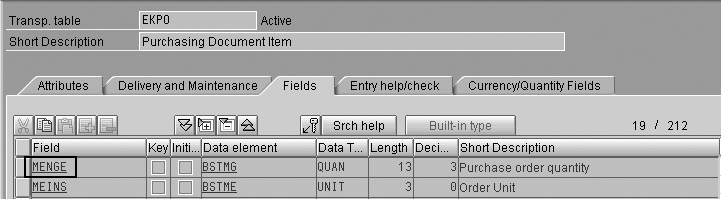
Figure 10
SE11 display of a quantity and UoM field for table EKPO. Double-click on quantity field MENGE to see detail.
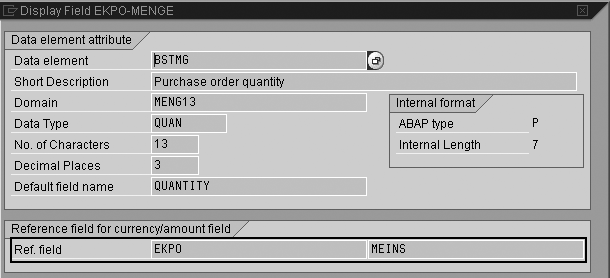
Figure 11
UoM reference field for a quantity field. This popup is displayed after double clicking on the previous screen.
When viewing data in SE16, SE16N,
or SE17 in the row overview screen,
the values are always displayed to three
decimal places regardless of UoM (Figure
12). In the row detail screen, the
value could be in three decimal places
or the correct number of decimal places,
depending on how the reference field
for the quantity field was defined.

Figure 12
Quantity data in SE16 and SE17 overview is always displayed to three decimal places regardless of the UoM
10. Custom Reporting
Errors
Custom reporting is often used for
documents such as commercial invoices
when an SAP standard SAPscript is modified
for a company-specific format. When extracting
data in custom reports, make sure programmers
use a UoM reference field. I often come
across problems with quantity reporting
when this has not been done. Here is
some sample ABAP code using a UoM reference
field for a write statement: WRITE
EKPO-MENGE USING UNIT EKPO-MEINS.
To see how quantity values are displayed
with and without a UoM reference field,
see Table 2. You can check for the lack
of a UoM reference using the extended
syntax check in the ABAP editor, accessible
through transaction SE38 or directly
with transaction SLIN.
You do not need to have custom rules
in your ABAP programs, hard-coded logic,
or printing with special formats as to
get the correct output of quantity fields.
Using the UoM reference, your SAP system
looks up the correct number of decimal
places automatically and formats the
quantity correctly.
When working with UoM conversions,
SAP provides several standard function
modules that do all the hard work for
you, so you can avoid creating new code
to look up conversion routines (Table
5). If you need to test function UNIT_CONVERSION_SIMPLE using SM37,
you can run into problems. Use ABAP
RSBZME10 instead.
| Function Module |
Description |
| UNIT_CONVERSION_SIMPLE |
Used for simple conversion of quantities
between two UoMs with the same dimension. |
| MATERIAL_UNIT_CONVERSION |
Used for conversion of quantities
taking into account alternate UoMs
in the material master, as well as
conversion between two UoMs with
the same dimension. |
| Table
5 |
Key
SAP function modules used for UoM
conversion |
If you use the ALV grid for reporting,
include the UoM reference field in your
data table and cross-reference the quantity
field to the UoM field in the field catalog.
The ALV grid uses this information to
display values correctly and to subtotal
columns with values in multiple UoM correctly
(Figure 13). Showing a total of
82,030.88 available stock is meaningless
as it is the sum of L + M2 + PC.
Instead, ALV subtotals by each UoM.
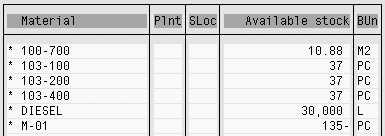
Figure 13
Subtotals by UoM are formed automatically by ALV if a UoM reference field is provided

When working with SAPscript, the correct
number of decimal places is displayed
if the quantity field used has the UoM
reference field defined. If your SAPscript
is based on an SAP standard SAPscript
and displays data using one of the standard
SAPscript output structures, such as VBDPA or VBDPR,
make sure you populate the UoM reference
field (e.g., UoM field VBDPR-VRKME for
quantity field VBDPR-FKIMG).
11. Internal Storage
Format vs. External Display Format
When a UoM is displayed to a user,
it is translated to its language-dependent
code. Internally, the UoM may be stored
in a different code. This can cause problems
when dealing with raw codes (e.g., loading
data via a BAPI, preparing a material
master load using ABAP RMMMM,
or working with custom ABAPs).
For example, the UoM EA is
commonly used for “each.” However,
your SAP system stores this internally
as ST, short for the
German word for each, which is Stück.
See Figure 14 for codes
in different languages. This is the SE16 display
of table T006A. This
is why a list of UoMs called up by F4
help may appear to be in a random order,
as it is sorted by the internal German
language codes. With newer installations,
SAP makes the internal code the English
language code instead of the German,
but this applies to new implementations
only and would still be an issue if your
main operating language were not English.
The internal UoM code is displayed at
the top of the UoM configuration screen
in transaction CUNI.
See SAP note 619937 for more details.
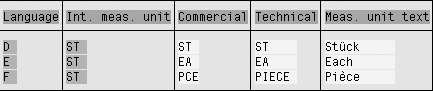
Figure 14
The user sees the language dependent UoM code but internally it is always stored with the same code
When working with custom ABAPs, use
the following function modules to convert
between SAP internal and external language
dependant codes: CONVERSION_
EXIT_CUNIT_INPUT and CONVERSION_EXIT_CUNIT_OUTPUT.

Rohana Gunawardena
Rohana Gunawardena heads the SAP practice division at Exium Inc. Exium is a leading business and technology consulting firm that enables companies to achieve their strategic business goals. Exium specializes in delivering superior IT solutions using ERP systems, with a special focus on SAP products. Rohana has been working with SAP since 1992. During his career he has assisted multiple clients on detailed system correction projects, such as correcting inventory balances, controlling area reorganizations, retrospectively activating group currency, and optimizing inter-company accounting transactions. He has spoken at many SAP conferences and has published more than 20 articles in Financials Expert, SCM Expert, and SAPtips on various aspects of SAP. His presentations have focused on Financials module selection, the order-to-cash process, global rollouts, business segment reporting, cross-module integration, and the financial impact of SCM transactions. Rohana is widely acknowledged as a leading SAP expert. Rohana is a Fellow of the Institute of Chartered Accountants in England & Wales. Previously Rohana has worked with the consulting practices of Accenture, Deloitte, and PwC.
Rohana will be presenting at the upcoming SAPinsider Financials 2018 conference October 16-18 in Prague. For information on the event, click
here.
You may contact the author at Rohana@Exium.com .
If you have comments about this article or publication, or would like to submit an article idea, please contact the editor.



 Premium