When the same HR user is in charge of multiple tasks, conflict problems can occur on the subject of how much authorization to grant the user. The author compares the technical differences between general and structural authorization and how to optimize their usage. He also describes SAP's context-sensitive authorization functionality in R/3 Enterprise Release 4.70.
The changing business climate and restructuring of workforce responsibilities mean that some users are asked to assume more than one role in their organization. Their day-to-day duties might mean they “wear many hats,” each with its own particular needs and restrictions from a business software security standpoint.
It is not uncommon to find SAP users who have more than one functional role and whose security needs are more complex than the traditional single-role user. For example, a user with multiple functional roles may need to view certain HR master data for one organizational unit, but also maintain read/write access to that same data for a separate unit. Designing SAP security roles to meet the demands of these multi-functional users is not always as simple as it sounds.
Traditionally, the design of SAP security roles has closely mirrored functional job duties for many customers. In a role-based design, the transactions, authorization levels, and organizational restrictions built into security objects reflect the day-to-day job duties of the person holding the role. This is true whether the overall security concept includes only general roles or also includes structural security profiles. For some, the addition of structural security to limit a user’s view of the organizational structure provides a level of detail in their security that is required to fully use R/3’s growing functionality.
For companies whose R/3 security strategy requires both general role-based security and structural security concepts, accommodating such a user has usually meant assigning more than one general and structural role to the user. However, assigning multiple general and multiple structural roles to the same user carries a risk that these roles may provide broader access than what was intended. What are the risks of using more than one functional role when using both general and structural security in R/3? How does SAP react to multiple combinations of general and structural profiles given to the same user?
The task of combining general and structural authorization components into a single authorization strategy has long been a challenge facing SAP HR customers. The challenge lies primarily in the technical differences between the two security approaches. General authorization roles consist of a grouping of authorization objects, while structural security roles are normally based on HR organizational hierarchies. Because the technical constructs of these two authorization approaches are different, historically there has been no way to link a specific general role to a particular structural role when giving both to a user. The end result is a risk of assigning structural and general roles for the same user that causes an undesirable — in many cases excessive — group of authorization values.
The term “context” is used to describe the problems that can arise from the combination of multiple structural and general roles for the same user. Context problems specifically relate to the overlapping or overriding security levels given to a user who holds more than one functional role in the organization. This article explains context problems and summarizes SAP’s context-sensitive authorization functionality contained in R/3 Enterprise Release 4.70.
Example of a Context Problem
To illustrate context problems in R/3, let’s walk through an example: User A has responsibility for two different parts of her organization as indicated by the shaded units of the organization chart in Figure 1. As an R/3 user, she requires access to the benefits department and its subordinate units. She also requires view-only access to some infotypes for employees in the facilities department. To accommodate the different security views necessary, user A is assigned two different structural profiles and two different general roles (Figure 2).
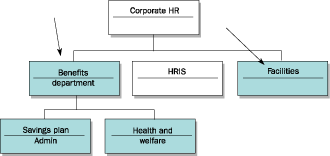
Figure 1
ExamOrganizational chart depicting areas of user A’s split responsibilityple
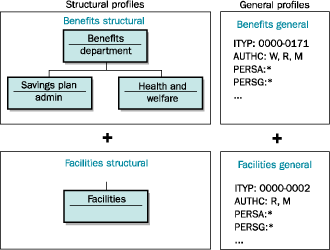
Figure 2
Illustration of the combination of structural and general roles assigned to user A
By combining these structural and general roles, the goal as depicted in Figure 2 is to allow user A to have read and write access to infotypes 0000 through 0171 for the three organizational units that comprise her benefits responsibility, plus read access to infotypes 0000 through 0002 for the facilities department. However, because there is no way to link a structural profile to a specific general role, these four roles overlap when assigned to the same user. What happens is that user A is granted the union of the roles. When these are assigned to user A, she is granted read and write access to infotypes 0000 through 0171 for both the benefits department structure and the facilities department. This is obviously not what was intended. How should context security problems such as this be addressed?
The Context-Sensitive Solution
Prior to Enterprise Release 4.70, the recommended method for avoiding the problem associated with multiple overlapping roles was to separate the functional roles into separate user IDs. In other words, user A would be given two different user IDs — one for the benefits access and one for the facilities access. While this work-around provides an alternative to the context problems, it is less than desirable for the people who have to use separate IDs and passwords to do their jobs. It is also a potential problem from a licensing standpoint because it requires you to carry two separate user IDs for the same user to provide proper security.
Beginning with Enterprise Release 4.70, SAP introduced a context-sensitive solution to HR security. It addresses the context problem by providing new authorization objects that add a field for assigning structural profiles to the contents of traditional HR master data authorization objects such as P_ORGIN. These authorization objects provide the direct link between general and structural profiles that had been missing. They can take the place of standard HR master data authorization objects in general roles for users who encounter context problems.
The first of the new authorization objects, P_ORGINCON (HR: master data with context), contains the same authorization fields as P_ORGIN for limiting HR master data access in R/3, but also adds the authorization profile field to enable the direct link to a structural profile. The other seven fields included in this object function exactly as they do in P_ORGIN, making the conversion to the new objects easier to manage and test.
Authorization object P_ORGXXCON (HR: extended check with context) is similar to the P_ORGXX object, with the addition of the structural profile field. As with the other new authorization objects, you can only enter structural profile names in the authorization object that are assigned to the user receiving the security in the structural user authorizations table T77UA.
The third option for addressing context problems is to create custom authorization objects that also include the structural profile field. If you have security needs that require custom authorization objects for HR, they can be built to include your required fields plus the structural profile. However, any custom context-related authorization object you build must include at least four basic fields: infotype, subtype, authorization level, and authorization profile, in addition to your optional custom or organizational assignment fields.
Authorization Switches
The new context-sensitive objects are not active by default in standard SAP. In order to use the new authorization objects in your user security, you must activate the appropriate context authorization switches in table T77S0. Like all HR authorization switches, the entries can be maintained directly through table maintenance, via transaction code OOAC, or through the IMG menu path Personnel Management > Personnel Administration > Tools > Authorization Management > Maintain Authorization Main Switches.
Exactly which of the four new authorization switches you activate depends on which new context authorization objects you implement. Default switch values and possible entries for the new switches are listed in Table 1. The first switch, INCON, controls whether the P_ORGINCON authorization object is evaluated in the R/3 authorization check. Switch XXCON is necessary if you plan to use the P_ORGXXCON, and switch NNCON is required if you have activated any custom authorization objects with context-related fields.
|
INCON: HR master data with context
0 – Inactive (default)
1 — Active
XXCON: HR master data extended check with context
0 – Inactive (default)
1 — Active
NNCON: Custom authorization object with context
0 – Inactive (default)
1 — Active
DFCON: Authorization check for a person holding a default position
1 – Evaluate org unit if available; deny authorization by default (default)
2 – Never evaluate org unit; deny authorization by default
3 – Evaluate org unit if available; grant authorization by default
4 – Never evaluate org unit; grant authorization by default
|
|
|
Table 1
|
Context-sensitive HR authorization switches in table T77S0 |
|
The last of the new authorization switches, DFCON, controls how context-related authorization checks should be handled for persons who are not linked to the organizational structure, such as those holding default positions in your hierarchy. To evaluate the organizational unit stored on infotype 0001 for these persons, switch values 1 or 3 do so while either denying or granting access by default. Switch values 2 or 4 either grant or deny access to persons holding default positions without evaluating the organization unit stored in the current infotype 0001 record for the employee record being viewed.
Note
Whenever you create custom authorization objects, you must execute report RPUACG00 to generate the ABAP code necessary for security to take effect. When running the RPUACG00 report for a context-related security object, you must choose the With context solution criterion on the report selection screen before executing. This selection option ensures that the MPPAUTCON include that is required for context security to function properly is generated.
Tip!
If you choose not to implement all the context authorization objects, you can instead introduce a combination of context and non-context authorization objects by activating and deactivating the appropriate switches. For example, you can activate context switch INCON for HR master data but not activate XXCON for master data with extended check, choosing to use standard switch ORGXX instead. Likewise, you can continue to use the ORGIN switch for master data but activate the XXCON switch for master data with extended check. How you use these switches and in what combination depends on your security goals and how widely you wish to implement the context solution.
Implementing the Context Solution
The context-sensitive authorization solution was created to address R/3’s inability to link general and structural profiles together directly in releases prior to 4.70 and is not required for HR security in SAP. Before you decide to implement this solution, evaluate your current use of HR security and your potential exposure to context problems. For example, if you do not currently use structural security, then context is not a problem and you do not need to use this functionality. In the event that you choose to implement the context-sensitive solution, carefully test the combinations of context authorization objects and authorization switches to ensure you achieve the proper results. Your own implementation may include a combination of traditional authorization objects and context authorization objects or may rely completely on the context objects.
A.J. Whalen
A.J. Whalen has successfully combined more than two decades of global business expertise with in-depth experience in the strategic development, management, and delivery of large-scale projects and education for SAP ERP HCM. Prior to his current role as SAP Marketing Director at Velocity Technology Solutions, he served as lead consultant for several global SAP implementations and engagements as well as an SAP Conference Producer for Wellesley Information Services. A.J. has been invited to speak at nine annual SAP educational events and holds an MBA degree from the Stern School of Business at New York University.
You may contact the author at whalen.aj@gmail.com.
If you have comments about this article or publication, or would like to submit an article idea, please contact the editor.




 Premium
