Failure to recognize data load dependencies between different data flows and objects can result in erroneous results and downtimes. Find out how you can address this using a five-step process.
Key Concept
Typical enterprise data warehouse scenarios involve a large amount of data consolidation, cleansing, and enrichment. These processes create dependencies on data load sequencing and modeling. These dependencies ensure that the dependent data load happens only after the previous data load has finished.
Consider an organization with multiple source systems feeding master and transactional data to an enterprise data warehouse based on SAP NetWeaver BI. During these data update stages, all the data targets that the system retrieves for consolidation, cleansing, and enrichment need the most current data. This is particularly critical in a single-source data warehouse. When you consolidate or enrich information, you must confirm that all the dependent loads succeeded.
If your enterprise has a single master data chain, the transactional loads can still progress even though the master data chain has failed for some of the master data. This allows inconsistent data to infiltrate your system. To avoid this, you need to set up dependencies in the data load process chain.
However, SAP NetWeaver BI 7.0 and earlier releases lack the infrastructure capabilities to set up these dependencies. We developed a five-step process that allows you to set up and track dependencies for critical loads:
Step 1. Become familiar with using the ABAP program process type in transaction RSPC
Step 2. Create a custom table in transaction SE11 to map and store the dependencies
Step 3. Create a custom program to get the dependencies for the data load
Step 4. Create a variant for each dependency you need
Step 5. Run the process chain with the variant you created in step 4
When implemented, the process automatically synchronizes the data loads — using dependencies that you maintain in a custom table — and checks for successful completion of these dependencies in the process chain execution. If a dependent process does not complete successfully, the process blocks the next data load and raises an error.
Note
We recommend developing this process in a live environment or if you are in the process of going live. This allows you to maintain dependencies in the custom table using InfoPackage IDs that keep changing during development due to deletion, for example.
Business Scenario
In our example, we want to combine the customer and sales area characteristics for the order and billing processes. We have a transaction DataSource 0EC_PCA_3 and we want to add a profit center group field (Profit Center Area) to it. We could enhance the DataSource in R/3. However, per our modeling, we prefer to look up the value from the profit center master data table and populate our transaction DataStore object in which 0EC_PCA_3 brings transaction data from R/3 to SAP NetWeaver BI (Figure 1).
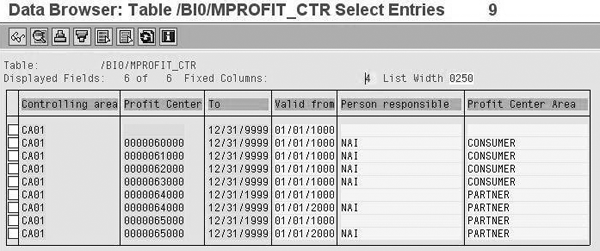
Figure 1
The Profit center area field from the master data that you need to look up while populating the DataStore object
Assume that the implementation team loaded and activated the profit center InfoObject as part of an earlier project in the same system. The team then activates transaction DataSource 0EC_PCA_3, which is part of a new project in the same system landscape. The profit center InfoObject’s delta data load runs occur daily. Our transaction data loads should therefore run after the delta runs and also look up the profit center group values from the master data table. In this case, the 0EC_PCA_3 delta load is dependent on the 0PROFIT_CTR delta loads. Ideally, if the delta load for 0PROFIT_CTR fails, then the load for 0EC_PCA_3 should not continue.
Five-Step Process
We tested this process in a BW 3.5 system, but the process also applies to SAP NetWeaver BI.
Step 1. Become familiar with using the ABAP program process type in transaction RSPC. You can find more information about this in David Eady’s article, “Enable Your Process Chains to React to Outcomes of ABAP Programs."
Step 2. Create a custom table in transaction SE11 to map and store the dependencies. Check with your Basis team to make sure you have the necessary authorizations to create and maintain custom tables in transaction SE11. In our example, we named the table ZBW_INFOPAK_DEP. The table contains three fields: INFOPAKID, INFOPAKDEPID, and DEPENDENCYCOUNT (Figure 2).
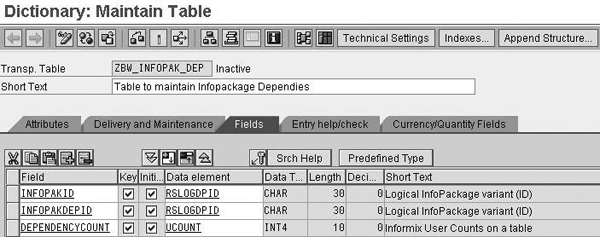
Figure 2
Structure of ZBW_INFOPAK_DEP table
The details for these fields are as follows:
- INFOPAKID is the field that holds the InfoPackage technical ID for the load that is dependent on any other load
- INFOPAKDEPID is the field that holds the InfoPackage technical ID for the load on which INFOPAKID is dependent
- DEPENDENCYCOUNT represents the number of dependencies that INFOPAKID has. The 0EC_PCA_3 load in this example depends on 0PROFIT_CTR. However, it could also depend on 0COSTCENTER.
Use transaction SM30 to maintain the InfoPackage IDs (Figure 3). In our example, ZPAK_0XICZ* is the InfoPackage ID for the transaction data load (delta) for the profit center accounting DataStore object. ZPAK_9IIH0T* is the InfoPackage name for our master data load (delta) for 0PROFIT_CTR master data object. The Informix User Counts on a table column maintains the number of dependencies that ZPAK_0XICZ* has. ZPAK_ 10JDR* is the InfoPackage ID for 0COSTCENTER.

Figure 3
Maintain the entries in the ZBW_INFOPAK_DEP using SM30
Step 3. Create a custom program to get the dependencies for the data load. Go to transaction SE38 and enter the code shown in Figure 4. For our example, we named the custom program ZBW_DEPENDENCIES. The comments in the code explain the program logic.
REPORT ZBW_DEPENDENCIES .
************************************************************************
* This program is intended to be called by a custom process type in BW process
* chains. It gets the dependencies for a particular load. * A custom table is maintained with all dependencies. During a process chain-based load, the program will check if the
InfoPackage to be used for loading
* depends on any predecessor InfoPackage as maintained in the custom table
* and checks the status of the latest load done for the predecessor info
* package(s). If green, the process chain continues with the load. If red, the
* load doesn't start * The InfoPackage technical ID Parameter: LOGDPID type RSLOGDPID. * Data definition DATA: I_ZBW_INFOPAK_DEP like ZBW_INFOPAK_DEP occurs 0,
wa_ZBW_INFOPAK_DEP like line of I_ZBW_INFOPAK_DEP,
I_RSREQDONE like RSREQDONE occurs 0,
WA_RSREQDONE like line of I_RSREQDONE. * Selecting dependencies from the custom table
* This table needs to be maintained SELECT * FROM ZBW_INFOPAK_DEP INTO TABLE I_ZBW_INFOPAK_DEP WHERE INFOPAKID
= LOGDPID. * Selecting the dependent statuses of dependent InfoPackages SELECT * FROM RSREQDONE INTO TABLE I_RSREQDONE FOR ALL ENTRIES IN
I_ZBW_INFOPAK_DEP WHERE LOGDPID = I_ZBW_INFOPAK_DEP-INFOPAKDEPID.
* Sort the table to get the latest entry at the top SORT I_RSREQDONE DESCENDING BY TDATUM TUZEIT LOGDPID. * Delete all previous entries and get the latest load DELETE ADJACENT DUPLICATES FROM I_RSREQDONE COMPARING LOGDPID. * If the load was successful, continue, if not, then throw an error LOOP AT I_RSREQDONE INTO WA_RSREQDONE. IF NOT ( WA_RSREQDONE-TSTATUS = '@08@') AND NOT ( WA_RSREQDONE-TSTATUS
= '@08') . * Throw a message
MESSAGE e001(zbw)
WITH 'Status of latest load of Info Pack #'
WA_RSREQDONE-LOGDPID 'is red'.
ENDIF.
ENDLOOP.
|
| Figure 4 |
Enter this code in transaction SE38 |
Step 4. Create a variant for each dependency you need. Every time that you want to use this program in your process chain for a different dependency, you have to maintain a variant. This is necessary because you must specify the variant name in the custom process type variant definition in the process chain.
Go back to transaction SE38 and enter your program name, in our example ZBW_DEPENDENCIES (Figure 5). Then select Variants and click on the Change button. This takes you to the screen to create a variant (Figure 6). Values is selected by default. Enter a variant name, such as PCA_DELTA_1, and click on the Create button. The Maintain Variant screen appears (Figure 7). Enter the InfoPackage ID from Figure 3 in the LOGDPID field. This is ZPAK_0XICZ*, as explained in step 2. Save your settings.

Figure 5
Maintain variants for the program ZBW_DEPENDENCIES
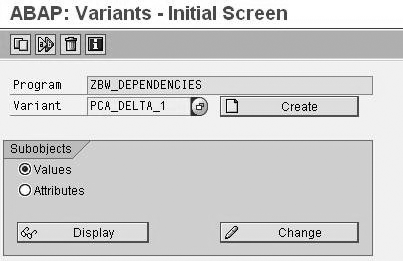
Figure 6
Enter the variant name PCA_DELTA_1

Figure 7
Enter the InfoPackage ID ZPAK_0XICZ*
Then follow the same process for the InfoPackage ID ZPAK_089WE* using the variant name PCA_DELTA_2. When you save again, you can see that there are two saved variants, as shown in Figure 8.
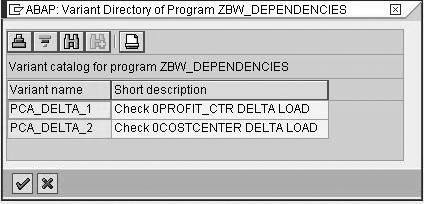
Figure 8
The maintained list of variants
Step 5. Run the process chain with the variant you created in step 4. Now you need to use the custom program and the respective variant that you created for your transaction data load. You carry out this process in the process chain using transaction RSPC. As part of the process in step 1, you familiarized yourself with the ABAP program process type in process chains. After you create your start process for the chain, drag the ABAP program process type from the general services section to the right side (Figure 9). Then drag your InfoPackage into the process chain, similar to how you would normally build your chain.

Figure 9
Insert the ABAP program into the process chain
In the prompt, create a new process chain variant, which in our case is ZCUSTOM_DEPENDENCY. The screen in Figure 10 appears. Enter the custom program ZBW_DEPENDENCIES in the Program Name field. Then, in the Program Variant field, enter the variant that you created for this InfoPackage load, in our example PCA_DELTA_1. When you finish, your process chain should resemble the one shown in Figure 11.

Figure 10
Call the program in process chain with the variant PCA_DELTA_1
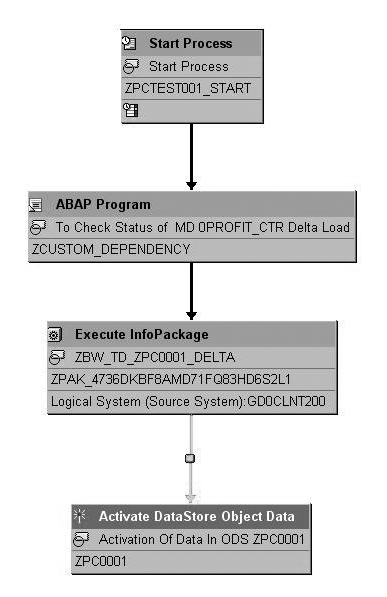
Figure 11
Final process chain view
You must include the custom process type before each dependency check in your process chain. Make sure you add the relevant variant you created in step 4. If the custom program runs successfully, then the system begins the next data load. If the program raises an error, you need to go to the data load that failed and correct it before you can continue the subsequent data loads.
Nikhil Sharma
Nikhil Sharma is a manager in the advisory practice at PricewaterhouseCoopers LLP, based out of Mclean, VA. He specializes in SAP NetWeaver BW architecture, design, and visualization. For the past 10 years he has led several implementations, including projects in the retail, automotive, and chemical domains. Prior to consulting, he was involved in sustenance and development of SAP NetWeaver BW at SAP, primarily concentrating on master data services.
You may contact the author at nikhil.sharma@us.pwc.com.
If you have comments about this article or publication, or would like to submit an article idea, please contact the editor.
Prakash Holalkere
Prakash Holalkere is an SAP NetWeaver BW consultant and manager with Accenture, based out of Seattle. He has executed end-to-end implementations in SAP BW 3.x and SAP NetWeaver BW 7.0 at various clients. Before working on SAP NetWeaver BW implementations, Prakash started his career with SAP Labs in India on its custom development team.
You may contact the author at prakash.l.holalkere@accenture.com.
If you have comments about this article or publication, or would like to submit an article idea, please contact the editor.



 Premium