Learn the requisite configuration, master data setup, and transactions to enhance automation of creating a dispute case for lockbox data processed for incoming payments from customers.
Key Concept
Reason codes are keys that explain the difference between invoice amount and payment amount. The dispute case is the central object in SAP Collections and Dispute Management. Lockbox is a popular mechanism in the US and Canada for customer payments, whereas European countries use Electronic Bank Statements (EBS).
Imagine a scenario in which company FSCM Prototype, Inc. has decided to conduct transactions such as customer payments and dispute management quickly on a mass basis in the SAP system for a customer, ABC, Inc. For these tasks, the SAP system provides various functionalities, such as Electronic Bank Statements (EBS) and lockbox for processing a payment document and a standard SAP-delivered program for creating dispute cases automatically.
Note
Payment transactions in the US and Canada are made almost exclusively in the form of checks. To process these payments quickly, banks offer lockbox services where customers can send their payments directly to the bank (lockbox). The bank deposits the checks and sends the check deposit information to the payee via electronic file transfer.
In my example FSCM Prototype, Inc. uses lockbox to manage a short payment received from ABC, Inc. FSCM Prototype, Inc. uses lockbox to manage customer payments and SAP Collections and Dispute Management to manage customer dispute cases. ABC, Inc. is one of the customers of FSCM Prototype, Inc. In this example, ABC, Inc. sends a short payment owing to a customer dispute. Payments are received in short when the amount is less than the invoice amount because the customer has a dispute and has reduced the payment by the disputed amount. With automation of mass creation of dispute cases, an organization can focus on handling and resolving disputes rather than spending time on administrative tasks such as creating dispute cases. Timely and efficient resolution of dispute cases results in improved customer satisfaction, thereby increasing revenue for an organization.
SAP provides a standard program to create dispute cases, but to create dispute cases automatically, FSCM Prototype, Inc. needs to configure it in accounts receivable (FI-AR) and SAP Collections and Dispute Management.
I’ll show you the step-by-step configuration of the FI-AR and SAP Collections and Dispute Management, the customer master data, and the business process used to create dispute cases for the check payments applied through lockbox. This article includes an example of how you can automate dispute-case creation from lockbox, and at the end of the article, I mention EBS.
Note
SAP Collections and Dispute Management includes the functionality formerly known separately as SAP Collections Management and SAP Dispute Management. These were packaged as part of SAP Financial Supply Chain Management (SAP FSCM). You may see some of these names in menu paths and screenprints in this example, but the functionality is now known as SAP Collections and Dispute Management. I am primarily talking about dispute management functionality in this article.
Step-by-Step Configuration and Customer Master Data
FSCM Prototype, Inc. needs to configure FI-AR and SAP Collections and Dispute Management components, respectively. SAP Collections and Dispute Management contains functions for processing receivables-related dispute cases. It supplements the logistics process chain Order > Delivery > Invoice > Payment in the stage between invoice and payment if there are disagreements with the customer.
The dispute case is the central object in the dispute functionality of SAP Collections and Dispute Management. It enables you to access all the information that it needs to process dispute cases based on receivables. You can create dispute cases through various transactions in FI-AR such as document display (FB03) and customer line item display (FBL5n), or also directly in dispute-case processing. The most common dispute-case scenario occurs when a residual item is created while applying an incoming short payment against a customer invoice and the payment amount is reduced by the disputed amount.
In this example, the company has sent an invoice to the customer with the understanding that the customer should pay the full amount. Customers may have various reasons (e.g., damaged goods or spillage) to reduce payment. They may send the payment to the company after deducting the dispute amount with the reason for and details of the dispute. The SAP system creates the dispute case, and the company’s customer service department investigates it. Once the customer service department determines that the dispute case is genuine, the company settles the dispute case and approves the customer’s reduced payment. If the dispute case is not genuine, you can close it, and then the customer is liable for paying the disputed amount. This is a process that happens after you create the dispute case and therefore is not in the scope of this article.
FI-AR Configuration
Step 1. Define reason codes: Reason codes are the keys that explain the difference between the invoice amount and the payment amount. They represent the cause of a dispute case. You create reason codes for each company code separately. To create reason codes, follow IMG menu path Financial Accounting (New) > Accounts Receivable and Accounts Payable > Business Transactions > Incoming Payments > Incoming Payments Global Settings > Overpayment/Underpayment > Define Reason Codes (Figure 1).

Figure 1
Configuration of reason codes
In this example, FSCM Prototype, Inc. created nine reason codes to trace the source of payment differences. You can see four indicators against each reason code configured in the system. To use the reason code in dispute management, select the second indicator (D) in the screen. In this example, DDG and RTD are set up for dispute management.
When a customer sends a payment to a company after reducing the disputed amount (whenever there is a dispute), the customer explains the reason for the dispute. The bank sends the company the payment details along with the reason for the deduction (dispute). Usually, when setting up a lockbox with a bank, companies ask their customers to inform the bank about reason codes in case of any disputes. If the bank receives these reason codes, disputes and invoice deductions are handled more smoothly than in cases when customers do not send reason codes to a bank. In the latter case, the company has to contact the customer to create a dispute case manually.
The reason codes configured in this step are internal to FSCM Prototype, Inc.’s SAP system. The next two steps explain the configuration required to map the external reason codes of a customer or bank with the internal reason codes that FSCM Prototype, Inc. has set up.
The bank specifies the reason code on a lockbox file if it receives the details of a dispute. By doing this, the bank provides better services to its clients. Reason codes in a bank system’s software will be different from the ones in an SAP system. For example, the reason code for damaged goods in a bank’s system may be 010, whereas your internal code may be DDG. The bank is catering to multiple customers, so it would be difficult to adapt the customer’s reason codes. However, when you implement lockbox in your system, you can map the bank’s code with your SAP system codes. Steps 2 and 3 explain the details about mapping the bank’s codes with the company’s codes in the company’s system so that when the lockbox file is processed by the SAP system, the SAP system can convert the bank’s reason codes to the SAP system code to determine the reason for the dispute.
Step 2. Define the reason code conversion version. Configure a version number that facilitates the conversion of external reason codes to internal reason codes. To set up the reason code conversion version, follow IMG menu path Financial Accounting (New) > Accounts Receivable and Accounts Payable > Business Transactions > Incoming Payments > Incoming Payments Global Settings > Overpayment/Underpayment > Define Reason Code Conversion Version. In this example, I defined version CUS for Custom Version to map external reason codes with the internal ones (Figure 2).

Figure 2
Configuration of reason code conversion version
Step 3. Define the conversion of payment difference reason codes. You can map external reason codes with internal reason codes for a specific reason code conversion version. For this configuration activity, follow IMG menu path Financial Accounting (New) > Accounts Receivable and Accounts Payable > Business Transactions > Incoming Payments > Incoming Payments Global Settings > Overpayment/Underpayment > Define Conversion of Payment Difference Reason Codes. Then map reason codes configured for dispute management, as shown in Figure 3. The bank is using reason codes 010 and 020 for damaged goods and returns, so they are mapped to internal reason codes DDG and RTD, respectively. Note that the customer sends a payment with the information about the deduction. Usually, companies ask their customers to send the information (usually with the bank’s code) so that the bank can send the payment details as well as the dispute reason in the lockbox file to the company.
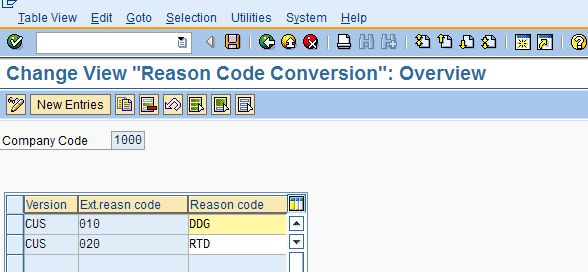
Figure 3
Conversion of external reason code to internal reason code
Customer Master Data Setup
Next, you need to assign the reason code conversion version to the customer to facilitate the reason code conversion while applying the customer payments. The Rsn code conv. field is available in the Payment Transactions tab of the company code segment of the customer master data. Enter CUS in the Rsn code conv. (reason code conversion) field, as shown at the bottom of in the screen in Figure 4.
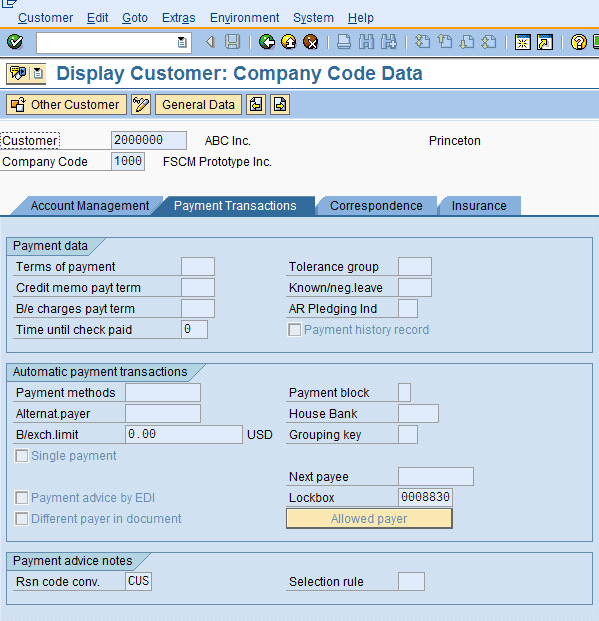
Figure 4
Specify reason code conversion version in the customer master data
SAP Collections and Dispute Management Configuration
To configure dispute management components, follow these steps:
Step 1. Define the case type. Case type is a central property of the dispute management component as it groups all the customization of dispute management. To create the case type, follow IMG menu path Finance Supply Chain Management > Dispute Management > Dispute Case Processing > Case Type > Define Case Type (Figure 5). F_DM is the default case type delivered by SAP. Select the F_DM case type and click the copy icon  to copy the case type F_DM to the new case type ZFDM. Configuration of case type ZFDM is shown in Figure 6.
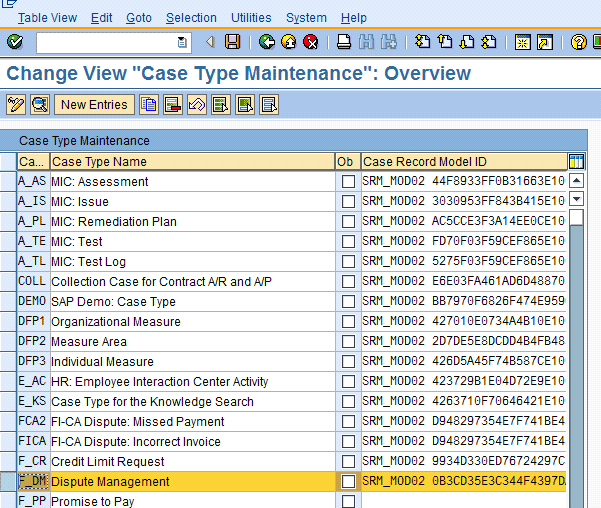
Figure 5
Copy F_DM case type to create the new case type

Figure 6
New case type ZFDM
F_DM is an SAP-supplied dispute-case type. It is an established procedure to keep SAP-supplied objects intact and copy them as a new object. The main reason behind this is that if you change an SAP-supplied object to meet a company’s specific requirement, you lose the original settings of the object (in your case, F_DM). So you copy F_DM to ZFDM, and if any changes are required to the dispute-case type, you carry out changes to ZFDM. Thus, in the future if you need to create another dispute-case type, you can use F_DM type as a template again.
Step 2. Define the values for the attribute reason. Now you need to configure attribute reasons for the case type ZFDM that are reason codes within SAP Collections and Dispute Management (Figure 7). To create these reason codes, follow IMG menu path Finance Supply Chain Management > Dispute Management > Dispute Case Processing > Case Type > Create Values for Attribute Reason. The keys for these reason codes are kept the same as the reason code keys configured in FI-AR.
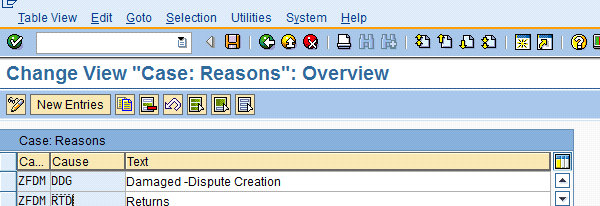
Figure 7
Configure reason attributes
Step 3. Assign the case type to the company code. After configuring the dispute management reason codes, you need to assign a company code with a case type to establish the integration between FI-AR and SAP Collections and Dispute Management. Follow IMG menu path Finance Supply Chain Management > Dispute Management > Process Integration with Accounts Receivable Accounting > Define Default Values for Creation of Dispute Case (Figure 8). Assign company code 1000 with the case type ZFDM. There are SAP-supplied reason codes, but you can set up your own if necessary.

Figure 8
Assign company code 1000 with case type ZFDM
Step 4. Map FI-AR reason codes with SAP Collections and Dispute Management reason attributes. Once the company code and case types are mapped, you need to extend this integration to map FI-AR reason codes with SAP Collections and Dispute Management reason codes. Keep the reason code keys the same in both components so that you avoid any confusion while mapping them. Select company code 1000 (Figure 9) and double-click Reason Code beneath the Company Code folder option.

Figure 9
Select company code 1000 once it is mapped with ZFDM case type
Double-click Reason Code and the screen allowing reason-code mapping appears (Figure 10).

Figure 10
Reason-code mapping configuration screen
Click the New Entries button and map FI-AR reason codes with SAP Collections and Dispute Management reason codes (Figure 11). In this example, you have two reason codes, DDG and RTD, with the default priority of the dispute case as Medium.

Figure 11
Mapping of FI-AR reason codes with SAP Collections and Dispute Management reason codes
With the mapping of reason codes, you have completed the configuration required for the system to create dispute cases automatically for incoming payment through lockbox.
Lockbox Configuration
The Bank Administration Institute (BAI) defines the lockbox formats. There are two primary standard lockbox formats: BAI and BAI2. BAI and BAI2 chiefly differ in their level of information detail. BAI does not subtotal the incoming check line items by invoice reference. One check total amount contains all invoices listed underneath it. Consequently, in BAI format files, the entire check must match the total amount for all invoices listed or be within configured payment difference tolerances. BAI2 splits the check total into separate invoice references and corresponding payment amounts per invoice. It can also contain deduction amounts, as well as the external reason code for the deduction.
Note
Because the BAI2 file format contains the details pertaining to external reason codes, it is recommend that you use the BAI2 format for the lockbox to automate the process of creating a dispute case for lockbox payments.
The SAP system already consists of configuration of control parameters for both formats. You just need to verify that the system has default configuration for the BAI2 file format. To do this, follow IMG menu path Financial Accounting (New) > Bank Accounting > Business Transactions > Lockbox > Define Control Parameters (Figure 12). Select the line for LOCKBOX procedure for BAI2 format and double-click to navigate to the screen detailing control parameters for BAI2 format of lockbox (Figure 13).
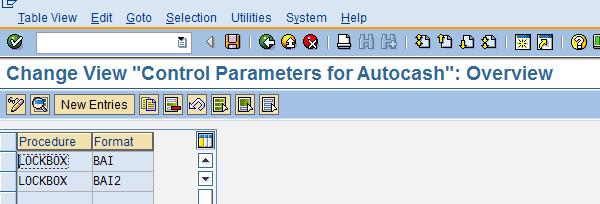
Figure 12
Control parameters BAI and BAI2 for two lockbox file formats

Figure 13
Configuration parameters of BAI and BAI2 lockbox file format
Note
No additional configuration is required for lockbox to automate the process of creating a dispute case. You assume that the rest of the lockbox configuration is already in place and that you are automating the dispute-creation process for the lockbox payments.
Now I’ll explain the business process used to create dispute cases automatically for lockbox payments from invoice creation to dispute-case creation. FSCM Prototype, Inc. posted a customer invoice for the amount of US$1,500 to customer ABC, Inc.’s account number 2000000 through document number 1800000062 (Figure 14). (In Figure 14, 2000000 is the customer code, and the customer description is ABC, Inc. Therefore, the customer account for ABC, Inc. in the SAP system is 2000000.)

Figure 14
Customer invoice that will be paid in short through the lockbox later
Customer ABC, Inc. sends a payment of US$1,200 against the invoice amount of US$1,500. The customer has subtracted US$300 for damaged goods and has sent the reduced payment of US$1,200 to the bank lockbox with the reason code for damaged goods. The bank has sent the BAI2 lockbox file with the external reason code for damaged goods.
Here is an explanation of the BAI2 file layout required of the lockbox file sent by the bank to FSCM Prototype, Inc. that contains information related to customer payment, such as payment amount, reference invoice number, check number, dispute amount, and external reason code for the customer dispute. Record types 6 and 4 of the lockbox file consist of the slated customer payment information. Record type 4 is a subrecord type of record type 6.
The record type 6 payment file contains the MICR number, check amount, check number, and batch number (Figure 15), whereas record type 4 consists of the invoice number, payment made for invoice, deduction, and key for external reason code. Figure 15 displays record type 6 and record type 4 (highlighted) of the lockbox file for the customer payment received for the amount of US$1,200.
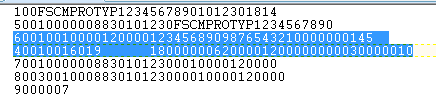
Figure 15
Lockbox file layout with record types 6 and 4 highlighted
For the exact positions of different fields on record types 6 and 4 on the BAI2 lockbox file, review SAP structures FLB26 and FLB24 with transaction SE11. Payment details of ABC Inc., as in the lockbox file appearing in Figure 15, are:
- Record type 6: Customer payment US$1,200, check number 0145
- Record type 4: Invoice number 1800000062, payment amount US$1,200, deduction amount US$300, and external reason code for deduction (dispute) amount is 010 (damaged goods)
Once you receive the lockbox file from the bank, you can process the file to apply the customer payment with transaction FLB2 or by following menu path Accounting > Financial Accounting > Bank > Incoming > Lockbox > Import (Figure 16). Enter BAI2 in the Input record format field so that the file will be processed as a BAI2 file.

Figure 16
Lockbox selection parameters for processing the BAI2 file
After processing the lockbox file, the system has applied the payment of US$1,200 against invoice number 1800000062. Figure 17 displays the total payment amount for the lockbox file, which is US$1,200.
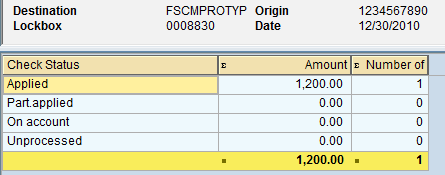
Figure 17
Total amount of lockbox file processed with SAP lockbox program
While you process the short payment of US$1,200 against the invoice amount of US$1,500 through the lockbox file, the SAP system clears the invoice, but creates the residual item for the deduction amount. So the system posts two documents to the customer — the payment document that credits US$1,200 to the customer account and the residual item that clears the invoice and payment document and posts the open item of the difference of US$300 to the customer. Figure 18 shows that the system has posted payment document 1400000055 and residual item document 1400000056. The residual item document is the open item posted to the customer for US$300, which is equivalent to the deduction amount for which the lockbox file has an external reason code of 010 (damaged goods). FSCM Prototype, Inc. is now interested in creating the dispute case for this document for the amount of US$300 to investigate and manage the customer dispute. Usually, companies that are receiving a large volume of customer payments set up batch processing jobs to create dispute cases automatically. Later in this article you learn how to create dispute cases automatically for the residual items created for the lockbox payments with reason codes.
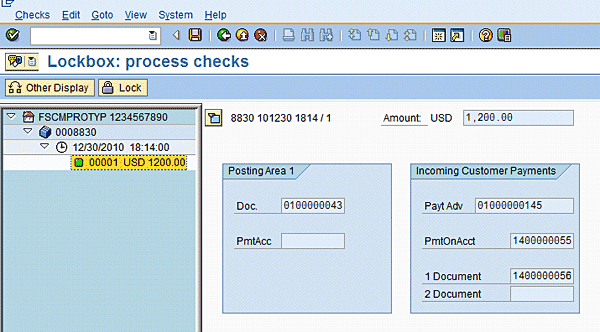
Figure 18
Documents posted by the lockbox program
While reviewing the residual item document 1400000056, you can see that the system has posted two line items to the customer: the first item has debited the customer for US$300, and the second item has credited the customer for US$300. The second line item has cleared the customer invoice of US$1,500 and customer payment of US$1,200, and has a posting of the remaining credit of US$300. However, the first line item has a debit of US$300; it is posted as an open item of US$300 to the customer that is a disputed item. While analyzing the first line item as in Figure 19, you can see the following:
- The Residual ite (item) field has a populated value of 1800000062; that is, this line item is a residual item of the document number 1800000062.
- The Text field displays damaged goods – disputed, which is the text of the reason code
- While looking at the Reason code field, you can see that the reason code DDG has been populated for this item. So, the lockbox program has converted the external (bank) reason code 010 to the SAP system’s internal reason code to DDG.
- While displaying document 1400000056, you can see the Create Dispute Case button. You can create a dispute case manually for each document from transaction code FB03, but you will create a dispute case automatically through an SAP-delivered program. Creating a dispute case with an automatic dispute-case creation program enables you to create dispute cases on a mass basis when the volume of payment is large. Automatic creation of dispute cases also helps companies increase efficiency of dispute handling and reduce the chance of error owing to manual creation of dispute cases in the system.
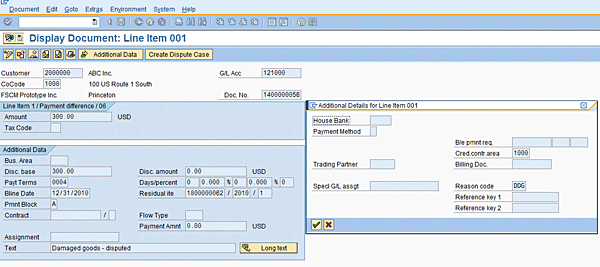
Figure 19
Residual item 1400000056 with reason code DDG
Because a residual item has been created, you’re at the final stage: executing the program that creates the dispute cases automatically for the specified criteria. Use transaction code FDM_AUTO_CREATE or follow menu path Accounting > Financial Supply Chain Management > Dispute Management > Periodic Processing in Accounting > Automatic Creation of Dispute Cases (Figure 20). This program has two buttons at the top and four tabs.

Figure 20
Program for automatic creation of dispute cases
Now you need to learn the important selection fields that are required to create dispute cases automatically for the lockbox payments it processed earlier. There are two options: Automatic Incoming Payment or Open Items (Figure 20). Select Automatic Incoming Payment and enter the specifications for an automatic incoming payment. For the Application field, you have four options (Figure 21).
Note
You can also create automatic dispute cases for electronic and manual bank statements, and steps 1 through 3 of the step-by-step configuration and customer master data setup remain the same. The only difference is step 4; instead of the lockbox, EBS needs to be configured suitably to carry and convert the external reason codes as you have seen in the case of the lockbox. The EBS file should also contain the external reason code.

Figure 21
Incoming payment application options for creating dispute cases
Upon selecting the Lockbox option, specify the requisite lockbox file details in the remaining fields, as shown in Figure 22.

Figure 22
Lockbox specifications for automatic dispute-case creation
The Further Selections tab provides an additional filter to the selection fields if you want to create dispute cases based on some additional criteria. In this example, specify the Reason code as DDG (Figure 23).

Figure 23
Further Selections tab
The Output Control tab selections are shown in Figure 24. The Output Control tab has the option of executing the program as a test run and then as an update run. If the Test Run option is selected, a program will be executed in test mode; that is, it displays the output, but does not create any update in the system. Execute the program in test run mode first, review the output of the program, and then execute the program again in update run mode with the Test Run option deselected. Other options include the dispute case for each individual residual item of the customer or groups of the residual item of the customer for a given reason code, as well as two check boxes: External Reference fm Payment and Notes with Standard Text.

Figure 24
Output Control tab
If the External Reference fm Payment check box is selected, the system populates the check number in the dispute case, and if Notes with Standard Text is selected, it populates the text specified in the Notes in Dispute Case tab in the dispute case created (Figure 25).
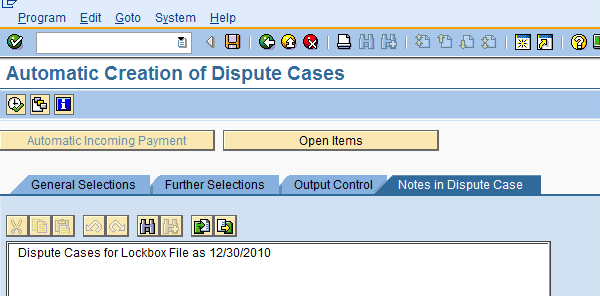
Figure 25
Notes in Dispute Case tab
Now when you execute the program, create a dispute case for the residual item 1400000056, as shown in Figure 26.

Figure 26
Report of the dispute-creation program mentioning successful creation of the dispute case for the residual item created with the lockbox program
Now review the residual item 1400000056 and the dispute case created for the residual item with the automatic lockbox creation program. Residual item 1400000056 shows that dispute case 606 has been created, as shown in Figure 27.
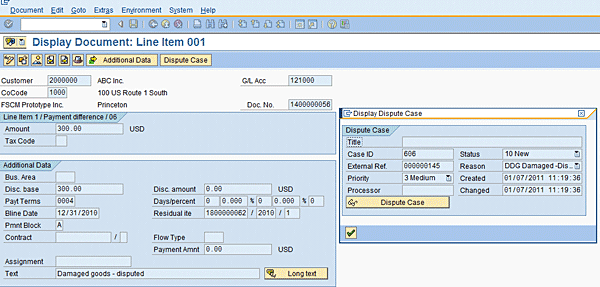
Figure 27
Document display for residual item 1400000056 with dispute case 606 created with automatic dispute-creation program
The dispute case created, 606, is shown in Figure 28. The details populated for various relevant fields are as follows:
- Cause: DDG damaged goods
- Disputed Amount: US$300
- External refer.: 000000145 (check number)
- Disputed Objects (the folder at the bottom of Figure 28): 1400000056After clicking the Notes button, you can see the standard text at the bottom of the screen that you have specified while executing the program of automatic dispute creation. Refer to Figure 29 to see the standard text.
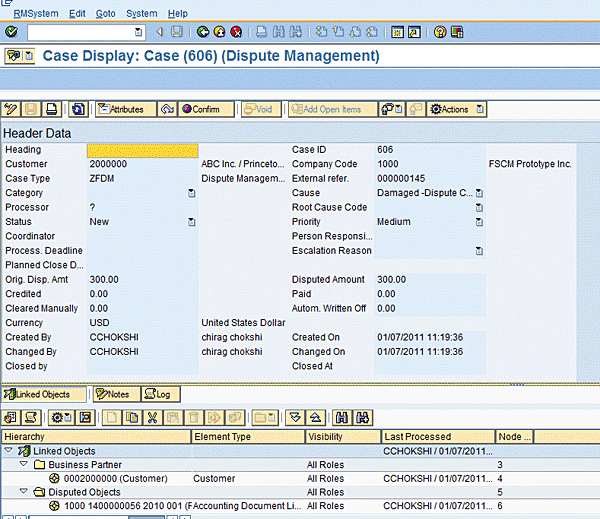
Figure 28
Dispute case 606

Figure 29
Standard text of the dispute case appearing at the bottom of the dispute case
Chirag Chokshi
Chirag Chokshi is a solution architect for SAP Financials. He has worked on SAP Financials since 2001 and specializes in implementing the Financial Accounting (FI) and Controlling (CO) modules along with their integrated areas for companies in industries such as consumer products, the chemical process industry, pharmaceuticals, the public sector, industrial machinery, and component manufacturing. He has worked on various complex projects, including global rollouts, greenfield implementations, and SAP system upgrades. In addition, he has developed various preconfigured solutions with a focus on SAP Financials.
You may contact the author at chiragmchokshi@yahoo.com.
If you have comments about this article or publication, or would like to submit an article idea, please contact the editor.




 Premium