For many companies, import/export trade processes are conducted manually. Automating these processes will reduce errors and reduce costly maintenance. SAP has introduced Global Trade Services (GTS), an application that runs on the NetWeaver platform, to help automate processes whether they run within or outside the R/3 enterprise structure. Get an inside look at GTS’s capabilities with this article.
Many companies that do business globally have automated their supply chains, yet they continue to rely on costly manual import/export trade processes. This is especially surprising in light of increased restrictions due to security concerns, low-cost sourcing abroad, and a greater reliance on distributed manufacturing.
Manual processes are not only prone to error, but also require high maintenance on day-to-day operations and business processes. They are difficult to deploy across the company and to integrate with the supply chain. The manual processes create bottlenecks within supply chain processes and add unpredictable lead times to the cycle. An automated global trade system can overcome these problems and increase customer satisfaction.
The good news is that, because international trade regulations are becoming more stringent, government agencies are moving toward automation. For example, you will see an increased availability of electronic submission, content for denial party list (DPL) screening with business partners, content for classification, and license determination. To help you automate your international trade processes, SAP has introduced Global Trade Services (GTS). It can help automate compliance in key areas such as:
- DPL or Sanctioned Party List (SPL) screening of business partners
- DPL/SPL screening at a transactional level (e.g., order to cash, cross-company stock transport orders, procure to pay, or shipments)
- Embargo checking with master data and transaction data
- Import/export controls and license determination
GTS can also play a role in automating customs activities such as:
- Product classification (Export Control Class, Harmonized Tariffs System [HTS])
- Electronic document submissions such as the European Union's New Computerized Transit System (NCTS), the American Automated Export System (AES), and Germany's Automated Tariff and Local Customs Handling System (ATLAS)
- Duty calculation/preferential handling
- Customs declaration/documentation
SAP R/3 has a strong Foreign Trade (FT) functionality within its SD module that includes legal control, customs processing, periodic declaration, communication printing, document payment and preference processing, and reporting. It is integrated along the production, financial accounting, sales, shipping, billing, and purchasing processes. One of the key advantages or the benefit of GTS over FT is that GTS is not limited to the R/3 enterprise structure. You can use it with non-SAP systems, applications, and services. GTS also offers centralized enhanced trade processes such as SPL screening, product classification, legal control, and import license determination that interlink with your supply chain processes.
SAP GTS offers key advantages in these areas:
Trade compliance: With globalization, companies are moving toward low-cost sourcing. GTS can help companies execute on their global sourcing strategy when, for example, choosing providers based on low duty rates, looking for preferential treatment, or making considerations based on special importing or exporting requirements. This also helps mitigate the risk of doing business internationally based on each country's import and export regulations requirements. This, in turn, helps businesses to maintain their brand equity and comply with each country's import and export regulations.
Trade process improvement: With GTS you have a centralized repository for all trade processes, and this information is available consistently across your supply chain. This helps reduce the fulfillment cycle times and increase customer service levels. GTS facilitates the import/export entry with necessary and accurate documentation. Companies might have trade partners such as freight forwarders or brokers. GTS can help meet partner compliance requirements.
Lower total cost of ownership (TCO): This is achieved by having one centralized global trade system in lieu of multiple systems. Now you can centrally manage your processes and operate the system locally, using one process compared to multiple processes managed locally. You can use off-the-shelf integration with SAP R/3 systems. External parties can also leverage the same system through different modes of communication such as EDI, fax, email, or a Web interface. Above all, you can continue to use your existing best practices in the software and the customer base.
Reduced risk: Automation helps to reduce risk. Export and import control checks can be performed at different points of the order-to-cash and procure-to-pay processes. You can establish electronic communication with government authorities (for example, AES for the US). You can mitigate the risk by accurately calculating duty rates. An intuitive system tool helps maintain the HTS, ECCN, and other classification schemas.
Now that I've described the benefits, let me provide more detail on how SAP GTS provides them.
Standardize Trade Processes via SAP NetWeaver
If you look at today's trade processes, you find that each business unit has its own ERP and FT implementation. The data is spread across the company on many platforms and in different systems. It is difficult to introduce change or to standardize these locally managed trade processes. Last but not least, this model has a higher IT cost.
With GTS in place, you have a centralized GTS implemented with data shared across the entire enterprise. The processes are managed centrally and operated locally. This way, it is relatively easy to change. You can standardize your compliance processes and deploy them across the enterprise. The IT maintenance cost is lower because you have one centralized process to maintain. Global trade processes cross enterprise boundaries, and GTS can be an intermediary system connecting the internal and external systems. Brokers helping you clear customs, carriers moving the goods, and customs authorities providing the clearance all have access to the information along the trade processes. Figure 1 summarizes the differences between today's typical trade processes and trade processes using GTS.
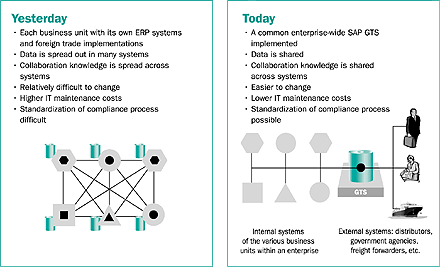
Figure 1
Trade processes model with and without GTS
GTS Within the SAP Landscape
Figure 2 shows the GTS system with other SAP and non-SAP systems. The core data for the GTS system is in the center, and above it resides the application components. Compliance Management and GTS Customs Management are two key components of GTS system. I will walk you through an overview of the key functionality available in these components later. SAP NetWeaver is the common platform for communication with the ERP and other SAP systems such as Supply Chain Management (SCM) and Customer Relationship Management (CRM).

Figure 2
SAP GTS within the SAP system landscape
Figure 3 shows the different activities in the supply chain process starting from classifying the goods and ending with receiving the goods. These processes/functions communicate with GTS for different information retrieval or update.

Figure 3
Supply chain processes integration with GTS
GTS Functional Capabilities
Now that you have background on the GTS system, let me give you an overview of the key functionality and features of the GTS. The Compliance Management component caters to the export and import controls of rules, legal control, license determination, and so on. SPL screening is also part of the Compliance Management component. Embargo services are the third part of the Compliance Management component. These services are represented as LCI (Legal Control Import), LCE (Legal Control Export), and SPL. The technology infrastructure provides a flexible and configurable support for different trade processes — export and import controls and customs. For example, you can maintain different numbering schemes for ECCN, the import list, HTS, Schedule B, and commodity code.
Figure 4 shows the main GTS cockpit with icons for different services: Sanctioned Party List Screening, Legal Control – Import, Legal Control – Export, and Classification/ Master Data under GTS Compliance Management. Under Customs Management you find Customs Processing – Import/Export, Transit/ Presentation, Classification, and Master Data. Within GTS Basis you have Archiving, System Monitoring (for data transfers with Application Linking and Enabling), and System Communication/WorkFlow (for transactions with Remote Function Calls).
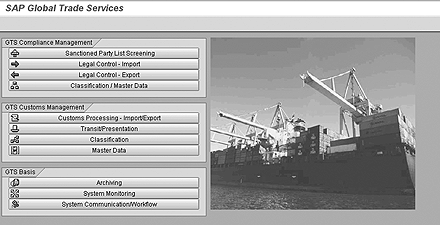
Figure 4
The main GTS cockpit
The Compliance Management services are enhanced functionalities within GTS. SPL screening provides the capability of uploading the content for denial party lists from different content providers, and it allows you to screen your business partners based on configurable check rules. With the SPL screening engine, you can define your own checking algorithm. The screening engine with SPL is based on the user-defined criteria and algorithm to match the different characteristic/ information (say, name or address, city or country). An example of user-defined criteria could be a minimum number of letters in a field that are required to match, percentage of word match (i.e., greater than a 40 percent match equals a hit), which fields are screened in the names or address fields, and options exits with cross-checking the name fields with the address fields and vice-versa. These settings are part of the cockpit, and users can set up and change these rules when appropriate. Figure 5 shows the different features and functionality with SPL services.
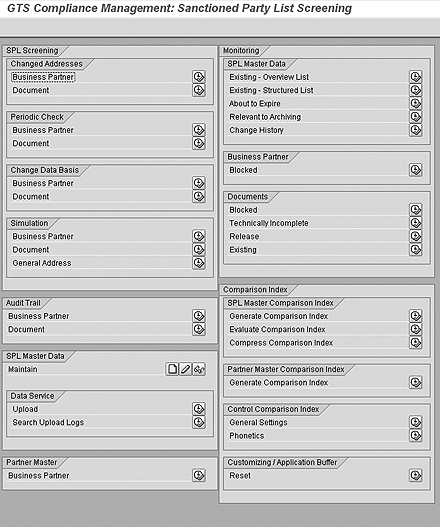
Figure 5
The SPL cockpit
LCE services provide configuration settings to map your export and import control processes — for example, the license determination strategy or license assignment. As I mentioned earlier, many of the export and import control business rules are now part of the cockpit. Figure 6 shows the different functionality and features within the LCE cockpit. For example, in the areas of export control, the license determination table and ECCN definition for export control are moved out of the configuration tables to the user-defined menus. The license master is now independent of company code and is determined by the license determination strategy matrix. Value or depreciation can be attached to the license type check object and item category. (For example, you could have a return item adding a value back into the license.)
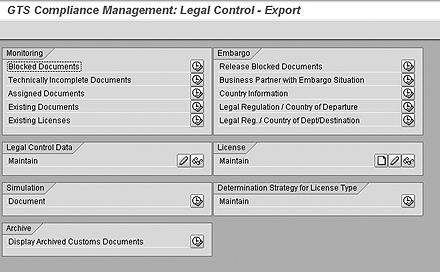
Figure 6
Legal Control Export cockpit
The license determination table is configurable with different procedures, for example, by legal regulation, ECCN, or ECCN grouping. You can see now how the export functionality is enhanced in GTS. Similarly, import now has rules and controls. You can define which services to invoke based on the document type and item category. For example, you can define stock transport orders in the PO type as export transactions and vendor POs as import transactions. You can also define the direction of the import or export check based on the document type in R/3. This helps you define return order type as export or import based on your business needs. R/3 MM document types could be defined for import or export control.
Embargo services allow you to define embargo as a service independent of other checks and settings for businesses to use based on their needs — for example, country grouping or defining itinerary legs for embargo check. If a company has a business requirement that does not allow a shipment by one route (say, US to Cuba) and has permission to ship through another route (Germany to Cuba), you can set this in the cockpit by embargo settings for export.
Figure 7 shows the different intuitive tools available to help with the import and export classifications. Some transactions help you to initially classify your product, set up search helps, and simulate the search help for classification. You can use the transaction to load export and import numbers from a file. Other transactions help with reclassification manually and through an XML file.
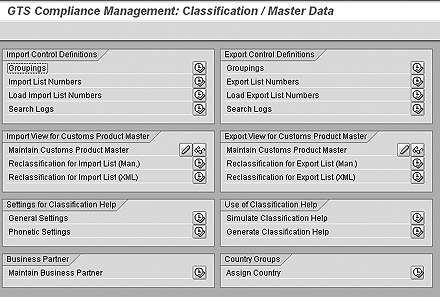
Figure 7
Classification cockpit
Moving on to the GTS Customs Management component, you have functionalities for maintaining master data (e.g., for customs offices, custom duty rates based on toll types, transportation connection points, trader identification number, and business identification number), classification tools, transit procedure, and customs processing (import/export).
Figure 8 shows the GTS Customs Management: Customs Processing for Import/Export screen. It has different options to view and process documents (Operative Cockpit, Strategic Cockpit, and Worklist for Logistics Documents). In the same view, you can simulate customs duties, define authorization for your submission procedures, maintain supplementary declarations, and so on.
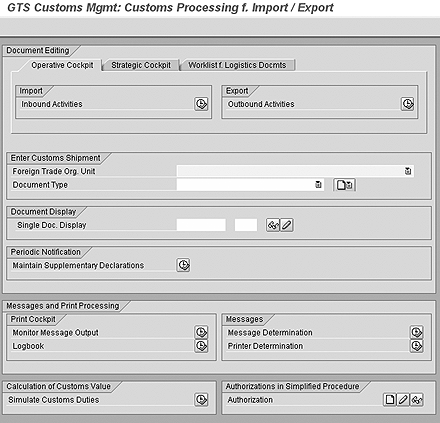
Figure 8
Use the GTS Customs Management component to maintain and process customs data
A few key benefits of the Customs Management component are:
- A product classification tool that integrates with the R/3 material master or with a non-R/3 system (you might need additional configuration or settings in GTS and development in the non-R/3 system to call this function). The tool allows for global text-based tariff searching, multiple HTS association, validity dates, and reference and ruling attachments.
- Duty calculation, import duty and tax calculation, and the sourcing decision can be based on the lowest duty rate.
- Trade document services, import and export document services, multimode distribution (email, fax, print, Acrobat, or XML), and printing use Smart Forms technology. Smart Forms is a new technology used for form or document printing.
- Customs communication services provide communication to customs and response handling and management. Product classification can be associated with duty calculation for importing. The system can be set up for preferential program determination as well. The creation of trade documents can be triggered through processes in R/3 or non-R/3 systems, similar to the Compliance Management component where the billing document can trigger customs document generation in GTS. Trade document services provide a repository for export and import documents including CF 434 NAFTA certificate of origin, shipper's letter of instruction, export packing list, CF 3461 immediate entry, CF 7501 entry summary, CF 7533 inward cargo manifest, and commercial invoice.
Examples of different parties that can access the GTS system for performing import/export activities throughout the supply chain appear in Figure 9. Who has access and the type of access required to perform certain tasks depend on a company's requirements. For example, once the goods leave the country, you might want your broker to have relevant information to prepare for importing the goods. On the right of Figure 9 are the government agencies, where you might have established online communications (AES reporting in US or NCTS in Europe, for example) and other partners involved in the trade process. These customs messages can be configured based on the different government requirements for transit procedures within the system.
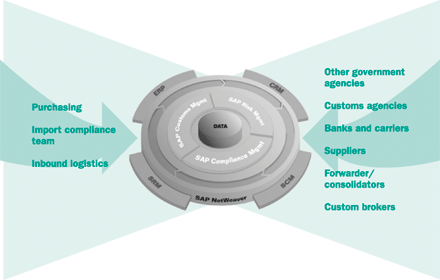
Figure 9
The extended enterprise with SAP GTS
SAP GTS can be your central repository of all your trade data, communications, documents, and business processes. Trade processes go beyond the enterprise boundaries with your partners (freight forwarder, broker), government agencies, and other parties involved along the end-to-end processes. Different parties can have access the GTS system for performing activities in the import and export processes throughout the supply chain.
With so many data updates/exchanges, communications, and handshakes in the trade processes, many opportunities for automation exist. You can set up the system to view and process data based on set rules or workflow designed by your company. Different types of communication can be established with government agencies (AES or NCTS) and other partners involved in the trade processes.
GTS provides a seamless integration not only within your organization, but also outside your enterprise system to help you deal with trade data (product classification based on destination country), parties, or different partners who assist you in the export or import process. With GTS, you are not limited to the boundaries of your enterprise structure. As with international trade, the controls, processes, and procedures are more defined by the route of the shipment, originating and departing country, and the end destination with different legs along the journey.
Rajen Iyer
Rajen Iyer is the cofounder and CTO at Krypt, Inc. Rajen has written several in-depth, best practice articles, white papers, patents, and best-selling books on SAP Logistics and SAP Global Trade Services, including Effective SAP SD and Implementing SAP BusinessObjects Global Trade Services. He is also an invited speaker at industry conferences.
You may contact the author at Rajen@kryptinc.com.
If you have comments about this article or publication, or would like to submit an article idea, please contact the editor.



 Premium
