SAP NetWeaver BI 7.0 includes many options to help you speed up query performance, such as SAP NetWeaver BI Accelerator. Find out about a lesser-known option, delta caching, that you can also use for fast query performance.
Key Concept
The concept of delta cache builds on the technique of caching the most frequently accessed data of a query in main memory or some other secondary storage media. The next time a query needs to access this data, it does not need to go to the database but reads it directly from the cache. This reduces the total runtime of a query. It also improves query performance and, of course, end-user satisfaction.
Getting SAP NetWeaver BI queries to run faster is almost an obsession for me. I am of the mindset that even if a query is perceived to be running fast enough, efforts should be made to make them run faster. In the earliest releases of SAP BW, your quest for query performance optimization would have been hamstrung due to the lack of adequate tools. However, SAP NetWeaver BI 7.0 offers many diverse tools to help speed up your queries.
Although you may be familiar with the more prominent tools that potentially bolster performance — such as aggregates, Online Analytical Processing (OLAP) cache, setting the appropriate read mode, and BI Accelerator — a few are obscure or new. One such tool that is both is delta cache. The delta cache functionality is available starting with Support Package (SP) 10 of SAP NetWeaver BI 7.0.
The first time I used this option in an SAP NetWeaver BI 7.0 system I didn’t know anything about it. I was looking for ways to improve the runtime of a query in the query monitor (transaction RSRT) when my eyes fell on a check box labeled Update Cache Objects in Delta Cache. After I selected this option, my query, which was run off a standard InfoCube, ran faster.
Obviously, there had to be something about this check box that accelerated things. Armed with evidence of this improved behavior, I set about doing research both in the SAP NetWeaver BI system and outside of it to get a better understanding of its features, its prerequisites, and the implications of using it. There still is very little official SAP documentation on delta cache.
My recommendation is that you should use delta caching to improve query performance. Nevertheless, it would be unwise to say that it can substitute for a tool such as the BI Accelerator. Your selection of performance-enhancing tools should depend on your enterprise’s specific needs and constraints.
What is Delta Cache?
The primary enabler of the delta cache technique — the OLAP cache — has been in existence since BW 2.0B. SAP has continued to improve the workings and configurability of the OLAP cache in each new release. The delta cache improves individual query performance further by bringing data that is currently in your InfoCube or aggregate into the OLAP Cache (delta).
Here’s a simple example: let’s say you are running a query on an InfoCube on dataset A and that the contents of the query are in the OLAP cache. You run this query again, but this time additional data needs to be retrieved from dataset B (in addition to data from dataset A). Now this dataset is available in the InfoCube fact table but not the OLAP cache. Instead of reading all the data from the InfoCube (i.e., both datasets A and B), the query now reads just dataset B from the InfoCube — since A is already in the OLAP cache — and populates the OLAP cache with it. Figures 1 and 2 illustrate the reading of data requested by a query when the delta cache is active.

Figure 1
Initial request for data in a delta cache scenario
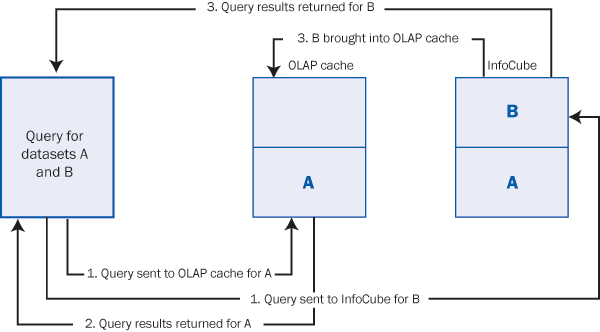
Figure 2
Subsequent request for data in a delta cache scenario
In BI terminology, the datasets are identified by request IDs. Delta caching facilitates the tracking of deltas by recording the last request ID for the data that the system reads for an InfoCube. The request ID is the identifier. If data in your InfoCube is compressed (a process that leads to dropping of request IDs), delta caching does not work. Also, delta caching does not circumvent the need for rebuilding the cache when master data relevant to the InfoProvider changes or if there are any structural changes to the InfoProvider.
Note
To learn more about the OLAP cache, refer the following articles in the BI hub of SAPexperts.
Configuring Delta Cache
Like the OLAP cache, you can configure the delta cache both at the InfoProvider and query level. Another similarity the two share is that the execution of queries triggers the filling up of the cache. Here are some important facts germane to the configuration of the delta cache.
First, the check box Delta Cache (labeled A) in the Query/Cache tab of the InfoProvider property maintenance transaction (RSDIPROP) has the highest priority (Figure 3). When a query is run, the delta cache functionality looks at this setting first before checking the settings in the individual query properties in transaction RSRT. This is what I mean by “highest priority.” If this option is selected for a particular InfoProvider, then all queries running off this InfoProvider can potentially use the delta cache, provided you do not change the settings of an individual query belonging to this InfoProvider. (I’ll explain how to set this up or change the existing setting in the next section.)

Figure 3
Delta caching set for the individual InfoProvider in RSDIPROP
Second, you can override the InfoProvider setting for individual queries in the query monitor (transaction RSRT). Figure 4 shows the maintenance pop-up screen for a particular query. This pop- up is displayed when you click on the Properties tab after entering the technical name of the query. The check box Update Cache Objects in Delta Process (labeled B) is made available for individual query setting. If for some reason you want delta caching to be disabled for this query, you need to uncheck this check box.

Figure 4
Delta cache configuration for a query in transaction RSRT
Alternatively, you can disable delta caching for an InfoProvider in transaction RSDIPROP and enable it for a particular query on that InfoProvider. For example, you may want to do this if your InfoProvider has multiple queries and only a very few of these — maybe as few as one or two — are run on a regular basis or pull in large volumes of data. In this case, you select the check box B in Figure 4 for that particular query.
Also in transaction RSRT, you can have the individual query inherit the InfoProvider setting by selecting the InfoProvider Setting check box (labeled “C”). When you select this, the check box B becomes display only (grayed out). The query now inherits the property of its parent InfoProvider. If you want all your queries on an InfoProvider to behave the same, you should opt for inheritance. In other words, if check box A is selected, you want to select check box C. If check box A is turned off, you still want to keep check box C selected because you presumably do not want to invoke the delta cache for any query. The biggest advantage of this approach is that it reduces repetitive maintenance. All your queries inherit the delta caching ability or inability of its underlying InfoProvider.
Note
The InfoProvider Setting check box in Figure 4 works the same way for all the other three customizing options (Read Mode, Req. Status, and Cache Mode). In other words, checking this box for a particular option results in the query inheriting the corresponding value from its parent InfoProvider.
Figure 5 contains a flowchart that depicts the various combinations of delta cache configuration. I had trouble figuring this out, so I felt that this flowchart may serve as a reference. This flowchart references the check boxes from Figures 3 and 4. For simplicity, these check boxes are labeled A, B, and C.
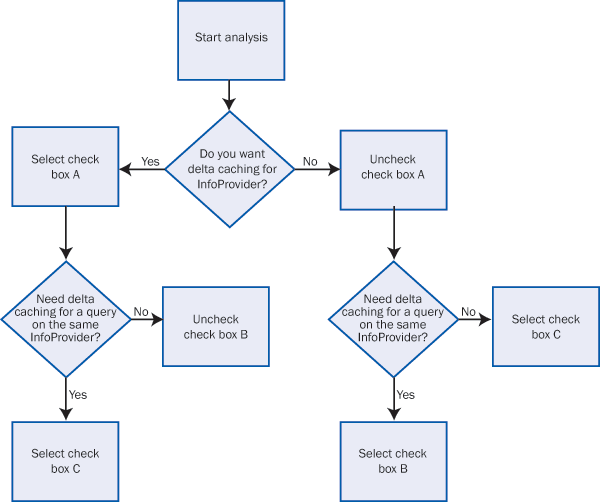
Figure 5
Decision tree for configuring the delta cache
Delta Cache Interface and Class
One other area of delta caching requires some elaboration. If you read two relevant SAP Notes (1136163 and 1138864) you will find that they state that an InfoProvider can potentially participate in delta caching if a class that implements IF_RSD_DELTACACHE_SUPPORT is specified for it. How would you know if this condition is being satisfied for the InfoProvider or query for which you are interested in setting up delta caching? It takes some research and understanding of the concepts of object-oriented (OO) programming. IF_RSD_DELTACACHE_ SUPPORT is an interface that contains the parameters (also known as “stub”) for all the methods you need for delta caching.
You can check this out in the Class Builder (transaction SE24). Enter the name of the interface, click on Display, and then click on the Methods tab. The resulting screen is shown in Figure 6.
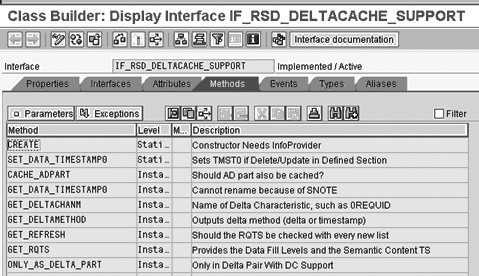
Figure 6
Methods in interface IF_RSD_DELTACACHE_SUPPORT
This interface needs to be implemented by a class, which should be specified for the particular InfoProvider. In Figure 3 you can see the line Delta Cache Class, which has the technical name of the class CL_RSD_DC_SUPPORT_INFOCUBE next to it. This is the class that implements the above interface and this is the reason why your InfoProvider can participate in delta caching.
To verify my assertion, go back to transaction SE24 and this time enter the name of the class (in my example, CL_RSD_DC_SUPPORT_INFOCUBE) and click on Display. Then click on the Interfaces tab. As you see in Figure 7, this class implements interface IF_RSD_DELTACACHE_SUPPORT. For those of you who understand OO-ABAP and want to figure out how delta caching works, click on the Methods tab and double-click on the methods you want to browse.
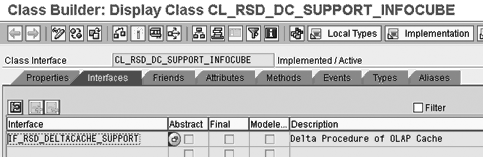
Figure 7
Class CL_RSD_DC_SUPPORT_INFOCUBE and the interface it implements
Additional Resources
Here are two other places you should check to learn more about delta caching:
Anurag Barua
Anurag Barua is an independent SAP advisor. He has 23 years of experience in conceiving, designing, managing, and implementing complex software solutions, including more than 17 years of experience with SAP applications. He has been associated with several SAP implementations in various capacities. His core SAP competencies include FI and Controlling FI/CO, logistics, SAP BW, SAP BusinessObjects, Enterprise Performance Management, SAP Solution Manager, Governance, Risk, and Compliance (GRC), and project management. He is a frequent speaker at SAPinsider conferences and contributes to several publications. He holds a BS in computer science and an MBA in finance. He is a PMI-certified PMP, a Certified Scrum Master (CSM), and is ITIL V3F certified.
You may contact the author at Anurag.barua@gmail.com.
If you have comments about this article or publication, or would like to submit an article idea, please contact the editor.



 Premium