You have a choice of of three approaches when reporting on CO-PA data: You can report using CO-PA, Business Information Warehouse (BW), or both.
Key Concept
Dear SAP Financials Expert,
What is the best way to report on Profitability Analysis (CO-PA) data? Should I integrate CO-PA with Business Information Warehouse (BW)?
— IT Manager, California
Thank you for the question. Many factors are involved in deciding which reporting tool to use. Some of the key factors may be your reporting strategy, underlying technology, IT infrastructure of the organization, data volume, report presentation, content and focus of data, data usage, and business communities served. Also, some factors may be specific to your company — type of industry, organizational structure, and cultural background.
When it comes to reporting CO-PA information, you should consider three common approaches:
- Reporting in BW only
- Reporting in CO-PA only
- Reporting in CO-PA and BW
BW Reporting
SAP's future trend is to move all analytical and strategic reporting into BW because of its inherent technological advantages. The R/3 system acts as an online transaction processing (OLTP) system, whereas BW is an online analytical processing (OLAP) system. This means that the underlying processor that executes the commands in each system was designed for two distinct purposes. R/3 is designed to execute transactions, such as sales order creation, whereas BW's processor is meant to analyze data. BW supports complex reporting requirements including cross-application reporting, and it provides significant reporting performance improvement, especially with large data volumes.
CO-PA Reporting
The CO-PA module within the R/3 system allows you to design and develop CO-PA drill-down reports within the SAP R/3 system. Its reports provide profitability information — for example, gross-margin analysis for characteristics such as customers, product lines, regions, and combinations of these characteristics. Since the CO-PA reports reside within the SAP R/3 system, these reports provide real-time profitability information, which may be vital for some industries.
CO-PA and BW Reporting
A third approach is to use both reporting engines concurrently. Although BW is the more powerful reporting tool, CO-PA also offers many useful reporting features, including drill-down, slice-and- dice, sorts, and exceptions. A clever combination of CO-PA and BW may offer the optimal reporting option with the maximum use of existing reporting investments.
Let me elaborate on these options and then I'll highlight the characteristics of CO-PA in OLTP systems and BW in OLAP systems. I'll also examine the CO-PA and BW technical structures.
Characteristics of OLTP and OLAP Systems
To appreciate the strengths of each system, you must first understand the typical characteristics of OLTP and OLAP systems, as shown in Table 1. In this example, CO-PA falls within the OLTP system, whereas BW is an OLAP reporting tool.
|
Characteristics of OLTP systems (CO-PA)
|
Characteristics of OLAP systems (BW)
|
|
Focus is on business processes and consistency of transactions, so that the same transactions are consistently performed
|
Focus is on the analysis of vast amounts of data.
|
|
Very detailed, transaction data required for reporting and analyzing. It is very common to retrieve transaction-level details like sales order number, purchase order number, and delivery/shipment number
|
Most of the time, summary data is required for reporting and analyzing. It is not common to have transaction-level details, though some extractors support line item details if required. Mostly pre-summarized information is required, such as sales organization, customer, and region
|
|
Business users mostly focus on current/ recent data from one day to one year of data
|
Business users mostly focus on more historical trends from one to five years of data
|
|
Business users have most predictable pattern of processing. Transactions like order processing and invoicing are standardized and repeated with the same methodology
|
Business users have the most unpredictable pattern for querying. Mining of data varies on a case-by-case basis
|
|
Data is constantly changed, transactions insert/update/delete data records
|
Data is more or less constant, mostly read-only transactions used for querying
|
|
OLTP systems are highly normalized for transaction processing so that performance is optimized for fast transactions
|
OLAP systems are designed to optimize performance for fast display of query results
|
Table 1BW's strengths make it the more powerful OLAP tool for consolidated reporting for the whole organization. However, costs are associated with transferring data from source systems to BW. Just because BW offers very flexible reporting tools, it may not be advisable to move all reporting to BW. In fact, you might be better off keeping some level of profitability reporting within CO-PA. One of the advantages of this approach is that you can get real-time profitability information from the SAP R/3 system.
BW and CO-PA Characteristics
Figure 1 describes the BW and CO-PA structures.
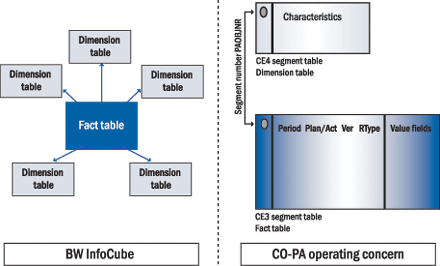
Figure 1
Technical features of BW and CO-PA structures
An InfoCube, BW's most basic component, is a set of tables arranged in the shape of a star. BW's central table, the fact table, is in the center and several dimension tables surround the fact table. This design is aptly called a star schema. The fact table stores all key figures and the dimension tables store the characteristics for analyzing and reporting the relevant facts in the fact table. For instance, in a report on sales credits for the consumer products division in the month of August, the number of sales credits is a fact — or key figure. The consumer products sales org and month are the characteristics that describe the sales credit amount.
In CO-PA, an operating concern primarily consists of segment tables and segment levels. Segment table CE4 stores the characteristics and segment level CE3 stores the totals of the value fields by fiscal period. Segment number PAOBJNR joins these two tables.
An operating concern in CO-PA is represented by its segment table and segment level. Segment table CE4 stores the valid combinations of characteristic values. Segment level CE3 stores the totals of value fields. CE3 also has columns for period, plan/actual, and record type. In simple terms, CE3 stores period- related totals. An InfoCube in BW consists of the fact table in the center surrounded by dimensions tables.
Characteristics in CO-PA match characteristics (or attributes) in InfoCubes. You can view value fields as key figures.
Summarization levels for an operating concern play the role of the aggregates in an InfoCube. Aggregates and summarization levels are pre-summarized data. Using pre-summarized data reduces the volume of data to be read from the database, speeds up query execution time, and therefore reduces the overall load on the database.
CO-PA line items can be compared to lines in BW's Operational Data Store (ODS). The ODS stores transaction data in relational database tables.
As I noted, many factors are involved in deciding which reporting tool to use, and many of these may be specific to your organization. Table 2 shows a summary of some of these factors that you should consider when choosing the CO-PA reporting tool.
|
Factor
|
CO-PA or
BW?
|
Why?
|
|
Reports require much flexibility
|
BW
|
BW offers very strong OLAP functionality for querying
|
|
Reporting requirements are relatively simple and predictable
|
CO-PA
|
Standard CO-PA drill-down reporting functionality is strong enough for routine requirements with simple setup
|
|
All data fields are not within SAP. There is cross-application reporting where data is required from multiple data sources
|
BW
|
If all the information is not within the SAP R/3 system, BW can retrieve and collect information from various systems and display consolidated query results. Note that CO-PA is not an option in this situation
|
|
Complex business processes across multiple systems
|
BW
|
BW’s robust architecture and its own administration tools are well suited to handle complexities in business processes
|
|
Extracting, transforming, and loading (ETL) efforts are huge
|
CO-PA
|
The costs of transferring data to BW can outweigh the benefits of BW reporting
|
|
High-volume reporting with large amounts of history reporting
|
BW
|
BW’s technical design based on data warehouse concepts makes it suitable for handling large volumes of data
|
|
Performance degradation of the SAP R/3 system due to high volume of data
|
BW
|
BW’s inherent reporting capabilities make it a strong candidate to take the query load away from the SAP R/3 system
|
|
Custom reporting or interface within SAP R/3 system
|
CO-PA
|
Custom ABAP reports/interfaces may require transaction data from SAP R/3 system that is not yet loaded into BW
|
Table 2It is important to fully evaluate these factors so that you can get the most out of your reporting tools, be it CO-PA or BW, or, under certain situations, a combination of both tools. For example, for fairly simple profitability reporting you would use CO-PA. If your requirements demand more flexible reporting across a multiple-system landscape, you would use BW. Finally, for real-time profitability reporting with complex reporting requirements, you would use a combination of CO-PA and BW.

Mitresh Kundalia
Mitresh Kundalia heads the SAP practice at Quality Systems & Software (www.QSandS.com), a consulting firm specializing in SAP S/4HANA, SAP General Ledger, and complex System Landscape Optimization (SLO)-type reorganizations. Mitresh is widely acknowledged as a leading SAP expert, with multiple publications and an SAP-PRESS book to his credit. He has published more than 50 peer-reviewed articles and white papers, and he has given presentations at various SAP conferences and events. Mitresh is the chief solutions architect of General Ledger Migration Optimizer (GLMO), a leading product to accelerate and jump-start the SAP S/4HANA and SAP General Ledger initiatives; SAP Data Reorganization Optimizer (SDRO), an SLO-type product for managing complex system landscape reorganizations; and Group Currency Activation and Conversion (GCAC), a product suite to manage introduction of parallel currencies and conversion of data in a live SAP system.
You may contact the author at Mitresh@QSandS.com.
If you have comments about this article or publication, or would like to submit an article idea, please contact the editor.



