A hidden relationship between the data entry field called "posting key" and several R/3 standard reports can affect sales or payment data.
Dear FI/CO Expert,
Our company offers some of our customers a rebate if their net sales for the year (sales order billings, less any product returns or credit memo adjustments) exceed a target figure. Every month or so, I get phone calls from customers asking me what their current net sales number is. The A/R module has a standard report called Customer Analysis (transaction code FD11) that has a nice and simple-to-access screen that shows sales for that customer. It seems to actually net out the sales billings and the credit memos/returns, which is perfect for what I need. But for some customers, this net sales figure is correct, and for others it is not correct.
What am I missing?
Thanks,
Linda Martin (A/R Credit Manager)
Linda,
Thanks for your question. The cause of your mystery is a hidden relationship between the data entry field called “posting key” and several R/3 standard reports, including the standard report that you’re trying to use to answer your customers’ net sales questions. Ironically, with Release 4.6 (the version meant to make R/3 more user-friendly), this particular relationship actually became more, rather than less, hidden.
On the A/R side, impacted standard reports include anything that offers information about sales to customers, or about payments by customers. This is why I thought your question would make for a good “Ask the Expert” article—almost every site with R/3 uses the A/R module standard reports. The way that R/3 decides whether to consider debit and credit postings to customer accounts as “sales” vs. “payments” vs. “neither” is simple to understand ... once I show you the hidden relationship.
The easiest way to see this is through an example. I’ll explain by showing you screenprints from two different debit postings to the same customer. In one case, R/3 will populate a subsidiary sales ledger where the specific standard report (FD11) you’re asking about gets its data. In the second posting, this update won’t happen. The only difference will be my choice of a posting key—a choice that can be confusing to the end user in Release 4.6.
Although most of the debits and credits posted to a customer’s account occur as part of SD billing, all companies occasionally need to make an adjusting entry directly in the A/R module. Also, as part of cash application, the end user often needs to record a short-pay, an unauthorized discount, or a residual item.
In all cases, the choice of a posting key impacts several of the A/R module’s standard reports. For example, R/3 often makes the posting key choice automatically. Usually the end user only cares that debits = credits and does not think about debit posting key 06 vs. debit posting key 04. It is important to explain the relationship between the posting keys and the standard reports, so that the end user does not unintentionally impact the sales or payment data that another person is communicating to your customers.
Example 1: Post $175 to the customer’s account using transaction code FB70
Figure 1 shows the A/R data entry menu tree. The end user sees a row in the Document Entry section called Invoice, and another (at the bottom) called Invoice – general. The first is FB70, and the second is transaction code F-22. Let’s look at the FB70 transaction first.

Figure 1
The A/R document entry menu tree in Release 4.6.
Notice in Figure 2 that the end user has no chance to type in a posting key. Instead, he or she can simply type in an amount that should be debited to the customer. This is because the FB70 transaction has its customer posting key defaulted in with R/3 Release 4.6.1

Figure 2
The FB70 data-entry screen
When I save my data entry, the following sequence happens. First, R/3 looks at the settings for the posting key involved. You can view these settings in your own system by accessing transaction code OB41. In Figure 3, note the differences in the checkbox fields towards the bottom for three “debit-to-customer”-related posting keys — 01 vs. 04 vs. 06.

Figure 3a
Settings for three debit-to-customer posting keys

Figure 3b
Settings for three debit-to-customer posting keys
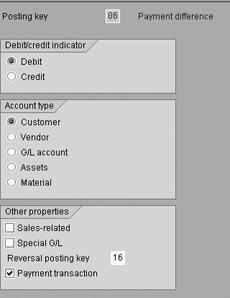
Figure 3c
Settings for three debit-to-customer posting keys
The next step in the save process only goes forward if R/3 sees that the posting key used has the Sales-related checkbox active. In these cases, R/3 updates the subsidiary ledger known as table KNC1.
Notice in Figure 4 that my one debit to customer 481 (from Figure 2) led to an entry in the KNC1 table’s Debit and Sales columns. This is because the FB70 posting key default in my 4.6 system is posting key 01, which has its Sales-related checkbox active (see Figure 3).
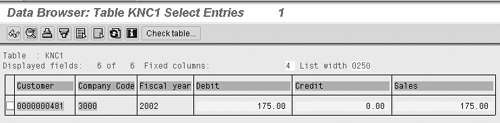
Figure 4
The Update to table KNC1 when $175 is debited via posting key 01
As a result, when I access the Sales section of the Customer Analysis standard A/R report (FD11), the $175 shows up in the December field of the sales tab (the posting date in Figure 2 was December 9, 2002). See Figure 5.
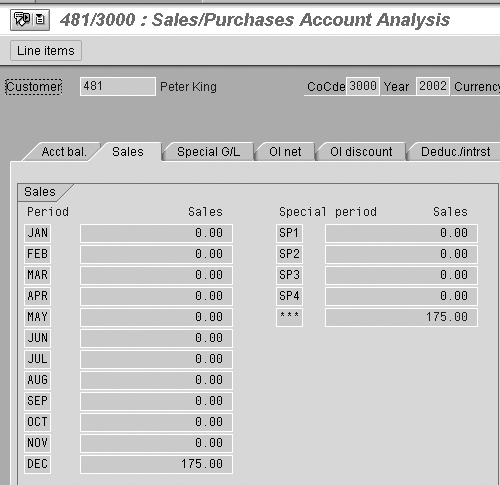
Figure 5
The sales section of the Customer Analysis standard A/R report
Example 2: Post $25 to the customer’s account using F-22
This time, I am posting my debit to the customer using the Invoice – general menu path from Figure 1. To make the relationship between the posting key choice and subsidiary ledger KNC1 more obvious, my debit is for just $25.
Notice in Figure 6 how this data-entry transaction gives the end user an easy way to change the default posting key 01 to something else (such as the 04 value I chose).2
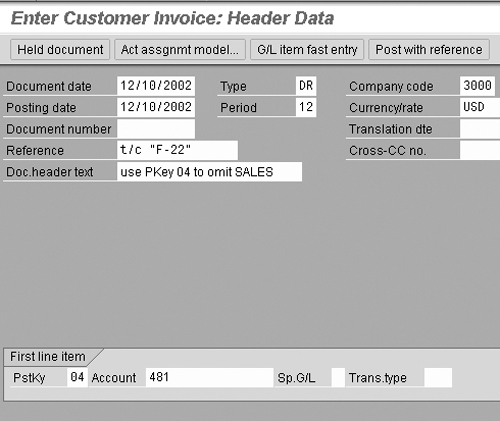
Figure 6
The first screen of transaction code F-22
After I typed in the rest of this $25 adjustment, I clicked on the save button, and R/3 looked at the settings for posting key 04 (look back at Figure 3). The result to subsidiary ledger KNC1 is shown in Figure 7. Notice that this debit was added to the earlier $175 debit, but not to the Sales column.

Figure 7
Table KNC1 after the $25 debit using posting key 04
Therefore, if you were to view the sales section of the Customer Analysis standard A/R report, you would see just that $175. You would not see $200. However, in the Open items section of the same report, you would see both the $175 and the $25 debits, as demonstrated by Figure 8.

Figure 8
The open items section of the Customer Analysis standard report
This example illustrates the somewhat hidden relationship between manual adjustments and the data that shows up in standard reports. In your particular case, I believe that the answer to the mystery of why the standard FD11 report shows a correct net sales value for some of your customers but not for others is the posting key choice made by your end users. I believe this is due to the end users not being able to see the relationship between the posting key choice (01 vs. 04 vs. 06) they were making during some of their manually-posted debits and credits, and the FD11 report.
In the future, verify that your FB70 Create A/R Invoice transaction is using the 01 posting key as a default, and that this posting key is set up as sales-relevant. Then, have your end users access just the FB70 transaction for those manual adjustments that your company wants to be included in net sales. For all other manual adjustments to customer balances, have your end-users access the F-22 transaction instead, and ask them to choose a posting key that is not set up as sales-relevant. Also, when performing cash applications, be careful of the posting key that R/3 pulls in automatically when you record a short-pay, a residual item, or an unauthorized discount. Verify that this posting key choice agrees with how your business wants to classify those debits and credits — sales-related vs. payment-related vs. neither.
1
Kurt Goldsmith
Kurt Goldsmith is a senior business consultant for Enowa Consulting, specializing in the diagnosis and resolution of productivity-related integration issues between a company’s division of labor (end users, managers, executives) and SAP software (R/3, BW, APO, CRM). He also has a lifetime performance record of one win and two third-place finishes from five career starts as a thoroughbred racehorse trainer.
You may contact the author at kurt.goldsmith@enowa-consulting.com.
If you have comments about this article or publication, or would like to submit an article idea, please contact the editor.



 Premium