One mobile platform for SAP work orders and the field forms that live alongside them
Reading time: 5 mins
One mobile platform for SAP work orders and the field forms that live alongside them Digital work orders are only part of the field work story Many leaders of asset management, maintenance or digital transformation for mining or heavy industry organisations are likely already looking at how to push maintenance work orders, inspections and forms […]
One mobile platform for SAP work orders and the field forms that live alongside them
Digital work orders are only part of the field work story
Many leaders of asset management, maintenance or digital transformation for mining or heavy industry organisations are likely already looking at how to push maintenance work orders, inspections and forms digitally onto the devices field technicians use to execute the work.
Explore related questions
In many mining or heavy industry operations, digital work orders for planned or corrective maintenance jobs come from SAP, and when integrated with a field mobility solution, these are pushed to a field technician’s tablet or smartphone to execute the work and capture the results electronically — no printed work packs, no re-keying.
But what about the field work that doesn’t have an SAP work order behind it?
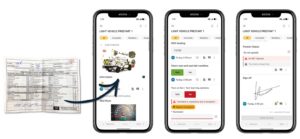
Equipment pre-starts, safety forms, environmental and process inspections, and drill & blast checks are all routine parts of a field technician’s shift, and many mining operations are still running them on paper or in a separate app. These checks are just as valuable as digitising work orders – and importantly, you don’t need a second system to do it.
One app for every field form – whether it comes from SAP or not
It’s important to note that:
- SAP is always your system of record — the master source of your maintenance and asset data, and
- Obzervr is your system of execution — the web platform and mobile app maintenance teams use to execute field work.
Obzervr has been built to handle any type of form that field teams need regardless of where it originated. For technicians this means accessing all forms, workflows and documents digitally in one app/system for the whole shift – eliminating paperwork and system switching.
Digital work orders (SAP-driven)
- Are the scheduled and corrective maintenance work orders created in SAP.
- When SAP is integrated with Obzervr, these push to the Obzervr Supervisor Portal where they’re allocated to field technicians.
- Field technicians then access the SAP-driven work order through the Obzervr Frontline Mobile App as structured, paperless jobs, with process guides and checklists built in.
- Completed work orders, approved and reviewed by supervisors, then flow automatically back to SAP – your system of record.

Digital inspections & forms (non-SAP driven)
- All other forms that don’t originate in SAP, such as equipment pre-starts, safety take-5s, environmental inspections, QA inspections, and any other specialist checks (see below for details).
- They are forms driven by safety, environment and quality requirements. SAP can hold this kind of information, but in practice these forms aren’t typically set up and scheduled in SAP the way work orders are.
- When using Obzervr for maintenance execution, these inspections and forms can be included in the Obzervr Frontline Mobile App – without needing a work order to be attached to them.
- The completed form record then sits within the Obzervr platform for reporting, or it can be pushed back to your chosen system of record, or anywhere your organisation needs the data (for example SharePoint or your HSE system).

These non-SAP inspection forms originate with the field operator and the operations, and in Obzervr they’re created and scheduled within Obzervr as digital forms, and triggered by shift, asset or a set frequency.
The relationship between systems and these types of forms usually runs the opposite way to an SAP-driven work order does. For example, when an equipment pre-start flags a critical defect, Obzervr can raise a notification or work order that pushes back into SAP – so the inspection feeds the maintenance system rather than coming from it.
How to digitise and publish all field form types in Obzervr
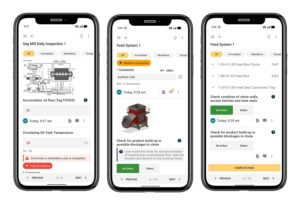
Both SAP-driven work orders and non-SAP inspections and forms can be quickly built and designed into a digital interactive form using the Obzervr Work Designer (included as standard in the Obzervr Digital Work Management Solution).
All form types are then saved to one single shared library within Obzervr – meaning each planned maintenance job or adhoc inspection is completed in the same standardised way, using the same form, across every shift, every site and every team member.
When changes or updates are required to all digital forms (including feedback from field technicians), planners can be easily updated, republished and pushed out immediately to technicians in the field, via the Work Designer.
Examples of common non-SAP triggered forms that clients build in Obzervr for technicians to use in the Frontline App:
- Equipment pre-starts – these are triggered by an operator using the equipment. Before an operator runs a haul truck, dozer, excavator or light vehicle (typically once per machine, per shift) they are required to complete a safety and condition check. The trigger is the shift and the act of operating the machine, and the requirement comes from work health and safety.
- Safety forms such as take-5s, job safety analyses, hazard reports and permits, typically come from the site’s safety management system, and triggered in Obzervr by a task or a hazard rather than a work order. In Obzervr, safety forms can be set mandatory before starting work – improving safety and risk compliance
- Environmental inspections typically come from environmental licence conditions and monitoring routines, usually on a set frequency.
- Process and quality (QA) inspections come from operational and production standards owned by the operations team.
- Specialised checks such as crane and drill & blast inspections come from the equipment and process they relate to, and the regulations covering them.
One work platform. One shared forms library. Clean structured data
When work orders and inspections are available on one digital platform, with one shared digital forms library, standardised work is embedded and clean structured data is available everywhere.
- Field technicians and operators only need to use a single app for the whole shift, with access to all their forms, guides and documents in one place with no paperwork to chase, complete or file. Additionally, they can submit instant feedback on form fields via the app for planners to review, accept and update digital forms.
- Supervisors can allocate work quickly, track work completion and safety/risk compliance at a glance, and act the moment a pre-start flags a critical equipment defect then raising a follow-up work order automatically.
- Planners can build standardised digital field forms once, publish to one shared library for all teams and sites, and easily make regular updates with instant publishing for the next shift.
- Asset managers and reliability teams get all field activity as one clean dataset – a real foundation for condition-based and predictive maintenance. HSE and safety teams keep their inspections audit-ready alongside the maintenance work, and IT and digital transformation leaders get one platform to support and one clean stream of field data feeding their reporting.
- Organisations can consolidate multiple field systems and paper-based forms into one integrated platform. They gain a single source of compliant, structured field data, can improve standardised work across sites, and achieve stronger condition-based and predictive maintenance.
What to know more or see Obzervr in action? Book a 30min discovery session via their website www.obzervr.com
More Resources
See All Related Content-
No need to consider greenfield or brownfield; Selective Data Transition could be the most effective migration path
Published: 09/November/2024
Reading time: 2 mins
-
Webinar On-Demand How Terumo Overcame Critical SAP S/4HANA Migration Challenges
Published: 26/May/2022
Reading time: 1 mins
-
-