SAPexperts/Project Management
This article provides an overview of developing a mobile application on HANA. It explains how to write data intensive logic in HANA, how to expose data from HANA so that it can be consumed by a mobile application, and the options for building the user interface of a mobile application. It also explains the overall architecture of developing a mobile application on HANA. The target audiences are SAP developers, solution architects, and IT managers. The article uses SAP HANA Service Pack 5 and some additional features in SAP HANA Service Pack 6.
Key Concept
The SAP HANA platform consists of an In-Memory database and an application platform. Data-intensive logic can be directly written in SAP HANA so that it uses the core capabilities of the HANA database, such as in-memory computing, parallel processing, and column storage. Data from SAP HANA is exposed as an OData service. One of the ways to build a user interface (UI) for a mobile application uses HTML5 and JavaScript. The mobile application consumes data from HANA that is exposed as an OData service.
In recent years, the demand for mobile applications has grown exponentially. Mobile technologies are one of the most disruptive technologies of the past few years. However, mobile usage for business has not grown at the same rate as consumer applications. A lot of factors are involved, but one of the main reasons is the performance of the underlying applications that hold the “business logic.” Having a mobile front end for an enterprise application is great, but the user is not going make use of the mobile applications if the response time is not acceptable (usually defined as within three seconds.) This is where SAP HANA brings in a lot of value. HANA is the new In-Memory database by SAP and can perform real-time operations at lightning speed, in many cases within sub seconds.
HANA, at its core, is a database that stores everything using In-Memory and has massive parallel processing capabilities. Data in HANA can be stored in a column store as opposed to the row store in a traditional relational database. In addition to being a database, SAP HANA also contains a lightweight application server that has the capability to build HTML5-based user interfaces and also write the business logic directly in the HANA layer. Essentially, if the SAP application has HANA as the underlying database, any custom application can consume data directly from the HANA database and does not have to go through the additional ABAP application server layer. All business logic can be written in HANA and can be consumed directly from HANA by mobile applications.
Now that I have explained the fundamentals of the HANA development paradigm, you can dive into what it will take to develop a mobile application on SAP HANA. Mobile applications can be easily built without a Mobile Development Platform (MDP), but an MDP, such as the Sybase Unwired Platform, is highly desired for building enterprise-ready mobile applications. The scope of this article is not to discuss the benefits of SUP and other similar tools. Instead, for reasons of simplicity, I focus on developing a mobile application without these tools. Mobile application development on HANA can be broadly categorized into the following three steps:
- Develop the business logic in HANA
- Expose the data from SAP HANA
- Develop the User Interface for the mobile application
I cover these three topics in detail below.
Develop Business Logic in HANA
Business logic can be written directly in SAP HANA, which also has a built-in lightweight application server with the capability to deploy and run HANA-based Web applications. The SAP HANA Extended Application Services (XS) engine makes this possible. HANA development can be done in the HANA Studio. HANA Studio Integrated Development Environment (IDE) is based on Eclipse and can be used for HANA modeling, administration, and development. In HANA Service Pack 6, in addition to Eclipse, there is also a browser-based IDE where you can perform HANA development. Figure 1 shows the difference between the traditional approach and the new one using HANA.
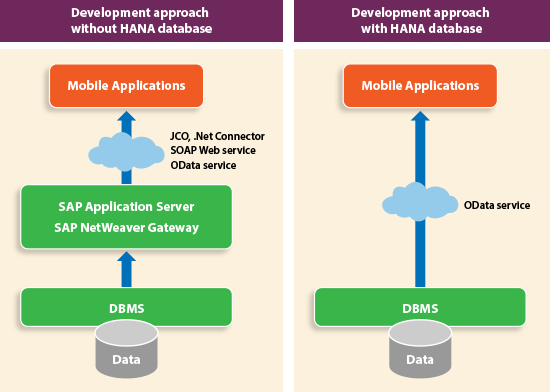
Figure 1
Development approach in a traditional development paradigm (without HANA database) and the new model (with HANA database)
Figure 1 Development approach in a traditional development paradigm (without HANA database) and the new model (with HANA database)
In the traditional SAP architecture, complete business logic is written in the application server and then the data is exposed to the external applications. Some of the available options for consuming data from SAP are:
- Java Connector (JCO) if the external application was Java based
- .Net connector if it was a Microsoft-based application
- SOAP-based Web services
- SAP NetWeaver Gateway – such as OData-based Web services
JCO, .Net connector, and SOAP-based Web services have been available for quite some time, while SAP NetWeaver Gateway is still fairly new. SAP NetWeaver Gateway is an add-on to the existing SAP NetWeaver Application Server (SAP NetWeaver AS) that can convert data from SAP into Representational State Transfer (REST)-based services. SAP NetWeaver Gateway allows you to take an existing Remote Function Call (RFC), BAPI, or even a transaction screen in SAP GUI and generate a REST-based service out of it. The application that consumes these REST-based services does not need to know the underlying business logic in the ABAP layer, since it is just concerned with calling the service with the correct parameters.
HANA application development does not follow the traditional development paradigm. In the traditional development paradigm there are no stored procedures written in the database nor does it take advantage of any database specific functionality. The application server collects a large amount of data and then processes it in the application server layer. Unlike a traditional database, with the HANA database, business logic can be written in SQL Script in HANA in the form of SQL script procedures. SQL script is an extension of American National Standards Institute (ANSI) standard SQL with additional features for SAP HANA.
A few of the advantages of writing the business logic in SQL script in HANA are:
- Eliminating the need to pass huge amounts of data from the database to the application server
- SQL Script procedures can make use of built in calculation functions
- SQL Script procedures can benefit from SAP HANA features such as fast column operations, query optimization, and parallel execution
With this new development paradigm, the HANA application developer can create a new HANA Extended Application Services (XS) project in the HANA studio. Instead of writing business logic in ABAP, you write business logic in SQL Script in the HANA database. If there you need to read data from SAP HANA, perform calculations, aggregate data, or generate reports from SAP HANA, you can use additional SAP HANA modeling capabilities. You can model data from SAP HANA as an Attribute View, Analytic View, or a Calculation View. See below for details of these various views:
- Attribute View: Views based only on master data
- Analytic View: Multi-dimensional views built by combining master data and transactional tables
- Calculation View: Used to join multiple tables or views. This view is used to create a data foundation using database tables, attribute views, analytic views, and calculation views to address a complex business requirement.
Attribute, Analytic, and Calculation views are created in the Modeling workbench of the HANA studio. These views can expose data from SAP HANA as OData Services.
Expose Data from SAP HANA
Once the business logic is ready, the next step is to expose data from HANA in a format that can be consumed by mobile devices. My preferred way of exposing data from HANA to a mobile application is by creating a REST-based service based on OData protocol. Unlike the SOAP-based Web services that are complex to implement and consume, OData-based services can be consumed easily. SOAP-based Web services have a complex format for envelopes and communicating the service definition in the form of WSDL documents is not straightforward. Consuming SOAP-based Web services requires a lot of programming on the client side. OData on the other hand embraces REST which is lighter weight and http-based. Operations can be passed as a URL parameter to an OData service. For example, if the OData service needs to return the first five entries of the database table, $top=5 can be appended to the URL parameter. Some of the other parameters include $orderby, skip, and $filter.
SAP adopted OData as its main service enablement standard for SAP Web and mobile applications. OData service is easy for mobile devices to consume. It makes a good standard for interoperating data between applications on the Web. Data from the OData service can be provided in either XML or JSON format.
SAP HANA has an OData generation framework to create OData services. With SAP HANA Service Pack 6, in addition to read operations, OData services can also perform insert, update, and delete operations from the HANA database.
To expose data from HANA, create an OData service in the HANA XS project. The file extension of OData service definition is .xsodata. The OData service exposes an end point that allows access to data in the SAP HANA database. Any HANA database table or view can be used as the source of the OData service.
The OData service format can be specified by appending $format= in the URL parameter.
Table 1 is an example of one entry of a database table exposed as an OData service in JavaScript Object Notation (JSON) format.
URL - https://Server Address/XXX/YYY/BusinessPartner.xsodata/BusinessPartners?$format=json&$top=1
OData End Point – BusinessPartner
Table Name – Business Partner

Table 1
Example of a database table exposed as an OData service
See Figure 2 for the data from the OData service in JSON format. Note that the values from every column of the table are specified as key value pairs separated by a colon. Data is displayed for only one business partner – 1234. This is a very simple OData service without relationships. Real OData services also have entity associations (e.g., the header entity of the OData service linked to the item entity). Every record in the OData service has a unique URL. Data can be filtered in the OData service by specifying URL parameters such as $top, $format, $orderby, or $filter.
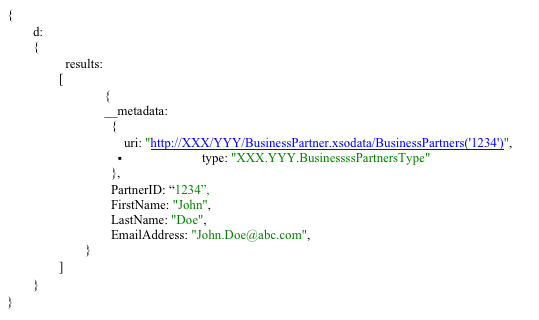
Figure 2
Example OData service in JSON format
To know more about the oData protocol and REST-based Web services, you can visit https://www.odata.org/.
Sometimes OData services cannot perfectly meet your needs. For instance, if you need complex validation logic on a server or a custom body format, there is an option to programmatically create services. Using server side JavaScript, you can create REST-based services where JavaScript is the primary programming language used in the XS engine. SQL script is designed for data intensive operations. On the other hand, JavaScript is more suited for imperative logic, creation of services, and control flow logic.
Once the data is provided in a JSON or XML format, there are many libraries available that can parse the data and populate it in the user interface of the mobile application. Mobile applications can use JavaScript/jQuery APIs to parse the OData services or, if the mobile application is built as a native app, it can use API’s native programming language to consume the OData services. The mobile application does not need to know the underlying business logic; it just needs to be able to call the OData service via the URL.
Develop the User Interface for the Mobile Application
There are multiple approaches for mobile application development. The application can be HTML5 based, native, or a hybrid and executed in a hybrid container. My intent is not to cover each of the development options in detail. However, broadly speaking, development of mobile applications falls in the below two categories:
- HTML5/Hybrid-based approach – Using this approach, mobile applications can be developed in HTML5, jQuery Mobile, and JavaScript. Many frameworks have been developed using HTML5. SAP has its own framework, SAP UI5. Third party libraries such as PhoneGap and Sencha can also be used in a mobile application. When you use the third-party libraries in an HTML5-based mobile application, the mobile application runs in a hybrid Web container. For example, a HTML5-based mobile application that uses Phonegap API runs in the Cordova hybrid Web container.
- Native approach – Using this approach, mobile applications are developed in the native programming language of the underlying operating system. In the case of Android applications the mobile application is developed in Java using Android SDK. Apple devices are developed in Objective C. This approach provides full control of the user experience and device peripheral integration.
The best approach depends on the use case, but there is one major difference between HTML5-based apps and native apps. For native applications, the code base for every device is different. For instance, if the mobile application needs to run on Android devices, it has to be programmed in Java, but if it needs to run on Apple devices, it has to be programmed in Objective C. The native approach can be used when the application needs to use features that are best available in the native mobile programming language. HTML5-based applications, on the other hand, can run on all types of devices, so you don’t have to develop mobile user interfaces for each device/operating system individually.
HTML5 provides a rich set of user interface elements and, when combined with jQuery and JavaScript, they provide the capability to develop the UI and also write client-side business logic. For example, you can use JaveScript for validations of input fields, checking, or mandatory values.
https://developer.android.com/sdk/index.html
There are many different steps and libraries involved in developing a mobile application. The UI is developed in HTML5. In most cases, you also use the jQuery Mobile framework. Instead of writing unique apps for each mobile device, jQuery mobile framework allows you to design an application that works on all popular mobile devices. If needed, some of the third-party libraries, such as PhoneGap, can be used to access the native features of the device. PhoneGap is an open source solution for building cross-platform mobile apps using standards-based Web technologies such as HTML, JavaScript, and CSS. It provides functionality for accessing the native features of a mobile device like a camera or address book.
To consume data from REST-based services, use JavaScript libraries, which can parse JSON string and populate the UI accordingly. To make all this work on an Android device, an Android project needs to be created and the .apk file, the executable of the android project, needs to be installed and deployed on the mobile device.
Putting It All Together
Now that I’ve explained all the pieces of developing a mobile application on HANA, I can show you how they integrate with each other. Figure 3 shows a simplified version of the overall end-to-end architecture of a mobile application on SAP HANA.
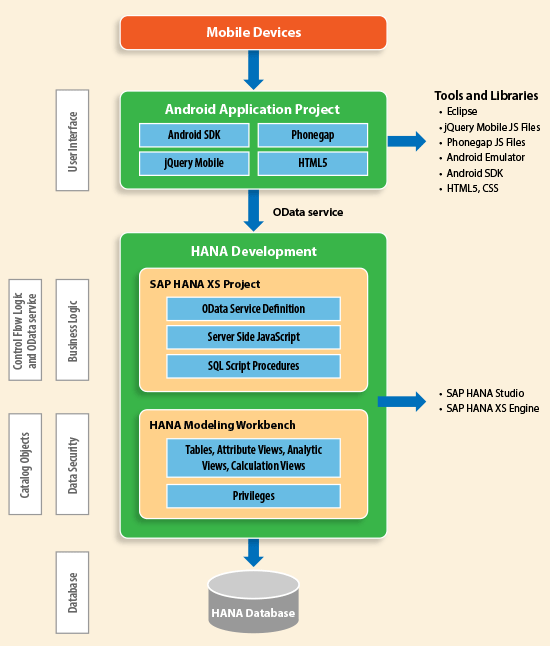
Figure 3
Overall architecture of developing a mobile application on SAP HANA
A key thing to note is that there is no application server in between the mobile application and the database. Data from the HANA database layer is directly consumed in the mobile application.
The HANA database contains all your business data. Access HANA tables via the HANA modeling workbench of HANA studio. Additional HANA specific views – Attribute view, Analytic View, and Calculation View – are also created in the HANA Modeling Workbench. You can restrict data from HANA by creating privileges. Business logic is written in SQL Script procedures.
If the data needs to be directly accessed from a table or a view, then the OData service can be directly created by the OData generation framework. If the business logic from SQL script procedures needs to be executed, then the calls to the procedures can be made by the server side JavaScript on the HANA layer.
The mobile application is developed in a separate IDE, Eclipse for Android and Xcode for IOS devices. The mobile application layer handles UI events. The application makes a call to the OData services from HANA via the http URL to get the relevant data.
Vivek Sharma
Vivek Sharma is a Manager with Capgemini US and has 11 years of experience in SAP. He is certified by SAP AG as “Application Associate for SAP HANA”. His expertise includes SAP UI technologies, SAP HANA Application Development, and SAP Mobile Application Development. His experience includes multiple full cycle SAP implementations spanning the pharmaceutical, food and media industries. Over the years he has played the role of a developer, solution architect, development lead, and project manager. Views expressed in this article are his own and not those of his employer. You may follow him on twitter at @vivsharma20.
You may contact the author at vivsharma20@gmail.com.
If you have comments about this article or publication, or would like to submit an article idea, please contact the editor.



 Premium