Have you ever assigned the wrong InfoObjects to a package prior to transport? You probably had to change the assignment for each transport request element manually. There is an easier way, and this article shows you how to do it.
In BW, many operations are performed on a group of objects rather than on a single object. A group could have hundreds of elements. This makes it difficult and time-consuming to correct mistakes. One place where it’s easy to make a mistake is the Change and Transport Organizer (CTO) This is where you usually collect objects that have never been transported and assign them to a package (called a “development class” before Release 3.0).
Once objects are collected in the CTO and assigned to a transport request, SAP asks you to assign objects that belong to a local package ($TMP) to a transportable package. Whatever package you assign is going to be assigned to all collected objects that belong to $TMP. If you select a wrong package, this wrong package is assigned to all new objects in that request.
I’ll show you how to fix such an error without changing the wrong package assignment for each transport request element manually. Figure 1 shows how to start object collection prior to transporting them. Go to Administrator Workbench and select the Transport Connection button. I’m using a query transport as an example, because assigning a query to a correct package is very important, and query collection usually involves many elements.

Figure 1
Select Transport Connection to begin object collection
In Figure 1, you can see that all three selected queries belong to the same $TMP package. If you decide that these are the objects you want to transport, select the transport icon. A pop-up window like the one shown in Figure 2 appears. Here, you need to be careful when selecting a package. For example, you might create a package that doesn’t belong to a selected query — i.e., a package that was created for another query or Administrator Workbench object. Also, an InfoObject might have been created (and therefore assigned to the $TMP package) and unintentionally collected in this transport request.
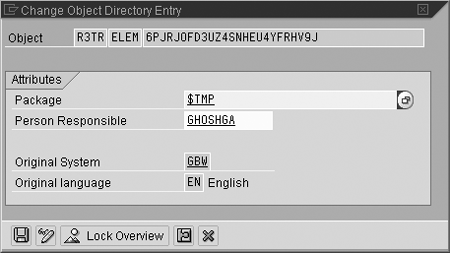
Figure 2
Select a package
Let’s assume that I make an error and assign everything to one package when some of the InfoObjects should be assigned to a different package. Before releasing this transport request, I realize that I made an error. By refreshing the CTO screen shown in Figure 1, I can see that all objects that had been assigned to package $TMP are now assigned to package ZBDF. Correcting this is easy. As Figure 3 shows, I select a context menu for each line I want to correct and change the package.
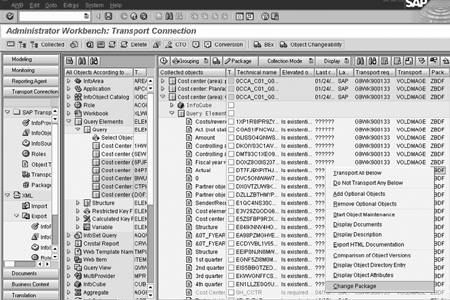
Figure 3
Select the context menu for each line you want to correct
This method works well if I need to fix a couple of objects, but in this case I have dozens of objects to change. Changing them this way would be time-consuming and could lead to new errors. So, I use transaction SE03 (Transport Organizer tool). I execute the Unlock Objects task under the Requests/Tasks folder and enter the request number that has just been created. You can see this request in Figure 3. Figure 4 shows settings for the Unlock Objects tool. Do not forget to unlock all tasks under this request.
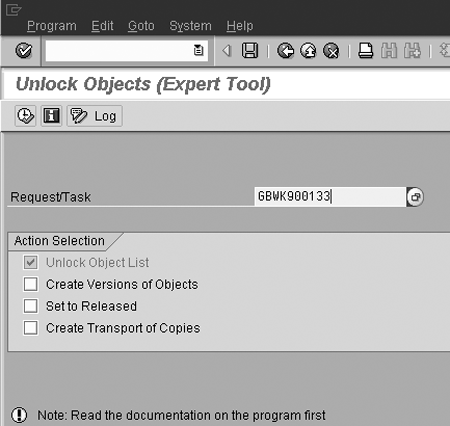
Figure 4
Unlock the tasks you want to change
Now I go back to SE03 and select function Change Object Directory Entries of Objects in a Request under the Object Directory folder. Then I put the same request as a parameter of this function and expand the selected objects. Figure 5 shows how it looks for my example.
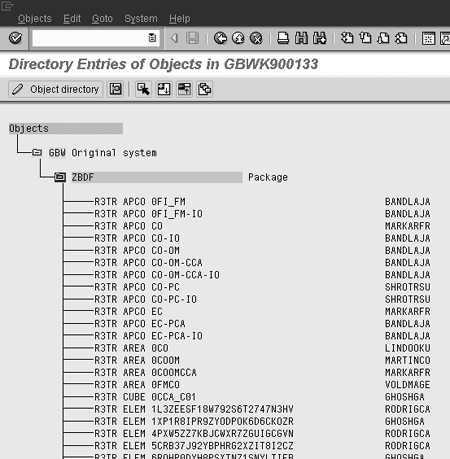
Figure 5
Expand the selected objects
Next I select all objects using the Select block menu item under Edit. Finally, I select Reassign under the Objects menu. I put $TMP in the New development class box and press the enter key. All objects are assigned back to $TMP. You can check this by refreshing the CTO screen, as Figure 6 shows.

Figure 6
Refresh the CTO screen to check the reassigned objects
Now I can re-collect these objects in a different way and assign objects to the right packages. You can now delete or release request GBWK900133, depending on your change request policies.
If you have already released this request, then you cannot change the package to $TMP, but you can change it to any other transportable package.
Gersh Voldman
Gersh Voldman has more that 15 years of IT experience including more than 10 years in consulting. His main area of interest is BW where he has over five years of experience from more than six successful projects. Gersh is a business intelligence manager at Inforte Inc.
You may contact the author at gersh.voldman@inforte.com.
If you have comments about this article or publication, or would like to submit an article idea, please contact the editor.


 Premium